

Average cost of Botox per state, from 562 practices’ price lists
The average cost of Botox per state runs from $12 to $15 a unit, and the nationa...

Last Updated: Nov 5, 2026
A HIPAA compliant electronic signature is a signing process that protects electronic protected health information (ePHI) under the HIPAA Security Rule. That protection runs from the moment a form is sent until it is stored. For most healthcare practices, Pabau, the practice management platform we build, is the better fit. Signing happens inside the patient record, under one Business Associate Agreement (BAA).
DocuSign wins when an organization needs one signing tool across HR, legal and vendor contracts, and has IT staff to manage its BAA and integrations. This comparison covers both platforms on compliance, audit trails, pricing, integrations and security.

A HIPAA compliant electronic signature needs a BAA, an audit trail, encryption and access controls, and no tool is HIPAA certified by law.
DocuSign’s own plan comparison lists HIPAA support through a BAA as not included on Personal, Standard or Business Pro, so practices go through sales.
Pabau builds e-signatures into patient intake and clinical records, so ePHI stays on one platform without middleware.
Pabau charges no per-document fee for signing, while DocuSign’s self-serve plans cap envelopes per user.
A HIPAA compliant electronic signature is a digital signing method that handles ePHI under the HIPAA Security Rule (45 CFR Part 164). It keeps that data safe from unauthorized access, interception or alteration. The HHS Office for Civil Rights has not issued a technical standard for e-signatures, so no tool is officially HIPAA certified. What matters is whether the tool, and the process around it, meets the Security Rule’s administrative, physical and technical safeguards.
The ESIGN Act (2000) and the Uniform Electronic Transactions Act (UETA) make electronic signatures legally valid across the United States. Those two laws answer whether a signature is binding. HIPAA answers a separate question, which is whether the ePHI touched during signing is protected. A tool can satisfy ESIGN and still violate HIPAA if it lacks encryption, an audit trail or a signed BAA.
Any vendor that accesses, stores or transmits ePHI during signing is a Business Associate under HIPAA. That relationship needs a signed BAA before the first patient document goes out.
Check these five safeguards whenever your practice signs documents that contain ePHI. Some are required standards and some are addressable, which means the practice assesses whether the measure is reasonable and documents its decision. HIPAA names no cipher or protocol, so the specific settings below are industry best practice.
Run this checklist against the plan your practice would pay for, not the vendor’s top tier. Our guide to HIPAA compliance software covers the wider evaluation. Some vendors need a plan upgrade, a configuration request or a separate contract before all five safeguards are in place.
Both platforms can support HIPAA compliant e-signatures. They differ in where compliance sits in the product, and that shapes a practice’s workflow, risk and total cost.
Pabau is built for healthcare practices, and every plan includes digital forms and consent signing. Practices that need a BAA request one from Pabau.
The main difference from general-purpose e-signature tools is where the signed document lands. When a patient signs a consent form in Pabau, it is stored on their patient record with the appointment and practitioner. That link supports HIPAA’s audit and integrity safeguards without a manual export or cross-system matching.
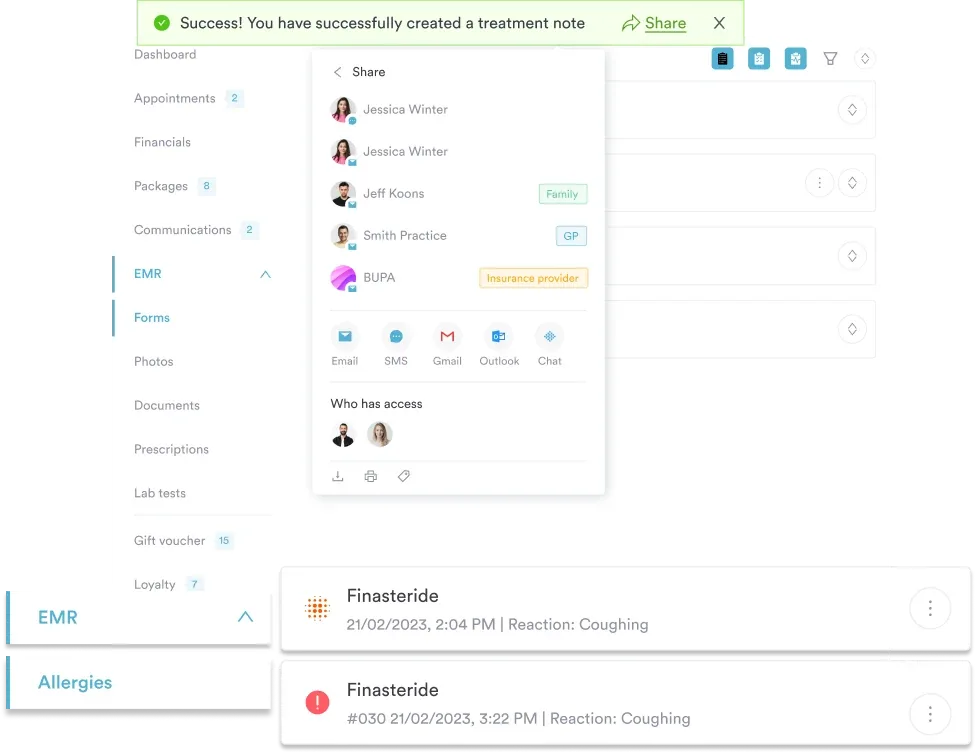
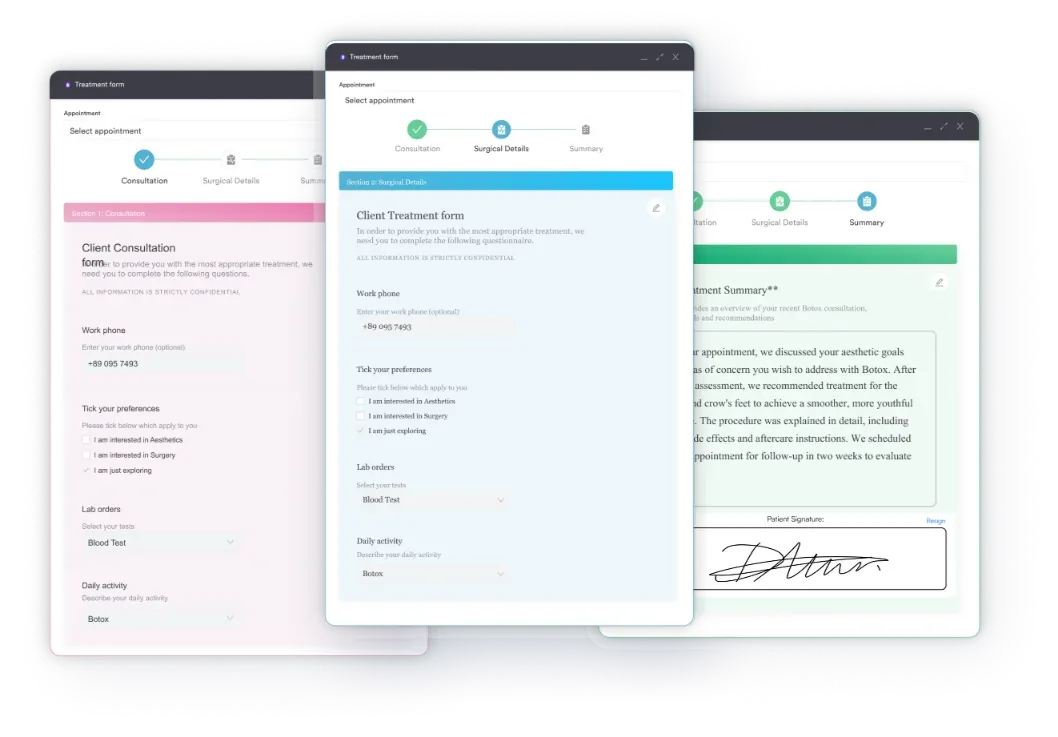
Pabau’s digital consent forms and capture forms cover the full intake journey, from health history to pre-treatment consent. Both run in the same environment as the patient record.
DocuSign is the best-known general-purpose e-signature platform. Its compliance page lists HIPAA among the regulations it supports, but a BAA is available only on eligible higher-tier plans. DocuSign’s published plan comparison shows HIPAA support through a BAA as not included on Personal, Standard or Business Pro.
A practice requests the BAA and signs it with DocuSign, and the plan comparison routes that to its sales team. Confirm with DocuSign which tier your practice needs. Without a signed BAA, a practice cannot use DocuSign to process ePHI.
On a qualifying plan, DocuSign offers a detailed document-centric audit trail, and its compliance page lists SOC 2 Type 2 reports. The limitation for practices is that signing records sit at the document level. Signer IP address, timestamp and authentication method are captured, but they are not linked to a patient record or appointment.
Connecting DocuSign to an EHR or practice management system takes API work or middleware such as Zapier. Each extra system that handles ePHI needs its own security review and its own BAA.
HIPAA authorization is the permission a covered entity needs under 45 CFR 164.508 before it uses or discloses PHI beyond treatment, payment and operations. A valid authorization form includes each of these elements.
An electronic signature meets the signature requirement when the process verifies the signer and records the timestamp in a tamper-evident audit trail. The HHS guidance on HIPAA authorizations does not restrict the signature method, wet ink or electronic. What matters is that every required element is present and the ePHI is handled under the Security Rule.
A HIPAA medical release form built on these elements gives your front desk a starting point. Signing it inside a compliant platform also leaves a searchable, audit-ready record that a paper filing cabinet cannot match.
Pricing is where a healthcare platform and a general-purpose signing tool differ most. Pabau includes e-signatures in its practice management subscription. DocuSign charges per user, caps envelopes on its self-serve plans, and handles BAAs through sales.
Every Pabau plan includes the core features, with digital forms and consent signing among them. There is no per-document or per-envelope charge for signing. Add-ons and usage credits, such as SMS and Pabau Scribe, our AI scribe, are billed separately. See Pabau’s pricing page for current plans.
A practice sending 300 or more consent and intake forms a month would use up a 100-envelope yearly allowance per user within weeks. Pabau charges no per-document fee for signing, so form volume does not raise the cost of signing itself. Middleware or development costs to connect DocuSign to a practice system come on top.
Note: DocuSign figures come from its own plan comparison, read in November 2026. Prices and BAA eligibility change, so confirm both with DocuSign before you buy.
Workflow fit is the test that pricing tables leave out. A HIPAA compliant electronic signature system earns its cost only if it fits the clinical workflow a practice already runs.
Pabau: Signing happens in the same platform as booking, clinical notes and patient records. A patient completing a pre-appointment intake form never leaves that environment. Their signed consent is attached to their record the moment they submit it, with no export or manual upload.
DocuSign: As a standalone platform, DocuSign needs a connection to your practice management system. Practices use the DocuSign API, which takes development time, a pre-built integration where one exists, or middleware like Zapier. Each connection adds a system that handles ePHI, and each one needs its own BAA and review.
Middleware is the easiest place to lose HIPAA coverage. When ePHI passes from your practice system to DocuSign through an automation layer, that layer becomes a Business Associate too. Zapier generally does not offer a BAA, so don’t route ePHI through it. The diagram below counts the systems on each route.
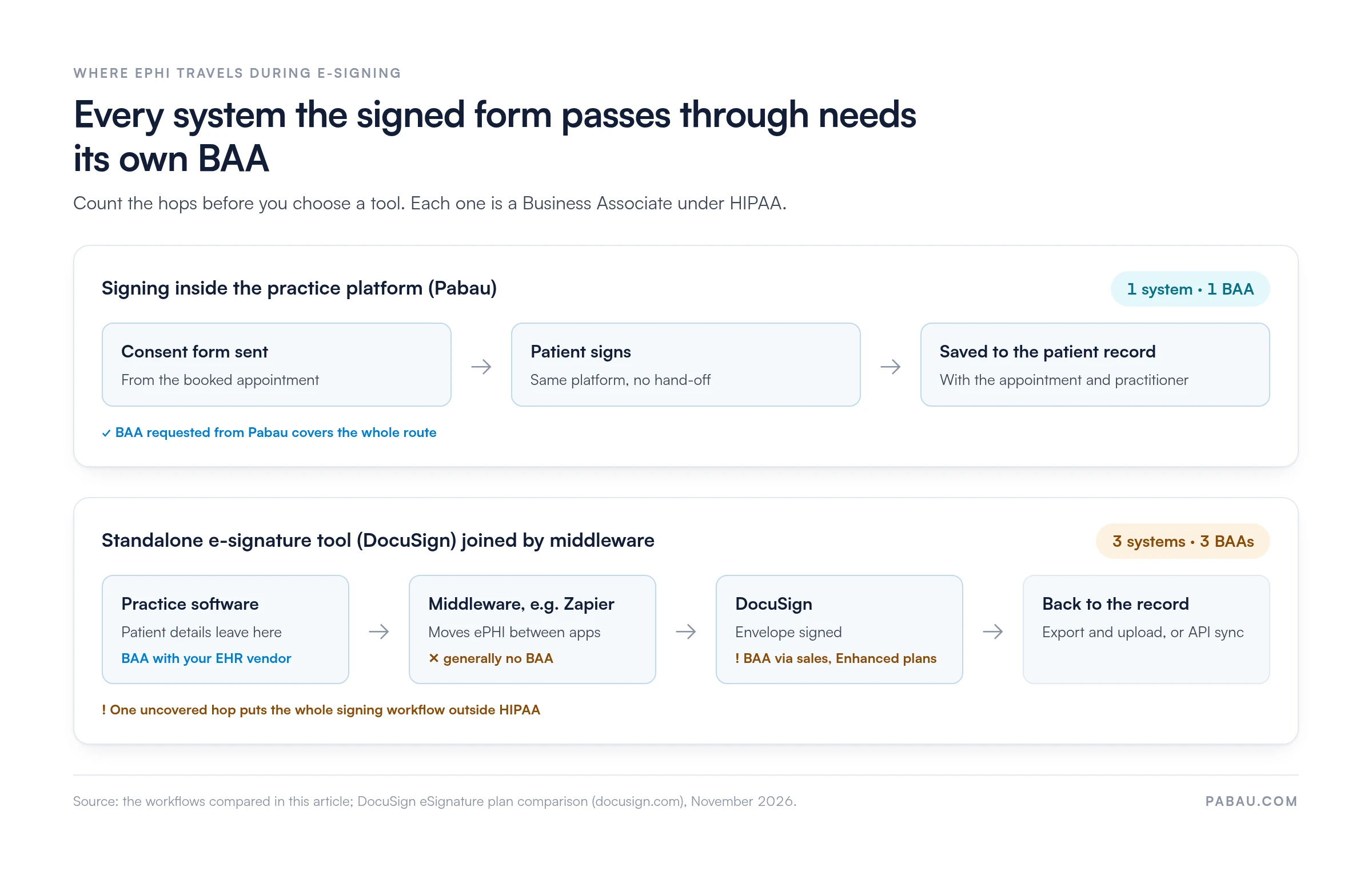
Before connecting a standalone e-signature tool to your EHR or practice system, map each system that touches ePHI in that workflow. Each one is a Business Associate that needs a signed BAA. A single system without one takes the whole signing workflow out of compliance.
Here is how the two platforms compare on security, and how their audit trails hold up when an investigator asks for records.
The audit trail matters most during an HHS Office for Civil Rights investigation. You need to show that a signed consent form belongs to the right patient and the right appointment. In Pabau, signed forms are stored on the patient record with the appointment and practitioner. With DocuSign used standalone, staff make that link by hand, which leaves more room for filing errors.
When you assess compliance management tools, check how the e-signature audit trail fits your wider documentation, not only whether each signing event is logged.
Pabau suits practices that sign patient forms as part of clinical care, and DocuSign suits organizations that sign across many departments. The right choice depends on what the signing workflow has to do after the signature.
Choose Pabau if you run a healthcare practice, such as an aesthetic practice, med spa, primary care, dermatology or physical therapy practice. Signing then becomes part of the clinical workflow, with automatic filing to the patient record and no integration overhead. Every plan includes digital forms and consent, add-ons and usage credits are extra, and there are no per-envelope fees.
Choose DocuSign if your organization needs one signing tool across HR contracts, vendor agreements and legal documents, with occasional healthcare signing. It suits teams whose IT staff can manage a BAA through sales, middleware setup and cross-system audit trails. It is also worth a look if your EHR already ships with a DocuSign integration.
Independent and small-to-midsize practices without IT staff will find DocuSign harder to deploy compliantly. The middleware and plan-tier requirements add work that a platform with built-in signing avoids.
Many practices send consent forms from one tool, then file the signed copy into the patient record by hand. That second step is where documents get misfiled or lost, and where the audit trail breaks.
In Pabau, the consent form is tied to the appointment and sent for the patient to sign before the visit. The signed form saves straight to the patient record, with the appointment and practitioner beside it. Practices request a BAA from Pabau, and signing stays inside the platform that agreement covers.
The result is a consent record your team can find in seconds when a patient, payer or investigator asks for it.

Pabau builds e-signatures into patient intake and clinical records, so each signed form saves straight to the right patient. No middleware, and no per-document signing fees.

If your practice signs patient forms every day, choose the tool that keeps the signed form where your clinicians work. For most healthcare practices that is Pabau, because one platform and one BAA cover the whole signing route.
DocuSign earns its place when signing spans HR, legal and vendor work as well as patient care. Budget for a higher-tier plan, a BAA agreed through sales, and a BAA for each system you connect to it.
Book a demo to see how Pabau sends, signs and files consent forms on the patient record in one workflow.

Building your own consent forms? HIPAA compliant form builder sets out what a secure form tool needs before patients start filling in forms.
Need a consent template to start from? Consent for medical treatment gives you a ready-made form to adapt for e-signing.
Sending forms or documents by email? HIPAA compliant email covers how to keep ePHI protected once it leaves your practice software.
Preparing for a HIPAA audit? HIPAA audit checklist walks through the records and safeguards an auditor asks to see.
Reviewing your wider system security? EHR security explains the safeguards that protect patient records beyond signing.
A HIPAA compliant electronic signature is a signing process that protects ePHI under the HIPAA Security Rule. It relies on a signed BAA with the vendor, an audit trail, encryption, access controls and a way to detect changes after signing. HIPAA prescribes no specific e-signature technology. HHS Office for Civil Rights expects these safeguards wherever ePHI is part of signing.
No. Electronic signatures are legally valid under the ESIGN Act and UETA, but legal validity and HIPAA compliance are separate questions. A signing tool fits HIPAA only when the vendor signs a BAA and audit trails, encryption and access controls are in place. DocuSign’s plan comparison shows no BAA on Personal, Standard or Business Pro, so those plans cannot be used to process ePHI.
JotForm offers a HIPAA environment on its Gold and Enterprise plans, and eligible accounts with HIPAA features enabled can sign a BAA with JotForm. Like DocuSign, its HIPAA support depends on the plan. JotForm builds forms rather than running a healthcare workflow, so signed forms are not linked to patient records. Weigh whether a standalone form tool or a platform built around the patient record suits your workflow.
The minimum necessary standard (45 CFR 164.502(b)) requires covered entities to limit the PHI used or disclosed to what the purpose needs. In e-signature workflows, a consent or authorization form should collect and transmit only the patient data that form requires. Review any third-party system that passes form data along to confirm it carries only the minimum necessary information.