HIPAA compliant texting: What you can send patients & how to communicate securely
HIPAA compliant texting is possible when a text holds no protected health inform...

Last Updated: Oct 16, 2026
A medical report template is a standardized document that captures a patient’s assessment, diagnosis, and treatment plan in the same order every time. Practices use one so a report written by one clinician can be read, checked, and acted on by another. That reader might be a primary care physician, a specialist, an insurer, or the patient’s own records team.
Without a fixed structure, reports vary by author. Key findings get buried, sections go missing, and unsigned reports hold up referrals. This page gives you a free, downloadable medical report template with seven sections, from patient information to clinician sign-off. It also explains the main report types and how to adapt the template for your practice.
The PDF covers patient details, presenting complaint, medical history, examination findings, diagnosis, treatment plan, medications, and clinician sign-off. Print it for paper records or use it as a checklist for your own editable version.
Download template
A medical report template is a fixed structure for documenting assessments, diagnoses, and plans.
Most reports need patient details, presenting complaint, examination findings, diagnosis, treatment plan, and sign-off.
SOAP, discharge summary, and referral letter formats cover most clinical reporting needs.
Pabau’s clinical documentation tools help keep reports consistent across practitioners.
A medical report template is a reusable document layout that tells a clinician which information to record and in what order. It captures the patient’s identity, the reason for the visit, what the clinician found, what they concluded, and what happens next.
Standardized reports matter for legal and regulatory reasons as well as clinical ones. Clinical documentation standards published by bodies such as the American Medical Association expect records to be complete, accurate, and attributable to a named clinician. A template makes those expectations routine rather than something each author has to remember.
Templates also help when reports leave the practice. Insurers, legal teams, and receiving specialists all look for the same information in the same place. Sharing a report that follows a known layout saves them time and reduces follow-up questions.
Most medical report formats share the same core sections. Each one answers a specific question the reader will ask, so none should be skipped without a reason.
The patient information section identifies the person the report is about. Record the full name, date of birth, patient ID, and the practice’s name and address. Errors here are common and serious, because a report filed against the wrong patient can change a treatment decision.
Start with the presenting complaint, the main reason the patient attended. Record it briefly and in the patient’s own words where possible. Follow it with relevant past medical history, including current medications and known allergies.
Clinical findings record what the clinician observed and measured. Keep objective findings separate from interpretation, so a reader can tell what was seen from what was concluded. The diagram below groups the seven sections by the job each one does, with the evidence kept apart from the judgment.
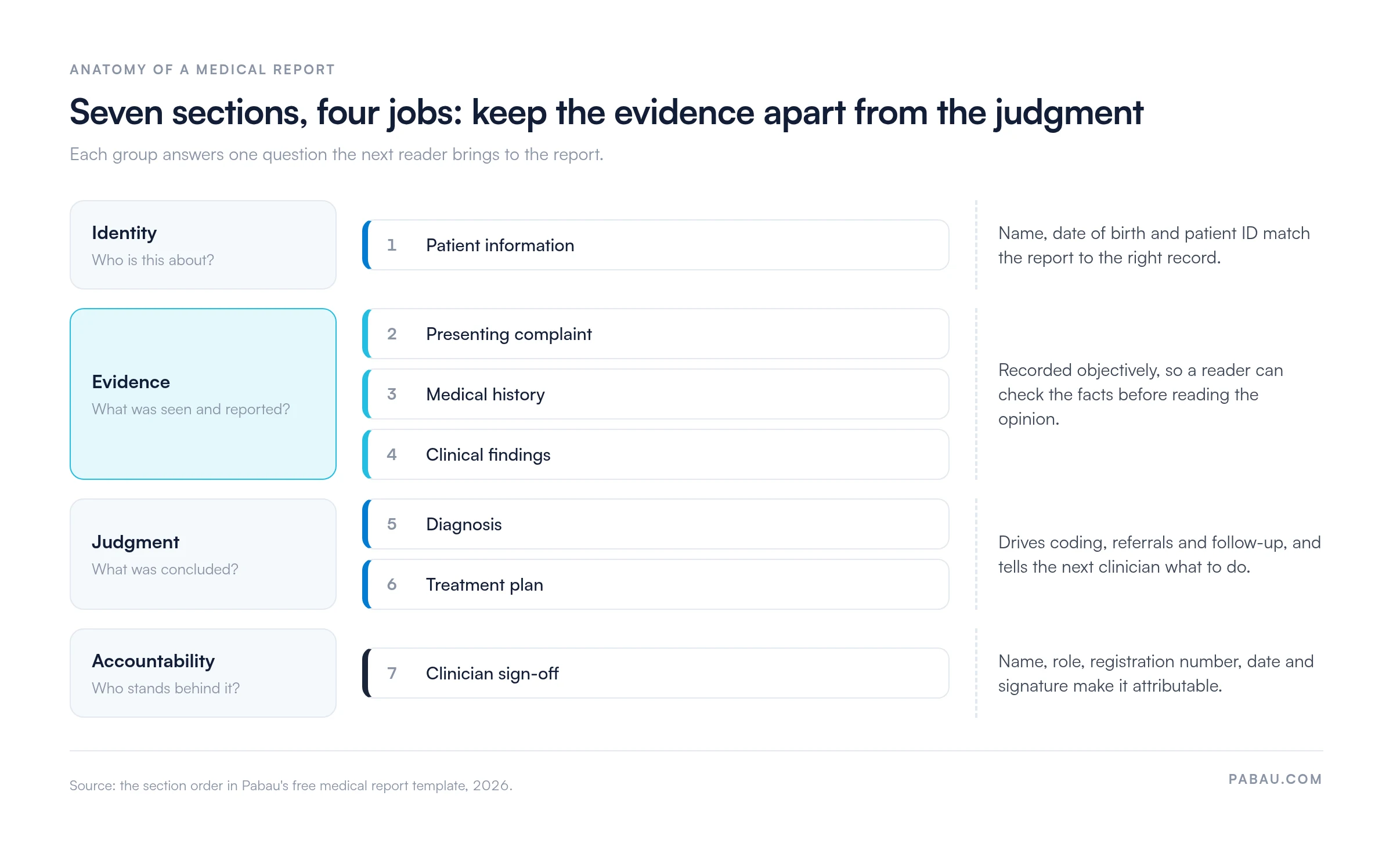
The diagnosis states the clinician’s working or confirmed impression. The treatment plan follows from it and lists the recommended management, any prescriptions, and the timing of review.
Different clinical situations call for different report formats. The core layout stays similar, but the emphasis shifts with the purpose of the report.
A SOAP note template suits day-to-day encounter documentation. Its four headings keep subjective reporting, objective findings, clinical reasoning, and the plan clearly separated, which makes it easy to scan at a later visit. Our SOAP note examples show how each heading reads once it’s filled in for a patient visit.
A discharge summary template is used when a patient leaves a hospital or another care setting. Under Joint Commission standards, discharge documentation is expected to include the diagnosis, treatment received, follow-up instructions, and medications. A dedicated template should prompt for each of these. Our discharge summary template covers medications at discharge and follow-up instructions, and adds a risk assessment.
A referral letter template helps the referring clinician send a specialist the details needed to triage the case. Include the reason for referral, the relevant history, current medications, and the urgency of the request.
The template on this page is available as a PDF from the download card above. Print it for paper records, or use it as a checklist when you build an editable version in your own word processor.
Many free medical report templates are offered in Word, PDF, or both. Choose Word if your team needs to edit the layout. Choose PDF if you want a fixed, print-ready version that looks the same on every device.
Adapting a template is quick if you work through it in a fixed order. The steps below follow the sections of the template so nothing is missed.
A template only helps if the people using it follow the same habits. The habits below suit practice owners and managers setting a standard across a team.
Write for the next reader. Assume the person reading the report has not met the patient. Use plain language and define any abbreviations the first time you use them.
Keep findings and opinions separate. A reader should be able to see what was observed and what was concluded without working it out themselves.
Make sign-off non-negotiable. A report without a named clinician and date is hard to act on and hard to defend later. Build the sign-off step into your workflow rather than leaving it to memory.
A static Word or PDF template gives you a layout, but every report still has to be filled in by hand. Pabau is an all-in-one practice management system with clinical notes, digital forms and letters held in the patient record. Your report structure can sit inside the same system. With digital patient intake forms, the history a patient gives before the visit is already on file when you write the report.
Practices that keep records in one place can reduce repeated data entry and keep patient details consistent across documents. Pabau’s medical records management shows how those details are held. Ask the Pabau team to show you how reports are set up for your practice.

Pabau holds clinical notes, digital forms, and letters inside the patient record. Practitioners write reports from details already on file, so each one follows your practice’s structure.

A medical report template only pays off when every practitioner on your team uses it the same way. Pick one format per report type, test it on a recent case, and retire the private variants.
Expect a short adjustment period. A fixed structure feels slower at first, but it cuts the follow-up calls that start when a reader can’t find the diagnosis or sign-off.
Once the printed version works, build the same structure into the system that holds your patient records, so details are entered once and reused. Book a demo to see how Pabau keeps medical reports consistent across every practitioner in your practice.

Writing up a full physical or occupational exam? Medical examination report template adds risk assessment and examiner determination sections to the core report layout.
Handing a patient over at the end of care? Discharge summary template prompts for medications at discharge, follow-up instructions, and risk assessment.
Need a form focused on the diagnosis itself? Diagnosis form template separates primary and secondary diagnoses and records referrals on a single page.
Reporting on imaging studies? Radiology report template includes a critical-findings communication log and a sign-off checklist to run before you finalize.
Documenting MRI scans specifically? MRI report template organizes anatomical findings by region and closes with the radiologist’s impression and follow-up recommendations.
A medical report template is a standard layout for recording a patient’s assessment, diagnosis, and treatment plan. It keeps every report in the same order so that any clinician can read it quickly.
At minimum, include patient information, presenting complaint, relevant history, clinical findings, diagnosis, treatment plan, and clinician sign-off. Add sections only where your specialty needs them.
Yes, you can download the template on this page as a PDF using the download button above. Choose Word-format versions when your team needs to edit the layout before use.
A medical record is the full ongoing file for a patient. A medical report is a document written for a specific purpose at a specific point. A report usually summarizes part of the record for a reader such as an insurer or specialist.
A template does not guarantee that a report will be accepted, because acceptance depends on the jurisdiction and the payer or court’s rules. Check the requirements of the body requesting the report before you submit it.