Anja Dodevska
Cytocare consent form
Cytocare is a hyaluronic acid-based mesotherapy skin booster from Revitacare, in...

1
Last Updated: Oct 27, 2026
Free PDF 3 pages, print-ready Clinician-reviewed
A health screening form is a structured questionnaire that collects a patient's medical history, health status, medications, allergies, and risk factors before a visit. Practices use it to spot potential concerns early and to set a baseline for ongoing care. This guide covers what the form should contain and the main form types. It also explains the compliance rules for screening data and how digital forms replace paper workflows.
A ready-to-use health screening form covering patient demographics, symptoms, medical and family history, medications, allergies, lifestyle, and consent. A clinician section records vital signs and blood test results.
Start from scratch, or upload this PDF or any form you already use, and Pabau's AI Form rebuilds it with tick boxes, text fields and a signature. Attach it to the treatment once, and every patient gets it on time.
AI Form rebuilds the consent, history and aftercare forms you already use. You review each one, then publish.
Patients complete forms on their phone before they arrive, so the front desk stops retyping paper.
Every signed form is versioned and attached to the treatment record, ready when you need it.
Set how long a consent stays valid. Returning patients skip forms they have already signed.
Supports HIPAA and GDPR compliance AES-256 encryption 4.8 on G2 4.7 on Capterra Trusted by 4,000+ practices worldwide

A health screening form identifies risk factors before a visit, and it does not produce a diagnosis.
Core sections cover demographics, medical history, medications, allergies, vital signs, and consent.
Our free template splits into a patient section and a clinician section for vitals and blood test results.
HIPAA treats a completed form as protected health information, so ask only for what the screening needs.
Pabau’s digital intake forms file completed screenings straight into the patient record.
A health screening form is a patient-completed questionnaire that captures the information a clinician needs before deciding what care is appropriate.
It differs in focus from a general medical intake form. Intake forms record the full registration picture, while screening forms concentrate on risk factors, current health status, and baseline measurements.
Practices use screening forms at new patient onboarding, before procedures, and at preventive or wellness reviews. The form does not diagnose a condition. It flags risk factors and open questions that the clinician then follows up in the consultation.
Every health screening form should cover the same core sections, whatever the specialty. Leave one out and the clinician starts the consultation without part of the patient’s history.
Keep the wording plain. Patients answer more accurately when each question is short and each option is clearly labeled.
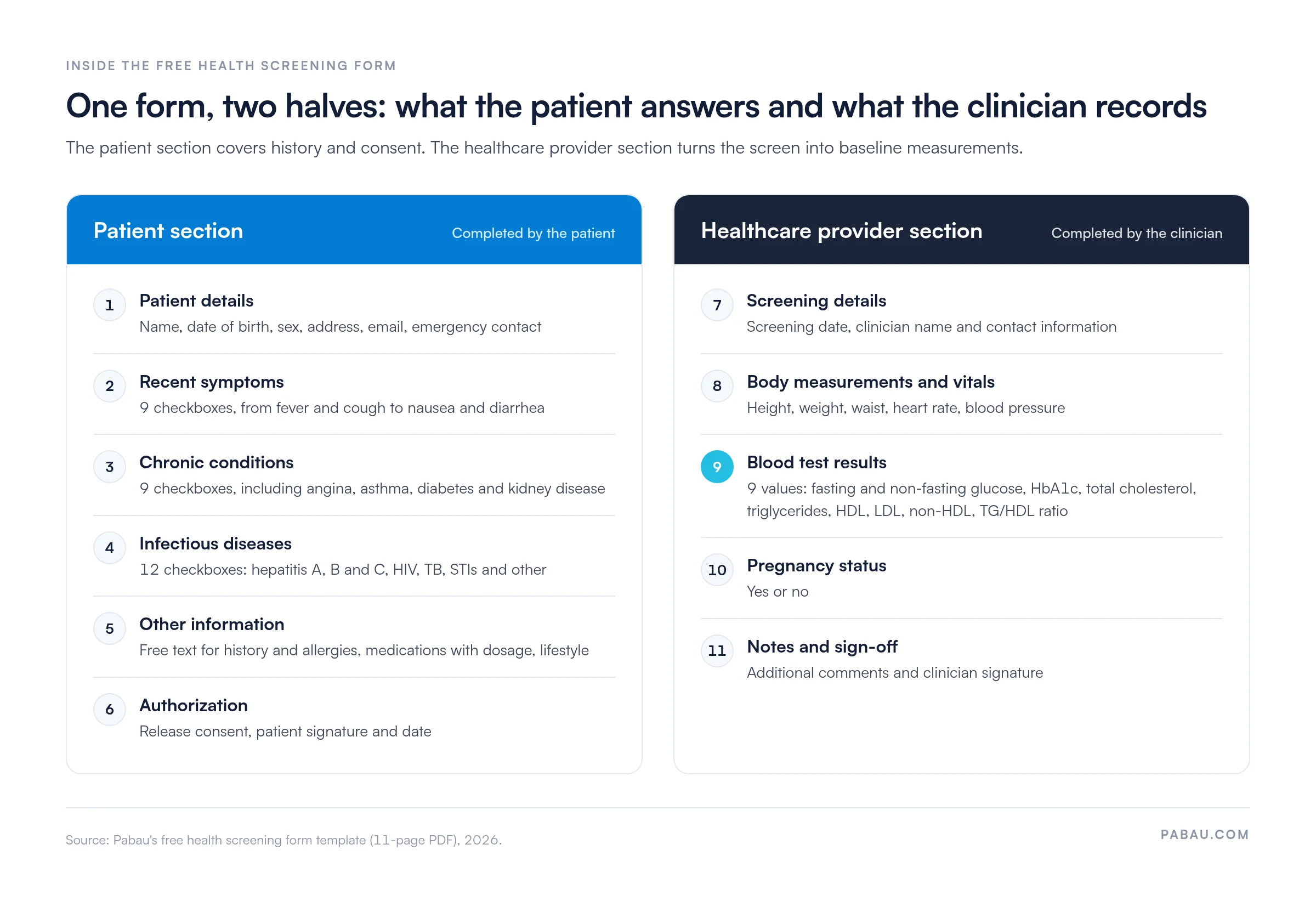
Our free template splits the work between two people. The patient completes the first half. It covers personal details, 9 recent symptoms, 9 chronic conditions, and 12 infectious diseases, plus free-text history, medications, lifestyle, and a signed authorization.
The clinician completes the second half with body measurements, vital signs, and 9 blood test values, from fasting glucose to the TG/HDL ratio. Those numbers become the baseline later visits are measured against, and a vital signs record tracks them over time.
Adapt the template to your specialty before using it with patients. Remove fields you do not use, and add any consent wording your state or insurer requires. Where a family history runs long, a separate family medical history form keeps the detail out of the free-text boxes.
Timing matters as much as content. A form handed over at check-in delays the appointment, while one sent weeks ahead gets forgotten. The workflow below keeps the process consistent across staff.
Medications change between visits more often than any other answer on the form. Patients on several prescriptions can keep a medication log and bring it to screening, so doses and side effects are recorded accurately.
Review every screening form once a year. Remove questions nobody reads and check that consent wording still matches your current services. Then confirm your team uses the form version you approved.
The same structure adapts to different settings. The types differ in which sections carry the most weight.
Pre-employment forms carry the strictest limits. Under the Americans with Disabilities Act (ADA), employers may not make disability-related medical inquiries before a conditional job offer. Medical questions become permissible only after that offer, and then only where applied consistently to everyone in the role.
Some occupational screens follow a set format. Staff who wear respirators at work, for example, complete the OSHA respirator questionnaire before fit testing.
Compliance depends on what the form collects and where it is stored. In the United States, a completed screening form held by a healthcare provider is protected health information (PHI) under HIPAA.
HIPAA’s minimum necessary standard means asking only for the information the screening needs. Stating on the form what is collected and why tells the patient how their answers will be used. Any vendor that stores completed forms must sign a Business Associate Agreement (BAA).
Sharing screening results with a third party, such as an employer, generally needs the patient’s signed HIPAA authorization form first.
Some states mandate specific forms or versions. California’s LIC 503, for example, is a required health screening form for licensed childcare facility staff. Check with your state health department before assuming a generic template meets local rules.
A PDF is the quickest way to start, but it creates work after the patient leaves. Someone must print, scan, file, and retrieve it, and each handoff adds risk.
A paper PDF still works for a small practice seeing a few patients a week. Once volume grows, digital forms cut the retyping and the storage risk that paper carries.
Paper screening usually means a printed form at reception and a staff member retyping the answers into the record. Pabau, the practice software we build, includes patient intake software that replaces the paper form with one patients complete on their own device.
Completed answers save straight into the patient record, so the clinician reads the screening before the consultation starts. Nobody at reception has to chase a clipboard or decipher handwriting.
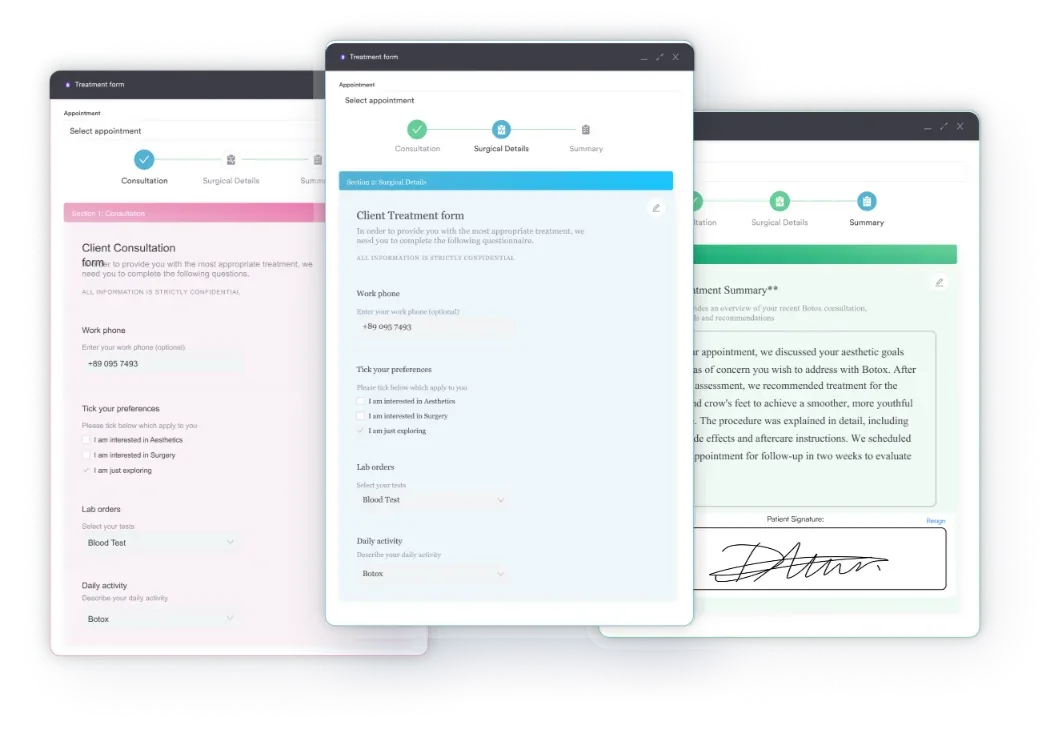

Watch how Pabau sends, collects, and files screening forms so your team spends less time on paperwork and more time with patients.

A screening form earns its place when the clinician reads it before the patient sits down. Collect only what the visit needs. Give the clinician half as much care as the patient half, because later visits are measured against those baseline numbers.
Paper works while volume is low. Once retyping and filing start to eat into appointment time, move the form online. Book a demo to see how Pabau sends, collects, and files screening forms before each appointment.

Seeing a patient for the first time? New patient questionnaire template collects registration and history details in one first-visit form.
Moving from screening to examination? History and physical form structures the full history and exam the screening leads into.
Telling patients how their data is used? HIPAA notice of privacy practices sets out the privacy notice patients receive alongside their forms.
Collecting signatures online? E-consent form explains what to include in a consent form and how to send it digitally.
A health screening form is a patient questionnaire that collects medical history, current health status, medications, allergies, and risk factors before a clinical visit. It identifies risk and does not provide a diagnosis.
Include demographics, medical history, medications, allergies, family history, immunization history, vital signs where relevant, the reason for the visit, and a signed consent section.
Not in every case. Some states mandate specific forms, such as California’s LIC 503 for childcare staff, while HIPAA governs how any health information on the form is handled.
Yes. Digital forms can be sent before the appointment, signed electronically, and filed into the patient record. The software must store that data in a HIPAA-compliant environment under a Business Associate Agreement.