Healthcare policy management software: Pabau vs dedicated tools
Healthcare policy management software helps a healthcare organization write, app...

Last Updated: Oct 29, 2026

Software covered: 1. Pabau, 2. JotForm, 3. NexHealth, 4. Formstack, 5. 123FormBuilder, 6. Cognito Forms, 7. FormAssembly, 8. HIPAAtizer, 9. Typeform.
No vendor here sells a production-grade free plan with HIPAA compliance, because a signed business associate agreement always sits behind a paid tier.
The cheapest compliant plan costs $29 a month at HIPAAtizer and $225 at 123FormBuilder, so the tier decides the bill.
Four of the nine vendors publish no price for a compliant plan at all, which makes a like-for-like comparison impossible without a sales call.
Standalone builders secure the act of collecting data, while integrated platforms like Pabau enforce compliance inside the clinical workflow.
Pabau bundles digital forms, consent capture, and appointment-triggered intake into practice management software, with no separate form subscription.
Collecting patient data on a generic web form is a HIPAA violation waiting to happen. The HHS Office for Civil Rights has levied over $130 million in HIPAA settlements since 2003, and poorly secured digital forms are a recurring cause. Your form tool is a compliance control, so it belongs on the same review list as your EHR.
This guide reviews the 9 best healthcare forms software platforms for private practices, med spas, dental offices, and larger healthcare organizations. We assess each one on HIPAA compliance architecture, intake and consent capability, EHR integration depth, pricing, and best-fit use case.
Every price below was read off the vendor’s own pricing page in August 2026, never a review site. That distinction matters here. The cheapest genuinely compliant tier runs from $29 a month to $225 a month. Four of the nine vendors publish no compliant price at all.
Here is how the nine platforms stack up on the criteria that matter most to a practice owner. Compliant price means the cheapest tier that carries a signed BAA.
A form tool is HIPAA compliant when it gives you four things. Those are a signed BAA, encryption in transit and at rest, role-based access controls, and an audit trail. Vendors use the phrase loosely, so check each element yourself with a HIPAA-compliant software checklist rather than taking the marketing at face value.
No software vendor can be “HIPAA certified.” HHS runs no software certification program, so a vendor claiming certification is using marketing language rather than a regulatory term. What counts is BAA availability, encryption standards, access controls, and audit logging.
Check all four before you sign. The same four tests govern any HIPAA compliance software review, whether the tool is a form builder or a full practice platform.
Each platform below was assessed on HIPAA compliance architecture, intake and consent capability, EHR integration depth, pricing transparency, and user feedback. The order reflects fit with clinical intake work, so a tool built for healthcare outranks a general form builder with a compliance tier bolted on.
Pabau sends the consent form the booking asks for, then files the answers in the patient record.
Pabau is practice management software built for aesthetic practices, med spas, wellness centers, and multi-specialty private practices. Unlike every other tool on this list, it is not a form builder. Forms are one part of a clinical platform that also handles scheduling, clinical notes, before-and-after photography, prescriptions, billing, and reporting.
What matters most for intake work is that Pabau’s patient intake software is appointment-triggered. When a patient books, consent forms and health questionnaires go out before the visit. Completed forms populate the patient record directly, with no manual transfer. For practices running high appointment volumes, that removes a daily bottleneck at reception.
Pabau’s Capture Forms also handles lead capture and pre-consultation intake from external sources, feeding straight into the client record.
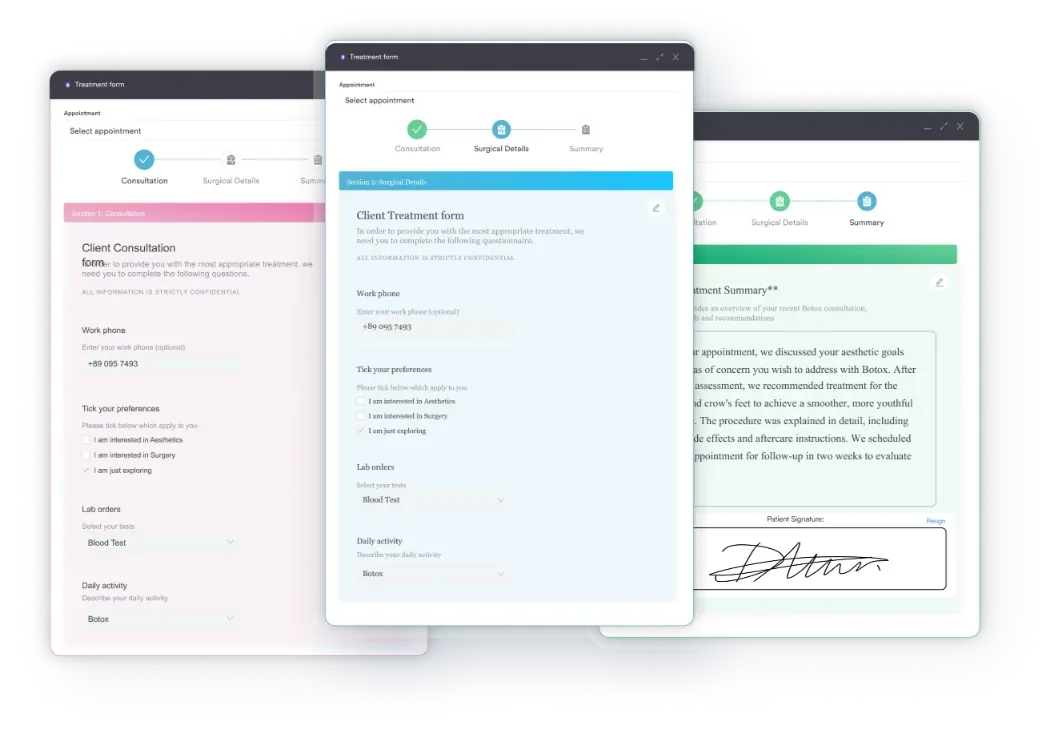
According to Capterra reviewers, Pabau scores 4.7 out of 5 based on 650+ verified reviews. Practitioners consistently highlight the all-in-one nature of the platform and strong client record management. Common feedback includes an initial learning curve for new users and occasional support response delays during busy periods.
| Plan / Tier | Price | Details |
|---|---|---|
| Solo | From $62/month | One user, unlimited patients, every feature included |
| Team, Medium and Group | Scales by user count | Two to 15 users, unlimited patients |
| Enterprise | Custom quote | 16+ users with multi-location support |
Forms, consent capture and clinical records sit in every Pabau plan, so compliance is never held back for a higher tier.
The widest healthcare template library on this list, with compliance parked on the Gold plan.
JotForm is the most widely used standalone HIPAA form builder on this list. Its compliant tier carries a BAA, AES-256 encryption, and access controls, alongside a large healthcare template library. That library covers patient intake, consent forms, medical history questionnaires, and appointment requests.
JotForm’s advantage is breadth. With over 10,000 templates and a polished drag-and-drop editor, most practices can have a working intake form online within an hour. HIPAA features and a signed BAA sit on the Gold plan, which costs $99 a month billed annually or $129 billed monthly. Bronze and Silver carry no BAA at all.
JotForm scores 4.7 out of 5 on Capterra based on 2,794 reviews. Reviewers consistently praise the drag-and-drop builder and the template depth. The most common healthcare criticism is that data still needs manual reconciliation with an EHR or practice management system.
| Plan | Price | HIPAA and BAA | Key inclusions |
|---|---|---|---|
| Starter | $0/month | No | Free tier, no BAA available |
| Bronze | $39/month | No | 25 forms, no HIPAA features |
| Silver | $49/month | No | 50 forms, no HIPAA features |
| Gold | $99/month billed annually, $129 monthly | Yes | BAA, encrypted storage, access controls |
| Enterprise | Custom quote | Yes | Multi-user controls and dedicated support |
HIPAA features start on Gold, so the cheapest compliant Jotform plan runs $99 per month on annual billing.
Digital intake that writes straight back to a dental or medical EHR you already own.
NexHealth is a patient engagement platform rather than a form builder. It combines digital intake forms with appointment scheduling, patient messaging, and online booking, all connected to your existing EHR. For medical and dental practices that want a compliant patient communication layer over an existing clinical system, it is worth evaluating.
The platform is built for covered entities, with a BAA included and compliance designed in from the start. Its strength is pairing digital intake with live EHR synchronization, which removes the manual re-entry that standalone form builders create. NexHealth publishes no pricing, so expect a sales conversation.
NexHealth scores 4.7 out of 5 on Capterra based on 31 verified reviews. Patient communication and EHR integration quality draw the strongest praise. The main limitation reviewers name is the narrow vertical focus, since practices outside dental and primary care report needing workarounds.
| Plan | Price | HIPAA and BAA | Key inclusions |
|---|---|---|---|
| All plans | No published pricing | Yes | Quoted by practice size and EHR |
NexHealth publishes no prices at all, so budget for a sales call before you can compare it with a form builder.
Enterprise form-to-document workflow, with HIPAA sold as an add-on rather than a plan.
Formstack is built for larger healthcare organizations that need more than form building. It combines HIPAA-compliant forms with workflow automation, document generation, e-signature capture, and Salesforce integration. For health systems or multi-department practices managing complex data routing between forms, documents, and CRM, Formstack is a serious option.
A BAA is available to healthcare customers, and the platform offers AES-256 encryption, audit trails, and role-based access. Formstack does publish plan prices, starting at $83 a month for the Forms plan. That figure excludes compliance, though. HIPAA is sold as a paid add-on, so your compliant total always comes from a quote.
Formstack scores 4.1 out of 5 on Capterra based on 110+ reviews. Workflow automation and audit trail quality receive consistent praise. Pricing complexity and setup difficulty are the most frequent criticisms, particularly from smaller healthcare organizations.
| Plan | Price | HIPAA and BAA | Key inclusions |
|---|---|---|---|
| Forms | $83/month billed annually, $99 monthly | Paid add-on | One builder user, 25 forms |
| Suite | $250/month billed annually, $299 monthly | Paid add-on | Three builder users, documents, e-signature |
| Salesforce | Custom quote | Paid add-on | Salesforce-native forms and documents |
| Enterprise | Custom quote | Paid add-on | Tailored security and volume terms |
Formstack sells HIPAA compliance as an add-on rather than a plan, so your compliant total always comes from a quote.
Strong conditional logic, but certified compliance sits behind the Enterprise plan.
123FormBuilder offers a drag-and-drop builder with unusually deep conditional logic, which suits practices whose intake questions branch by treatment type. The platform provides AES-256 encryption, multi-step layouts, and a BAA. Certified HIPAA compliance sits on the Enterprise plan rather than the mid-tier plans, and Enterprise starts at $225 a month billed annually.
For practices building custom intake questionnaires, health history forms, or consent workflows that vary by treatment type, 123FormBuilder’s form logic covers the requirement. It integrates with popular tools via Zapier, though native EHR integrations are limited next to NexHealth or Pabau.
123FormBuilder scores 4.4 out of 5 on Capterra based on 35+ reviews. Customization options and the BAA process receive positive mentions. The interface and support response speed are the most common areas for improvement in user feedback.
| Plan | Price | HIPAA and BAA | Key inclusions |
|---|---|---|---|
| Basic | Free | No | One form, no data encryption |
| Gold | $37/month billed annually | No | Five forms, no data encryption |
| Platinum | $49/month billed annually | No | Data encryption, no certified compliance |
| Diamond | $99/month billed annually | No | Data encryption, no certified compliance |
| Enterprise | From $225/month billed annually | Quoted by sales | Certified HIPAA compliance, SLA, data insurance |
Certified HIPAA compliance sits behind the Enterprise plan and a sales quote, so the Gold tier will not cover a practice.
The cleanest form logic of any general-purpose builder here, once you reach Enterprise.
Cognito Forms puts HIPAA compliance on its Enterprise plan only, at $129 a month billed annually or $174 billed monthly. Cheaper compliant tiers exist on this list. What Cognito buys at that price is the most capable form logic of any general-purpose builder here.
The builder is clean and capable, with strong conditional logic, repeating sections, and a table layout that suits structured clinical data. The limitation is the tier requirement. Its Individual, Pro, and Team plans all exclude the BAA and the compliance features that come with it.
Cognito Forms scores 4.6 out of 5 on Capterra based on 55+ reviews. “Best value for HIPAA compliance” is a recurring theme in reviewer feedback, alongside praise for the interface. Reviewers note the Enterprise requirement as a friction point for smaller organizations expecting HIPAA on a lower plan.
| Plan | Price | HIPAA and BAA | Key inclusions |
|---|---|---|---|
| Individual | Free | No | Personal use, no BAA |
| Pro | $19/month billed annually, $24 monthly | No | No compliance features |
| Team | $39/month billed annually, $49 monthly | No | Multiple users, still no BAA |
| Enterprise | $129/month billed annually, $174 monthly | Yes | HIPAA compliance and a signed BAA |
Enterprise is the only compliant Cognito Forms plan, and annual billing drops it from $174 to $129 per month.
The most precise Salesforce data routing here, and pointless if you do not run Salesforce.
FormAssembly is built around a single core capability: collecting data through secure forms and routing it precisely into Salesforce. For healthcare organizations where Salesforce Health Cloud is the system of record, this native integration eliminates the middleware layer that other form tools require. The platform provides HIPAA compliance with BAA, strong audit logging, and encrypted data storage for healthcare customers.
Outside the Salesforce context, FormAssembly is complex for what it delivers. It no longer publishes prices on its plans page, and HIPAA compliance with a BAA sits on the Atlas Enterprise tier. That makes it a platform for enterprise healthcare organizations with technical resources in house, rather than independent practices.
FormAssembly scores 4.5 out of 5 on Capterra based on 90+ reviews. Salesforce integration and compliance logging receive consistently strong marks. Cost and complexity are the two most common criticisms, particularly from users who over-estimated how much of the platform they would actually use.
| Plan | Price | HIPAA and BAA | Key inclusions |
|---|---|---|---|
| Atlas Explorer | No published pricing | No | Entry plan, quoted by sales |
| Atlas Team | No published pricing | No | Multiple users, quoted by sales |
| Atlas Enterprise | No published pricing | Yes | HIPAA compliance with a BAA |
| Gov Cloud | No published pricing | Yes | Public-sector hosting requirements |
FormAssembly no longer publishes prices, so the HIPAA-capable Atlas Enterprise plan costs whatever sales quotes you.
The cheapest published route to a signed BAA, with the narrowest feature set to match.
HIPAAtizer is the only tool here built for a single purpose, which is HIPAA-compliant form collection. Every other vendor on this list is a general-purpose platform with a compliance tier added on top. HIPAAtizer publishes a BAA on all four of its plans, and its cheapest paid tier is Simple Compliance Gold at $29 a month billed annually.
The trade-off for that focus is a narrow integration list and a smaller feature set than JotForm or Formstack. HIPAAtizer also has almost no review footprint on Capterra or G2, so independent verification of the user experience is thin.
HIPAAtizer carries no verified rating on Capterra or G2. The feedback that does exist highlights simple setup and the BAA on every plan as its strengths. With so few reviews, judge it on a trial of your own forms rather than on other buyers’ experience.
| Plan | Price | HIPAA and BAA | Key inclusions |
|---|---|---|---|
| Developer Sandbox | Free | Yes | Testing only, not for live patient data |
| Simple Compliance Gold | $29/month billed annually, $34 monthly | Yes | Entry compliant plan |
| Simple Compliance Gold Plus | $39/month billed annually, $45 monthly | Yes | More forms and submissions |
| Simple Compliance Platinum | $99/month billed annually, $125 monthly | Yes | Highest volume and support tier |
HIPAAtizer is the cheapest published route to a signed BAA on this list, at $29 per month billed annually.
The highest completion rates on this list, and compliance only on an Enterprise quote.
Typeform is a consumer-grade form builder rather than a healthcare tool. It is known for high completion rates, driven by its one-question-at-a-time interface. HIPAA compliance is Enterprise-only and carries no published price. The $91-a-month Business plan includes no BAA, and no tier offers a native EHR integration.
Typeform earns its place here on patient experience. For practices running satisfaction surveys, pre-consultation questionnaires, or screening tools, its conversational flow beats a traditional multi-field form on completion rate. That does not make it a clinical platform. Where engagement is the priority, though, it works well alongside a separate clinical records system.
Typeform scores 4.7 out of 5 on Capterra based on 840+ verified reviews. Interface quality and completion rates are the most praised elements. Healthcare reviewers flag the Enterprise-only HIPAA requirement and the missing EHR integration as friction points for clinical work.
| Plan | Price | HIPAA and BAA | Key inclusions |
|---|---|---|---|
| Basic | $28/month | No | 100 responses per month |
| Plus | $56/month | No | 1,000 responses per month |
| Business | $91/month | No | Higher volume, still no BAA |
| Enterprise | Custom quote | Yes | The only tier carrying HIPAA compliance |
HIPAA compliance is Enterprise-only at Typeform, so no published price covers a practice handling patient health data.
The table below compares all nine platforms across the six criteria that decide a clinical and compliance purchase. Every entry was checked against the vendor’s own site in August 2026, so confirm BAA terms once more before you sign.
Key finding: No vendor here offers a production-grade free plan you can collect ePHI on. HIPAAtizer is the single exception, and its free tier is a developer sandbox rather than a live account. Every other free plan excludes the BAA, so a practice using one for patient health information is non-compliant.
The second finding is money. Once you price the tier that actually carries a BAA, the compliant entry cost spreads across nearly an eightfold range. Four vendors will not quote it publicly at all.
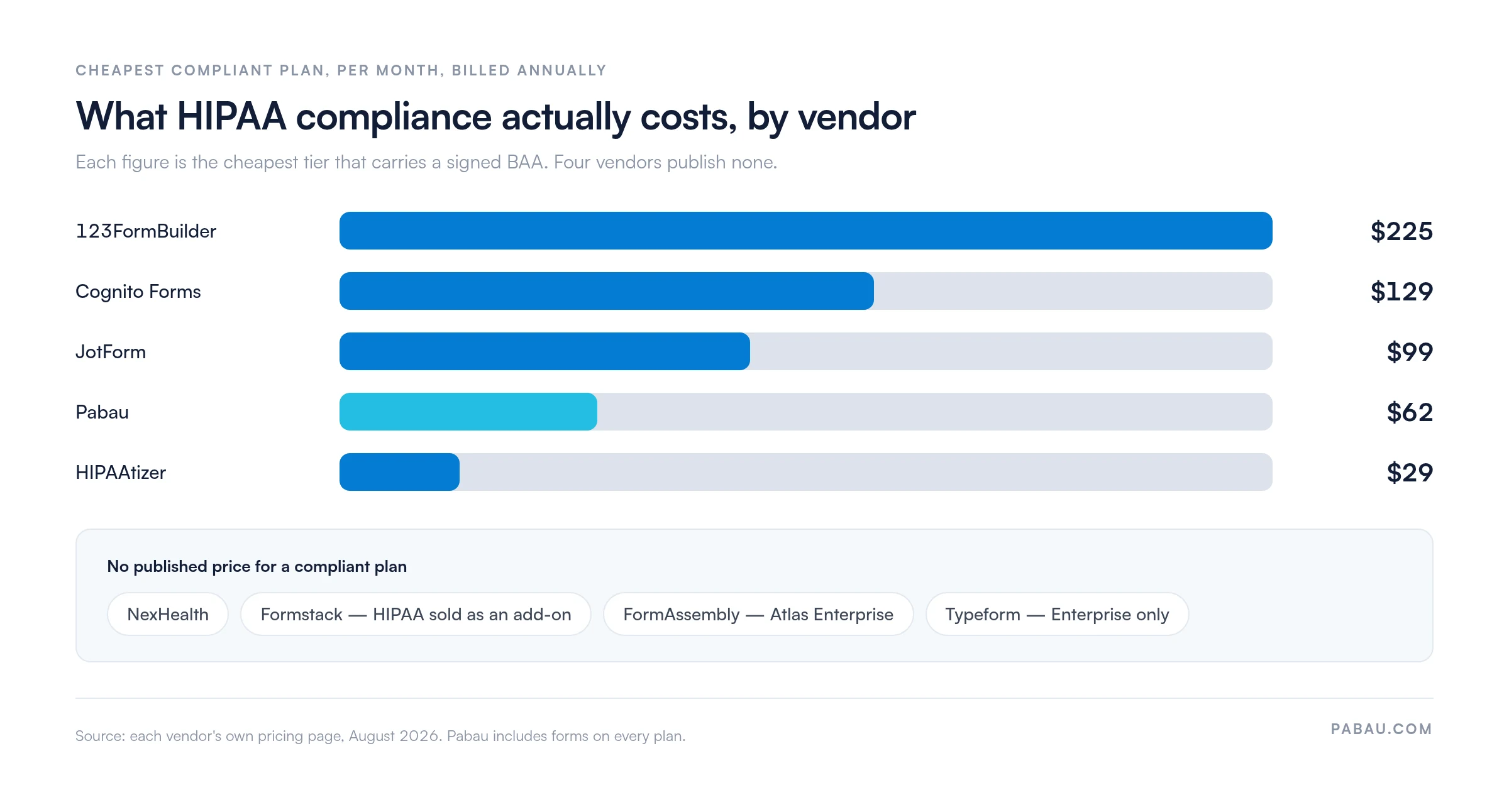
Two readings follow from that spread. A practice that needs only compliant forms can get a BAA for $29 a month. A practice buying a platform should price the whole subscription, not the form module alone.
The comparison table above shows a structural divide worth naming. Seven of the nine tools are standalone form builders that achieve HIPAA compliance at the infrastructure level, through encryption, a BAA, and access controls.
Two of them, Pabau and NexHealth, are integrated platforms where forms are one part of a wider clinical workflow. That distinction changes the daily work more than any feature list does.
A standalone form builder makes the act of collecting data compliant. It does not solve the workflow problem of moving that data into your clinical record safely and quickly. Practices running JotForm or Typeform beside a separate EHR keep two systems, two logins, and a permanent reconciliation job.
For a paperless workflow that connects forms to records end to end, see our guide to digital medical forms.
The right tool depends on what you already run, which workflow problem you are solving, and how much integration overhead your team can absorb. Use these five criteria to frame the evaluation.
In most practices, intake is a chase. Reception emails a form link after the booking, follows up the day before, then reprints the questionnaire when the patient arrives without it. The answers get typed into the record afterwards, which is where the transcription errors and the missing consent forms come from.
Pabau ties the paperwork to the appointment instead. Book a treatment and the consent form and health questionnaire for that treatment go out automatically, with a reminder 48 hours before the visit. The patient signs on their phone, and the signed version files itself against their record with a timestamp.
The form, the photo, the note, and the audit trail all live in the same record. A compliance review then means opening one patient file instead of reconciling a form tool against an EHR. Every subscription includes the forms, so no feature here sits behind a compliance tier.

Pabau sends the right consent form for the treatment booked, chases it automatically, and files the signed copy in the patient record. Book a demo to see the intake workflow end to end.

The tier you buy matters more than the vendor you pick, because the BAA lives on the tier. Price the compliant plan first, and half the shortlist above rearranges itself. Several of the cheapest headline prices here belong to plans that carry no BAA at all.
If forms are your only problem, a standalone builder is the honest answer, and HIPAAtizer will sign a BAA for $29 a month. If the problem is that form data never reaches the patient record without someone retyping it, no builder fixes that at any price. That is a workflow question, answered by the platform you book appointments in.
Whichever way you go, run the same three checks. Get the BAA in writing, confirm the encryption standard, and keep ePHI off every free plan. Book a demo to see how Pabau sends, signs, and files a consent form without anyone touching a keyboard.

Still deciding between a form builder and an intake platform? Patient intake software compares the tools that own the whole intake step rather than the form alone.
Looking for a paperless intake workflow that reaches the clinical record? Medical forms at your healthcare practice walks through moving from paper registration to a secure digital process.
Need the release form itself rather than the software? Our HIPAA authorization form template covers the disclosures a valid authorization has to carry.
Starting from a blank intake questionnaire? The new client intake form template gives you the fields to collect before a first appointment.
The best healthcare form-building software depends on your workflow model. Pabau is the strongest option for aesthetic practices, med spas, and multi-specialty practices that need intake, consent management, and clinical records in one platform. JotForm is the best standalone HIPAA form builder where you only need compliant collection without a clinical system. NexHealth suits dental and medical practices with an EHR they intend to keep, adding digital intake and patient messaging on top.
Google Forms is not HIPAA compliant on the free tier or on standard Google Workspace plans. HIPAA compliance requires a Google Workspace for Healthcare plan with a signed BAA and specific configuration. Standard Google Forms does not include a BAA, which makes using it to collect patient health information a HIPAA violation. If your organization has a Google Workspace for Healthcare plan with an executed BAA, confirm with Google directly whether Forms is covered under that agreement.
Yes. Any software vendor that handles protected health information (ePHI) on behalf of a HIPAA-covered entity must sign a Business Associate Agreement. This is a legal requirement under the Health Insurance Portability and Accountability Act, not a best practice. Without a signed BAA from your form tool vendor, collecting patient health data with that tool is a HIPAA violation. The vendor’s marketing about security or encryption does not change that.
There is no free HIPAA compliant form builder you can run a practice on. HIPAAtizer is the only vendor here publishing a BAA on a free plan. That tier is a developer sandbox rather than a production account. The cheapest paid route to a signed BAA is HIPAAtizer’s Simple Compliance Gold plan, at $29 per month billed annually. JotForm’s Gold plan is the next step up at $99 per month, and every other vendor on this list starts higher.
Digitizing patient intake needs three things. You need a HIPAA-compliant form tool with a signed BAA. You need a way to send forms before appointments, by email, SMS, or portal link. Finally, the completed answers must reach the clinical record without re-entry. Integrated platforms such as Pabau and NexHealth cover all three. Standalone builders such as JotForm and Cognito Forms cover the first two, then leave the third to integration work you configure yourself.
Six features decide it. Look for a signed BAA, AES-256 encryption in transit and at rest, and role-based access controls. Then check for an audit trail covering all form activity, and conditional logic for branching questionnaires. Last, confirm there is a dependable route from a completed form into your clinical system. Appointment-triggered distribution is the workflow advantage worth paying for, and only integrated platforms such as Pabau and NexHealth offer it.