Tanja Lepcheska
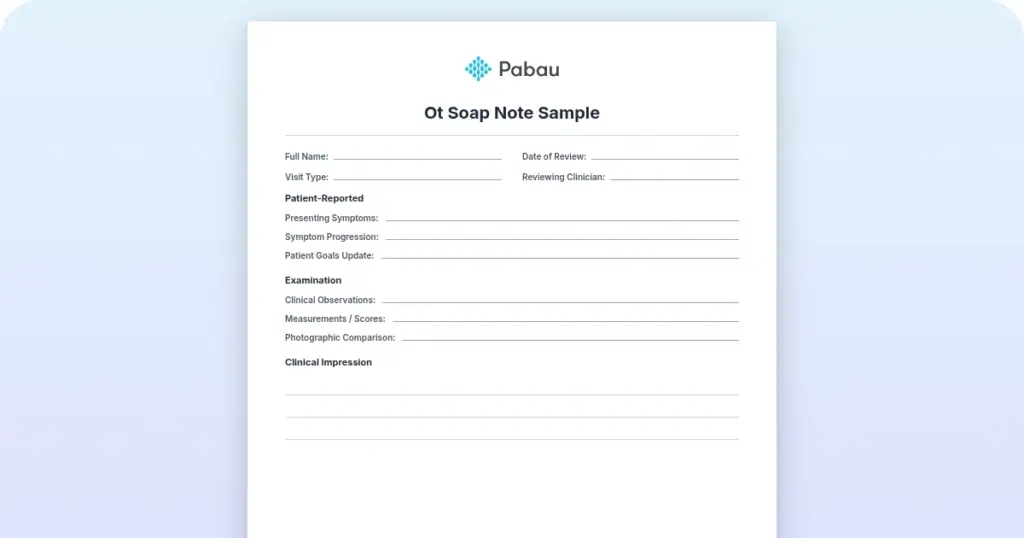
OT SOAP note sample: Free template and worked examples
Download your free OT SOAP note sample A four-page form with an identifying head...

5
Last Updated: Nov 5, 2026
Free PDF 5 pages, print-ready Clinician-reviewed
A health assessment form is the intake document that records a patient’s medical history, current health status, and contact details in one standard format.
Practices hand it to every new patient at the first visit. It sets the baseline the clinician works from, supports treatment decisions, and creates the record that proves what the patient reported.
This guide sets out the ten sections a complete form needs, what each is for, and the HIPAA and GDPR rules that apply. You can download the form as a free PDF below. It also covers the shorter update form for return visits, and how to move the process onto patient intake software.
A ready-to-use intake form covering patient demographics, medical history, medications, allergies, vital signs, family and social history, review of systems, and informed consent. It suits mental health, primary care, wellness, and specialty practices.
Start from scratch, or upload this PDF or any form you already use, and Pabau's AI Form rebuilds it with tick boxes, text fields and a signature. Attach it to the treatment once, and every patient gets it on time.
AI Form rebuilds the consent, history and aftercare forms you already use. You review each one, then publish.
Patients complete forms on their phone before they arrive, so the front desk stops retyping paper.
Every signed form is versioned and attached to the treatment record, ready when you need it.
Set how long a consent stays valid. Returning patients skip forms they have already signed.
Supports HIPAA and GDPR compliance AES-256 encryption 4.8 on G2 4.7 on Capterra Trusted by 4,000+ practices worldwide

A health assessment form captures demographics, medical history, current medications, and allergies before anyone treats the patient.
A complete form runs to ten sections, ending with vital signs, review of systems, and informed consent.
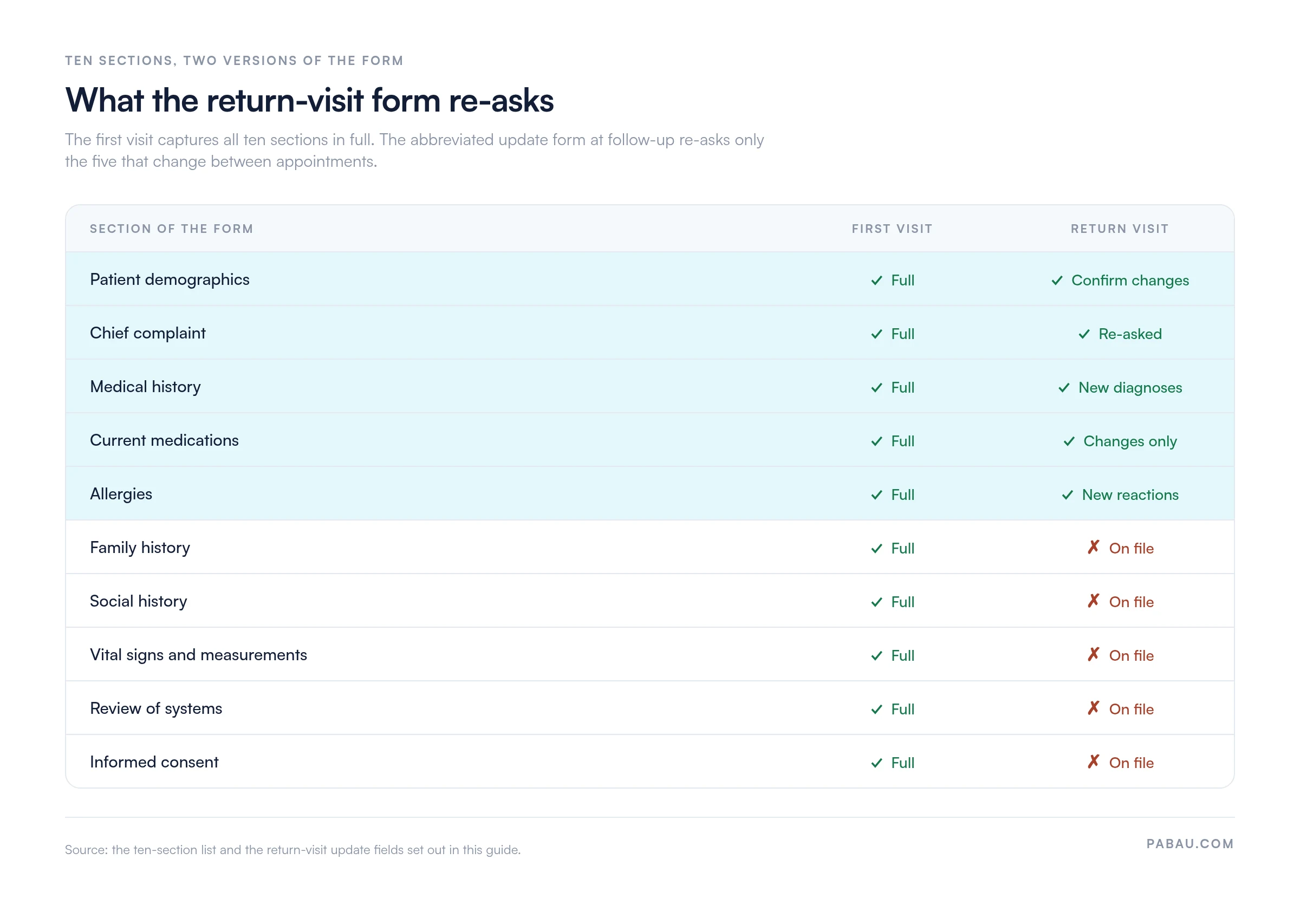
Return visits need only a short update form that re-asks the five sections likely to have changed.
Paper forms cost you in transcription errors and storage risk, which digital intake removes.
Practice management software like Pabau collects the form before the appointment and files it into the patient record.
A health assessment form is the structured entry point into a patient’s clinical record. It answers two questions before treatment starts. Who is this person, and what is their health status today? Unlike a check-in form, which only confirms the appointment, an assessment form carries enough detail for a safe decision about diagnosis and treatment.
Every clinical setting uses a version of it. Primary care practices collect it at the annual physical, and mental health practices collect it before the first therapy session. Aesthetic practices gather it before injectable or laser treatment. Functional medicine practices use it to build a full wellness picture.
Non-clinical settings ask for a different document. Schools, camps, and childcare programs want a health appraisal template that a licensed clinician completes and signs.
Intake and clinical assessment meet on this one document. It is also the first point at which data protection law starts to govern what the practice holds.
A sample patient intake form sets out the intake half in full, with demographics, insurance, emergency contact, and consent fields.
Practices that run intake verbally leave no written record of what was asked. A missed medication or an unrecorded allergy then has nothing to trace it back to. A standardized form prevents that, and it documents informed consent in a way that holds up later.
A complete form contains ten field categories. Each one serves a distinct clinical purpose and feeds a different part of care. The table below sets out the standard structure.
This opening section collects the identifiers that anchor the record. Capture full legal name, date of birth, phone and email, and an emergency contact name and number. Add insurance details where they apply, and employer details in occupational health settings.
A field for preferred contact method and language preference supports inclusive care. The patient demographics you collect also establish the medical record ID that ties every later note to this patient.
Capture the patient’s own description of the reason for their visit. This is separate from your clinical assessment, and it should stay in their words. A short history of present illness field follows it.
Record symptom onset, duration, and severity, plus what makes it better or worse and any treatment already tried. This narrative often tells you more than the checkboxes, and it points your diagnostic thinking in the right direction.
List significant past diagnoses with dates, prior surgeries, hospitalizations, and chronic conditions. The medication section needs drug names, doses, frequencies, and the indication for each one. “Patient is on three meds” is not enough to prescribe against.
For allergies, record the substance and the type of reaction: rash, anaphylaxis, or stomach upset. A patient who reports a penicillin allergy without naming the reaction leaves the clinician guessing. Hives and anaphylaxis lead to different decisions. Both fields carry protected health information, so whatever holds the form has to encrypt it and control access.
Family history captures hereditary disease patterns. Record parent and sibling diagnoses of diabetes, heart disease, cancer, and mental illness, along with any other heritable condition. A dedicated family medical history form is worth using where the family picture runs deep.
Social history covers smoking status, alcohol use, exercise frequency, occupational hazards, living situation, and relationship status. Record smoking as never, former, or current, with pack-years for the last two. These lifestyle factors reshape risk stratification and guide preventive counseling.
Vital signs at intake include blood pressure, heart rate, respiratory rate, temperature, height, weight, and BMI. Take blood pressure seated, after five minutes of rest.
The review of systems is a structured checklist across the body systems. It covers constitutional symptoms, then eyes, ears, nose and throat, then cardiovascular, respiratory, gastrointestinal, genitourinary, neurological, musculoskeletal, and psychiatric categories. Mark each one yes, no, or not applicable.
A fuller review of systems template breaks the checklist out in the detail a longer appointment allows. Either way, this sweep catches symptoms the patient never connected to their chief complaint.
The depth required changes with the practice type and with the visit. Matching the version to the workflow keeps the form short enough that patients finish it properly.
The new-patient version is the long one. It covers all ten sections in full, because this is the first chance to gather baseline data. Every new patient completes it on paper or as a digital equivalent, and it becomes the anchor document in their record.
Mental health practices, primary care, and specialty providers all use it at the first appointment. Some practices split it in two and send a short new patient questionnaire ahead of the visit, then finish the remaining sections in the room.
Established patients complete a much shorter form. It asks only for changes: new diagnoses, medication changes, new allergies, updated contact details, and the current chief complaint.
The baseline from the initial assessment already sits in the record, so re-asking it wastes the patient’s time. That matters most in high-volume practices, where form fatigue drives response rates down. The split between the two versions is worth mapping before you build either one.
Medical spas and wellness practices adapt the form to their context. Instead of a chief complaint, they ask about aesthetic goals or wellness objectives. They spend less space on disease diagnosis and more on nutrition, sleep, stress, fitness goals, and skin or body concerns.
The medication section stays as important as ever, because it screens for interactions with injectable and laser treatments. The tone across the rest of the form is solutions-focused rather than problem-focused.
Workplace health programs assess fitness for duty. The form emphasizes work-related injury history, ergonomic stressors, safety equipment use, and job demands. Standardized screening tools often sit inside it, such as the DASH questionnaire for arm, shoulder and hand disability.
These forms are more uniform than clinical ones, because the results feed employer wellness records and regulatory reporting.
Paper has been the clinical standard for decades, and it carries costs that rarely show up on a budget line. Handwriting is often illegible. Entering it into the EMR means manual transcription, which introduces errors. Storage takes space, creates a security risk, and makes retrieval slow.
Patients resent filling in the same form at every visit. That usually happens because nobody can find last year’s copy.
Digital forms remove most of that. Patients complete them once on a tablet in the waiting room, or at home before the appointment. The answers populate the patient record directly, and the form stays searchable and secure. Conditional logic adds something paper cannot. Tick a medication allergy and the clinician sees a warning straight away.

Practices that still run on paper carry the transcription work and the filing risk on top of the clinical work. Moving the assessment online removes both, which is why high-volume practices made the switch first.
Five steps put the form into the intake process without creating a bottleneck.
Practices running patient record management software can automate most of these steps. The template lives in the system, patients get an automated link before the appointment, and completed forms land in the chart without retyping.

A health assessment form collects protected health information, which is regulated by law. The rules differ by jurisdiction, and the practice carries the liability either way.
In the United States, HIPAA requires a privacy notice on any form that collects protected health information. The notice explains how the data will be used, stored, and protected. The form must also record that the patient received and understood it.
HIPAA-compliant intake also requires secure storage, whether that means encrypted files or a locked cabinet. Access controls limit the form to authorized staff. A breach notification protocol must be in place, and affected patients have to be told within 60 days.
GDPR applies to any practice processing the personal data of UK or EU residents. It is stricter than HIPAA in three ways. Patients must give explicit, informed consent for each use of their data, rather than a blanket acknowledgment.
They also have the right to see their data and correct it, and the right to request deletion. The form must state the legal basis for collecting the data. Wording such as “we collect your medical history to provide safe treatment” satisfies that. It must also say how long the practice will keep the record.
Retention periods vary by country and by specialty. In the US, most rules require five years from the last patient interaction. Some UK contexts run to seven or ten years.
Once the period ends, destroy the form securely. Shred paper, and delete digital copies cryptographically. Putting old assessment forms in general waste breaches both HIPAA and GDPR, so use a medical records destruction service or a documented in-house protocol.
Retention tracking is easier to automate than to remember. Practice management software can set deletion dates, send reminders, and keep an audit trail of who opened the form and when.
Whether you download the template or build your own, six principles decide how accurately patients fill it in.
Most practices still run the assessment as three separate jobs. Someone prints or emails the form, someone chases the patient for it, and someone types the answers into the chart afterwards. Each handoff is a chance for a page to go missing.
Pabau collapses the three into one. You build the health assessment form once inside the system, or import the PDF, and add conditional logic where it helps. A patient who ticks diabetes gets the diabetes follow-up questions, and nobody else sees them.
When the appointment is booked, Pabau emails the link automatically. The patient completes it on any device, and the answers are encrypted in transit and at rest. On submission they populate the clinical record directly, so the clinician reads a finished form before the patient arrives.
Storage and retention are handled in the same place. The completed form is archived against the patient, retention reminders fire on schedule, and the audit log records who opened it. Pabau Scribe, our AI scribe, can also draft parts of the clinical note from what the patient already reported.

Pabau builds your health assessment form into the booking flow, emails it automatically, and files the answers straight into the patient record. Consent, retention dates and the audit trail are tracked in the same place.

The form is only as good as the decisions it supports. A page of tick boxes that nobody reads before treatment protects no one. A thorough form filled in the waiting room under time pressure produces thin answers.
The decision that changes outcomes is about timing. Send the form ahead of the visit and read it before the patient is in the room. The same ten sections then do work that a clipboard handed over two minutes before the appointment cannot.
Customize the template to your practice type and jurisdiction before you use it, and add the update form for return visits. The trade-off worth remembering is length against completion. Every field you add lowers the chance the last one gets answered honestly.
Book a demo to see the assessment form collected, signed and filed before your next patient walks in.

Need the vitals section on its own? Vital signs record gives you a standalone chart for blood pressure, heart rate and BMI across visits.
Comparing systems to collect forms digitally? Patient intake software sets out what to look for when you move intake off paper.
Need written permission to share records? HIPAA authorization form covers the disclosure consent a health assessment form does not.
Auditing the rest of your paperwork? Medical forms at your healthcare practice walks through which forms a practice actually needs.
A complete form covers patient demographics, chief complaint, past medical history, current medications, and allergies with reaction types. It then adds family history, social history, vital signs, a review of systems, and informed consent. The exact fields vary by practice type. Mental health forms give more space to psychiatric history, while aesthetic practices focus on cosmetic goals and contraindications.
A medical history form captures past diagnoses, surgeries, and illnesses. An assessment form is broader. It adds current medications, allergies, vital signs, a review of systems, and lifestyle factors. The assessment is a snapshot of the patient’s health status today, while the history form looks only at the past. Most practices use an assessment form that carries medical history as one of its sections.
Yes. The template on this page is free to download and use. Government health departments and professional associations publish their own versions too. Check that whichever one you pick meets your jurisdiction’s HIPAA or GDPR requirements. A generic template rarely carries the privacy notice wording your practice needs, so expect to customize it.
Use practice management software with a built-in form builder, such as Pabau, SimplePractice, or Cliniko. General tools like Google Forms or Typeform need more caution. Healthcare form builders include encryption, compliance logging, and direct integration with the patient record. A generic tool leaves you to encrypt responses and export them to the EMR yourself.
In most healthcare settings, yes. HIPAA requires documented informed consent before treatment. Most malpractice insurers want evidence of a baseline assessment at intake. Professional standards in mental health, physical therapy, nursing, and medicine all call for initial assessment documentation. The content varies by specialty and jurisdiction, but the principle holds throughout.
The full version is completed once, at the first visit. After that, use the short update form that asks only what changed. Re-completing the whole form at every appointment burdens the patient and drives compliance down. Run a full re-assessment annually, or whenever the patient has had a major health change.