Chronic kidney disease nursing care plan
A chronic kidney disease nursing care plan is a structured document that guides ...

3
Last Updated: Oct 14, 2026
A HEENT review of systems is a structured review of head, eye, ear, nose, and throat symptoms, usually taken at the start of a visit.
Clinicians who record these answers consistently get a clearer picture of what the patient reports. Many send the questions through digital intake forms before the visit.
This guide explains what the review covers and how to use the free template. It also lists the questions to ask in each area and shows how the documentation fits US E/M coding.
A printable form that lists 29 head, eye, ear, nose, throat, and mouth symptoms to mark present or absent. It also has fields for patient details, relevant medical history, the referring physician, and summary notes.
Download template
The HEENT review of systems records patient-reported symptoms, not examination findings.
Cover each area: head, eyes, ears, nose, sinuses, throat, and mouth.
Under the CMS 1995/1997 guidelines, HEENT symptoms count toward the review of systems element (office-visit leveling now uses MDM or time).
Pabau’s practice software can send the template to patients as a digital form before the visit.
A HEENT review of systems is a subjective history, meaning the patient reports symptoms and the clinician records them by body area. It is separate from the physical examination, which records what the clinician observes, palpates, and measures.
The HEENT part covers the head, eyes, ears, nose, and throat, and it forms one section of a full medical review of systems. Each area gets a short set of questions about current symptoms, past problems, and symptoms the patient denies.
Under the CMS documentation guidelines, the review of systems sits within the history element of an E/M visit. A HEENT review is one way to document that element when the presenting concern involves the head or sensory organs.
Use the template during the history portion of the visit, one area at a time, and record each answer as the patient gives it.
Paper teams can print the PDF and file it with the chart. Teams working in an EHR or digital intake system can send the same questions to the patient beforehand, so appointment time goes to follow-up.
Use these prompts as a starting point. Adapt the wording to each patient, and record answers in the patient’s own terms.
The review of systems records what the patient reports, while the physical exam records what the clinician observes and measures.
Keep the two separate in the note. A reviewer should be able to tell which findings came from the patient and which came from your examination.
Documenting HEENT symptoms adds to the organ systems that CMS counts toward the review of systems element of an E/M visit.
Under the 1997 CMS E/M documentation guidelines, the review of systems has three levels. A problem-pertinent review covers one system, an extended review covers two to nine, and a complete review covers ten or more.
HEENT documentation typically contributes to the eyes and the ears, nose, mouth, and throat systems. A HEENT review that documents both systems therefore meets the extended level on its own, as the diagram below shows.
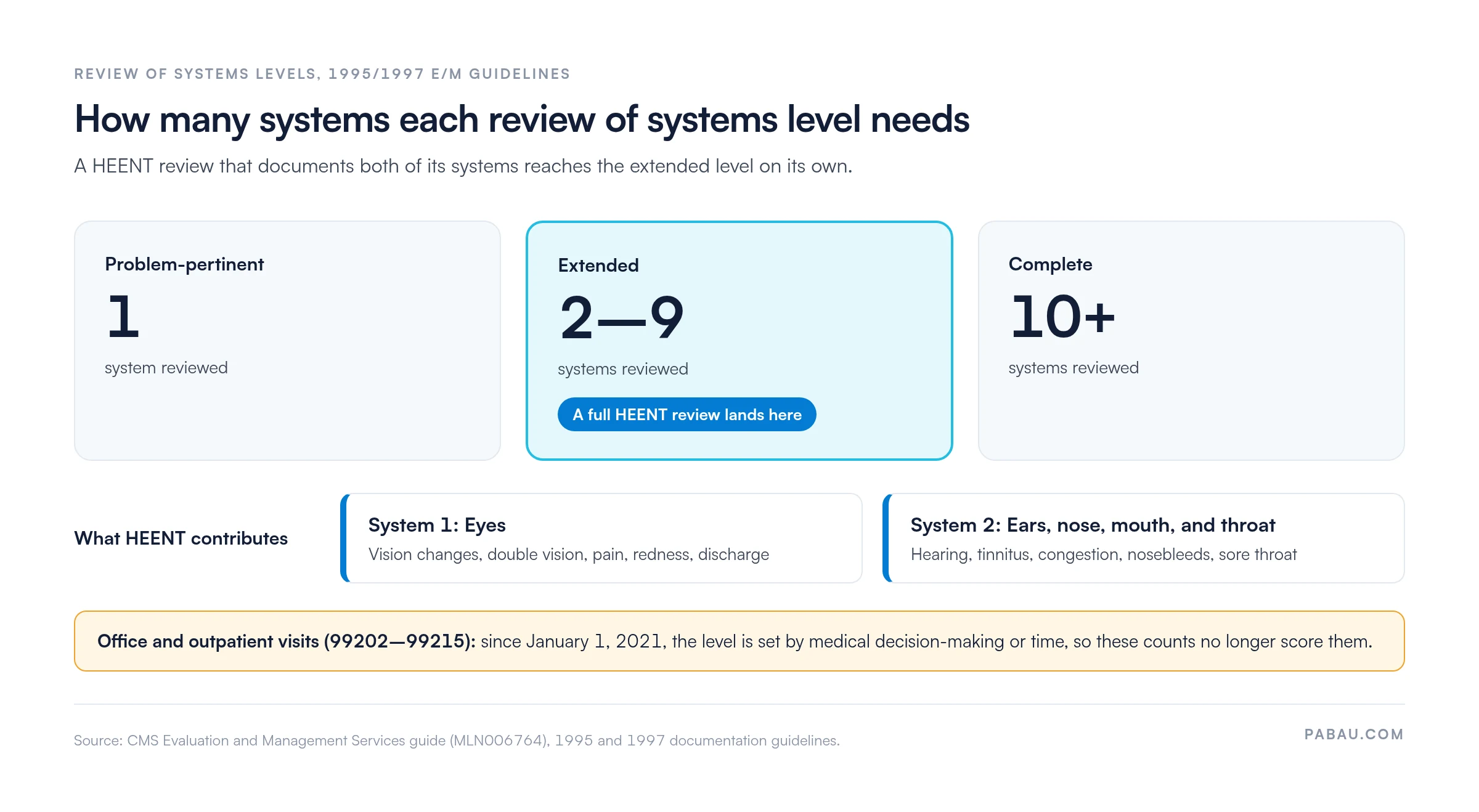
For office and outpatient visits since 2021, level is set by medical decision-making or time. The 1995/1997 ROS counts still apply to some other E/M settings and payers.
The 1995 guidelines also apply, and providers may use either set, so confirm which one your payer expects before you code. The AMA CPT guidance defines the E/M code descriptors these elements feed into.
These rules are US-specific CMS guidance. UK and UAE practices should not apply them without checking their own national requirements. Current payment rules are published on the CMS physician fee schedule page, and final coding decisions rest with the treating clinician.
Primary care physicians, physical therapists, chiropractors, and osteopaths use this template to record symptom history before assessment or treatment.
Each setting uses it differently. A physical therapy practice using an EMR for physical therapy may use it at the first assessment to spot symptoms that need referral. A primary care physician may fold it into a full new-patient history.
The main benefit is consistency. When every clinician asks the same questions in the same order, the record is easier to audit and safer to hand over between clinicians.
Teams comparing paper and digital workflows can review medical forms for your practice before choosing. Chiropractic teams often pair this form with their standard intake questionnaire.
Audit your template once a quarter against current CMS and payer documentation rules. Assign one team member to check the question list and record the revision date on the form. Retire any older version that no longer matches your clinical protocol.
On paper, the review gets printed, filled in at the front desk, and scanned into the chart later. Rushed handwriting is hard to read, and an unsigned copy can sit in a tray until someone chases it.
In Pabau, the HEENT questions become one of your custom digital forms, sent to the patient before the appointment. Completed answers sit in Client records beside the rest of the patient’s chart, so the clinician can review positives before the visit starts.
If your notes need help becoming more structured, Pabau offers Pabau Scribe, our AI scribe, for clinical documentation. It drafts the treatment note from the consultation for the clinician to review and sign.
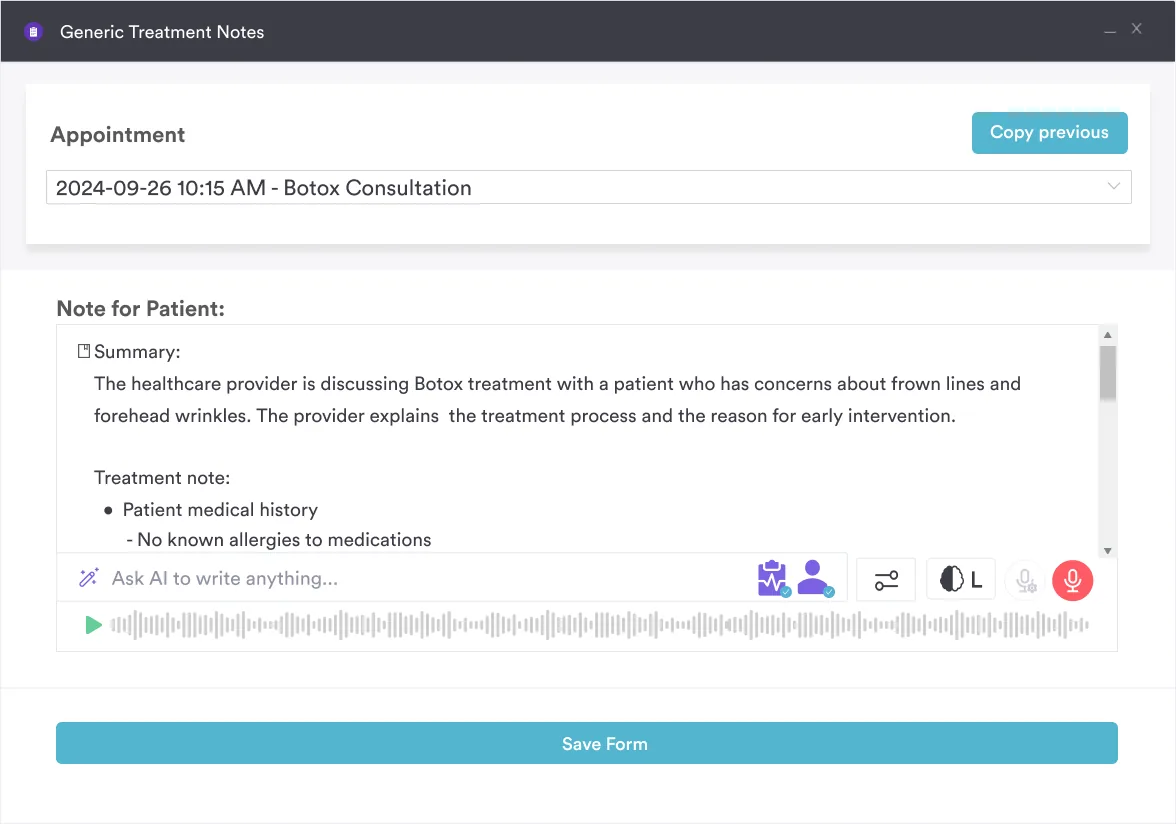
The result is a complete, signed review on every chart, with no paper to scan. Teams that want the template inside their everyday patient workflow can book a demo to see intake and documentation side by side.

Book a demo to see how Pabau handles digital intake forms and clinical documentation alongside the rest of your patient records.

A symptom history is only as useful as its consistency. Use one form, ask the questions in the same order, and keep patient-reported symptoms apart from exam findings.
Treat the coding rules as something to recheck. Office visits now level on medical decision-making or time, so the review there supports clinical completeness. The ROS counts still matter for settings and payers that use the 1995 or 1997 rules.
Start with the free PDF, adapt it to your specialty, and retire old versions as protocols change. Book a demo to see how Pabau sends the HEENT review before the visit and files the answers in the patient record.

Need the full head-to-toe version? Medical review of systems covers every organ system in one structured form.
Starting with general symptoms? Constitutional review of systems records the whole-body symptoms that open most reviews.
Reviewing digestive complaints? GI review of systems applies the same structured format to digestive symptoms.
Documenting nursing assessments? Nursing review of systems adapts the review for nursing workflows.
Prefer a fixed system count? 12-point review of systems walks through twelve systems in a set order.
HEENT is short for head, eyes, ears, nose, and throat. Many clinicians also include the sinuses and mouth within the same review.
Download the free PDF from the download section near the top of this article. It opens in a new tab.
Yes, you can adapt the HEENT review of systems to your specialty and patient population. Remove questions that never apply, and add questions your protocols require.
No. It records the patient’s reported symptoms and supports your assessment, but it does not replace clinical judgment. Practitioners should adapt the questions to their scope and patient population.
A cardiovascular review covers symptoms such as chest pain, palpitations, and leg swelling, while a HEENT review covers head and sensory-organ symptoms. Clinicians often document both when the visit calls for them.