
 Monika Lazarevska

Operative note: Required elements, templates and CMS rules
An operative note is the surgeon’s signed record of an operation, covering...

Last Updated: Nov 12, 2026
Free PDF 1 page, print-ready Clinician-reviewed
A daily medication tracker is a one-page log where a patient or caregiver records each dose as it's taken. Each entry notes the date, the time, the medicine and dose, and a Taken? Yes or No check.
That matters because missed doses rarely announce themselves. They surface weeks later, as a returning symptom or a vague answer at the next appointment. This free printable PDF adds patient details and a notes box, so the clinician gets a dose history they can read in seconds.
A one-page printable PDF with patient details, the medicine and dose, a dated and timed dose entry, a Taken? Yes or No check and a notes box.
Start from scratch, or upload this PDF or any form you already use, and Pabau's AI Form rebuilds it with tick boxes, text fields and a signature. Attach it to the treatment once, and every patient gets it on time.
AI Form rebuilds the consent, history and aftercare forms you already use. You review each one, then publish.
Patients complete forms on their phone before they arrive, so the front desk stops retyping paper.
Every signed form is versioned and attached to the treatment record, ready when you need it.
Set how long a consent stays valid. Returning patients skip forms they have already signed.
Supports HIPAA and GDPR compliance AES-256 encryption 4.8 on G2 4.7 on Capterra Trusted by 4,000+ practices worldwide

A daily medication tracker logs each medicine, its dose, the date and time, and whether the dose was taken.
The Taken? Yes/No check and the notes field show a missed dose, and the reason for it, at a glance.
Ruling a few columns into the large Notes box turns the one-dose sheet into a mini-log for a whole day or week.
Caregivers can use the same sheets to hand medication information over between shifts or family members.
Bring the completed sheets to appointments so the clinician sees which doses were taken and which were missed.
A daily medication tracker is a written record of every dose a person takes, filled in when the dose happens. Memory blurs after a few days, especially with three or four medicines on different schedules. A dated entry doesn’t, so a missed or late dose shows up long before the next appointment.
Three groups get the most from it. Patients juggling several prescriptions use it to stay consistent. Family caregivers use it to coordinate doses for someone else, often alongside a caregiver care plan. Clinical teams use it to collect an accurate medication history before a consultation.
The PDF is a single page. Patient details and the medicine sit at the top, followed by one dated dose entry and a notes box. The table shows what each field is for, plus the extras worth writing in yourself.
The PDF doesn’t say how Medication for and Treatment for differ, so many people write the same answer twice. Pick a split and use it on every sheet. We suggest the condition under Medication for, and the prescriber’s instructions under Treatment for.
The Agency for Healthcare Research and Quality (AHRQ) publishes a guide to building a “My Medicines List” among its pharmacy health literacy tools. It’s a useful reference when deciding which extras to write in.
The daily sheet records doses, not the full regimen. Keep a current medication list beside it, so every medicine the patient takes is written down in one place.
Each sheet holds one dose, so the top half gets copied onto every page. Fill in a master copy first, then photocopy it before writing in any doses. After that, the routine is the same every time, and a log completed the same way is far quicker to review.
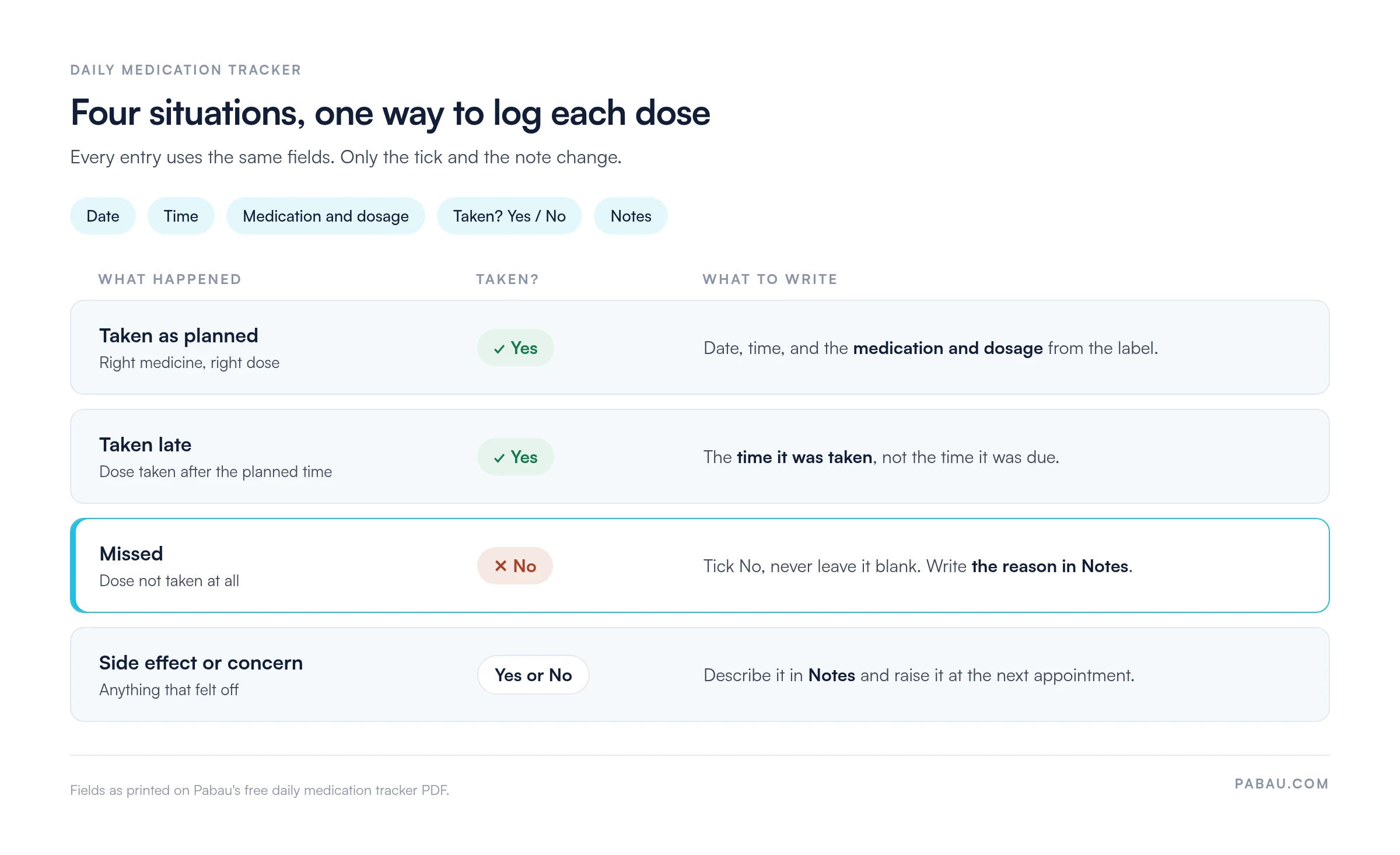
The tick and the note are where most logs go wrong. The four situations below show how each one should look on paper.
One sheet per dose suits a short course, but it gets bulky fast with two or three medicines a day. The large Notes box offers a workaround.
Fill in the patient details and medicine once. Then rule five columns across the Notes box: day, time taken, medicine and dose, Taken? and a short note. Each line becomes one dose.
Depending on handwriting, a few days to a week of doses fits on one sheet. Use the printed dose entry for the first dose, and start the mini-log under it.
Settle these points before the first dose is logged, while the routine is still easy to change.
These problems rarely show at home. They surface when a clinician tries to read two weeks of sheets in a 15-minute appointment.
Take an illustrative patient, Ruth, who takes one medicine at breakfast and another at bedtime. Her daughter logs every dose for two weeks and brings 28 sheets to the appointment.
Three evening sheets read No, each with the note “asleep before dose.” Two weekend morning doses are logged hours late, close to lunchtime. Every other entry is a Yes, logged within minutes of the dose.
The clinician doesn’t need to ask whether Ruth takes her medicines. The pattern points to two specific times of day instead. Whether the evening dose can move earlier is now a short, focused question for the prescriber.
The PDF as printed suits a short course with few doses. The Notes-box mini-log suits several medicines at different times of day. A calendar grid suits longer courses where the same dose is taken on set days.
Where staff give the doses, as in a care home, use a nursing medication administration record instead. It fits many dated doses on one page.
Handed out once and forgotten, the sheets rarely come back. Built into the visit cycle, they arrive with the patient. A typical loop runs like this.
Asking for the packs, often called a brown bag review, lets the clinician check the log against the labels. A pack fuller than the log suggests is a sign of doses nobody wrote down.
The last step is where a medication reconciliation form helps, because the log shows what was taken against what was prescribed.
A tracker supports the conversation, but it doesn’t replace review by a prescriber or pharmacist. Questions about interactions or dose changes should always go to a qualified clinician.
Paper sheets work well at home, but they create work once they reach the practice. Someone has to read them, scan them and copy the details across.
In Pabau, the practice management platform we build, prescription management keeps medication details inside the patient record. Pabau’s digital forms can collect a patient’s current medicines before a first visit, so nobody transcribes handwritten lists.
Completed forms and clinical notes sit together in Pabau’s medical records software. The next clinician opens one file instead of a folder of loose sheets.

Pabau’s digital forms collect a patient’s current medicines before the visit, and prescriptions sit in the same patient record. Your team reads one history instead of retyping paper lists.

A daily medication tracker earns its place the moment a missed dose has a reason written beside it. Without that, a stack of sheets is paperwork. With it, the clinician sees a pattern in seconds, as Ruth’s evening doses showed.
The trade-off is effort, since one sheet per dose adds up fast. Keep the routine short, log at the moment of the dose, and the extra paper pays for itself at the next review.
For practices, the bigger win comes after the appointment. Once the dose history lives in the patient record, nobody rebuilds it from paper next time. Book a demo to see how Pabau keeps each patient’s medication history in one record your whole team can read.

Supporting a family caregiver? Caregiver assessment helps you check how the person giving doses is coping.
Caring for patients at home? Home health documentation covers the records a home visit needs.
Giving medicines in a care setting? Medication administration form records each dose given by staff.
Collecting history before a first visit? Medical history questionnaire gathers conditions, allergies and current medicines.
Managing pain medicines? Pain medication chart lists analgesics by class, strength and controlled-substance schedule.
Yes. Supplements, herbal products and over-the-counter medicines can interact with prescriptions, so log them the same way. The clinician needs the full list to spot an interaction.
Log it only when it’s taken. Write the date, time and dose, tick Yes, and note what prompted it. That pattern of use helps the prescriber review the medicine.
Tick No and write the reason in Notes. Don’t take a double dose to catch up unless the patient leaflet or a pharmacist says it’s safe for that medicine.
No. A medication administration record (MAR) is the formal record nurses and care staff keep when they give medicines. A daily tracker is a personal log kept by the patient or a family caregiver.
Apps add reminders and keep the history without filing. Paper suits people who don’t use a smartphone, and households where several caregivers share one copy. Choose the format the person giving doses will use every day.
Medication adherence means taking medicines as prescribed, at the right dose and time. A daily log makes it visible, because every missed or late dose is written down.