Despina Petrushevska
Good character traits list
What is a good character traits list? A good character traits list is a structur...

3
Last Updated: Oct 30, 2026
Free PDF 2 pages, print-ready Clinician-reviewed
A “my current medication list” is a one-page record of every medicine you take, including prescriptions, over-the-counter (OTC) drugs, vitamins, and supplements. For each one, write the brand and generic name, strength, how often you take it, who prescribed it, and what it treats. Add your allergies and pharmacies, then update the list within a week of any change.
The list lets your doctor, pharmacist, and emergency responders see your whole treatment plan at a glance. When it is incomplete or outdated, a new provider may prescribe a medicine that interacts with one you already take, or miss a dosage change.
A general printable form with a details header, three checkbox sections, an item tracking table, and a blank Notes page. It has no dedicated medication columns, so write your medicines, doses and allergies on the Notes page using the steps below.
Start from scratch, or upload this PDF or any form you already use, and Pabau's AI Form rebuilds it with tick boxes, text fields and a signature. Attach it to the treatment once, and every patient gets it on time.
AI Form rebuilds the consent, history and aftercare forms you already use. You review each one, then publish.
Patients complete forms on their phone before they arrive, so the front desk stops retyping paper.
Every signed form is versioned and attached to the treatment record, ready when you need it.
Set how long a consent stays valid. Returning patients skip forms they have already signed.
Supports HIPAA and GDPR compliance AES-256 encryption 4.8 on G2 4.7 on Capterra Trusted by 4,000+ practices worldwide

A medication list records all prescriptions, OTC drugs, and supplements to prevent dangerous drug interactions and dosage errors.
Include the drug name (brand and generic), strength, frequency, prescriber, and the condition it treats on your list.
Bring your list to every medical visit and update it whenever a medication changes.
Pabau’s practice software collects medication history through digital intake forms before the visit and stores it in each patient’s record.
A current medication list is a one-page or digital record that captures every medicine a patient is taking at that moment. It includes prescription medications, OTC drugs, vitamins, and herbal supplements taken for a condition or for general health. Any provider who reads it knows what the patient already takes before adding a new medicine.
The Agency for Healthcare Research and Quality (AHRQ) advises patients to keep a list of every medicine they take, including vitamins and supplements. Without one, a patient might unknowingly take two medications that interact dangerously, or a provider might miss a contraindication.
Older adults managing multiple prescriptions (known as polypharmacy) face the highest risk. CDC data show about 4 in 10 adults over 65 take five or more prescription drugs in a month.
The list serves as a bridge between healthcare visits, in emergencies, and when switching providers or pharmacies. Keep a printed copy in your wallet or purse and a digital copy on your phone, so the information is always on hand. You can also ask your practice whether its patient portal can store your list.
The downloadable form above is a general checklist with a blank Notes page, not a medication chart. Follow these five steps on its Notes page, a sheet of paper, or a note on your phone:
The layout below puts those five steps on one page, so you can copy it straight onto the form’s Notes page.
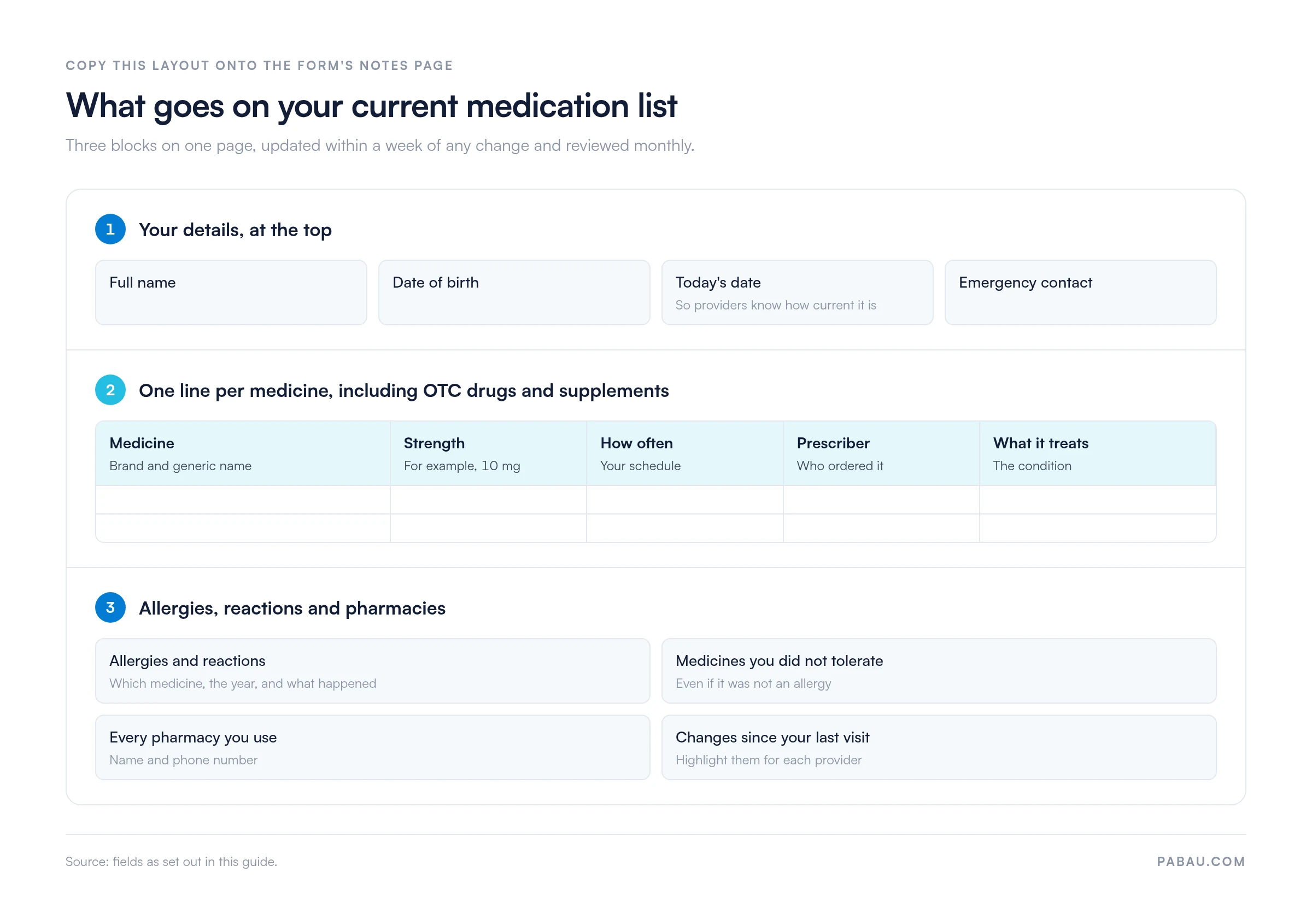
A medication list helps anyone managing one or more chronic or acute conditions with medication.
Practices can also ask patients to bring a completed list to intake, so clinicians can review medication history before treatment begins. Commercial drivers need the same list at their medical exam, where DOT medication restrictions guide the examiner’s certification decision.
Prevents dangerous drug interactions. When your healthcare team sees all your medications at once, they can spot interactions. An antihistamine can add to the drowsiness of a sedating antidepressant, and an OTC pain reliever can interfere with a blood thinner. Early detection stops harmful combinations before they happen.
Reduces medication errors. A written or digital list is a reference point if a pharmacy gets a prescription wrong or if you accidentally take the wrong dose. You can catch the error before it becomes a problem.
Saves time at appointments. With a current list in hand, your doctor does not have to rebuild your medication history from memory. More of the visit goes to discussing your health.
Protects you in emergencies. Paramedics and emergency-room staff can see immediately what you’re taking, whether you have allergies, and who your regular doctor is. This speeds up triage and prevents harmful drug combinations in crisis situations.
Helps with medication reviews. Your pharmacist can use your list to advise you on timing, food interactions, and whether any medications are no longer needed. Stopping medicines that no longer help is called deprescribing.
Many patients assume “medication list” means prescription drugs only. OTC painkillers, cold medicines, vitamins, and herbal supplements belong on the list too. They can interact with prescriptions, and some of those interactions are serious.
Common OTC-prescription interactions include:
The FDA recommends keeping a list of all the prescription medicines, OTC drugs, vitamins, and supplements you take. Your healthcare team cannot spot an interaction if they do not see the full picture.
Storage options:
Update triggers:
Update your list within a week of any change: a new, stopped, or adjusted medicine, a new OTC product or supplement, or a new allergy. Set a phone reminder on the first of each month to review your list for accuracy. Ask your pharmacist to print a list of your current medications at each refill, and compare it with yours to catch discrepancies.
If you also need to record each dose as you take it, keep a medication log alongside the list. A daily medication schedule helps when several medicines are due at different times of day.
If you see a cardiologist, rheumatologist, and primary care doctor, each may prescribe independently. Without a unified medication list, doses conflict or duplicate medications slip in unnoticed.
Best practice workflow:
Many practices still collect medication history on a paper form at check-in, then retype it into the chart. Each handoff is another chance for a dose or an allergy to go missing.
In Pabau, patients complete digital intake forms before the visit. Their answers, including medication history, are saved to the patient record.
Every clinician who opens the record sees the same history the patient gave. Your team still reviews each medication with the patient at the visit, but starts from their own words instead of a blank form. Pabau Scribe, our AI scribe, then helps clinicians document the consultation notes.
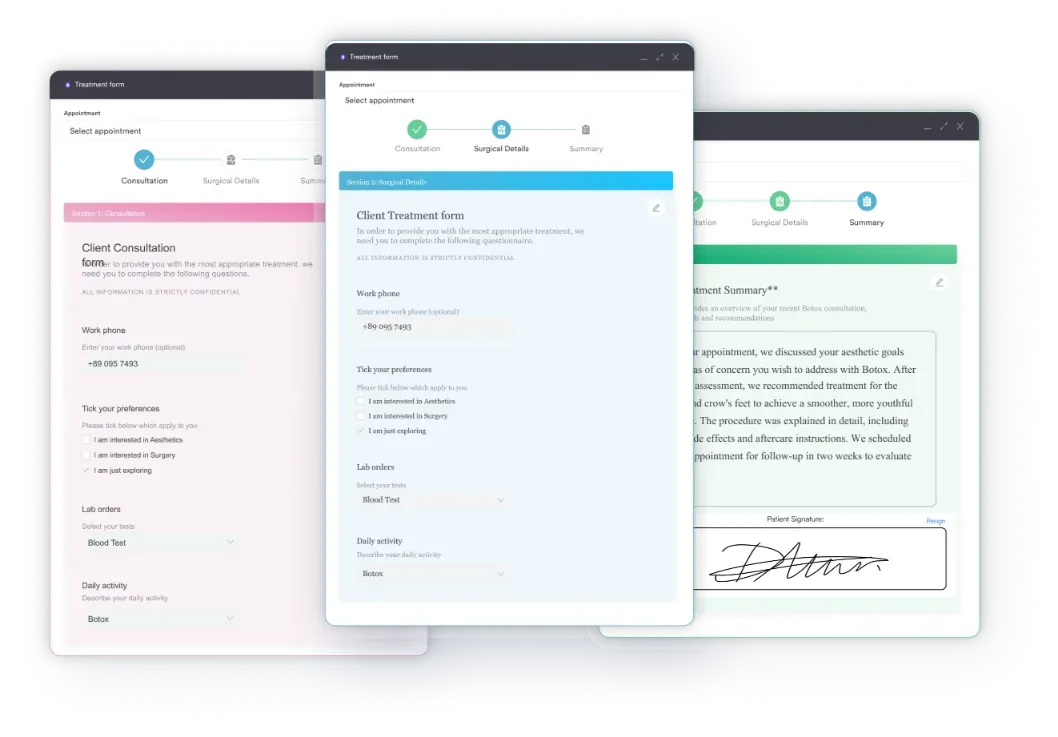

Pabau’s digital intake forms collect medication history before the visit and store it in each patient record. Pabau Scribe, our AI scribe, helps clinicians document consultation notes.

A current medication list is simple, but it protects you across every healthcare setting. The format matters less than the habit: paper, the Notes page of the form above, or your phone all work if the list stays current. Show it to every provider, including your pharmacist and dentist, before they prescribe something new.
For practices, collecting that list digitally means the history is already in the patient record when the patient arrives, not on a clipboard. Book a demo to see how Pabau keeps patient medication history in one place.

Tracking each dose, not just the medicine? Free medication log template shows what to record every time a dose is taken.
Juggling medicines at different times of day? Medication schedule template lays out each dose by time so none are doubled or skipped.
Want a record of what each pharmacy dispensed? Pharmacy record template covers what to include and how long to keep it.
Filling in your health history for a new provider? Family medical history form helps you record the conditions that run in your family.
Include each medicine’s brand and generic name, strength, how often you take it, who prescribed it, and what it treats. Add any allergies or adverse reactions, and do not skip OTC medicines or supplements.
Gather every medicine you take, write one line for each with its name, strength, and schedule, and bring the list to your next appointment. Ask your pharmacist to print a list of your prescriptions if you are unsure what you are taking.
Keep a laminated copy in your wallet, a printout on your refrigerator, and a digital copy on your phone. Ask your practice whether its patient portal can store your list, and update it whenever a medication changes.
Update it within a week of any change, such as a new prescription, a stopped medication, or a dosage adjustment. Review the full list monthly for accuracy.
The download at the top of this guide is a free printable checklist and notes form, not a dedicated medication chart. Write your medicines, doses, and allergies on its Notes page, or keep them on your own list.