Monika Lazarevska
Nursing pharmacology cheat sheet
What is a nursing pharmacology cheat sheet? A nursing pharmacology cheat sheet i...

1
Last Updated: Oct 29, 2026
Free PDF 3 pages, print-ready Clinician-reviewed
A visual birth plan is a short birth preferences document that your care team can scan in seconds. It uses tick-boxes, icons or brief labels instead of paragraphs. Labor rooms are busy and staff change shifts, so a plan that reads at a glance is the one that gets used.
This free template is a three-page printable checklist form. It has sections for personal details, delivery, feeding, pain relief, birth, newborn care and postpartum care. Some wording on the form is US-style, so adapt it to your own hospital or birth center. Fill it in at a prenatal visit, then condense your top choices onto one page for the delivery room.
A three-page printable checklist form with tick-boxes and fill-in fields. It covers personal information, delivery, feeding, pain relief, birth, newborn care and postpartum care, plus NICU wishes.
Start from scratch, or upload this PDF or any form you already use, and Pabau's AI Form rebuilds it with tick boxes, text fields and a signature. Attach it to the treatment once, and every patient gets it on time.
AI Form rebuilds the consent, history and aftercare forms you already use. You review each one, then publish.
Patients complete forms on their phone before they arrive, so the front desk stops retyping paper.
Every signed form is versioned and attached to the treatment record, ready when you need it.
Set how long a consent stays valid. Returning patients skip forms they have already signed.
Supports HIPAA and GDPR compliance AES-256 encryption 4.8 on G2 4.7 on Capterra Trusted by 4,000+ practices worldwide

A visual birth plan lets your care team read your main preferences in seconds.
The free form runs to three pages of tick-boxes and short fill-in fields, ordered from labor to recovery.
Fill it in at a prenatal visit, then condense your top choices onto a one-page summary for the delivery room.
Adapt US-style wording, such as Labor Tub or Dermoplast, to the options your hospital or birth center offers.
Share copies with your midwife or obstetrician, your birth partner and your hospital bag before labor starts.
A visual birth plan is a birth preferences document built for scanning. It uses tick-boxes, short labels and sometimes icons instead of long paragraphs. Each section covers one area of care, such as pain relief or newborn care, so a nurse or midwife can find one preference fast.
The format suits teams working under time pressure. Staff may change shifts during a long labor, and each new person needs your key wishes quickly. Clear marks carry the core message. A few words then add the detail that matters, such as which pain relief you would try first.
The downloadable template is a three-page printable checklist. It has no icons. Instead, each section uses tick-boxes or short fill-in fields, and the sections follow the day in order.
Page 1 holds the planning details, from your due date to your feeding plan. Page 2 covers labor, birth and the first hours with your baby. Page 3 deals with recovery, NICU wishes and COVID-19 considerations. The map below shows where each of the 16 sections sits.
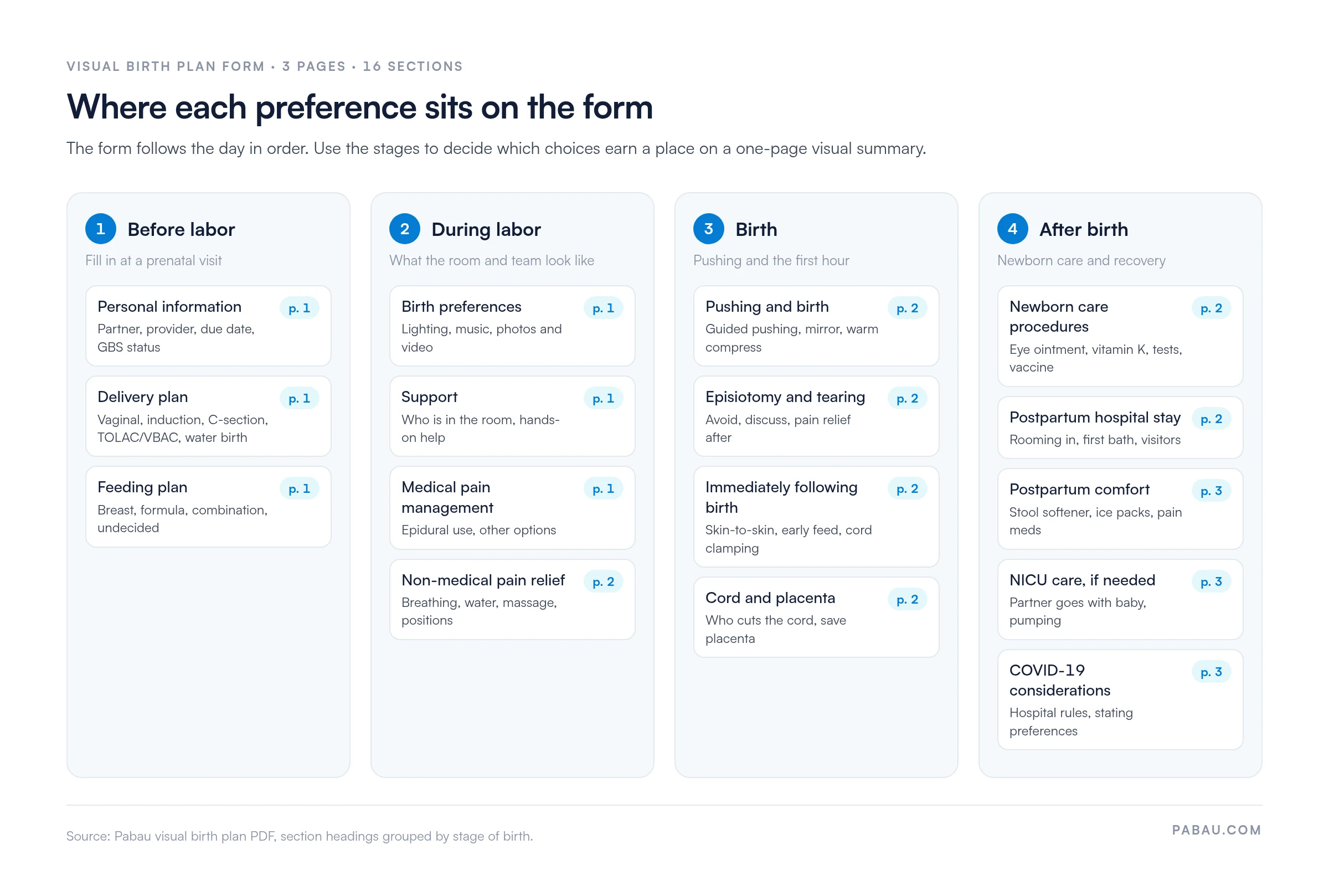
Some wording on the form is US-style. It names items such as a “Labor Tub” and Dermoplast spray, plus procedures like circumcision. Cross out or rename any option your hospital or birth center does not offer. Then check local guidance with your midwife or obstetrician, such as NICE intrapartum care guidance in the UK.
A written birth plan is a narrative document, while a visual plan is a scannable summary. Both record the same choices, but they serve the reader differently.
Many parents use both. The visual summary goes to the team, and a longer note explains a complex situation, such as a previous difficult birth. The visual version is the one most likely to be read in the moment.
Start in the third trimester, once you have had a few prenatal appointments and know your options. Sit down with your birth partner, because many choices on page 2 involve them.
Leave a section blank rather than guess. A blank tells staff to ask you, while a rushed tick can send them the wrong signal.
A few boxes need more than a tick. Check these before you print your final copy.
Some boxes pair unrelated choices. The newborn care section reads “Eye Ointment, Vitamin K Shot”, “Blood Test, Hepatitis B Vaccine” and “Hearing Screening, Circumcision”. One tick can’t show which item you mean. Write “yes” or “no” beside each item instead. Do the same for any box that lists more than one option, such as the comfort measures on page 3.
Most of these newborn procedures are routine recommendations. The American Academy of Pediatrics recommends a vitamin K shot for every newborn. Babies who miss it face a higher risk of vitamin K deficiency bleeding, a rare but serious disorder.
Newborn blood screening and hearing tests are standard checks, and many US states require eye ointment by law. Talk any of them through with your provider before you decide to decline one.
The “Immediately Following Birth” box offers “Breastfeed Within 1-2 Hours”. The World Health Organization recommends starting within the first hour instead. If you plan to breastfeed, ask your team to support skin-to-skin contact and a first feed in that hour.
Page 3 still carries a COVID-19 section. You can skip it, or use it to note any infection-control rules your hospital has now, such as visitor limits.
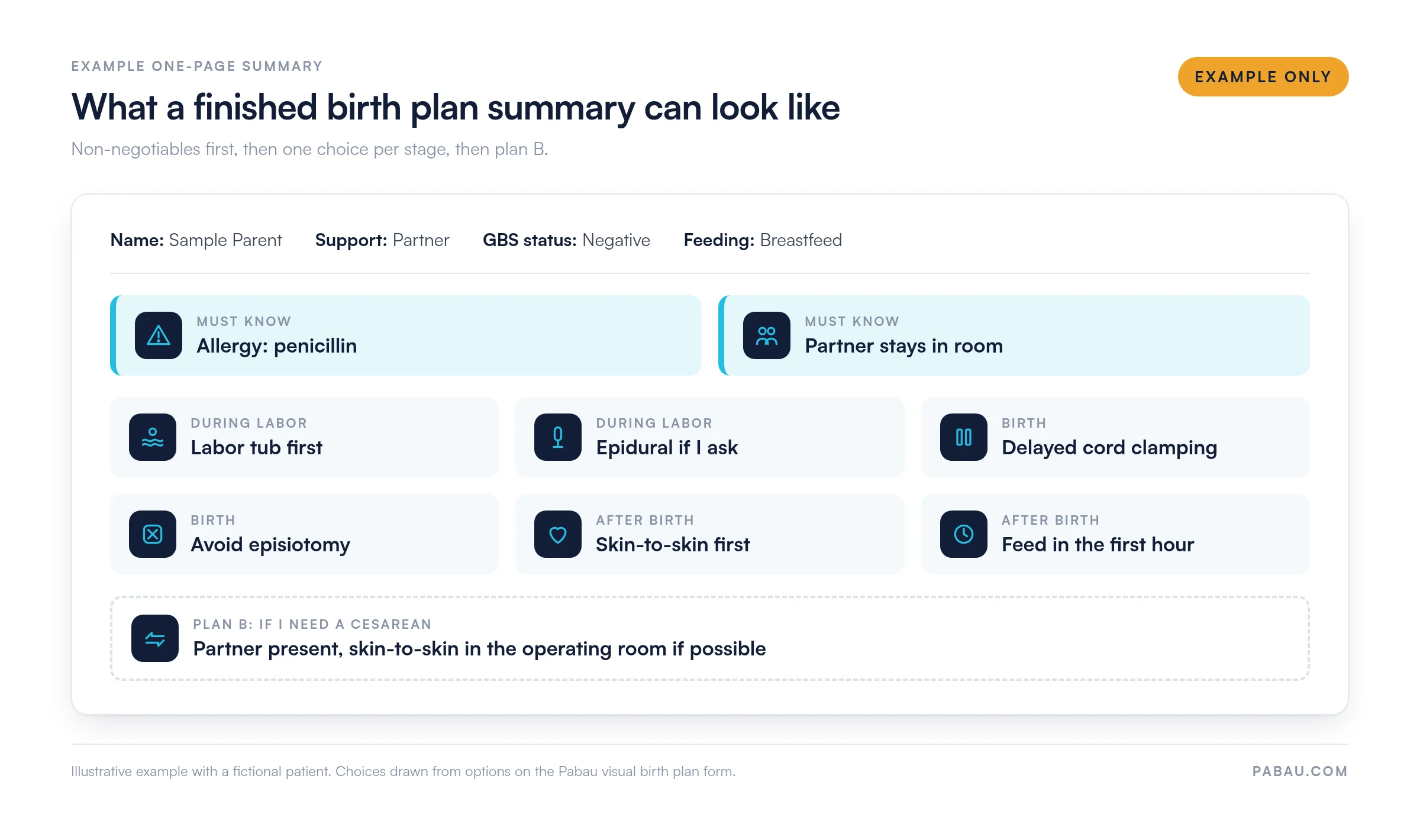
Three pages are thorough, but nobody reads them between contractions. A one-page summary on top fixes that. Keep the full form in your notes, and hand staff the summary.
Before you print the summary, run through this checklist:
Free design tools and printed stickers both work for the icons. Just make sure each symbol means one choice, and the label says which one. The example below shows how a finished summary can look.
Most problems show up on the day, when staff try to act on a plan that contradicts itself. These are the ones to check for:
Sharing works best when the plan reaches people early. Bring a copy to a prenatal appointment, and ask your midwife or obstetrician to add it to your notes.
If a fertility clinic cared for you early in pregnancy, ask it to send its notes to your maternity team. Many fertility practices keep those notes in fertility clinic software, so a digital copy is quick to send.
Your choices on page 3 also carry into recovery. They give you a head start on a postpartum care plan for the weeks after birth.
Many OB-GYN and midwifery practices still hand out paper birth plans. Parents fill them in at home, forget them on the day, or bring a different version to each visit. Staff then re-key the choices into the chart by hand.
Pabau, the practice management platform we build, turns a form like this into a digital form that patients complete before their appointment. Their answers flow into the patient record automatically. That way, every clinician at the next prenatal visit sees the latest version.
Practices use Pabau as OB-GYN EMR software, with scheduling, reminders and invoicing in the same system. Staff can see which patients have completed their forms before the visit, so nobody chases paper on the day.

Pabau’s digital forms let patients complete their birth preferences before a prenatal visit. Answers save to the patient record, so the whole care team reads the same plan.

A birth plan helps only if someone reads it at the right moment. The three-page form does the thinking, and the one-page summary gets it read. Treat both as a starting point for talks with your care team, because labor can change the plan.
Finish the form early in the third trimester, and review it at your next prenatal visit. Whenever a choice changes, update the summary and replace every printed copy.
Running an OB-GYN or midwifery practice? Book a demo to see how Pabau collects birth plans digitally and keeps them in each patient’s record.

Want a different birth plan layout? Mama Natural birth plan template offers a written alternative for parents planning an unmedicated birth.
Supporting a patient through labor? Labor and delivery nursing care plan sets out nursing goals and interventions from admission to birth.
Still preparing for the baby’s arrival? Newborn essentials list covers the supplies to have ready before you come home.
Planning recovery after birth? Postpartum checklist tracks the key recovery milestones of the fourth trimester.
Thinking ahead to feeding changes? Breastfeeding weaning plan gives a gradual schedule for moving off breastfeeding.
No. A birth plan records your preferences, and staff follow it where it is safe. They still need your consent before any procedure, and you can say no. If your health or your baby’s changes, the team may recommend something else and explain why.
Aim for one page that staff can scan quickly. Keep a longer form, like this three-page template, in your notes for the detail behind each choice.
Leave out long explanations and care your hospital gives by default. Focus on choices that differ from routine care, plus allergies, support people and your feeding plan.
Yes, add a short plan B. Note who joins you in the operating room. Then say whether you want skin-to-skin contact or delayed cord clamping where possible.
It is free to download and print, but it is a flat tick-box checklist without icons. Fill it in by hand, then add your own icons to a one-page summary.