Monika Lazarevska
Pregnancy resting heart rate chart
A pregnancy resting heart rate chart sets out the expected resting pulse for eac...

4
Last Updated: Oct 30, 2026
Free PDF 1 page, print-ready Clinician-reviewed
A musculoskeletal review of systems is a short set of questions about a patient's bones, joints, muscles and back, answered before the physical exam. It records what the patient feels, such as joint pain, swelling, weakness or lost movement, while the exam records what you observe. The most important step comes after each yes. Record the location, onset, duration and severity in the patient's own words, because that detail guides the exam and supports medical necessity.
What follows is the full question set, a five-step way to use the free form, and the mistakes that weaken the note.
A ready-to-use musculoskeletal review of systems form covering joint swelling and pain, muscle pain and weakness, back pain, movement, range of motion and bone fractures. It includes space for a summary and additional notes.
Start from scratch, or upload this PDF or any form you already use, and Pabau's AI Form rebuilds it with tick boxes, text fields and a signature. Attach it to the treatment once, and every patient gets it on time.
AI Form rebuilds the consent, history and aftercare forms you already use. You review each one, then publish.
Patients complete forms on their phone before they arrive, so the front desk stops retyping paper.
Every signed form is versioned and attached to the treatment record, ready when you need it.
Set how long a consent stays valid. Returning patients skip forms they have already signed.
Supports HIPAA and GDPR compliance AES-256 encryption 4.8 on G2 4.7 on Capterra Trusted by 4,000+ practices worldwide

A musculoskeletal review of systems records what the patient reports about bones, joints, muscles and the back, before the physical exam.
Ask about joints, muscles, the spine, gait and past injuries, then add questions tied to the presenting complaint.
For every symptom marked present, record location, onset, duration and severity so the note supports medical necessity.
Keep patient-reported answers apart from exam findings, and never copy last visit’s answers forward unchanged.
Ask about red flags such as new bladder or bowel problems with back pain at every visit, however minor the complaint seems.
A musculoskeletal review of systems asks the patient about symptoms in their bones, joints, muscles and connective tissue. It belongs in the subjective part of the note. The physical exam, which records what you observe and measure, comes after it.
Start with the five groups below. Then add the items your specialty and the presenting complaint call for. A knee referral, for example, needs more detail on locking and giving way than a general intake does.
A fall in the past six months is worth a formal fall risk assessment before the patient leaves. It turns one answer into a plan the whole team can act on.
A few answers change how urgent the visit is, not just what you examine. Ask about them even when the complaint seems minor.
A yes to any of these needs prompt medical assessment. Your note should also show who was told and when.
The free form lists seven symptom items, each marked present or absent. It also has fields for patient details, relevant history and the referring physician, plus a summary box. Here is how it works in practice.
The flow below shows how a single yes on the form becomes a focused exam.
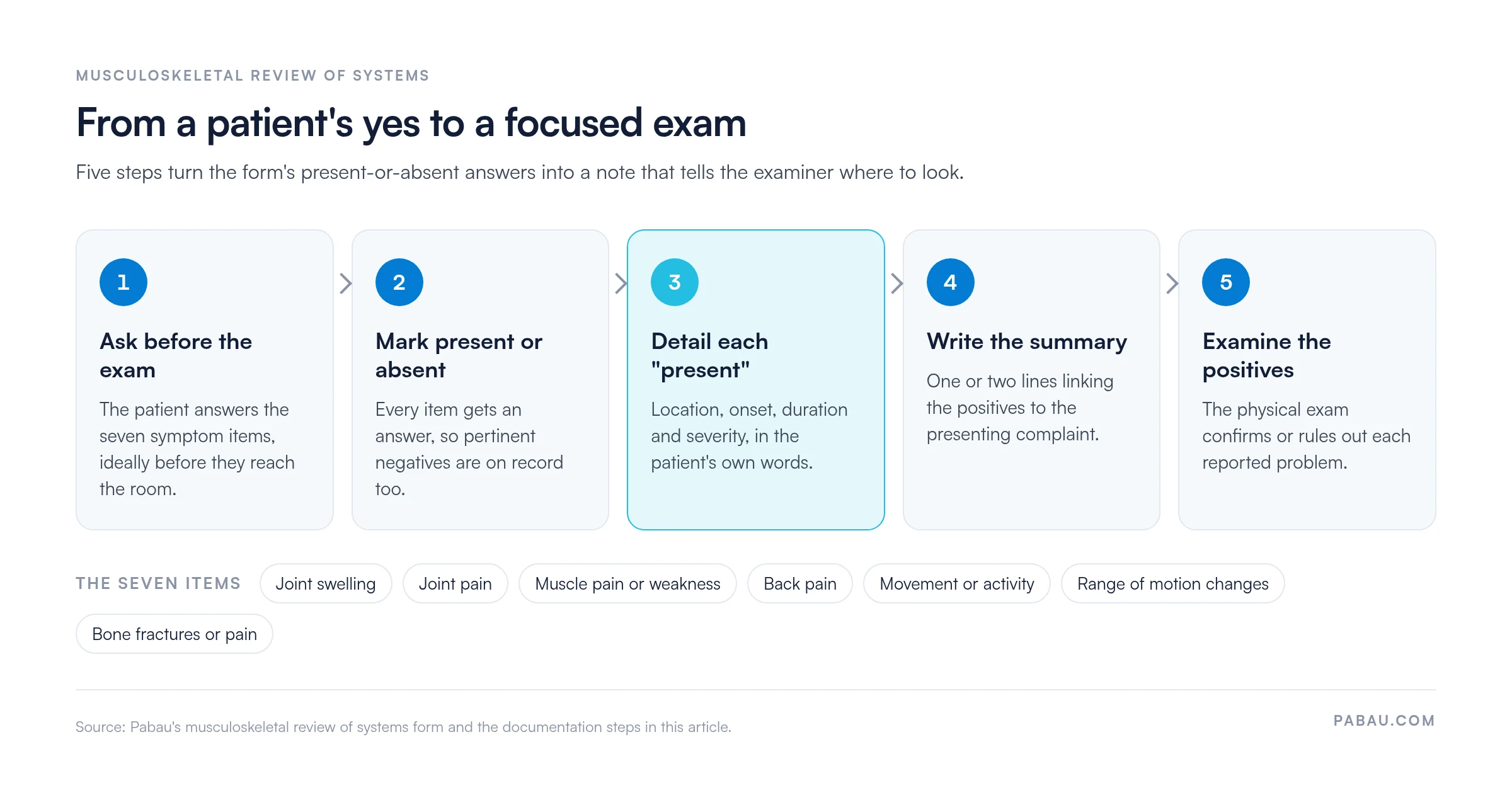
Say a patient marks joint swelling and joint pain as present. A weak entry reads “Knee pain: yes.” A useful one reads like this.
Right knee pain and swelling, inner side, started three weeks ago after a twist stepping off a curb. Worse on stairs, 6/10 at worst, eases with rest. No locking. No previous knee injury.
That entry tells the examiner where to start. It also shows a payer why the visit was needed.
The review of systems screens for symptoms and records them. The exam then confirms or rules out each problem. The table pairs each symptom area with its screening question and the reason it matters.
For the hands-on side, a musculoskeletal nursing assessment covers inspection, palpation and strength testing in a set order.
The same rules apply whether a physician, nurse practitioner or other advanced practice provider takes the review. Each provider records it in their own encounter note. Nurse practitioner scope and supervision rules vary by state, so confirm yours before adopting a template.
The review supports medical necessity when the questions match the presenting complaint. Since 2021, office visit E/M levels rest on medical decision making or time. History is documented as medically appropriate, so record your clinical reasoning alongside the answers.
Some complaints reach above the shoulders, such as neck pain with headaches. Add a HEENT review of systems to the same note.
On paper, the form gets scanned or retyped, and the answers sit apart from the treatment notes. Comparing this visit with the last one then means hunting through files.
Pabau, the practice management platform we build for healthcare practices, lets you rebuild the seven items as a digital medical form. Patients complete it before the appointment, and the answers go straight into their record.
Each completed form is stored in Client records, so Pabau’s medical records software keeps it beside earlier forms and treatment notes. Physical therapy and chiropractic teams can run scheduling, notes and billing in the same time-saving physical therapy EMR.
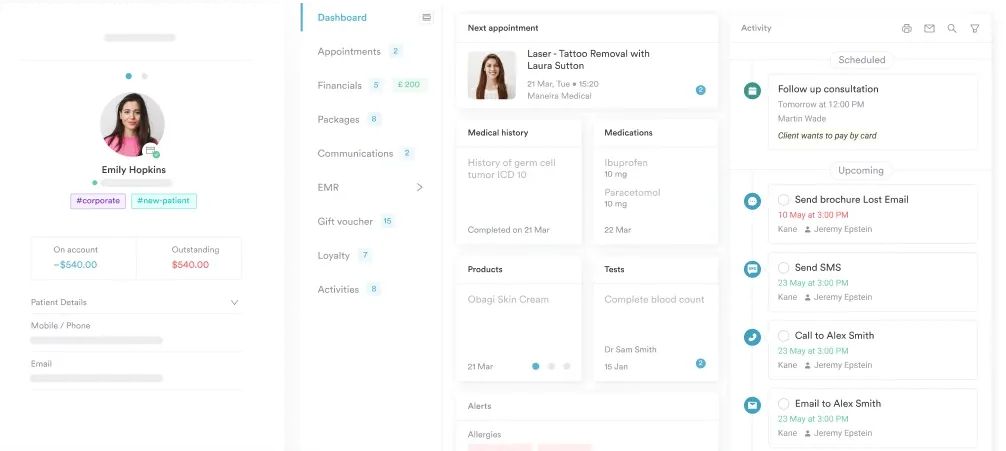

Pabau sends digital medical forms ahead of the visit and files every answer in the patient record. Your team starts the exam with the history already in hand.

The form is the easy part. The value comes from what you write next to each yes, and whether the exam follows it up.
Start with the seven items and add the questions your specialty needs. Then hold every positive to the same standard of location, onset, duration and severity. Your notes become comparable from visit to visit, and much harder for a payer to question.
Book a demo to see how Pabau collects the musculoskeletal review before the visit and keeps it with the patient’s record.

Want to measure the movement your patients report? Range of motion assessment covers how to measure and record joint movement.
Need a note format for the visit itself? PT SOAP note shows where the review of systems sits within a full physical therapy note.
Short on time when documenting? Physical therapy documentation cheat sheet summarizes what each part of a PT note should contain.
Did the patient report walking changes? Dynamic gait index scores gait and balance across eight everyday walking tasks.
Is back pain the main complaint? Back pain location charts help patients mark exactly where their pain sits and spreads.
Yes. CMS documentation guidelines let staff record the review of systems, or the patient complete it on a form. The provider must review the answers and note that review, usually by confirming or adding to them.
Under the 1995 and 1997 CMS guidelines, a complete review covers at least 10 of the 14 organ systems. Office visit E/M levels stopped counting systems in 2021, and most other E/M services followed in 2023.
Under the 1995 and 1997 guidelines, yes, but only for a complete review. You must first record the positive and pertinent negative answers for the systems related to the problem individually.
Neurological, skin and constitutional systems overlap most. Numbness or tingling points to the nerves, and a rash with joint pain can suggest psoriatic arthritis or lupus. Fever or weight loss raises concern about infection or cancer.