HIPAA compliant texting: What you can send patients & how to communicate securely
HIPAA compliant texting is possible when a text holds no protected health inform...

Last Updated: Oct 16, 2026
A medical application form is the document new patients complete before their first appointment. It captures personal details, medical history, insurance, emergency contacts, and consent, so your team has what it needs for safe, compliant care.
It is your practice’s own intake document, not a government Medicaid or Medi-Cal application. Under the HHS HIPAA Privacy Rule, the health information it collects must be protected from unauthorized access.
This guide covers what the form includes, how patients complete it, and how to customize or digitize it for your practice.
A one-page form covering patient details and record number, emergency contact, reason for completing the form, relevant history, and current medications, supplements, and allergies. It closes with an accuracy and privacy notice declaration, a signature line, and an office-use block.
Download template
A medical application form collects patient demographics, medical history, insurance, emergency contacts, and treatment consent before the first appointment.
Every application form should include informed consent language and an acknowledgment of your HIPAA Notice of Privacy Practices.
Paper forms add admin work and delay record entry. Pabau’s practice management software sends digital forms before the visit and fills the patient record automatically.
Pabau’s built-in digital forms reduce manual data entry and store responses in the patient record, with no separate tool or data transfer required.
A medical application form is a practice-specific intake document that collects essential patient information before the first visit. It serves three purposes:
Do not confuse this with government forms: A medical application form is different from federal or state Medicaid/Medi-Cal applications. Those are eligibility documents for public health insurance. Your practice’s medical application form is the intake workflow your team designs to match your practice model and specialty.
Medicaid enrollment also brings its own paperwork. A medical choice form records the plan and provider a patient picks, and it sits alongside your own application form.
Aesthetic, primary care, mental health, and physical therapy practices all use one. It is the first point where you collect the data behind clinical decisions and accurate billing.
Every medical application form should capture these core sections:
Each section does a different job for your practice, as the breakdown below shows.
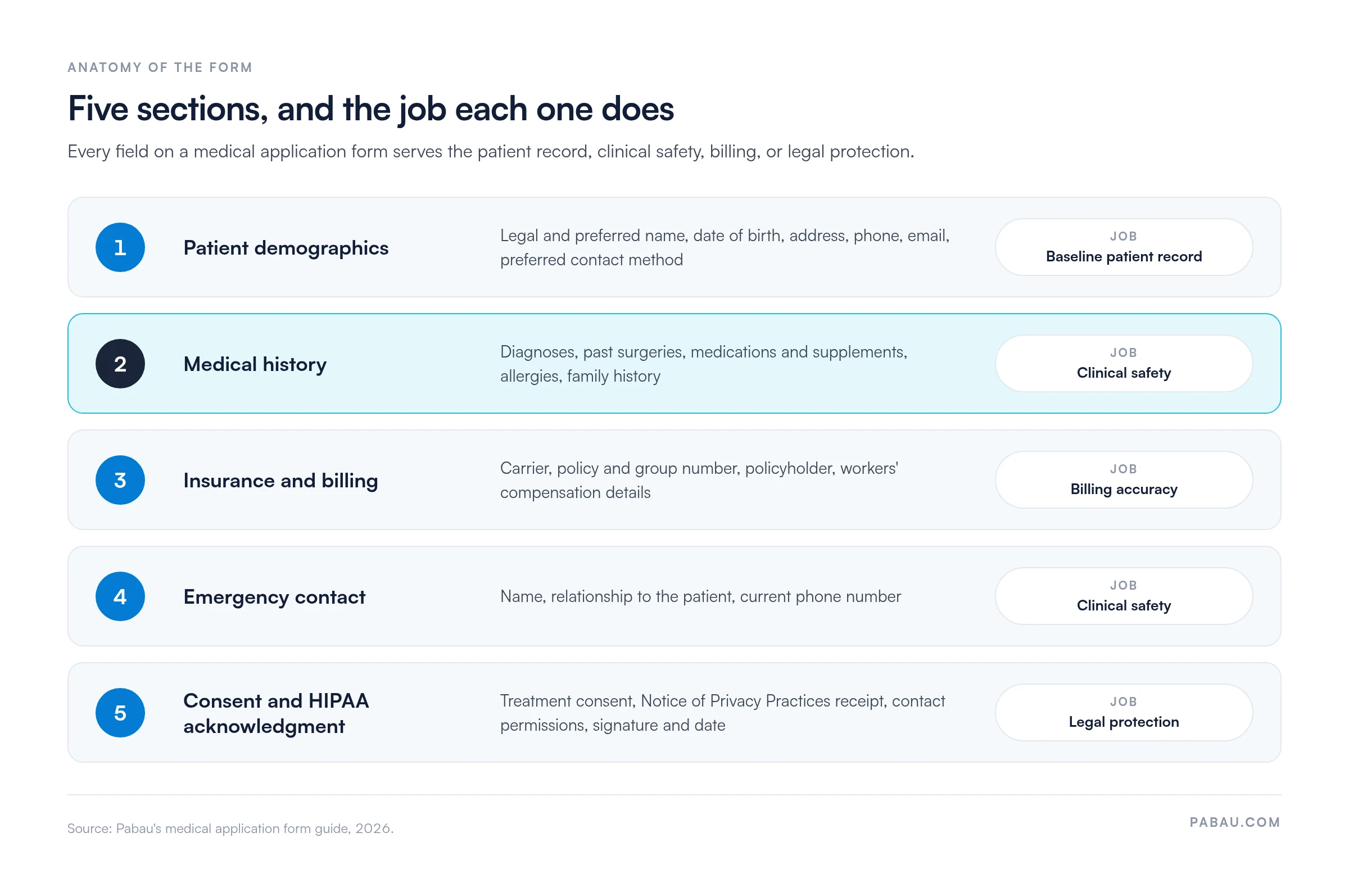
Collect the patient’s full legal name and any preferred name, plus date of birth, sex assigned at birth, and current gender identity. Then add their address, phone numbers, email address, and preferred contact method. Date of birth matters for age-specific clinical decisions and for matching the patient correctly in pharmacy systems.
Many practices also ask for occupation and marital status for context.
Ask patients to list:
Some practices add a “reason for visit today” field to put the appointment in context and flag urgent complaints. Where family history drives care, pair the application with a family medical history form.
Capture the primary health insurance carrier name, policy number, group number, and the patient’s relationship to the policyholder. If the practice is contracted with the insurer, these details show which benefits and copay tiers apply. For workers’ compensation or disability claims, include the claims administrator contact and case number.
The downloadable template has no insurance section, so add these fields if you bill insurers. Intake software for practices can reuse billing details after the first entry, which cuts re-entry errors.
Require at least one emergency contact name, relationship to the patient, and phone number. Some practices ask for a second emergency contact. This information is critical if a patient becomes incapacitated during an appointment, or for discharge planning after a hospital referral.
Every application form needs three elements:
Many practices add checkboxes for permission to contact by email or phone, and for sharing health information with other providers. This section documents that the patient was told about their privacy rights before care began. If your treatment consent needs more detail than a checkbox, an adult medical consent form keeps it on its own page.
Patients typically complete the form in the waiting room on arrival or online before the appointment. Either way, walk the patient through the process to ensure accuracy.
After submission, practice staff should review the form for completeness. Follow up with the patient on any blank fields or illegible entries before the practitioner sees them. Patient records systems let you flag missing data and prompt staff to gather it before the appointment.
The free medical application form template is a starting point. Most practices tailor it to their specialty and workflow. Pediatric and family practices may also need a separate health appraisal template, since schools and camps require one signed by a licensed provider.
Limitation of the PDF approach: A printed or PDF form requires manual data entry into your patient records system, which is slow and error-prone. Once your customized template is tested, consider moving to a digital form workflow.
Medical application forms contain Protected Health Information (PHI): Patient names, dates of birth, medical diagnoses, insurance details, and medication lists. Any practice handling PHI must comply with the HIPAA Privacy Rule.
Paper form storage: Keep completed forms in a locked cabinet that only authorized clinical and administrative staff can open. Do not leave forms on desks or in waiting areas. Shred forms only after your required retention period, typically 6-10 years or more depending on state law and patient age. Document your retention schedule in your privacy policy.
Digital form storage: If you digitize forms, use a system with role-based access control. Only clinical and billing staff should see the form data, while front-desk staff see only the name and appointment time. Encrypt data in transit and at rest, and regularly audit who has accessed which records. Pabau’s digital forms are designed to support HIPAA compliance.
Patient rights: Under HIPAA, patients can access and get a copy of their medical records, and can ask you to amend them. Give patients a copy of their submitted application form within 30 days of a request. A medical record request form gives them a standard way to ask.
Never alter or destroy a submitted form. If a patient requests an amendment, record the change with a timestamp and the reason instead of editing the original.
Data breach notification: A form containing PHI may be lost, stolen, or accessed by someone unauthorized. HIPAA then requires you to notify affected patients, the HHS Office for Civil Rights, and in some cases the media.
Prevention through locked storage, encryption, and access logs is far simpler than breach remediation. Designate one staff member as the privacy officer responsible for form handling and compliance audits.
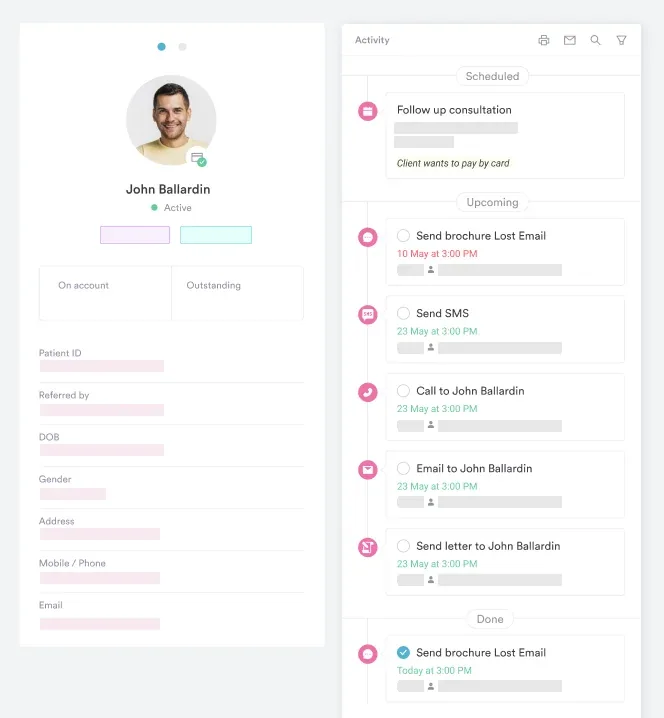
Paper forms and PDF downloads create administrative friction: Patients write slowly, staff re-enter data, and information is duplicated across paper and electronic systems. Pabau’s digital forms replace that workflow. Patients complete the intake form online before their appointment, and responses populate the patient record automatically.
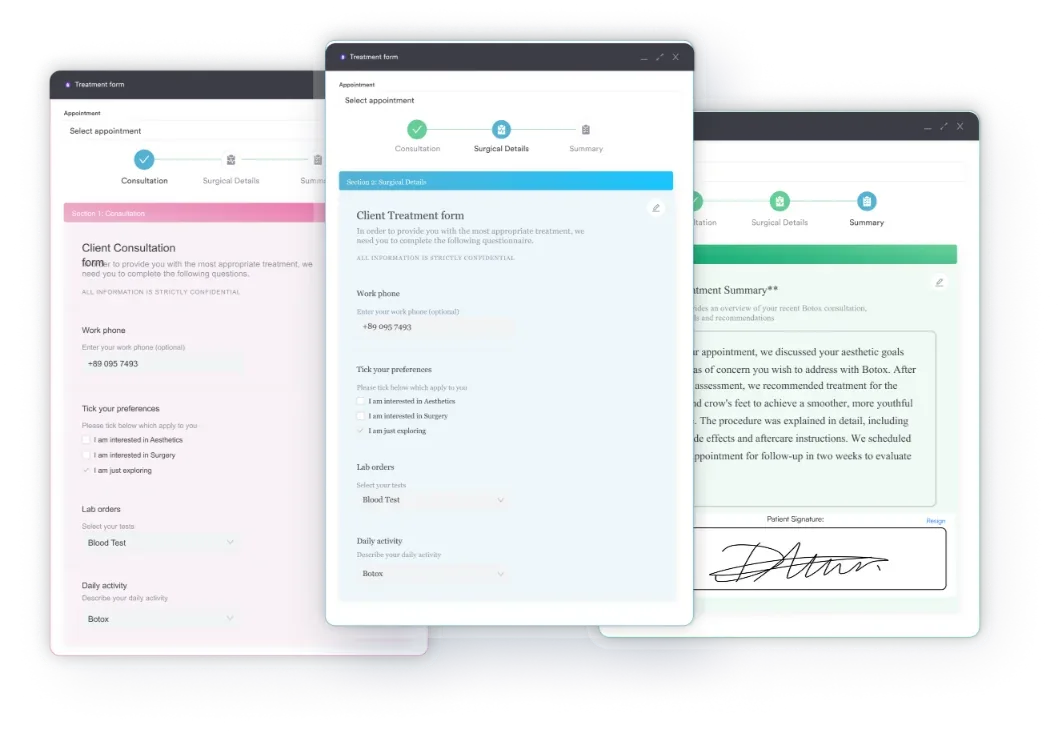
How Pabau’s digital forms work: You build your customized medical application form once in Pabau’s form builder. Patients receive a link by email or SMS before their appointment. They complete it on a phone or computer, and responses flow directly into their patient profile. Your team sees alerts when critical fields such as allergies or emergency contact are missing.
Compliance built in: Digital forms include checkbox fields for informed consent and HIPAA acknowledgment, plus e-signature capture. E-signatures are generally legally valid in the US under the ESIGN Act and UETA. Signed forms are stored in the patient record, so there is no paper to lose.
From template to workflow: Download this free template and use it to scope your ideal form structure. Then bring that design into Pabau’s form builder to go fully digital. The jump from paper to digital intake cuts appointment admin time and reduces data-entry errors.

Pabau sends your medical application form before the appointment and files each response in the patient record. Your team spends less time on data entry and starts each visit with the history it needs.

If your practice sees a handful of new patients a week, the PDF works, but customize it before the first patient signs. Add an insurance section if you bill insurers, switch the date format for US records, and have your consent language reviewed.
As new-patient volume grows, retyping paper forms becomes the bottleneck. That is the point to move intake online, so patients complete the form before they arrive and staff stop re-entering data.
Book a demo to see how Pabau collects signed, complete application forms before every first appointment.

Running a dental practice? Dental new patient form adapts the same intake structure to dental history and treatment consent.
Taking on therapy patients? Counselor intake form covers the intake questions counseling and therapy practices ask at the first session.
Moving from intake to examination? History and physical form structures the clinician’s first full assessment once the application form is in.
Sharing records with other providers? HIPAA authorization form documents patient permission for disclosures that need written authorization.
Comparing digital intake tools? Best patient intake software compares platforms that send forms before the visit and file responses automatically.
A medical application form is a practice-specific document new patients complete at registration, capturing demographics, medical history, insurance, and consent. A patient intake form is broader and may include symptom screening, questionnaires, or structured assessment tools specific to the appointment type. Many practices use the terms interchangeably, and both capture essential data before care begins.
Yes. The template is a general structure that suits most healthcare settings: Clinics, private practices, aesthetic medicine, mental health, physical therapy, and primary care. Customize the fields to match your specialty and local regulations. If your practice has specific compliance requirements, such as state-mandated forms or accreditation standards, have your compliance officer review and amend the template before use.
HIPAA compliance depends on how your practice collects, stores, and shares the form. Store paper forms in a locked cabinet with restricted access. Transmit and store digital forms with encryption and access controls. Include HIPAA privacy language on the form, and make sure your privacy policy and staff training cover secure handling.
Yes. Digital forms are faster for patients to complete, reduce transcription errors, and populate your patient records automatically. Pabau’s built-in forms feature sends patients a link before their appointment and collects responses securely. Staff then view the completed intake in the patient chart.
Medical-record retention is set by state law, so check your state medical board guidance and your malpractice insurer. Most US practices keep patient records, including intake forms, typically 6-10 years or more depending on state law and patient age. Records for minors often need to be kept longer. HIPAA’s own six-year rule covers its compliance documentation, such as your privacy policies. Train staff on secure destruction, such as shredding paper and securely deleting digital files.