Anja Dodevska
Average cost of Botox per state, from 562 practices’ price lists
The average cost of Botox per state runs from $12 to $15 a unit, and the nationa...

Last Updated: Nov 5, 2026
Free PDF 5 pages, print-ready Clinician-reviewed
An encounter form records the diagnosis codes, procedure codes, and charges from a patient visit, so your billing team can turn them into a claim. It’s the same document many practices call a superbill, fee slip, or charge slip.
The clinician completes it at the point of care, and it becomes the source record for coding, charge entry, and any appeal later. The free template below gives you a ready-made form you can print or adapt to your specialty.
A five-page encounter form with sections for patient, insurance, and provider details, visit information, and medical history. It also has room for five services, four ICD-10 diagnoses, and four CPT procedures with modifiers, units, fees, and totals.
Start from scratch, or upload this PDF or any form you already use, and Pabau's AI Form rebuilds it with tick boxes, text fields and a signature. Attach it to the treatment once, and every patient gets it on time.
AI Form rebuilds the consent, history and aftercare forms you already use. You review each one, then publish.
Patients complete forms on their phone before they arrive, so the front desk stops retyping paper.
Every signed form is versioned and attached to the treatment record, ready when you need it.
Set how long a consent stays valid. Returning patients skip forms they have already signed.
Supports HIPAA and GDPR compliance AES-256 encryption 4.8 on G2 4.7 on Capterra Trusted by 4,000+ practices worldwide

An encounter form captures a visit’s patient details, diagnoses, procedures, and charges, and it’s also called a superbill or fee slip.
Core fields are patient and insurance details, provider information, ICD-10 diagnosis codes, CPT or HCPCS procedure codes, charges, and signatures.
Encounter form data feeds straight into medical billing, so a complete form means fewer transcription errors and faster claims.
A visit that exists only to complete an administrative form is coded Z02.89, unless a more specific Z02 code fits.
Practice management software like Pabau keeps the form on the patient record, so codes and charges reach the claim without retyping.
An encounter form is a clinical document completed during or right after a patient visit. It records what was diagnosed, what was treated, and what the visit costs. That gives it two jobs at once: clinical documentation and the start of billing.
On the clinical side, it captures the chief complaint, examination findings, diagnosis, and treatment plan. On the billing side, it holds the codes that drive medical billing: CPT codes for procedures and ICD-10 codes for diagnoses. A coder later turns those codes into an insurance claim, and the form stays on file as an audit trail.
In a paper-based practice, staff hand over the form at check-in and the clinician completes it by hand. In a digital practice, the clinician fills it in on a tablet or desktop and it’s saved to the patient’s electronic health record. Coding and billing staff can open it straight away, with no filing or scanning in between.
In most healthcare settings, a superbill and an encounter form are the same document. Both list patient details, services rendered, diagnosis codes, and charges. The name changes by region and practice type, but the function doesn’t.
Some practices do draw a line between the two. They use “encounter form” for the sheet completed during the visit and “superbill” for a billing summary given to the patient afterward. These are the names you’ll see most often:
Every encounter form needs enough patient and clinical detail to support a claim. The fields vary slightly by specialty, but the core set stays the same across practices.
Our template covers the patient, insurance, provider, visit, diagnosis, procedure, and charge rows. It has no signature lines, so add them if your workflow needs them. Specialty forms may also add injection sites, before-and-after notes, medications, or follow-up instructions.
Because a completed form holds protected health information, HIPAA privacy rules govern how you store and share it.
The encounter form links clinical care to the revenue cycle. Here’s how it moves through your billing process:
A lost or illegible paper form stalls this whole chain, because coders can’t verify what happened at the visit. The chart below shows who handles the form at each step.
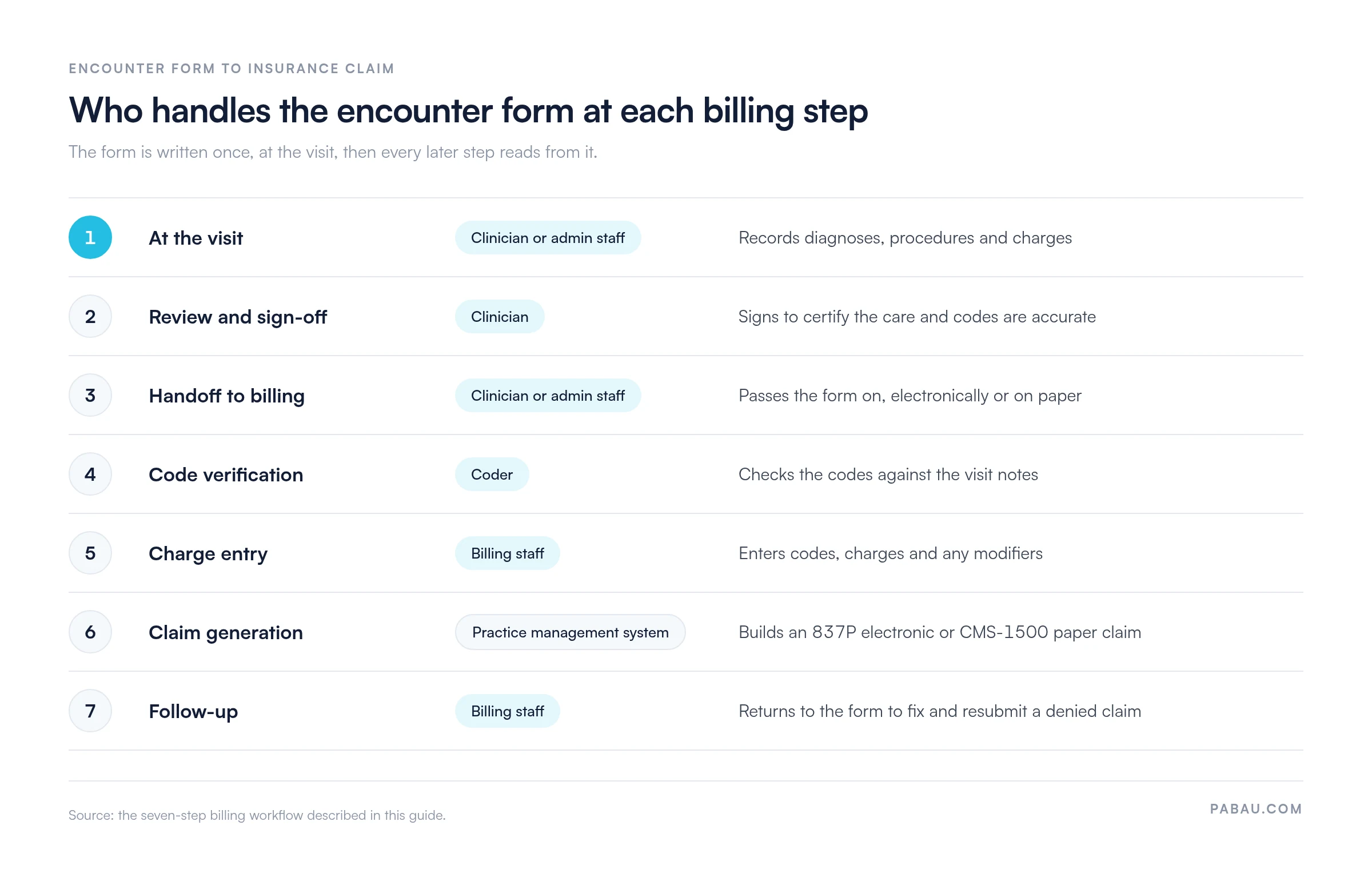
When the form feeds straight into claims management software, its codes and charges fill the claim without retyping. That cuts transcription errors and gets you paid sooner.
When a patient visits mainly to have an administrative form completed, you code the visit with ICD-10-CM code Z02.89. Immigration and summer camp examinations are typical examples. The code covers administrative examinations that no more specific Z02 code describes.
Z02.89 belongs to category Z02, Encounter for administrative examination. Use a Z02 code when the main reason for the visit is the paperwork rather than treatment of a medical condition. Other common Z02 codes include:
An examination after a work-related injury isn’t a Z02 code at all. It’s coded Z04.2, Encounter for examination and observation following work accident.
The right Z code shows the payer why the visit happened and backs up your billing documentation. The ICD-10-CM code set from CMS updates every October 1, so check your form’s preprinted codes each year.
Different specialties document different information, so the form adapts to each setting:
Med spas and aesthetics: Add fields for injection sites (body mapping), treatment areas, product used, photo consent, expected results timeline, and aftercare instructions. Purely cosmetic visits are usually coded Z41.1, Encounter for cosmetic surgery, rather than a disease code.
Physical therapy: Add range-of-motion measurements, functional assessment scores, treatment modality (such as manual therapy, exercise, or electrotherapy), and discharge planning. Diagnosis codes usually come from the musculoskeletal and injury chapters (M and S codes).
Mental health and psychiatry: Include mental status exam findings, psychiatric diagnoses (F codes), medications prescribed or adjusted, and a safety assessment. Procedure codes reflect psychotherapy minutes and psychiatric evaluation levels.
Primary care: Document vital signs, chief complaint, examination findings, assessment, and plan (SOAP format), plus preventive screening codes (Z codes). Diagnosis codes span the full ICD-10 range, from acute infections to chronic disease management.
Whatever the specialty, the form does the same two jobs. It records what happened at the visit, and it gives billing what it needs for an accurate claim.
On paper, the encounter form travels from the treatment room to the front desk to the biller. Every handoff is a chance to lose the sheet or misread a code.
Practice management software like Pabau keeps the form, the treatment note, and the invoice on the same patient record. The clinician completes the form digitally during the visit, and billing staff see the same codes and charges as soon as it’s signed.
Because claims management sits in the same system, those codes flow into the claim without anyone retyping them. You spend less time on transcription and corrections, and when a payer asks about a visit, the original form is one click away.

Pabau keeps encounter forms, treatment notes, and invoices on one patient record, so codes and charges reach the claim without retyping. Book a demo to see how.

Start by using the template for a week of visits before you change anything else. Wherever your team still retypes codes or chases a missing detail, that’s the step to fix first.
A form your coder can read without asking the clinician is worth more than a longer one. Keep the fields tight, code paperwork-only visits correctly, and store every completed form where billing can reach it.
Book a demo to see how Pabau moves encounter form codes straight into your claims.

Want more claims paid on the first pass? What is a clean claim in medical billing? explains what payers check before they accept a claim.
Curious what happens to your codes after charge entry? What is an 837 file? walks through the electronic claim format your encounter data ends up in.
Looking to reduce claim denials? Medical billing compliance: The laws and violations covers the coding errors that trigger denials and how to prevent them.
An encounter form documents a patient visit’s diagnoses, procedures, and charges, and it starts the insurance claim. It works as both a clinical record and a billing document.
Yes. Encounter forms are also called superbills, fee slips, charge slips, or patient encounter forms, and all of these names refer to the same document.
Core fields are patient and insurance details, provider information, visit date, ICD-10 diagnosis codes, CPT or HCPCS procedure codes, and charges. Many practices add patient and clinician signatures.
The clinician completes and signs the form at the visit. Billing staff then verify the codes, enter the charges, and use them to generate the insurance claim.
Z02.89 is the ICD-10-CM code for encounter for other administrative examinations. Use it when a visit is mainly for completing a form rather than treating a condition.