HIPAA compliant texting: What you can send patients & how to communicate securely
HIPAA compliant texting is possible when a text holds no protected health inform...

Last Updated: Oct 16, 2026

Sheryan is the Dubai Health Authority’s online licensing system, and it is the only accepted route to a DHA license.
Facility owners use two separate Sheryan services, because a New Facility License is issued inactive and a second service activates it.
An inactive facility license lasts one year, and the practice cannot treat patients or advertise until DHA activates it.
Activation needs a valid trade license, an appointed Medical Director, and an EMR that meets NABIDH standards.
NABIDH connectivity is written into the activation requirements, so it is not a task you can leave until after opening.
Sheryan is the Dubai Health Authority’s online licensing system for healthcare professionals and healthcare facilities in Dubai. It is the single portal where a license is applied for, activated, renewed, amended, and eventually cancelled. DHA runs it through its Health Regulation Sector, and paper or emailed applications are not accepted.
Two tracks run through it. Professionals get registered and licensed to practice in Dubai. Facilities get set up, licensed, and run. Both tracks live in the same Sheryan DHA portal, and they behave very differently.
The professional route is well covered elsewhere, so this guide keeps it brief. The facility route gets the depth, because that is where a practice owner spends the most time and money.
One requirement runs through the whole facility route. Before DHA will activate a facility license, you have to show an electronic medical record (EMR) system that meets NABIDH standards.
Pabau is an all-in-one practice management system built for NABIDH connectivity. Its NABIDH integration sends patient and clinical data to DHA in the format the exchange expects.
Sheryan is DHA’s digital gateway for registering and licensing healthcare professionals and healthcare facilities in Dubai. The Health Regulation Sector owns it, and DHA’s Health Licensing Department runs facility licensing through it.
DHA’s current facility licensing manual is blunt about the online-only rule. All applications must be submitted through the Sheryan licensing system, and manual or emailed applications are not acceptable. There is no counter to walk up to.
The portal splits into two tracks, and each has its own service catalog:
The tracks meet at one point. A professional license is activated by the facility that hires the clinician, so a practitioner cannot switch their own license on.
You do not create a Sheryan account. You create a DHA e-Services account, then open Sheryan inside it through the Health Licensing Service icon.
One email address gets one account. Decide early who owns the login for the facility. A registration made under a personal email has to be handed over the first time that person leaves.
The professional path runs from a new license application to an activated license to practice, with credential verification and an exam in between. In order:
Two distinctions save arguments later. Registration and eligibility are not the same as an active license to practice. And either the professional or the hiring facility can submit the application, so agree who is doing it before two people start.
Passing the exam gives roughly a year to find a recruiting facility. That makes exam timing a hiring decision as much as a study one, particularly for a practice building a launch team.
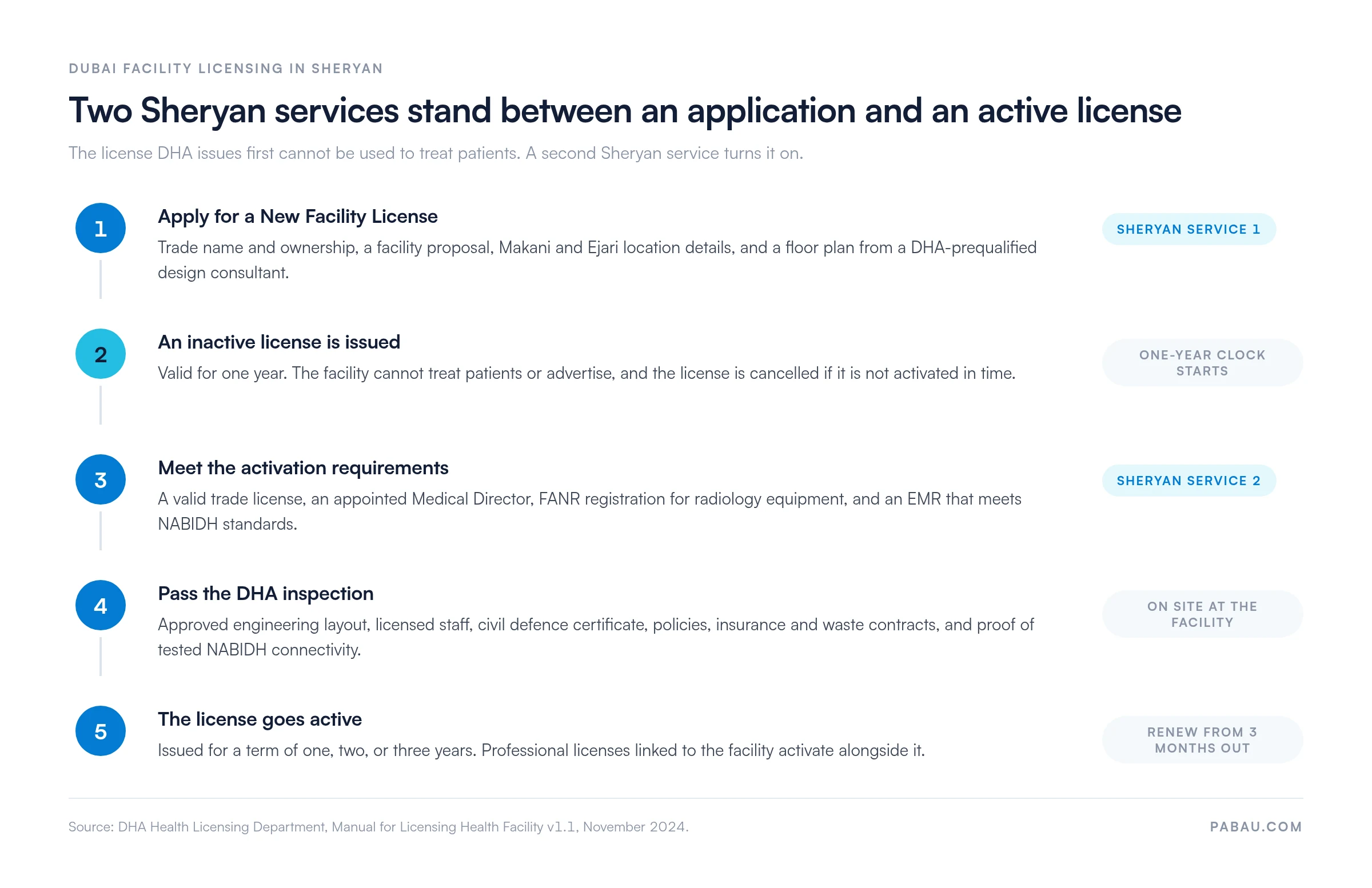
Facility licensing runs through two separate Sheryan services, not one. New Facility License issues a license that is inactive. Activate Facility License turns it into one you can treat patients under.
The stages below are the whole route, and the second one is where launch plans usually slip.
The application asks for five inputs, and none of them can be supplied later:
Before any of that, Sheryan offers a free Facility Qualification Recommendation. It tells you whether what you are planning is likely to qualify, which is worth running before you sign a lease.
What comes back from a successful application is an inactive license, valid for one year. The facility cannot treat patients and cannot advertise while it sits inactive. Miss the year and the license is cancelled, and you apply again from the start.
Drafts expire too. An application left untouched for 90 days is cancelled automatically. A half-finished form is not a safe place to park a project while you wait on a landlord.
Fees vary by facility category, and Sheryan shows the current figure when you apply. Check it there rather than in a consultancy’s estimate, since those vary widely and are not confirmed by DHA.
Your facility category decides which requirements apply, and DHA’s list is more granular than clinic or hospital. The official categories include:
Settle the category before you write the facility proposal. A psychology practice and an assisted fertility center are licensed as different facility types. The services you list have to match the category you applied under.
Activation has five requirements, and the EMR one is the requirement owners plan for last:
The inspection is a document check as much as a walk-through. DHA’s checklist covers:
Read that last line twice. On inspection day, DHA wants the email confirming your NABIDH connection has already been tested. That is a software milestone sitting inside a building inspection.
When activation succeeds, professional licenses linked to the facility activate alongside it. The facility license is then issued for a term of one, two, or three years.
Every DHA-licensed facility must have a Medical Director, and the post cannot sit vacant for more than two weeks without a qualified replacement. Two further rules shape who you can appoint:
So a two-site group can share one director, but nobody can hold the post for an unrelated practice down the road. The two-week limit also runs regardless of notice periods. Sensible groups hire a medical director with cover in mind, not just one name.
Renewal opens three months before the license expires, and a license left unrenewed for more than six months after expiry is cancelled. The rest of a facility’s life also runs through Sheryan, service by service.
One consequence is worth planning around. A license that lapses past the six-month mark is cancelled rather than reinstated. A renewal missed during a busy quarter turns into a fresh application.
The DHA Sheryan dashboard opens from the Health Licensing Service icon inside your DHA e-Services account, not from a separate Sheryan login. From there the account menu holds the pieces you use most:
The Linked Facility User switcher is where a practice manager spends the day. Without that link, the account only shows a personal licensing view, and the facility services look like they are missing.
My Applications is the screen worth learning properly, because the status word tells you who is holding the file:
DHA also runs an AI chatbot called Ask Latifa for Sheryan questions. There is a support ticket form too, plus a phone and chat line staffed around the clock.
Treat the walkthrough above as the shape of the dashboard rather than a pixel-exact tour. DHA has refreshed the interface since its published user guide, so a label may have moved even where the function has not.
NABIDH connectivity is built into facility activation, so it is not a compliance job that waits until the doors open. Two of the activation requirements say so outright.
The first asks for evidence of an installed EMR complying with NABIDH’s Minimum Data Set, connectivity requirements, and other NABIDH standards. The second is the inspection checklist item requesting a copy of the approval email for tested connectivity with NABIDH.
The practical effect is a sequencing one. The EMR has to be chosen, installed, mapped to your DHA identifiers, and tested against NABIDH before you book the inspection.
That order is harder than it sounds while you are also fitting out a space and hiring. Owners comparing EMR software in Dubai should filter on NABIDH support first and feature depth second. The same test applies to software for UAE practices licensed in other emirates, where a different exchange collects the data.
Registration is also where the reporting starts, since demographics messages fire the moment a patient is created or checked in. So the EMR features that matter in Dubai are the messaging and logging ones, not the ones on the front of the brochure.
A Dubai facility has two NABIDH problems. It needs proof of tested connectivity before DHA will activate the license, and it needs reporting to keep running once patients start arriving.
Pabau’s NABIDH connector handles both from inside the working day. Patient demographics sync out of the box as HL7 v2.5.1 ADT messages, firing at registration, update, and check-in. Visits, allergies, prescriptions, lab results, documents and letters, and patient merges are available as opt-in message types.
Setup is a one-time entry rather than an integration project. In Pabau’s Data Sync setup you add four values. They are your DHA NABIDH EMR code, your 7-digit Sheryan facility license ID, the NABIDH endpoint URL, and an application key. Credentials are stored encrypted.
Each practitioner’s 8-digit Sheryan clinician ID is mapped in Pabau and rides on their visit messages, with a clinic-wide fallback for anyone unmapped. Pabau validates Emirates ID formats, UAE phone numbers, and license ID formats before a message leaves the system.
Every message is logged with its delivery status, and failures retry automatically. So when DHA asks a facility to evidence its NABIDH reporting, the delivery log is already there. It sits alongside Pabau’s compliance tools and the chart audit trail your team builds day to day.
The outcome for a newly activated practice is that NABIDH stops being a project. Your front desk registers patients, your clinicians write notes, and the reporting happens behind that work. Good patient onboarding software earns its keep twice over in Dubai for exactly that reason.

Pabau generates NABIDH HL7 messages as your team registers and treats patients, with a delivery log for every message. So your Dubai practice can evidence its reporting whenever DHA asks.

Sheryan rewards owners who plan backwards from the inspection date. The slowest requirements sit at the end of the process, and the one-year inactive window is shorter than a fit-out schedule makes it look.
The trade-off worth remembering is that the two tracks look alike in the portal and work very differently. A clinician’s license is switched on by a facility. A facility’s license is switched on by an inspection, and that inspection asks for a NABIDH email.
So if your Dubai practice is heading toward activation, make the EMR decision early rather than last. Book a demo to see how Pabau reports to NABIDH from the work your team already does.

Writing the facility proposal for your application? Medical practice business plan sets out the services, staffing, and financial detail a licensing submission leans on.
Moving off an EMR that cannot report to NABIDH? EMR conversion covers how to move patient data between systems without losing history.
Need patient data rules that satisfy an inspector? Managing data protection turns the policy requirement into day-to-day practice.
Running a practice across more than one jurisdiction? HIPAA compliance for medical offices explains how the US rules compare with what DHA expects.
Billing insurers once the doors open? Claims management software shows how claims run from the same patient record you report from.
Sheryan is the Dubai Health Authority’s online licensing system for healthcare professionals and healthcare facilities in Dubai. Every licensing application, activation, renewal, and amendment runs through it, and DHA operates it through its Health Regulation Sector.
Yes. DHA’s facility licensing manual states that all applications must be submitted through the Sheryan licensing system, and that manual or emailed applications are not acceptable. There is no offline route for a new license.
A professional license lets an individual clinician practice in Dubai, while a facility license lets a business operate as a healthcare facility. They are also activated differently. A professional license is activated by the facility that hires the clinician, and a facility license is activated after a DHA inspection.
Yes. Renewal is a Sheryan service, and it opens three months before the license expires. A license left unrenewed for more than six months past expiry is cancelled, which means a new application rather than a renewal.
Yes. Activation requires evidence of an installed EMR that meets NABIDH’s Minimum Data Set and connectivity standards. The inspection checklist also asks for a copy of the approval email confirming that connectivity with NABIDH has been tested.
Log in to your DHA e-Services account and open the Health Licensing Service. Sheryan sits inside that account rather than behind its own login, and the dashboard shows your unique ID, your applications, and your license status.