Fertility clinic marketing: Strategies that attract & convert patients
Fertility clinic marketing is how a fertility practice attracts, educates, and c...

Last Updated: Oct 14, 2026
Knowing how to ask patients for reviews comes down to four habits. Ask every patient, ask within 48 hours of the visit, pair an in-person ask with an SMS or email link, and never offer a reward.
Those habits pay off. According to a BrightLocal consumer survey, 83% of consumers who were asked to leave a review did so. Patients are willing, so the work is building a compliant process that asks every patient, every time.
This guide covers the timing windows, word-for-word staff scripts, and email and SMS templates. It also covers the Federal Trade Commission (FTC) and Google rules that keep the process compliant.

Ask within 24 to 48 hours of the appointment, while the experience is still fresh, because delayed requests get far lower response rates.
Use more than one channel, because an in-person ask plus an automated SMS or email follow-up tends to outperform any single channel alone.
Never offer incentives for reviews, because FTC guidance and Google policy prohibit it, and Google can remove or penalize review-gated listings.
Never confirm in a public reply that someone is your patient, because in the US that can count as a HIPAA disclosure.
Practice software such as Pabau can send review requests by SMS and email after each appointment, so front-desk staff don’t have to remember to ask.
Patient reviews directly influence whether someone books with your practice or a competitor down the road. A practice with 4.8 stars and 200 Google reviews will usually beat one with 4.9 stars and 12 reviews. It wins in local search rankings and in first-impression trust.
Volume and recency both matter, because Google’s local algorithm factors in how many reviews a business receives and how recently they were posted. Reviews do three separate jobs for a practice:
Good care earns the reviews, but a system collects them. Practices that build patient review management into daily operations turn satisfied patients into visible public proof.
Reviews also compound. A practice collecting 30 reviews a month adds 360 in a year, while one collecting three adds 36. When the profile links to online booking for practices, a reader can go from reviews to a booked slot without a phone call.
Review platforms don’t carry equal weight, and spreading effort across a dozen sites rarely pays off. For most practices, the priority order is clear.
For most med spas, aesthetic practices and private practices, Google Business Profile is the non-negotiable starting point. Start there and get the volume flowing. Once the Google profile is healthy, direct patients to a secondary platform.
Timing affects response rates more than wording does, and a late request is the most common way a review gets lost.
The best window is within 24 to 48 hours of the appointment. The visit is still fresh, the good feeling hasn’t faded, and the patient hasn’t moved on to the rest of their week. Requests sent after 72 hours see significantly lower response rates across most patient feedback channels. Each window suits a different channel.
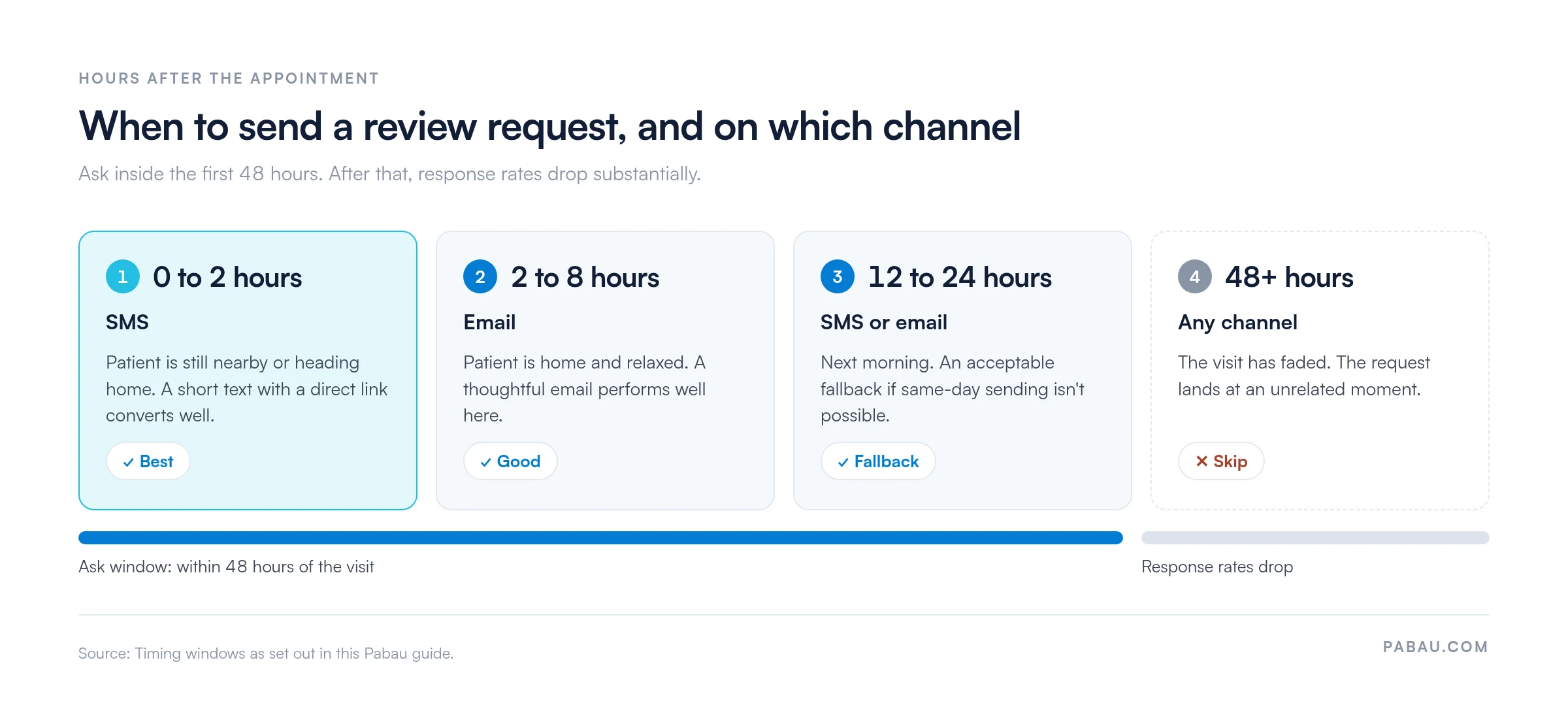
Moments within the visit itself also prime a patient to respond. When a patient says “that was better than I expected” or “I’ll definitely be back,” follow the conversation up with a written request. Train front-desk staff to recognize and act on these signals.
In-person asking is the highest-converting review channel when it’s done well. A warm verbal request from a clinician or receptionist carries more weight than an automated message. The catch is consistency, because it rarely happens every time without a system behind it.
The most effective scripts are short, sincere, and give the patient an easy out. Pressured or hard-selling language produces the opposite result. Here are word-for-word options for different roles.
A QR code at the front desk or on a printed card removes friction from the in-person ask. The patient scans it before leaving and lands directly on your Google review page. Print one, laminate it, and keep it at every checkout point.
Staff training should address one common hesitation, which is feeling pushy. Reframe the ask as a service to future patients, not a favor to the practice. Patients who had a good experience usually want to share it. They just need a prompt and a clear path.
Email review requests give you more room than SMS for warmth and context, but they’re often too long. The most effective ones run three to five sentences.
Subject: How was your visit, [First Name]?
Hi [First Name],
Thank you for visiting us at [Clinic Name] on [date]. We hope you’re feeling great after your appointment.
If you have two minutes, we’d genuinely appreciate hearing about your experience. Your feedback helps other patients find the care they need.
[Leave us a Google review]
Thank you. It means a lot to our team.
The subject line matters more than the email body. “How was your visit?” tends to outperform “Please leave us a review” because it reads as a question rather than a promotion. Keep the call to action to a single button or link pointing directly to your Google review page, not your homepage or a form.
SMS gets far higher open rates than email. Widely cited Gartner research suggests SMS open rates can exceed 90%, compared with roughly 20% for email. For review requests, that translates directly into response volume. Keep the message under 160 characters and include a direct link.
Here are two SMS templates that convert well:
Two compliance points are easy to overlook: In the US, SMS marketing requires prior express consent under Telephone Consumer Protection Act (TCPA) rules. In the UK, the Privacy and Electronic Communications Regulations (PECR) govern electronic marketing messages. Before you automate SMS review requests, confirm your opt-in process captures the right consent at intake.
Your existing appointment reminder texts are a useful model for how a compliant transactional message is structured.
Manual asking breaks down on busy days. A verbal ask happens when a staff member remembers it, when the patient seems receptive, or when the queue is short. Automation removes that dependency.
Practice software with automated patient workflows can trigger a review request after an appointment is completed. The request goes to the patient by SMS, email or both, inside the 24-to-48-hour window, with no action from the front desk.
Automation also produces data you can act on:
That data feeds back into a better asking strategy over time. If you’re comparing tools for this, our roundup of the best patient communication software looks at platforms that send automated SMS and email.
Set up two automated messages. Send one SMS within two hours of the appointment and one email the following morning. This two-touch approach reaches patients who prefer different channels without feeling like spam. It can noticeably increase review collection compared with a single-channel request.
A short set of rules protects your practice legally, keeps patients comfortable, and keeps your reviews authentic.
Yes, asking patients for reviews is ethical and legal if the request is voluntary, unpaid and sent to every patient. What crosses the line is offering something of value in exchange for a review, or review-gating. Review-gating means only asking satisfied patients, and Google explicitly bans it.
The FTC’s updated Endorsement Guides (2023) treat incentives conditioned on a positive review as deceptive. They also require disclosure of any material connection, such as a discount or gift given to a reviewer. Google separately bans incentivized reviews. Breaking these rules can lead to enforcement action and, more immediately, removal of your reviews.
The distinction between reviews and testimonials matters for UK practitioners. General Medical Council (GMC) guidance on advertising is more restrictive for testimonials, which imply an endorsement of clinical skill, than for general experience reviews.
Compare “the team were lovely and the clinic was clean” with “Dr. Smith is the best surgeon I’ve ever had.” The first is broadly acceptable, and the second needs more careful handling.
One rule catches practices by surprise: Google’s review policies explicitly prohibit review-gating. You can’t send only satisfied patients to a public review site while routing unhappy ones to a private feedback form.
Some review guides suggest starting with your happiest patients, and Google’s policy calls that selective solicitation. Ask every patient through the same process, and design any patient survey to collect honest, unfiltered feedback.
Replies are where medical practice reputation management happens in public. How you respond shapes how the reviewer and every future reader see your practice.
Keep positive review responses short and warm. Thank the reviewer by first name if they used it, and invite them to share more with the team directly. In the US, leave treatment details out of even a glowing reply, because HIPAA applies to praise as well as complaints.
Example: “Thank you for the kind words, Sarah. We’re glad to hear it, and we’ll pass your message on to the whole team.”
Negative review responses need more care. Acknowledge the concern, show that the practice takes feedback seriously, and move the conversation offline without confirming any clinical detail.
HIPAA and UK data protection reminder: Never confirm in a public response that someone is your patient. Never reference their appointment, diagnosis or treatment either. In the US, doing so is a disclosure of protected health information (PHI) under HIPAA. According to the HIPAA Journal, even acknowledging someone’s patient status in a reply can constitute a violation.
A safe reply reads: “Thank you for sharing your experience. We take all feedback seriously and would like to understand more. Please contact us at [phone/email] so we can discuss this properly.”
Prompt, professional replies to negative reviews show prospective patients that the practice responds when something goes wrong. That matters to readers as much as the star rating itself. Measuring patient satisfaction gives you the private data layer underneath the public review signal.
At many practices, the review ask lives in someone’s head. The receptionist remembers on a quiet afternoon and forgets during a packed Saturday list.
Pabau, the practice management platform we build, handles the ask with post-visit messaging. After an appointment, it can send the patient a review request by SMS, email or both, from a template you set up once. Templates can be tailored, so a patient leaving a minor procedure can get a different message from someone in for a routine check-in.
The outcome is a steady flow of fresh reviews without anyone on the front desk chasing them. Your team gets that time back, and every patient gets the same chance to share their experience.
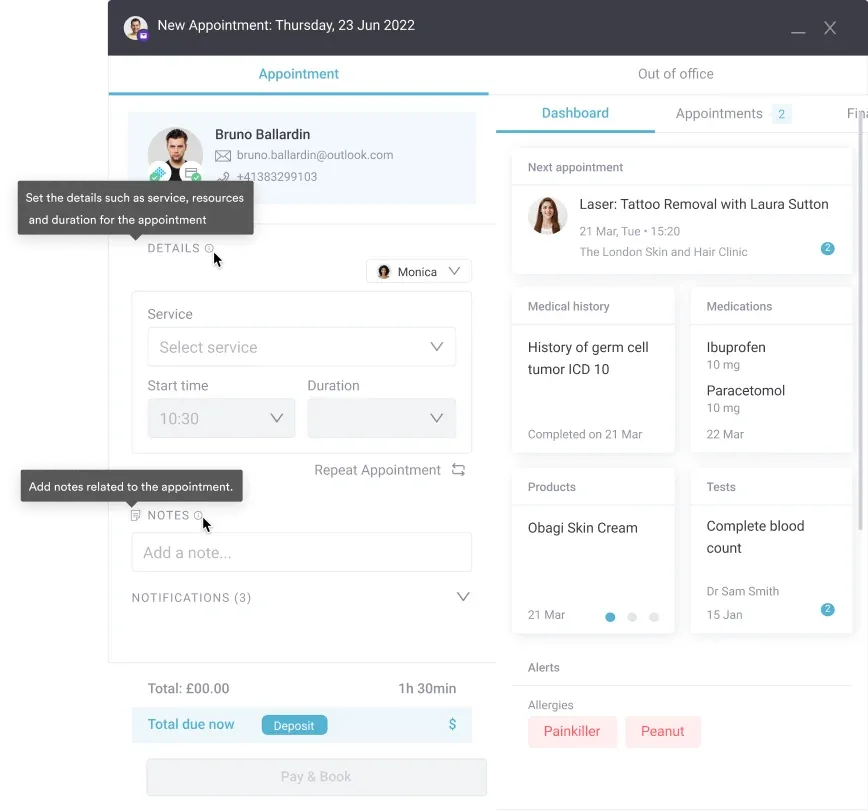

Pabau’s post-visit messaging can send review requests by SMS and email after each appointment. Your team stops chasing reviews, and every patient gets asked.

Asking for a review takes one sentence. Asking every patient, on the right channel, inside 48 hours, is the hard part. That habit is what separates a profile with 15 Google reviews from one with 300.
Start this week with two changes. Give front-desk staff one script and a QR code, and set up one SMS that goes out within two hours of each visit. Keep the FTC and Google rules in view, because incentives and review-gating can cost you reviews you’ve already earned.
Book a demo to see how Pabau’s post-visit messaging can send review requests for you, so your team stops chasing them.

Want to understand the full patient feedback loop? How to collect patient feedback compares five methods for gathering, analyzing, and acting on what patients tell you.
Building a wider reputation strategy? Medical practice reputation management covers monitoring, responding and growing review volume across platforms.
Managing reviews for a physician practice? Online reputation management for doctors walks through how individual clinicians protect their online profile.
Looking at reputation across a whole organization? Healthcare reputation management explains how practices track and improve what patients say about them online.
The best way to ask patients for reviews is a two-touch approach. A brief in-person ask at checkout is paired with an automated SMS sent within two hours of the appointment. The verbal ask primes the patient, and the SMS gives them the direct link once they’re relaxed. This combination can outperform any single-channel method.
Ask within 24 to 48 hours of the appointment, while the experience is fresh. An SMS right after the visit works best for quick responses. A follow-up email the next morning reaches patients who prefer that channel. Requests sent after 72 hours see significantly lower response rates.
Yes, asking all patients for honest reviews is ethical and broadly acceptable. What crosses the line is offering incentives, asking only satisfied patients, or soliciting clinical testimonials that imply a guaranteed outcome. FTC guidance treats incentives tied to a positive review as deceptive, and Google bans incentivized reviews and review-gating. In the UK, GMC guidance treats general experience reviews differently from endorsements of clinical skill.
Frame the ask as helping future patients rather than promoting the practice. “If you’re happy to, a quick Google review genuinely helps other people find us” lands differently than “please leave us a review.” Give the patient an easy out (“no pressure at all”) and a QR code, so they can leave the review in their own time.
Acknowledge the concern and move the conversation offline without confirming any patient or clinical details. A compliant template reads: “Thank you for your feedback. We take this seriously and would like to discuss it. Please contact us at [phone/email].” Never confirm someone is a patient or reference their appointment in a public reply. In the US, that counts as a PHI disclosure under HIPAA.
Give receptionists and clinicians word-for-word scripts, and run a brief role-play during onboarding. The key reframe is treating the ask as a service to future patients, not a favor to the practice. Staff who understand why reviews matter, and who feel the ask is natural, request reviews far more consistently.