Despina Petrushevska
Pain medication chart: Strength tiers, DEA schedules and free PDF
What is a pain medication chart and how do clinicians use it? A pain medication ...

2
Last Updated: Nov 4, 2026
Free PDF 1 page, print-ready Clinician-reviewed
A return-to-work doctor’s note confirms that a patient has been examined and is cleared to resume work. It takes a minute to write, and one missing field for an employer to reject it.
This guide covers what the note must contain, how to complete it, and when an employer can legally ask for one. The template above prints as-is or sends digitally. Customize the header and the restriction fields for your own practice.
The line that matters most is a privacy one. An employer may ask whether the employee is fit to work. It may not ask why the employee was absent. That distinction decides what goes on the note and what stays in the chart.
A one-page, ready-to-print form with fields for patient details, examination date, clearance statement, work restrictions, an optional diagnosis line, and the provider’s signature block. Add your practice header, then hand it to the patient at the end of the visit.
Start from scratch, or upload this PDF or any form you already use, and Pabau's AI Form rebuilds it with tick boxes, text fields and a signature. Attach it to the treatment once, and every patient gets it on time.
AI Form rebuilds the consent, history and aftercare forms you already use. You review each one, then publish.
Patients complete forms on their phone before they arrive, so the front desk stops retyping paper.
Every signed form is versioned and attached to the treatment record, ready when you need it.
Set how long a consent stays valid. Returning patients skip forms they have already signed.
Supports HIPAA and GDPR compliance AES-256 encryption 4.8 on G2 4.7 on Capterra Trusted by 4,000+ practices worldwide

A return-to-work doctor’s note confirms that a patient is medically cleared to resume work after illness, injury, or leave.
Every note needs the patient’s name, the provider’s details, the examination date, the return date, and any work restrictions.
Employers may require a note after a set number of sick days, but the rules vary by state and by policy.
An employer can ask whether an employee is fit to work, but the EEOC bars it from requiring a diagnosis.
Practice management software like Pabau stores the signed note in the patient record and shares it through the patient portal.
A return-to-work doctor’s note is a short medical document from a licensed provider. It states that the patient has been examined and cleared to resume work. A physician, nurse practitioner, or physician assistant can issue one.
It is narrower than a formal medical release. The note gives the fitness-to-duty status and the recommended return date, and stops there.
A patient who cannot be cleared needs a different document. A disability claim form asks the physician for diagnosis, functional limitations, and work capacity.
The note does three jobs for the practice. It proves a qualified provider evaluated the patient, sets a clear return date, and leaves a defensible record if the absence is later disputed.
For the employer, it confirms the patient is ready to work and flags any duty modifications needed during recovery. Practices that run intake and clearance paperwork on one set of medical forms tend to catch missing fields before the patient leaves.
Filing the signed note against the patient record keeps it retrievable a year later. Medical records management built into the chart beats a shared drive and a naming convention.
Practitioners mix up the return-to-work note and the formal physician release. The two documents answer different questions, so issuing the wrong one sends the employer straight back to you.
If the patient needs the longer document, our medical release form covers work restrictions, accommodations, and the review dates that go with them.
Six fields are required on every note, and four more are optional. Leave out a required field and the employer can reject the note outright.
The split below is worth reading before you sign anything, because one of the optional fields is governed by federal employment law.
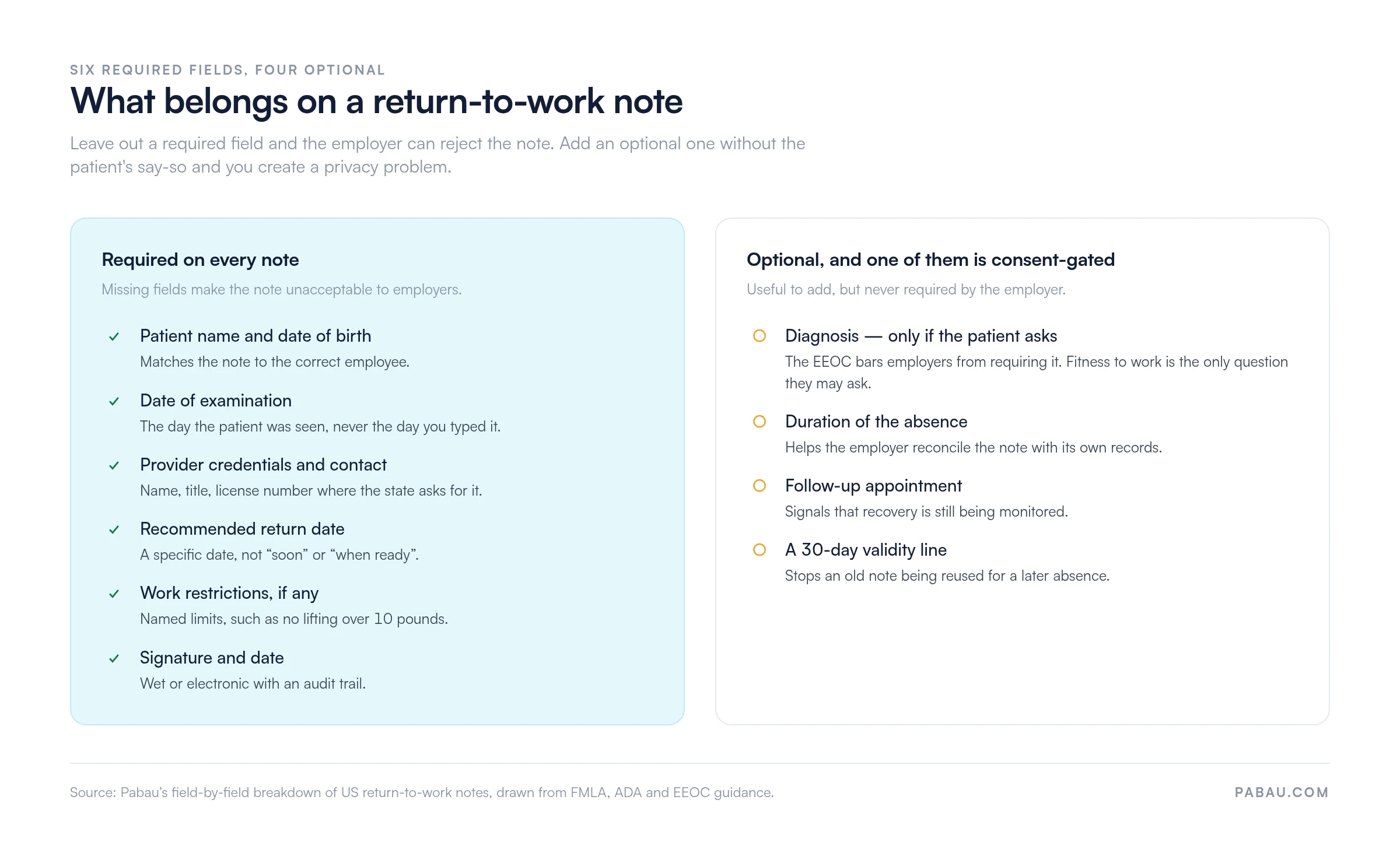
The optional fields: duration of absence, follow-up appointment, and a line stating the note is valid for 30 days. Diagnosis sits in the same list, but it is not the same kind of choice.
Our downloadable template ships diagnosis as a plain fillable field. Treat it as consent-gated and leave it blank unless the patient asks for it.
Once the note is signed, share it through the patient portal so the patient can download it and forward it to their employer.
Completing the note correctly keeps it out of the employer’s reject pile and leaves your practice a clean record. Six steps cover it.
The template prints on a single page, so a practice header and a restriction line are usually the only edits it needs.
It depends on the employer’s size, the state, and the company’s own policy. No single federal rule sets a number of sick days.
Federal law (FMLA): Under the Family and Medical Leave Act, a covered employer can require medical certification for a qualifying absence. The law reaches employers with 50 or more employees, and staff who have worked there at least a year. Smaller practices and small employers often sit below that threshold.
State law: Many states run their own leave programs, including California’s CFRA. Thresholds differ. Some states let an employer ask for a note after three consecutive sick days, others after five or seven. Point the patient at their state labor department or their employee handbook.
ADA and disability law: The EEOC bars an employer from demanding a diagnosis on a return-to-work note. It may ask whether the employee is fit to work. It may not ask why they were absent.
Keep the diagnosis off the note unless the patient asks for it and understands who will read it.
Yes. Any licensed provider working within their scope can issue one, including urgent care, walk-in practices, and telehealth services.
The condition is the examination. The provider has to see the patient, in person or by video, and document the visit in the chart.
Occupational health, physical therapy, and mental health providers write these notes routinely. Employers accept telehealth notes far more often than they did in 2019, though some still want an in-person visit.
Ask the patient what their employer will accept before the appointment, not after.
This template and guidance are educational and are not legal or medical advice. Return-to-work requirements vary by state, by employer policy, and by the law that applies. That includes FMLA, state leave acts, HIPAA privacy rules, and ADA accommodation duties.
Check with a healthcare attorney or your state labor department before you issue notes from this template. Review it against your scope of practice, your state licensing rules, and your malpractice cover.
Most practices handle these notes by hand. Reception prints a blank form and the provider fills it in. Someone scans it, and the file lands in a shared drive under whatever name the scanner gave it.
Practice management software like Pabau does the same job from one record. Build the note once as a form in patient intake software, and the patient’s name, date of birth, and employer pull through automatically.
The signed note then files itself against the patient record, and the patient receives it through the portal the same day. Your team stops chasing paper, and an audit two years later takes one search instead of an afternoon.
That matters most for practices issuing several notes a week. Occupational health and urgent care teams see the difference first.

Pabau builds the note as a digital form, files the signed copy in the patient record, and shares it through the patient portal. Your team stops scanning and chasing.

A return-to-work note is a small document with a large surface for error. Get the six required fields right and the employer has no reason to send the patient back.
The judgment call is the diagnosis line. The employer cannot demand it. The patient may not understand what disclosing it means. Once it is written down, it travels with the note.
Download the template, add your header, and set a house rule on the diagnosis field before the next request arrives. Book a demo to see how Pabau turns the note into a form your team fills in once.

Need the longer version of this document? Medical release form covers work restrictions, accommodations, and the review dates that go with them.
Clearing a patient for surgery or activity instead? Medical clearance letter sets out the fitness statement a specialist or an employer will accept.
Asked to put the diagnosis in writing? Diagnosis letter from a doctor shows how to word it once the patient has consented.
Filing more forms than your drive can handle? Clinical documentation software explains how practices template, store, and retrieve notes like this one.
Starting from a blank certificate instead? Medical certificate template gives you the general-purpose form this note narrows down.
It depends on your employer’s policy and state law. Many employers require a doctor’s note after three to five consecutive sick days, but this varies. Check your employee handbook or ask your HR department.
A return-to-work note confirms you are fit to work. A medical release details the specific work restrictions or accommodations you need during recovery.
Yes. Any licensed healthcare provider (urgent care physician, nurse practitioner, or PA) who has evaluated you can issue a return-to-work note.
No. Under ADA and EEOC guidance, an employer cannot require a diagnosis. It can only ask whether you are fit to work.
Increasingly, yes. Some employers still require an in-person visit, so check with the employer or the HR department beforehand.
Typically 30 days from the date issued, though this varies by employer. The template above recommends a 30-day validity window, and your practice can adjust it.