HCPCS Code L0472: Hyperextension TLSO billing guide
HCPCS code L0472: Official descriptor and device definition HCPCS code L0472 des...

Last Updated: Nov 5, 2026
E0290 is the HCPCS Level II code for hospital bed, fixed height, without side rails, with mattress.
Most E0290 denials trace back to three problems. A modifier is missing, the supplier didn't complete the written order before delivery, or the diagnosis code fails the active Local Coverage Determination. In turn, this reference covers the descriptor, coverage rules, reimbursement, modifiers, and the neighboring codes that billers most often confuse with E0290.
Let Pabau's smart automation suggest the right codes, reduce claim denials, and keep your practice compliant—effortlessly.
Automate repetitive tasks and focus on what matters most—your patients.
Reduce coding errors and ensure compliance with the latest regulations.
Clean claims, fewer denials, and faster reimbursements.
Powerful insights and reporting to help your practice thrive.
HIPAA compliant SOC 2 certified GDPR-compliant Trusted by 4,000+ clinics worldwide

HCPCS code E0290 describes a hospital bed, fixed height, without side rails, with mattress, billed to Medicare Part B as durable medical equipment.
Medicare Part B pays 80% of the DMEPOS fee schedule amount after the deductible. A standard written order and a qualifying diagnosis must be on file before delivery.
Certificates of Medical Necessity no longer apply. CMS discontinued the CMN and DIF forms for dates of service from January 1, 2023.
Modifiers NU (purchase), RR (rental), and KX (coverage criteria met) carry the most weight on E0290 claims. Incorrect modifier use is a leading cause of denial.
Pabau keeps the written order, the clinical notes, and the delivery record on one patient file. An audit request is then easy to answer.
E0290 sits in the E-code series of HCPCS Level II, which the Centers for Medicare and Medicaid Services maintains. That series covers durable medical equipment. Specifically, two details define this code: the overall frame height does not adjust, and the supplier delivers the bed without side rails.
DME suppliers, home health agencies, and healthcare administrators use this code on Medicare Part B claims. The bed must be medically necessary, and the supplier must deliver it to the patient’s home. Ultimately, reading the descriptor literally before submission saves the rework that comes from confusing E0290 with adjacent E-codes.
The official CMS descriptor for E0290 is hospital bed, fixed height, without side rails, with mattress. Each code in this family names one fixed combination of features. E0290 does not stretch to cover a bed that arrives with rails, and it does not cover a frame that arrives without a mattress. If the supplier includes rails, the claim belongs in the E0250 to E0266 series instead. If the bed doesn’t include a mattress, E0291 is the correct code.
Billers checking the full current-year descriptor should verify it against the official CMS HCPCS file rather than a third-party lookup. The AAPC Codify HCPCS lookup mirrors CMS data and is useful for a quick check.
Medicare Part B covers E0290 as a DMEPOS item under three conditions. In particular, the equipment must be medically necessary, a treating practitioner must order it, and it must comply with the applicable Local Coverage Determination.
The four DME Medicare Administrative Contractors issue LCDs for hospital beds. Noridian handles Jurisdictions A and D, and Jurisdictions B and C sit with CGS Administrators. So, read the active LCD for the patient’s jurisdiction, and verify eligibility, before you deliver the bed.
The hospital bed LCD requires that the patient has a condition needing body positioning that a regular bed cannot achieve. Traction that a regular bed cannot administer also qualifies. Common qualifying diagnoses include:
CMS revises LCD policies periodically, so re-read the active version whenever a revision posts. Otherwise, billing against a superseded policy carries both denial and audit risk.
E0290 claims require a standard written order (SWO) from the treating practitioner, which the supplier must complete and receive before delivering the equipment. The SWO must name the beneficiary, describe the item, and carry the order date. It also needs the prescriber’s name, NPI, and signature. Consequently, an order the supplier obtains after delivery does not support the original claim date.
A custom hip abduction brace supplied to the same patient is not part of the bed claim. It bills separately under HCPCS code L1680, and the written order must list it as its own item. A bed cradle supplied alongside the bed is another separate item, coded E0280.
One item on the old checklist is gone. CMS discontinued Certificates of Medical Necessity and DME Information Forms for dates of service from January 1, 2023, in MLN Matters article SE22002. A file still built around a signed CMN is documenting to a retired standard.
Supporting documentation in the patient’s medical record should include recent clinical notes demonstrating the qualifying condition, plus any relevant test results. In addition, the claim itself must carry a valid, current-year ICD-10-CM diagnosis code that the medical record supports.
Medicare reimburses E0290 through the DMEPOS fee schedule. The allowable amount varies by DME MAC jurisdiction, and by whether the supplier bills the item as a purchase (NU modifier) or a rental (RR modifier). Medicare pays 80% of the allowable amount, and the beneficiary is responsible for 20% coinsurance after the Part B deductible. Because CMS updates rates annually, verify current figures against the CMS DMEPOS fee schedule for the patient’s jurisdiction before quoting.
One reference trap is worth naming. DMEPOS items do not price off the Physician Fee Schedule, so the MPFS lookup tool will not return an allowable for E0290. The DMEPOS fee schedule files are the only correct source for this code.
Geographic variation exists because locality adjusts DMEPOS rates. A fixed height hospital bed a supplier bills in a high-cost metropolitan area may carry a different allowable than the same item billed rurally. Therefore, suppliers operating across jurisdictions should keep a jurisdiction-specific rate reference and refresh it each January. Read the remittance advice on the first few claims to confirm that payment matches the expected rate.
Billing E0290 correctly involves more than placing the code on a claim form. The submission sequence matters, and you have to finish each step below before the next one starts.
Running these steps in a fixed order shortens the delay between delivery and claim submission. It also keeps the documentation audit-ready.
Modifier selection is where most E0290 claims go wrong. Each modifier carries a specific meaning for the DME MAC. Applying the wrong one, or omitting a required one, results in denial. The table below covers the modifiers most commonly used with HCPCS code E0290.
CMS has expanded prior authorization requirements for certain DMEPOS items under its Prior Authorization Program. Suppliers should check the current CMS prior authorization list before delivery to confirm whether E0290 requires it in the patient’s jurisdiction.
Requirements can change between plan years. Delivering equipment without a required prior authorization is grounds for non-payment, even when every other document is in order. A clean DME claim starts before a single piece of equipment leaves the warehouse.
Track modifier usage by claim outcome in your billing system. A run of denials linked to one modifier combination points to a workflow problem rather than a one-off error. Run a quarterly modifier audit across all E-code claims to catch systemic issues before they compound into write-offs.
The hospital bed HCPCS family splits along three attributes. Those are height adjustment, whether the bed includes side rails, and whether it includes a mattress. E0250 through E0266 cover beds that include any type of side rails. E0290 through E0297 mirror that same range without rails, and E0290 sits at the plainest end of it. The grid below lays out all sixteen codes in the family.
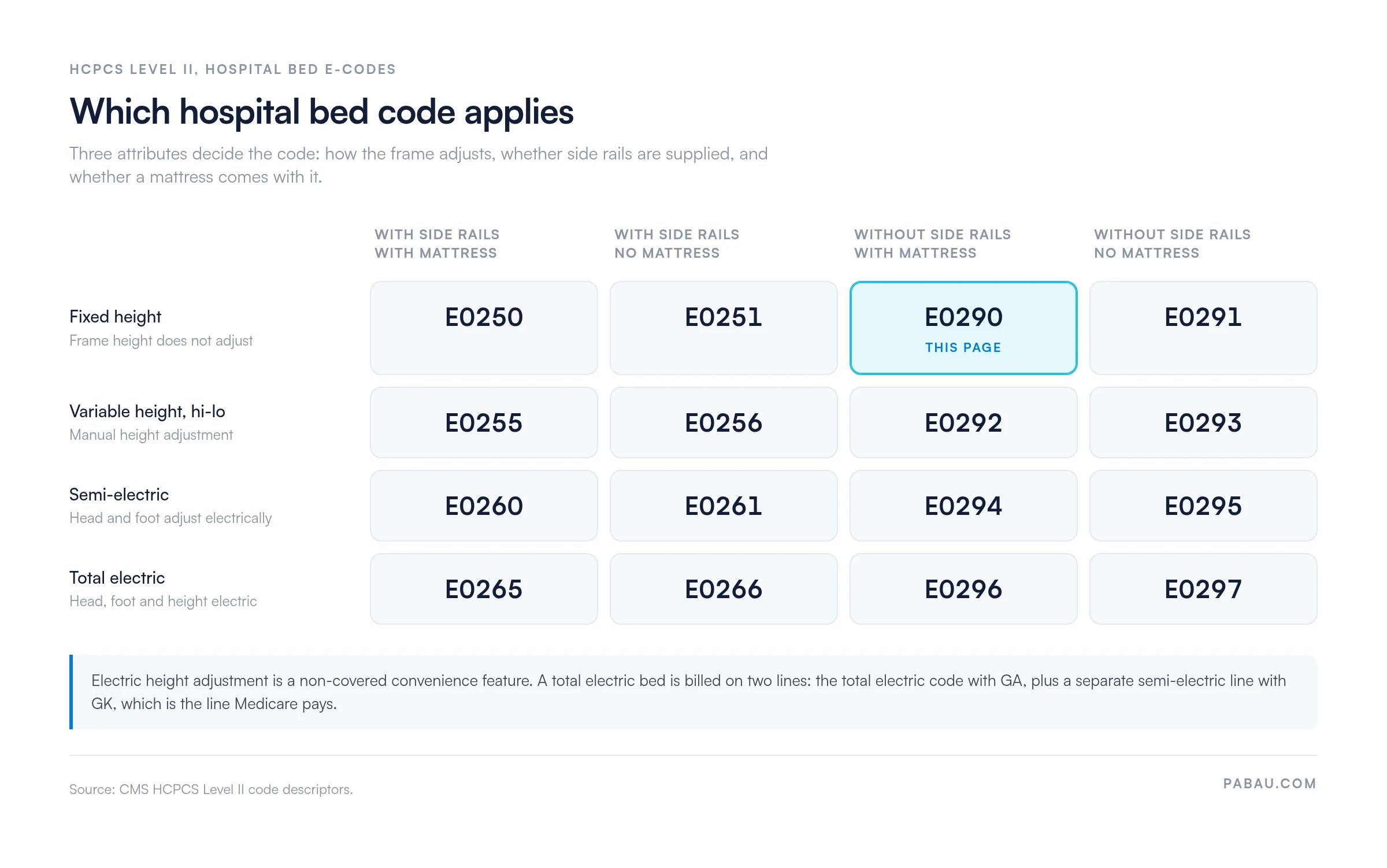
E0265 deserves a second look, because it is easy to read as the top of a payment ladder. Medicare treats electric height adjustment as a convenience feature rather than a covered benefit. As a result, a supplier delivering a total electric bed obtains a signed Advance Beneficiary Notice and submits two claim lines.
The first line carries E0265 with the GA modifier. The DME MAC denies that line, and the upgrade charge becomes the patient’s responsibility. The second line bills E0260 with the GK modifier, and that is the line Medicare pays at the semi-electric allowance. So, submitting E0265 on its own, as though it earns a higher rate, is a reliable way to create a write-off.
When the supplier includes rails with the same fixed height frame, the claim belongs to E0250 instead. That is the substitution the DME MACs catch most often on this code.
The drive mechanism moves the code as well. A semi-electric frame supplied without side rails and without a mattress bills as E0295, because its head and foot sections are motor-driven.
Patient weight moves the code too. A heavy duty, extra wide frame for a patient between 350 and 600 pounds bills as E0301, which carries side rails and no mattress.
The written order and the delivery ticket should describe the exact configuration the supplier delivered. When the delivered equipment does not match the billed code, the DME MAC will deny or recoup on post-payment review. Overall, accurate code-to-equipment matching is the foundation of a defensible claim record.
E0290 claims face a predictable set of denial patterns. Most are avoidable with a pre-submission checklist, because denial management starts before you file the claim rather than after the remittance comes back.
Building a pre-submission checklist into the billing workflow catches most of these patterns early. A monthly review of remittance data catches the rest before they turn systemic.
Run a 90-day look-back on all E0290 claims each quarter. Group denials by reason code. If more than 20% share the same denial code, treat the workflow as the cause. Fix the process rather than the individual claims.
Most E0290 denials trace back to paperwork that exists somewhere, but the practice cannot produce it on request. Practice management software like Pabau keeps the written order, the clinical notes behind it, and the delivery record on the same patient file. A reviewer’s request stops meaning a hunt through three systems.
Pabau’s digital forms capture the practitioner’s findings at the encounter, including the positioning need that a hospital bed order rests on. Custom fields let you record the frame type, the mattress, and whether the bed included rails. That means your team writes down the configuration behind an E0290 claim once, at delivery, instead of reconstructing it months later.
On the insurer side, Pabau’s claims management software submits and tracks claims electronically through Claim.MD in the US. Medicare DMEPOS claims still go out through your DME billing system, with Pabau holding the clinical record that sits behind them.

Pabau keeps written orders, clinical notes, and delivery records on one patient file, so the documentation a reviewer asks for is already assembled.

Read the descriptor literally before you code the claim. E0290 is the fixed height bed with a mattress and no side rails, and every neighboring code changes exactly one of those attributes. For example, rails move the claim to E0250. A missing mattress moves it to E0291. Hi-lo height moves it to E0292.
After that, E0290 billing succeeds on three requirements. The written order precedes delivery, the modifiers match the transaction type, and the diagnosis satisfies the applicable LCD. Those three account for most denials in this code family.
Pabau keeps the order, the clinical notes, and the delivery record together on the patient file. In practice, an audit request does not turn into a search. To see how that fits a DME or home health operation, book a demo and walk through the workflow with the team.

Need a structured approach to clean claims? Clean claim submission covers the field-level requirements that decide first-pass acceptance rates.
Dealing with repeated denials on DMEPOS claims? Denial management in healthcare outlines the workflow for tracking, appealing, and preventing recurring denial patterns.
Want the broader billing cycle for DME? Revenue cycle management maps the full process from eligibility check to final payment reconciliation.
Checking coverage before the bed is delivered? Insurance eligibility verification walks through the checks that stop a coverage denial before it happens.
Reading the payment back from the DME MAC? Electronic remittance advice explains how to read the remittance file and match it to what you billed.
HCPCS code E0290 describes a hospital bed, fixed height, without side rails, with mattress. Suppliers bill it to Medicare Part B as durable medical equipment. The overall frame height does not adjust, and the bed carries no side rails. If the bed includes rails instead, the correct code is E0250 rather than E0290.
Yes. Medicare Part B covers HCPCS code E0290 as a DMEPOS item when it meets the medical necessity criteria in the applicable Local Coverage Determination. A standard written order from the treating practitioner must be on file before the supplier delivers the bed. Medicare pays 80% of the DMEPOS allowable after the Part B deductible, and the beneficiary pays 20% coinsurance.
The annual DMEPOS fee schedule sets the reimbursement rate for E0290. It varies by DME MAC jurisdiction and by purchase versus rental billing. Confirm the current-year allowable against the CMS DMEPOS fee schedule before quoting or submitting a claim, because rates change each January 1. The Physician Fee Schedule lookup tool does not price DMEPOS items and will not return a rate for this code.
Billing E0290 requires a standard written order received before delivery, plus clinical documentation supporting the qualifying diagnosis. The claim also needs a valid current-year ICD-10-CM code that satisfies the active LCD, and a delivery confirmation. A Certificate of Medical Necessity is no longer part of the file, because CMS discontinued CMN and DIF forms for dates of service from January 1, 2023. Retain all records and keep them available for post-payment audit.
The most common modifiers for E0290 are NU (new purchase), RR (rental), and KX (coverage criteria met and documentation is on file). GA applies when the supplier has a signed Advance Beneficiary Notice on file and expects denial. GZ applies when the supplier expects denial and no ABN exists. Incorrect modifier selection is one of the leading causes of E0290 claim denial.
Medicaid coverage for E0290 varies by state. Each state Medicaid program sets its own DME coverage policies, prior authorization requirements, and fee schedules. Check the patient’s specific state Medicaid policy before delivery, and obtain any prior authorization it requires. Medicare coverage rules do not automatically apply to Medicaid claims.