Seated flexion test
The seated flexion test is a palpation-based assessment of sacral motion at the ...

8
Last Updated: Oct 15, 2026
A CRM for chiropractors is a patient relationship management system built around the clinical and scheduling demands of chiropractic care. It combines appointment booking, automated patient communication, billing, and marketing in one platform. Patient retention and consistent follow-up are among the most common operational challenges in chiropractic practice.
When a practice runs on spreadsheets, a standalone scheduler, and a separate email tool, rebooking prompts get missed and patients quietly stop coming back. This guide covers what a chiropractic CRM does and which features matter most. It also looks at marketing automation, reporting, and the compliance checks to run before you choose a platform.

A CRM for chiropractors combines patient scheduling, clinical communication, billing, and marketing automation in one system built for clinical workflows.
Online booking with automated reminders is the highest-impact CRM feature for cutting no-shows and front-desk admin.
Recall sequences and lapsed-patient outreach are native to purpose-built chiropractic CRM platforms, not bolt-on extras.
HIPAA compliance is a legal requirement for any CRM storing chiropractic patient data in the US. Check that your vendor signs a Business Associate Agreement.
A CRM for chiropractors is practice management software that holds every patient touchpoint in one place. That runs from the first inquiry through treatment, rebooking, and long-term retention. A general-purpose CRM like Salesforce or HubSpot tracks sales pipelines and contacts. It has no concept of a SOAP note, a chiropractic appointment type, or a care plan completion cycle.
A purpose-built chiropractic CRM schedules appointments, sends clinical reminders, manages billing, and runs marketing campaigns from a single patient record.
The practical difference shows up fast. A generic CRM needs a manual export to a scheduling tool, another export to an email marketing platform, and manual reconciliation of payment data.
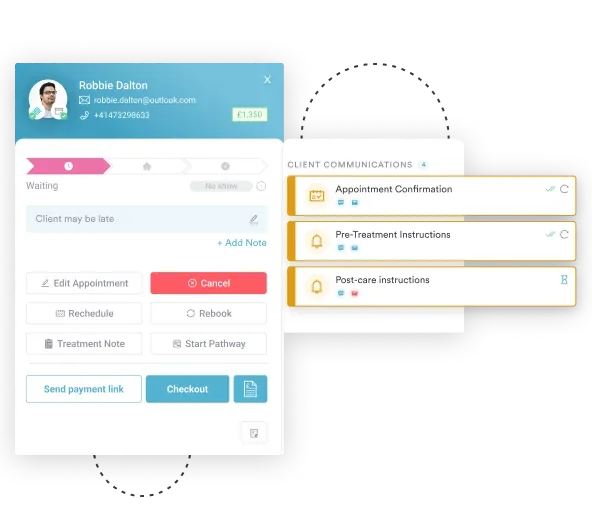
A chiropractic-specific CRM connects those workflows natively. A confirmed appointment triggers a pre-visit reminder, a post-visit follow-up email, and a rebooking prompt if the patient hasn’t returned within their care plan interval.
Generic CRMs are built for sales teams converting leads into customers. Chiropractic practices convert inquiries into patients, then into long-term care relationships. Those two workflows have little in common.
Here’s what falls apart when a chiropractic practice runs on a general CRM:
Purpose-built chiropractic practice management software handles all four. It’s designed around the chiropractic care lifecycle, from first visit through to care plan completion.
The same pattern runs across allied health. A physical therapy EMR is built around treatment plans, progress notes, and discharge criteria rather than deal stages, and chiropractic software follows the same logic.
Not all platforms are built the same. These are the features that separate a working chiropractic CRM from a booking tool with extra tabs. If you are already comparing products, our guide to chiropractic practice management software ranks the main options.
Self-booking is where most chiropractic practices see the fastest return. Patients expect to book online, especially outside business hours. Platforms with solid online booking let patients pick their practitioner, service, and slot without calling.
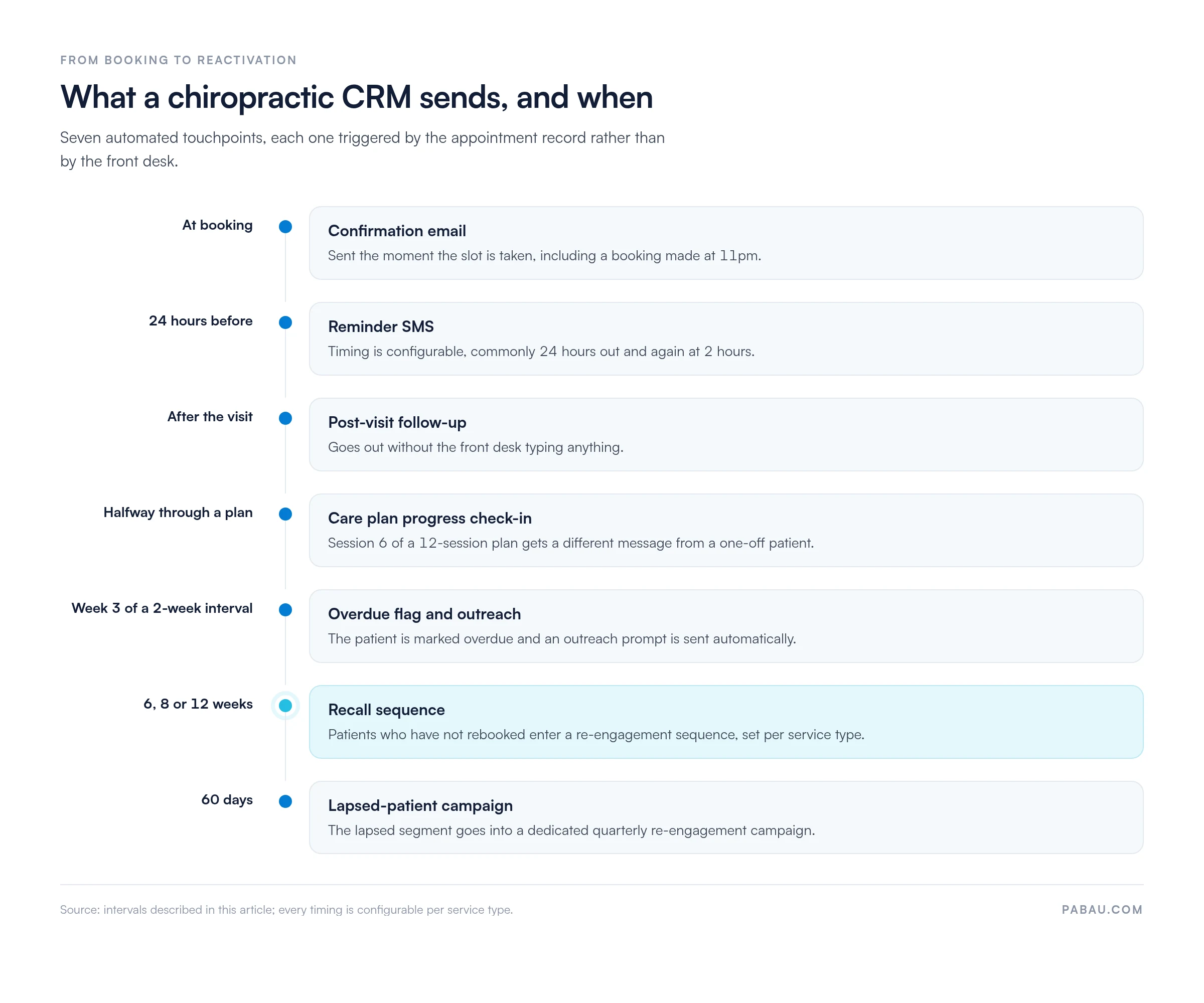
The system still enforces your scheduling rules automatically, including buffer times, room allocation, and which services each practitioner offers. The scheduler should also connect straight to automated reminders. A booking confirmed at 11pm triggers a confirmation email immediately and a reminder SMS 24 hours before the appointment.
Automated reminders are the single highest-impact tool for reducing no-shows in chiropractic practice. Communication should reach further than the appointment reminder, though. Effective patient communication also covers post-visit follow-up messages, care plan progress check-ins, and re-engagement prompts for patients who haven’t booked within a defined window.
All of it runs off the patient record, which is why a chiropractic intake form completed before the first visit is worth getting right. Incomplete contact details stop a recall sequence before it starts.
A chiropractic CRM should let you configure these sequences by service type, practitioner, or care plan stage. A patient six sessions into a 12-session care plan gets one message. A one-off patient who hasn’t returned in eight weeks gets another.
Laid out end to end, those messages form a timeline rather than a set of one-off sends.
Chiropractic billing needs vary a lot. Cash-pay practices need clean invoice generation, package management, and online payment processing. Selling a block of six or ten sessions upfront is a common model, and the system has to track redemption against it.
At minimum, the billing module should handle package creation and redemption, online payment links sent after the appointment, and a clear outstanding balance per patient. Practices with heavy insurance claim volume may need a specialist billing platform or a CRM with a dedicated insurance module.
Marketing automation is where a CRM for chiropractors earns its keep beyond the appointment book. Rather than running one-off email blasts, a chiropractic CRM with native marketing tools lets you build triggered workflows. They run in the background and send the right message to the right patient at the right moment.
The most valuable automations for chiropractic practices fall into three categories:
The difference from bolted-on tools is that native email and SMS campaigns read live patient data rather than an exported spreadsheet. Pabau, the practice management platform we build, resets a patient’s recall clock the moment they rebook. Finish a care plan and the patient moves into a maintenance sequence. Nobody keeps a list up to date by hand.

Patient retention in chiropractic is arithmetic. Take a practice with 150 active patients and a 15% monthly lapse rate. With no re-engagement system, that is roughly 22 patients lost every month. Reactivating even a third of them puts seven patients back in the book each month.
Beyond recall sequences, retention-focused chiropractic CRM platforms use automated recall workflows tied to treatment intervals. If a care plan specifies adjustments every two weeks, the system flags the patient as overdue at week three and sends an outreach prompt.
Set up a ‘lapsed patient’ segment for anyone who hasn’t booked in 60 days, and run a dedicated re-engagement campaign each quarter. A short two-message sequence with a personalized subject line can bring some of those patients back without any manual chasing.
A CRM earns its place once you can see what it changed, and that shows up in the reporting.
A chiropractic practice running 150 appointments a week produces plenty worth tracking. Rebooking rates differ by practitioner, no-show rates differ by service type, and patient lifetime value differs by care plan. Without a reporting layer, those questions get answered by instinct or not at all.
The metrics that matter most for chiropractic practice growth:
Pabau covers these metrics in its core practice reporting dashboards. Owners can track performance without rebuilding a spreadsheet report every month.
Any CRM storing chiropractic patient data in the US must comply with HIPAA. Patient names, appointment histories, treatment notes, and billing records all count as protected health information, known as PHI. That definition comes from the US Department of Health and Human Services HIPAA framework. A CRM vendor that stores or processes this data for you qualifies as a Business Associate under HIPAA’s covered entity rules. That vendor must sign a Business Associate Agreement, or BAA, with your practice.
Before selecting any CRM platform for your chiropractic practice, confirm these four compliance requirements:
UK practices storing patient data must also align with GDPR, which governs consent, retention periods, and the right to erasure. Either way, the controls belong inside the platform rather than in a policy document. Permissions, access logs, and retention rules should apply to every patient record by default.
Pabau brings the CRM, the diary, the patient record, and the marketing into one system. Rather than stitching separate tools together, every workflow runs off the same patient record.
For chiropractic practices, the link between booking and marketing is where that matters. When a patient books through Pabau’s online booking portal, their record updates immediately. Reminders fire without a manual trigger. If they don’t rebook within their care plan interval, a recall sequence starts on the rules you set per service type.
Capabilities that matter most to chiropractic practices:
Every subscription includes the full platform, so a solo chiropractor and a four-practitioner group work from the same feature set. There is no free trial. Your recall rules, booking logic, and care plan intervals are configured during structured onboarding, because those settings are what make the system earn its keep.

From first booking to long-term retention, Pabau connects scheduling, patient records, billing, and marketing in one platform built for healthcare practices.

Here’s the question worth asking of any chiropractic CRM. What happens when a patient drifts past their care plan interval and nobody notices? On disconnected tools, that patient is simply gone. On a connected one, the recall message goes out anyway.
That is the trade-off to weigh. A dedicated platform costs more than a spreadsheet and a free scheduler, and it takes time to configure around your care plans. What you get back is follow-up that doesn’t depend on anyone remembering to do it.
If you want to see how that runs day to day, book a demo. We’ll walk through chiropractic patient management from first booking to recall.

Looking for a full feature walkthrough? Pabau’s chiropractic practice software page covers every feature relevant to chiropractic practice operations.
Want more patients booking in the first place? Chiropractic marketing: 7 strategies to grow your practice sets out the channels that bring new patients through the door.
Opening a practice of your own? Starting a chiropractic practice walks through the launch decisions that shape your systems later.
Need the clinical side documented properly? Chiropractic treatment plan template gives you a care plan structure your recall rules can run from.
A CRM for chiropractors is a practice management system that connects patient scheduling, communication, billing, and marketing in one platform. It replaces the usual mix of a standalone scheduler, a separate email tool, and manual billing by working from a single patient record. When a patient books, reminders fire automatically. When they finish treatment, a recall sequence starts without anyone at the front desk doing it.
The essentials are online booking with practitioner-specific availability, automated SMS and email reminders, and patient records with clinical note templates. Add billing and package management, marketing automation with trigger-based workflows, and reporting on revenue and appointment fill rates. Compliance features such as a HIPAA Business Associate Agreement, data encryption, and audit logging are non-negotiable for US practices.
The best CRM for chiropractors depends on your billing model and practice size. Pabau suits multi-practitioner practices that want booking, marketing, billing, and reporting in one platform rather than several connected tools. ChiroSpring and Noterro offer chiropractic-specific scheduling with strong clinical templates. AdvancedMD is better suited to practices with high insurance claim volume that need a specialist billing module.
Yes. Any CRM that stores or processes chiropractic patient data in the US is subject to HIPAA. Patient names, appointment records, and treatment notes all qualify as protected health information. The vendor must sign a Business Associate Agreement with your practice. Operating without one puts the practice at risk of a HIPAA violation, even though the vendor holds the data.
A chiropractic CRM improves retention through automated recall sequences, care plan completion tracking, and lapsed-patient re-engagement campaigns. The system spots patients who have not booked within a defined interval and sends a re-engagement message automatically. Practices using recall automation can recover some dormant patients without manual outreach from staff.
Yes. Pabau supports chiropractic practice management with online booking, automated patient reminders, clinical notes, package and membership management, native email and SMS marketing, and reporting dashboards. It suits cash-pay and package-based chiropractic practices best. Practices with complex insurance claim submission may need a specialist billing module alongside the platform.