Choosing between them is harder than the marketing suggests. Some practices want ambient AI that listens to the consultation in the background. Others want AI medical dictation that sits on top of the EHR they already run. A growing number want clinical documentation software that handles notes, scheduling and billing in one place, with no second system to integrate.
This guide ranks nine tools on five criteria:
Transcription accuracy and specialty vocabulary support
HIPAA compliance and business associate agreement (BAA) availability
EHR integration depth
Pricing transparency
Practical fit for different practice types
Each review follows the same structure, so you can compare tools at the same level. The ranking runs from Dragon Medical One down to Talkscriber, with Pabau, our own practice management platform, at number five.
Found our content helpful?
The nine tools compared at a glance
The table below covers all nine tools across the criteria that matter most at the buying stage. Ratings come from public review platforms at the time of writing, and every price comes from the vendor’s own website.
Tool
Best for
Starting price
EHR integration
HIPAA
Rating
Dragon Medical One
Voice recognition accuracy
No published pricing
Epic, Cerner, Athenahealth + others
✅
4.4/5 (320)
Abridge
Hospital and health system use
No published pricing
Epic (native)
✅
4.3/5 (15)
Suki AI
AI medical scribe for physicians
No published pricing
Epic, Cerner, Athenahealth
✅
4.6/5 (85)
DeepScribe
Ambient AI documentation
No published pricing
Multiple EHRs
✅
4.7/5 (45)
Pabau
Documentation inside practice management
From $62/month
Native (built-in)
✅
4.7/5 (600+)
Nabla Copilot
AI-generated clinical notes
No published pricing
Growing integration list
✅
4.5/5 (30)
Otter.ai for Healthcare
Budget-friendly transcription
Pro $16.99/month; Business $30/month for HIPAA
Limited medical EHR support
⚠️ Business plan required
4.5/5 (1,200+)
AWS Transcribe Medical
Developer and enterprise integration
$0.075 per minute
Custom via API
✅
4.2/5 (25)
Talkscriber
Offline and hybrid transcription
No published pricing
Limited
⚠️ Verify with vendor
N/A
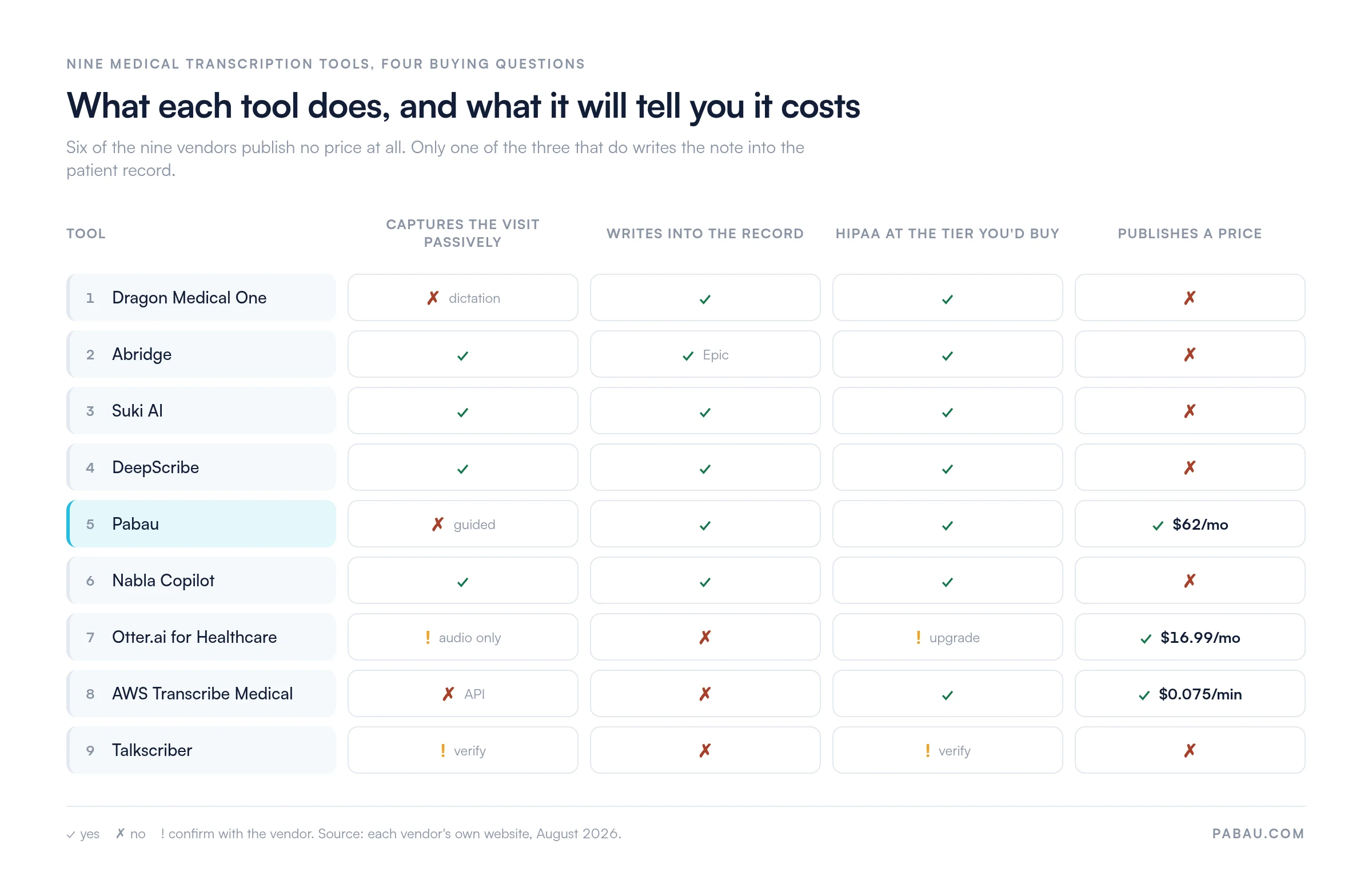
Two of those columns decide most shortlists. The first is whether the tool writes into the record you already keep. The second is whether the vendor will tell you a price at all.
Six of the nine vendors will not name a price without a sales call. Only one of the three that do publish one writes the note into the record. Figures from each vendor’s own website, August 2026.
That pattern is worth noticing before you book any demos. Six vendors quote only through sales, so a like-for-like cost comparison is impossible until you have sat through four or five of those calls.
How we ranked these nine tools
Every tool here was assessed against five criteria that practice managers and owners use at the buying stage.
Transcription accuracy and specialty vocabulary: Does the tool recognize clinical terminology, brand-name drugs, and specialty-specific phrasing without constant manual correction?
HIPAA compliance and BAA availability: Is the tool HIPAA-eligible at its standard tier, and does the vendor offer a Business Associate Agreement as standard?
EHR integration depth: Does transcription push directly into patient records inside the EHR, or does it require manual copying between systems?
Pricing transparency: Is per-user or per-minute pricing published, or does the vendor require a sales call before revealing costs?
Fit for clinic type: Is the tool designed for solo physicians, private practices, multi-specialty clinics, hospitals, or developer teams building custom workflows?
Ratings cited in each review come from verified Capterra and G2 review pages as of 2026. Every pricing figure comes from the vendor’s own website. Where a vendor publishes nothing, the review says so rather than repeating a third-party estimate.
The 9 best medical transcription software tools reviewed
Each review opens with a summary card carrying the verdict and the headline price. The sections below it run in the same order for every tool, and each review closes with pricing.
1. Dragon Medical One – Best for voice recognition accuracy
Rating4.4/5★★★★★Top pick
The bottom line
The most accurate dictation engine here, and the one hospital specialties still standardize on.
Who it’s for
Multi-specialty groups and hospital outpatient departments
Radiology, oncology and cardiology clinicians
Practices already running Epic, Cerner or Athenahealth
Teams with IT support for setup
PricingNo published pricingquoted per user, per month
No passive listening, the clinician has to dictate
Enterprise pricing is steep for a solo practice
Setup needs IT time and voice training
Dragon Medical One, developed by Nuance Communications (now part of Microsoft), is the longest-established name in medical voice recognition. It uses cloud-based speech processing with a user-specific voice profile that improves recognition accuracy over time. Nuance’s product documentation lists support for more than 80 medical specialties. That is the broadest specialty vocabulary in this comparison.
Dragon Medical One works as a dictation overlay. Physicians speak notes straight into the EHR field, and Dragon converts speech to structured text as they talk. It never listens passively, so the clinician has to dictate during or after the encounter. That buys precision on clinical phrasing and costs attention that an ambient tool would not ask for.
Key features
Specialty vocabulary: Covers 80+ medical specialties including cardiology, oncology, radiology, and primary care
Custom voice profile: Learns the individual clinician’s speech patterns and terminology preferences
Real-time dictation: Text appears immediately in the EHR field being populated
EHR integrations: Works with Epic, Cerner, Athenahealth, and dozens of additional EHR systems
Multi-device support: Consistent experience across desktop, tablet, and mobile
HIPAA compliant: BAA available; data processed in HIPAA-eligible cloud infrastructure
Where Dragon Medical One shines
Broadest specialty vocabulary: The 80+ specialty coverage makes it the default choice for hospital outpatient departments and multi-specialty group practices
Recognition accuracy: The personalized voice model is widely cited by reviewers as more accurate than newer ambient AI tools for complex clinical terminology
EHR compatibility depth: Integrations with major hospital EHR platforms go beyond simple API connections to full in-workflow dictation
Where Dragon Medical One falls short
High cost for solo practices: Enterprise pricing makes it difficult to justify for independent physicians or small practices
Requires active dictation: Not an ambient tool; clinicians must remember to dictate and cannot simply have the system listen during consultations
Setup complexity: Voice profile training and integration need IT involvement, plus EHR training time for the team
Customer reviews
Dragon Medical One holds 4.4 out of 5 on Capterra from 320 verified reviews. Reviewers praise voice recognition accuracy and EHR integration depth. Common criticisms focus on cost for smaller practices and the initial setup and training requirement.
Who Dragon Medical One is best for
Multi-specialty group practices and hospital outpatient departments running Epic, Cerner, or Athenahealth
Clinicians in highly technical specialties (radiology, oncology, cardiology) who need precise terminology recognition
Practices with dedicated IT support to manage setup and voice profile configuration
Pricing
Plan
Price
What you get
Per user, per month
No published pricing
Cloud dictation with specialty vocabularies
Enterprise agreement
Custom quote
EHR integration and deployment support
Nuance publishes no rate card for Dragon Medical One. Expect a per-user, per-month quote after a sales conversation, and budget for setup time.
2. Abridge – Best for hospital and health system use
Rating4.3/5★★★★★
The bottom line
The ambient scribe health systems buy when the note has to land inside Epic.
Who it’s for
Health systems and hospital outpatient departments
Passive capture, with the note ready for review after the visit
Refined alongside major health systems
What doesn’t
Enterprise contracts only, with no small-practice route
Few public reviews to weigh up
No self-service pricing
Abridge is an enterprise ambient AI documentation platform built for health systems and hospitals. It integrates natively with Epic, the dominant EHR in US hospital settings, and is designed for high-volume clinical environments. Abridge has also been rated Best in KLAS for ambient AI documentation in 2025 and 2026. That record is why it outranks tools here with far more public reviews.
Key features
Epic-native integration: Designed to work within Epic’s ambient documentation framework
Hospital-grade accuracy: Built and refined in partnership with major health systems
Ambient AI capture: Passively records patient encounters; note generated for physician review post-visit
Clinician-friendly interface: Designed for physician adoption within existing hospital workflows
HIPAA compliant: BAA available; enterprise-grade data security
Where Abridge shines
Epic integration quality: Among the strongest native Epic integrations of any ambient AI tool
Hospital-scale deployment: Designed for system-wide rollouts rather than individual physician adoption
Best in KLAS recognition: Rated top of its category by hospital technology buyers in 2025 and 2026
Where Abridge falls short
Not available for small practices: The enterprise contract model makes it inaccessible for independent or small group practices
Very limited public reviews: Fewer than 20 public reviews make independent validation difficult
No self-service pricing: Budget evaluation requires a full sales engagement
Customer reviews
Abridge holds 4.3 out of 5 on G2 from 15 reviews. Reviewers highlight the Epic integration and hospital-grade accuracy. The thin review count reflects enterprise-only availability rather than unhappy users.
Who Abridge is best for
Health systems and hospital outpatient departments running Epic
Physician organizations looking for system-wide ambient documentation deployment
Pricing
Plan
Price
What you get
Enterprise agreement
No published pricing
System-wide ambient documentation with Epic integration
Abridge sells through enterprise contracts only. There is no self-service tier, so a health system’s procurement team sets the price.
3. Suki AI – Best AI medical scribe for physicians
Rating4.6/5★★★★★
The bottom line
A physician-first ambient scribe that has the note drafted before the next patient arrives.
Who it’s for
Primary care, internal medicine and general surgery
Practices on Epic, Cerner or Athenahealth
Clinicians who want note generation and little else
Suki AI is a purpose-built AI medical scribe designed to reduce physician documentation time. It listens during patient encounters and generates structured SOAP notes automatically after each visit. Physicians review and approve the generated note before it writes to the EHR. According to Suki’s product documentation, the platform integrates with Epic, Cerner, and Athenahealth, and reviewers consistently cite fast note generation as its standout capability.
Key features
Ambient AI listening: Passively records patient encounters without clinician activation during the visit
SOAP note generation: Auto-structures clinical conversations into Subjective, Objective, Assessment, and Plan format
EHR sync: Notes push directly into Epic, Cerner, and Athenahealth upon physician approval
Voice commands: Supports in-session commands for adding specific instructions or coding flags
Physician review workflow: Generated notes are presented for review before EHR submission
Where Suki AI shines
Fast note generation: Reviewers consistently report significant reduction in post-visit documentation time
Clean physician review experience: The interface for reviewing and editing AI-generated notes is rated as intuitive by clinical users
EHR sync quality: Integration with major EHR platforms is direct and does not require manual copying
Where Suki AI falls short
Limited specialty coverage: Primary care and common hospital specialties are well supported, while niche specialties get thinner vocabulary
Pricing opacity: No public pricing makes budget planning difficult without engaging a sales process
Occasional recognition errors: Some reviewers note correction overhead for specialty-specific terminology
Customer reviews
Suki AI scores 4.6 out of 5 on Capterra from 85 verified reviews. Positive themes include time savings on documentation and the intuitive interface. Negative themes mention limited specialty depth relative to Dragon Medical One and occasional transcription errors.
Who Suki AI is best for
Physicians in primary care, internal medicine, or general surgery already using Epic, Cerner, or Athenahealth
Practices with enough patient volume to justify an enterprise ambient AI subscription
Clinicians who want a physician-first interface focused entirely on note generation rather than broader practice management
Pricing
Plan
Price
What you get
Per clinician subscription
No published pricing
Ambient capture with EHR sync and review workflow
Suki lists no prices publicly. A quote depends on your practice size and which EHR the notes have to reach.
4. DeepScribe – Best for ambient AI documentation
Rating4.7/5★★★★★
The bottom line
The least demanding tool during the visit itself, if it already talks to your EHR.
Fully passive capture, with no activation mid-visit
Holds up in long, complex consultations
Strong vocabulary across common specialties
What doesn’t
No published pricing
Accuracy needs a calibration period
Shorter EHR integration list than Dragon
DeepScribe is a dedicated ambient AI documentation platform. A smartphone in the consultation room captures the full patient-clinician conversation, and clinical notes AI then structures it into a complete note. Nothing has to be switched on mid-visit. The physician reviews and edits the drafted note after the encounter.
DeepScribe is consistently cited in this category for ambient capture accuracy. Its review base is smaller than Dragon Medical One’s, but the 4.7/5 Capterra rating from 45 reviewers reflects strong satisfaction among current users. The platform supports multiple specialties and integrates with several EHR systems, though the integration list is narrower than Nuance Dragon at this stage.
Key features
Fully passive ambient capture: No mid-consultation activation; the physician simply consults normally
Structured note generation: AI converts conversation audio into SOAP notes or custom formats
Specialty support: Vocabulary and note structure adapted for primary care, cardiology, and other common hospital specialties
Physician editing interface: Clean post-visit review and edit workflow before EHR submission
EHR integration: Connects to multiple EHR platforms; integration list expanding
HIPAA compliant: BAA available
Where DeepScribe shines
Passive documentation experience: Of all ambient AI tools tested, DeepScribe requires the least clinician attention during the visit itself
Accuracy for complex conversations: Reviewers note strong performance even in longer or more complex multi-issue consultations
Strong specialty support: Coverage of clinical vocabulary across common specialties is well rated
Where DeepScribe falls short
No public pricing: Budget evaluation requires engaging a sales process before knowing cost
Onboarding period: Some reviewers note a period of AI adaptation before accuracy reaches its peak
Narrower EHR integration list: Compared to Dragon Medical One, fewer EHR platforms are natively supported
Customer reviews
DeepScribe holds 4.7 out of 5 on Capterra from 45 reviews. Positive themes focus on ambient accuracy and reduced post-visit documentation burden. Negative themes cite the absence of public pricing and the initial calibration period.
Who DeepScribe is best for
Physicians who want the most passive documentation experience possible, with minimal interaction required during visits
Practices already using an EHR that DeepScribe integrates with natively
Group practices in primary care, cardiology, or other common hospital specialties
Pricing
Plan
Price
What you get
Per clinician subscription
No published pricing
Passive capture with post-visit note generation
DeepScribe quotes by practice or health system size. Nothing is published, so budgeting starts with a sales call.
Pro Tip
Before shortlisting any AI transcription tool, ask the vendor for a business associate agreement and a sample HIPAA attestation. Get that confirmed in writing before any clinical data is processed. HHS puts the responsibility on the covered entity, so the agreement has to be signed before you share data.
5. Pabau – Best for documentation built into practice management
Rating4.7/5★★★★★
The bottom line
The only tool here that publishes a price and writes the note into the record it came from.
Notes land in the client record, with no sync step
Every subscription includes every feature
Procedure templates for aesthetic and cosmetic work
What doesn’t
Guided capture rather than passive listening
Narrower specialty vocabulary than Dragon
Scribe usage runs on credits you top up
Pabau is an all-in-one practice management platform built for aesthetic, medical and multi-specialty private practices. It is the one entry here that is not a dedicated transcription product. Pabau Scribe, our AI scribe, sits in the same system as scheduling, billing, client records, consent forms and treatment notes.
Clinicians work in one platform from check-in to checkout. The note is written inside the consultation workflow, so nothing has to sync back from a disconnected tool.
That bundling is also why Pabau sits fifth here rather than first. On raw transcription depth the four specialists above it go further. Capture is guided rather than passive, and the specialty vocabulary is narrower than Dragon’s. What Pabau wins on is the paperwork around the note.
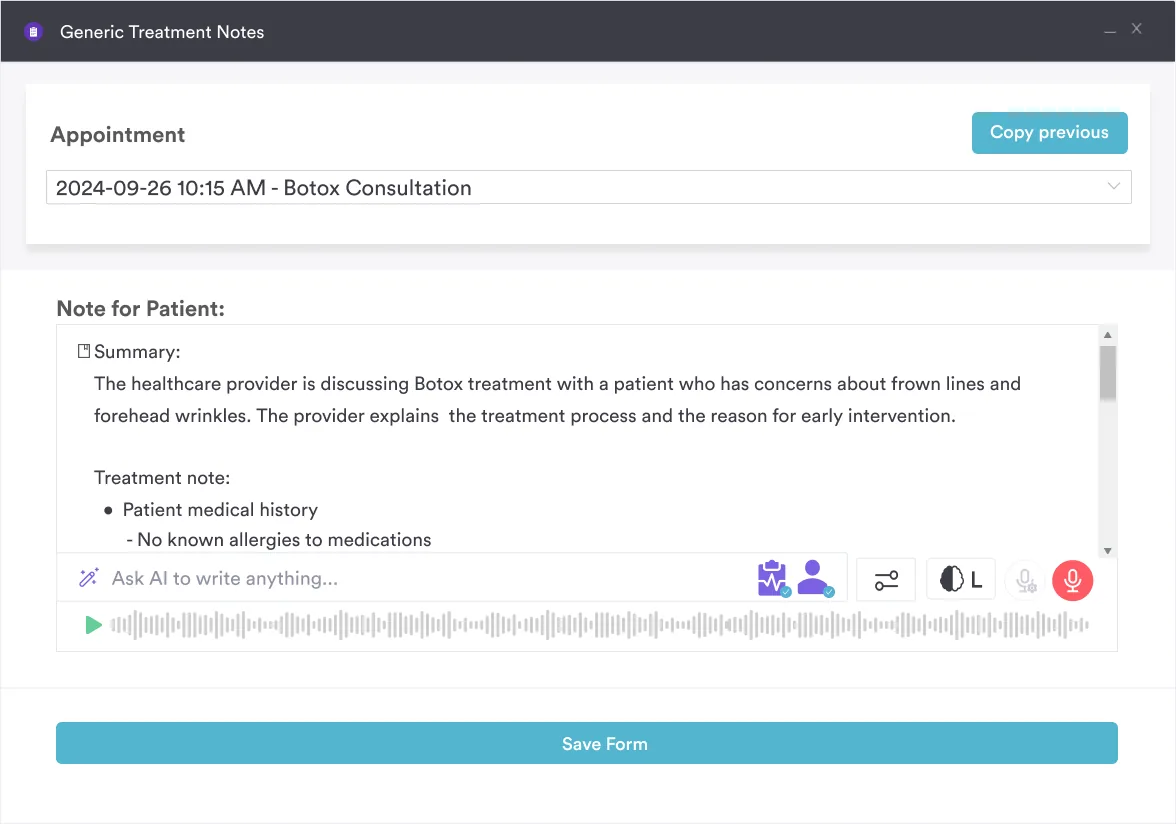
Pabau Scribe drafts the treatment note inside the client record, so nothing gets copied across from a separate transcription tool.
This matters most for practices already paying for practice management software. Pabau Scribe records the consultation, structures the output into a clinical note, and stores it in the client record. Adding a second per-seat transcription license on top of an existing platform rarely makes the maths work.
Procedure-specific templates for aesthetic medicine, dermatology and cosmetic treatments are built in. Practices outside those specialties run the same workflows across primary care, physical therapy, mental health, IV therapy and weight management.
Key features
Pabau Scribe: Records the consultation and structures the output into a chart note automatically
Procedure-specific templates: Pre-built for aesthetic medicine, dermatology, and cosmetic treatments
Native client record integration: Notes write directly into the patient record with no manual sync required
Digital forms and consent: Intake, consent, and medical history capture in the same platform
Automated pre- and post-care instructions: Linked to treatment notes for follow-up consistency
Multi-location management: Single dashboard for practices running more than one site
HIPAA and GDPR compliant: Business associate agreement available, with data security built into the core platform
Scheduling, billing, and payments: Fully integrated alongside documentation in one subscription
Where Pabau shines
No integration work: Scheduling, billing, records and AI documentation live in one platform, so nobody has to stitch a transcription tool into an existing EHR
Aesthetic and cosmetic specialty depth: Procedure-specific templates, injection plotting, and before-and-after photo management are purpose-built for the specialty most standalone tools skip
One subscription, every feature: AI documentation is part of the platform rather than a separate license, with Scribe usage running on credits you top up
Built for private practice workflows: From online booking through consultation documentation to billing, the full patient journey is handled in one environment
Strong compliance foundation: HIPAA and GDPR compliance designed in from the start, with security documentation available on request
Where Pabau falls short
Specialty breadth: Dragon Medical One covers 80+ hospital specialties, while Pabau’s depth is strongest in aesthetic and cosmetic medicine
No passive listening: Capture is guided and procedure-centric rather than fully ambient, as it is with DeepScribe or Abridge
Learning curve for new teams: Reviewers note an onboarding period, which is why setup runs with a dedicated client coordinator rather than a self-serve signup
Customer reviews
According to Capterra reviewers, Pabau scores 4.7 out of 5 from over 600 verified reviews. Positive themes center on having scheduling, notes, billing and follow-ups in one place, and on the fit for aesthetic practices. Critical comments mention the learning curve for new teams and requests for more reporting options.
Who Pabau is best for
Med spas, aesthetic clinics and dermatology practices that want documentation built into their practice management workflow
Private practices running scheduling, billing, and records in a single system who want AI documentation included rather than added on
Multi-specialty and allied health teams working across primary care, physical therapy, speech therapy and wellness services
Practice owners adding up total software cost who would rather not pay separately for transcription, EHR, scheduling and billing
Pricing
Plan / Tier
Price
Details
One user
From $62/month
Full platform, every feature included
Team or multi-location
Scales with users and locations
Same feature set at every size
Annual billing
Save 20%
Paid yearly instead of monthly
Those figures come from Pabau’s pricing page. Pricing scales with users and locations rather than locking features behind a tier, and Scribe usage runs on credits you top up.
6. Nabla Copilot – Best for AI-generated clinical notes
Rating4.5/5★★★★★
The bottom line
A privacy-forward ambient scribe that suits smaller ambulatory teams more than large systems.
Nabla Copilot is a privacy-focused AI clinical documentation tool built specifically for ambulatory and primary care physicians. It records consultations, generates structured SOAP notes, and presents them for physician review. Nabla leans on data privacy, and positions the tool for practices where data residency and EHR security weigh as heavily as transcription accuracy.
Key features
Ambient note generation: Listens during consultations and generates structured clinical notes
Privacy-first architecture: Designed with data minimization principles and minimal audio retention
Clean note structure: Reviewers rate the format and organization of generated notes highly
EHR integration: Integration list is growing; currently supports a range of ambulatory platforms
HIPAA compliant: BAA available
Where Nabla Copilot shines
Privacy emphasis: Well suited to practices with heightened data governance requirements
Note quality: Reviewers consistently praise the structure and clarity of generated notes
Primary care fit: Works well for general practice and ambulatory settings with high-volume daily consultations
Where Nabla Copilot falls short
Smaller review base: Fewer than 35 public reviews across platforms, so patterns are harder to read
EHR integration breadth: Integration list is growing but narrower than Dragon Medical One or Suki AI at this stage
Fewer controls at scale: Better suited to smaller and mid-size practices than large health systems
Customer reviews
Nabla Copilot scores 4.5 out of 5 on Capterra from 30 reviews. Users highlight clean UI, strong note organization, and privacy-forward design as standout strengths.
Who Nabla Copilot is best for
Primary care and ambulatory physicians who prioritize data governance and privacy
Practices not yet heavily invested in a single EHR who want a flexible documentation layer
Pricing
Plan
Price
What you get
Per clinician subscription
No published pricing
Ambient note generation with privacy controls
Nabla publishes no rates. Pricing follows your practice size and specialty, so ask for a written quote.
7. Otter.ai for Healthcare – Best budget-friendly option
Rating4.5/5★★★★★
The bottom line
A cheap way to turn audio into text, and the furthest thing here from a clinical note.
Otter.ai is a general-purpose AI transcription tool with a healthcare page aimed at clinicians who want a cheap route into voice-to-text. It was not built for medicine, and the limits show. There is no specialty medical vocabulary, no native AI SOAP notes, and HIPAA coverage arrives only with a plan upgrade. On a tight budget it still earns a look. For clinician-grade accuracy or structured EHR integration, the tools above it are the answer.
Key features
AI transcription: Real-time and post-meeting transcription of audio
Speaker identification: Distinguishes between multiple speakers in a conversation
Summary generation: Creates a summary of key points from a recorded session
HIPAA eligibility: Available on Business plan only; not on lower tiers
Limited EHR integration: No native medical EHR integrations; text is exported manually
Where Otter.ai shines
Accessible price point: The lowest-cost entry in this comparison for practices that want plain voice-to-text
Easy to get started: No IT setup required; clinicians can begin recording immediately
Where Otter.ai falls short
Not a clinical tool: Lacks medical vocabulary, SOAP note structure, and EHR integration that clinical documentation requires
HIPAA requires a plan upgrade: Using Otter.ai on any tier below Business with patient data is a HIPAA risk
Manual export to EHR: Transcribed text must be copied manually into the patient record
Customer reviews
Otter.ai scores 4.5 out of 5 on Capterra from over 1,200 reviews, which reflects its broader use as a general transcription tool. Healthcare feedback praises the price and returns again to the missing clinical features.
Who Otter.ai is best for
Practitioners who need plain transcription for internal notes rather than patient-facing clinical documentation
Practices on the tightest possible budgets exploring voice-to-text before committing to a clinical-grade tool
Pricing
Plan
Price
What you get
Basic
Free
Limited monthly transcription minutes
Pro
$16.99/month
More minutes, or $8.33/month billed annually
Business
$30/month
The tier that covers HIPAA, or $20/month billed annually
Those figures come from Otter’s own pricing page. The Business tier is the one to budget for, because it is the tier that covers HIPAA.
8. AWS Transcribe Medical – Best for developer and enterprise integration
Rating4.2/5★★★★★
The bottom line
Transcription infrastructure for a build, not software a clinician opens on Monday morning.
Who it’s for
Health technology and product teams
Telehealth platforms adding transcription
Enterprise systems with developers in house
Workloads that spike and settle again
Pricing$0.075 per minutestandard rate, varies by region
AWS Transcribe Medical is Amazon’s HIPAA-eligible medical transcription API. It is cloud infrastructure rather than a finished tool. Developers and health technology teams use it to build transcription into custom applications, telehealth platforms or SaaS EHR products. With development resources in house, the pay-per-minute pricing and documented API are genuinely useful. Without them, no clinician can open this and start working.
Key features
API-first design: Transcription as a service; output structured for programmatic use
Medical vocabulary: Trained on clinical terminology, drug names, and medical phrasing
Pay-per-minute pricing: No monthly subscription; costs scale with actual usage
HIPAA eligible: Listed on AWS’s HIPAA-eligible services list
Scalability: Handles large volumes of transcription without performance degradation
Pay-per-use economics: No minimum commitment; cost matches actual volume
Developer ecosystem: Well-documented API with AWS’s full support infrastructure behind it
Where AWS Transcribe Medical falls short
No clinical workflow features: It is raw transcription infrastructure, not a documentation tool
Technical barrier: Requires developer resources to configure, deploy, and maintain
Not suitable for direct clinical use: A clinic without technical staff cannot use this without a custom build or third-party implementation
Customer reviews
AWS Transcribe Medical holds 4.2 out of 5 on G2 from 25 reviews. Reviewers are primarily developers and health IT architects. Positive themes focus on scalability and API quality; negative themes note the technical barrier for non-developer users.
Who AWS Transcribe Medical is best for
Health technology teams building custom transcription workflows or telehealth applications
Enterprise health systems with in-house development resources needing a scalable transcription backend
Pricing
Plan
Price
What you get
Free tier
60 minutes per month
First 12 months of use only
Standard transcription
$0.075 per minute
Batch or streaming, billed by the second
AWS bills by the second and rates shift by region. Model your expected monthly minutes before you commit to a build.
9. Talkscriber – Best for offline and hybrid transcription
Rating4.5/5★★★★★
The bottom line
A voice platform with private deployment, and the one entry here you have to vet yourself.
Talkscriber is a voice AI platform that supports offline and hybrid workflows, with cloud, VPC or private deployment. For practices on unreliable internet, or clinicians capturing notes where there is no cloud access, local processing solves a problem the cloud-first tools cannot. Two caveats matter. It carries no verified public reviews, and its current marketing points at regulated sales conversations rather than clinical documentation. Confirm HIPAA coverage with the vendor before any patient data goes near it.
Key features
Offline transcription: Processes audio locally without requiring a cloud connection
Hybrid workflow support: Syncs transcriptions when connectivity is available
Medical vocabulary: Supports medical terminology, though specialty depth needs checking with the vendor
Where Talkscriber shines
Offline capability: The only tool in this comparison that processes audio without a cloud connection
Hybrid workflows: Suitable for mobile or field-based clinicians who cannot rely on continuous internet access
Where Talkscriber falls short
Very limited public reviews: No verified G2 or Capterra ratings at this time; independent validation is difficult
HIPAA compliance unclear from public documentation: Verify with the vendor before using with protected health information
Niche positioning: Does not compete on feature breadth, EHR integration or AI accuracy with the tools above it
Customer reviews
No verified public reviews are available for Talkscriber on Capterra, Trustpilot, or G2 at the time of writing. Community feedback from clinical forums highlights the offline capability as a genuine differentiator for rural or remote practice settings.
Who Talkscriber is best for
Clinicians practicing in rural, remote, or low-connectivity settings where cloud-first tools are unreliable
Mobile health teams or visiting practitioners who need transcription capability without consistent internet access
Pricing
Plan
Price
What you get
All plans
No published pricing
Cloud, VPC or private deployment
Talkscriber publishes no rates and asks buyers to book a demo. Ask about HIPAA coverage in the same conversation.
Key features to look for in medical transcription software
Which criteria matter most depends on your practice type. The table below sets out what to check, and why each one decides the purchase.
Feature
Why it matters
What to look for
HIPAA compliance
Processing patient audio without a BAA is a HIPAA violation
BAA offered at your intended plan tier, not only at enterprise level
EHR integration
Manual copy-paste between transcription tool and EHR adds time and error risk
Native or certified integration with your existing EHR, not just API access
Specialty vocabulary
General speech-to-text tools misrecognize drug names and clinical terminology
Specialty-specific vocabulary lists, ideally trained on your specialty
Ambient vs active dictation
Ambient tools listen passively; active tools require the clinician to dictate
Match the interaction model to how your clinicians actually work
Pricing model
Per-user, per-minute, and bundled pricing have very different cost curves
Published pricing at your expected volume; avoid tools requiring a sales call just to get a number
Integration with practice management
A standalone transcription tool adds a second system to manage, sync, and pay for
Consider whether a platform that bundles transcription with scheduling and billing reduces total cost
Ambient AI or traditional dictation: Which fits your practice?
The choice between ambient documentation and traditional dictation is the biggest decision in this category. Ambient tools are what most buyers now mean by an AI medical scribe. Both approaches cut the time a note takes, and both change how the visit itself feels.
Factor
AI ambient documentation
Traditional dictation
Clinician effort during visit
Minimal: consult normally, AI captures the conversation
Active: clinician must dictate notes verbally
Post-visit editing
Required: physician reviews AI-generated note before submission
Minimal: speech-to-text is more literal; less AI interpretation
Accuracy type
Conversational context; may miss specific terminology in noisy environments
High for deliberate dictation; degrades with fast or accented speech
Setup time
Moderate: AI calibration period of 1-4 weeks typically reported
Higher: voice profile training and EHR integration configuration required
Best fit
High-volume ambulatory practices, primary care, hospital outpatient
Radiology, pathology, or specialties needing precise word-for-word documentation
Ambient tools are winning primary care and multi-specialty workflows, where clinicians cannot stop to dictate between patients. The benefits for physicians go past time saved, since a lighter documentation load is linked in published research to lower burnout. Whatever the tool drafts still has to match the format you file, whether that is a SOAP note, a progress note or a specialty form.
Whichever model you pick, the note is only one part of the daily admin load. Pabau’s AI agents answer out-of-hours calls and rebook no-shows, with staff approving each action before the patient sees it.
How much does transcription software cost?
Three of the nine publish a price: Pabau from $104 a month, Otter.ai from $16.99 a month, and AWS Transcribe Medical at $0.075 a minute. Dragon Medical One, Abridge, Suki AI, DeepScribe and Nabla Copilot all want a sales conversation first. That makes a straight cost comparison across the category impossible without a week of calls.
Tool
Pricing model
Free trial available?
Dragon Medical One
Enterprise per user, per month; contact for a quote
Trial via sales
Abridge
Enterprise contracts only
No self-service trial
Suki AI
Enterprise pricing; contact for a quote
Trial via sales
DeepScribe
Enterprise pricing; contact for a quote
Trial via sales
Pabau
From $104/month, with AI documentation included
Demo plus structured onboarding
Nabla Copilot
Contact for pricing
Contact vendor
Otter.ai
Free tier; Pro $16.99/month; Business $30/month for HIPAA
Free tier available
AWS Transcribe Medical
$0.075 per minute, billed by the second
AWS free tier applies
Talkscriber
Contact for pricing
Contact vendor
For practices weighing total cost, a bundled platform changes the sums. One plan covers the practice management platform and the documentation, instead of two subscriptions per user. Add up what you already pay across every system before you assume a standalone transcription tool is the cheaper route.
How to choose the right tool for your practice
Four variables decide it: practice type, existing EHR, documentation workflow, and total software budget. Work through the steps below before you request demos or quotes.
Identify your EHR first. At hospital scale on Epic, Cerner or Athenahealth, Dragon Medical One and Suki AI integrate most deeply. A private practice or GP practice without a legacy hospital EHR can use a bundled platform instead, and skip the separate EHR.
Decide between ambient and active dictation. Ambient AI (DeepScribe, Suki AI, Abridge) is best for high-volume ambulatory settings where clinicians cannot stop to dictate during visits. Active dictation (Dragon Medical One) is best for specialties where precise word-for-word accuracy matters more than passive capture.
Verify HIPAA coverage at the tier you will buy. Do not assume every tier of every tool is HIPAA eligible. Confirm the business associate agreement and the exact plan that covers it before any patient data moves.
Calculate total cost across tools. Add up what you currently pay for practice management, EHR, and any existing documentation tools. A bundled platform that includes transcription may cost less in aggregate than a standalone transcription subscription added to existing tools.
Match the vocabulary to your specialty. Dragon Medical One leads on hospital specialty breadth, and Pabau on aesthetic and private practice workflows. A mental health practice writing PIRP notes needs different terms from a dermatology practice. Test with your most complex terminology before you commit.
Pro Tip
Request a live transcription accuracy test with terminology from your specific specialty before signing any contract. Ask the vendor to transcribe five minutes of typical consultation audio from your practice type, then count the corrections needed. This single test reveals more than any marketing claim about accuracy percentages.
How Pabau handles consultation notes without a second subscription
Pabau Scribe, our AI scribe, sits inside the practice management platform itself. It records the consultation, structures the output into a chart note, and files it in the client record. For aesthetic, dermatology and cosmetic work, procedure-specific templates are already there.
The difference from a standalone tool is where the note lands. Dictate into Dragon Medical One or Suki AI and the text syncs across to a separate EHR. In Pabau, the note is created inside the system that already holds the appointment, the consent form, the treatment photos and the invoice. There is no sync step, because there is no second system.
HIPAA compliance is built into the core platform, and a business associate agreement is available. UK practices get GDPR compliance alongside it. Any software handling electronic protected health information has to meet the HIPAA Security Rule, per the Department of Health and Human Services.
For med spas and skin practices, the same record holds injection plotting, before-and-after photos and consent forms beside the note. Aesthetic practices such as Intrigue Cosmetic Clinic run their client records, notes and photos in that one system. For an owner, that shortens the admin tail, so the note is finished when the patient leaves.
Get the note written where the record already lives
Pabau Scribe drafts the consultation note inside the client record, beside scheduling, billing and consent forms. See what your team stops copying between systems.
The right choice here comes down to what you are optimizing for. If that is recognition accuracy across hospital specialties, Dragon Medical One is still the benchmark. If it is a passive scribe running inside Epic at system scale, Abridge earns its place at number two.
If documentation is only one part of the admin you are trying to shrink, a bundled platform makes more sense than a fifth subscription. That is the trade-off worth remembering. The specialists transcribe better, and the platform removes the work that surrounds the note.
Whatever you shortlist, ask for a business associate agreement and a written price before you commit. Six of these nine vendors quote only through sales, so start those conversations early. Book a demo to see how Pabau writes the consultation note straight into the client record.
Continue your research
Looking for software built around clinical notes?Best clinical notes software compares platforms addressing the documentation time burden on providers.
Need a refresher on structured assessment order?Gastrointestinal assessment guide walks nurses through the IAPP sequence and the diagnoses it can miss.
Upgrading intake alongside your documentation tools?Best patient intake software compares seven platforms for practices of different sizes and specialties.
Need a compliant drug test form on hand?5-panel drug test form is a free DOT-compliant template covering consent, chain of custody, and results.
Medical transcription software converts spoken clinical notes, consultations or physician dictation into structured text for the patient record. Active dictation tools have the clinician speak the note directly. Ambient tools capture the whole patient-clinician conversation and draft the note afterwards. The category runs from standalone tools like Dragon Medical One to practice management platforms like Pabau that include a scribe.
What is the best medical transcription software for small practices?
Pabau is the strongest fit for small private practices, because AI documentation is included in the platform subscription rather than licensed per user. Otter.ai covers practices that need plain transcription at minimal cost, though it has no clinical vocabulary and no SOAP structure. Dragon Medical One is more accurate but priced for enterprise budgets, which is hard to justify for a solo practice.
Is medical transcription software HIPAA compliant?
Most dedicated medical transcription tools are HIPAA compliant, but compliance is not automatic at every plan tier. Dragon Medical One, Suki AI, DeepScribe, Abridge, and AWS Transcribe Medical all publish HIPAA eligibility documentation and offer Business Associate Agreements. Otter.ai requires a Business plan upgrade before it becomes HIPAA eligible. Talkscriber’s compliance status should be confirmed directly with the vendor. Per HHS guidance, a signed BAA must be in place before any tool processes protected health information.
What is the difference between medical dictation and medical transcription software?
Medical dictation software has the clinician speak notes into the system, and converts speech to text as they talk. Medical transcription is the wider process of turning recorded audio into written clinical documents, which once meant human transcriptionists. The two terms now get used interchangeably for AI tools. Today the distinction that matters is between active dictation tools like Dragon Medical One and ambient tools like DeepScribe, Suki AI and Abridge.
What is ambient AI medical documentation?
Ambient AI medical documentation means tools that listen to the patient-clinician conversation without the physician dictating or switching anything on. The AI captures the encounter, then structures it into a clinical note, usually in SOAP format, for review after the appointment. DeepScribe, Suki AI and Abridge are the best-known ambient tools in the category. The point is to keep the clinician looking at the patient rather than the keyboard.
How much does medical transcription software cost?
Only three of the nine publish a price. Pabau starts at $104 a month with AI documentation included. Otter.ai charges $16.99 a month for Pro, and $30 a month for the Business tier that covers HIPAA. AWS Transcribe Medical bills $0.075 per minute of audio. Dragon Medical One, Abridge, Suki AI, DeepScribe and Nabla Copilot all quote through sales rather than publishing rates.
Can AI replace medical transcriptionists?
AI tools now handle the transcription and first-draft structuring that human transcriptionists used to do. Physician review of every AI-drafted note is still standard, and still required for clinical accuracy. The manual work shrinks, but the clinical judgment before a note enters the record does not. AHIMA, the American Health Information Management Association, supports AI-assisted transcription alongside documentation accuracy standards.