HIPAA compliant electronic signature: Pabau vs DocuSign
A HIPAA compliant electronic signature is a signing process that protects electr...

Last Updated: Nov 5, 2026
An AI medical receptionist is software that answers patient calls and messages, books appointments, sends reminders and collects intake forms without a staff member. It comes in two forms.
Standalone voice agents answer a ringing phone and connect to your EHR through an integration. MedReception.ai, Freed, OmniMD and Zocdoc’s Zo all work this way. Platform-native agents live inside your practice software instead. Pabau, the all-in-one practice management system we build, offers one as its AI Receptionist, part of its AI agents for healthcare.
Pick a standalone medical AI receptionist if live calls swamp your front desk all day. Pick a platform-native one if patients slip away through missed follow-ups, unrebooked no-shows and unsigned forms. Published standalone plans run from $149 to $1,495 a month on the vendors’ own pricing pages.

An AI medical receptionist answers calls, books appointments, sends reminders and collects intake forms without a staff member, working from your live schedule.
Standalone voice agents are built to answer live calls at any hour, while Pabau’s AI Receptionist answers out-of-hours calls and works from the patient record.
Run the four-bucket call audit on your last 20 calls before you buy, because the fullest bucket tells you which tool type you need.
Published standalone plans run from $149 to $1,495 a month, and EHR scheduling can cost extra on the cheapest tiers.
Ask any vendor for a signed Business Associate Agreement (BAA) before its AI touches protected health information.
An AI medical receptionist answers, books, reminds and collects intake without a staff member, working from your practice’s live schedule and booking rules.
In practice, it takes the repetitive half of the medical office receptionist’s day. That means the hold queue, the “can I move my appointment?” calls and the form chasing. Your team keeps the conversations that need judgment. If you are weighing it against wider automation, our roundup of AI practice management tools covers the rest of the stack.
Deciding what to automate first is a separate question. Our guide to automating practice workflows takes reminders first, then intake, then billing.
Most products in the category cover that list. The differences sit in where the data lands afterward, and in how the tool hands off a call it should not handle.
Standalone AI receptionists are voice-first tools that bolt onto your EHR, while Pabau’s AI Receptionist runs inside Pabau and works from the patient record.
That split decides what each one can do without a person. The table compares them on the capabilities practice managers ask about first.
| Capability | Standalone AI receptionist | Pabau AI Receptionist |
|---|---|---|
| Answers live calls by voice | Yes, the core product | Yes, out-of-hours calls, with booking handled live on the call |
| Missed-call text-back | Varies by vendor | Yes, and it tells callers when you reopen |
| Books into the calendar | Yes, through the EHR or PMS integration | Yes, natively in the Pabau calendar |
| Works from the patient record | Only the fields the integration exposes | Yes, the same record the clinician uses |
| Form chasing | Some tools, often as a paid workflow | Yes, chases incomplete forms before the appointment |
| Aftercare | Rarely included | Yes, sends your aftercare where it never went out |
| No-show rebooking | Reminders are common, rebooking varies | Yes, emails recent no-shows the next available dates |
| Human approval of actions | Usually scripted in advance, without draft review | Every action drafted for approval until you set a skill to auto-approve |
| BAA | Ask each vendor, and check it covers the voice and AI sub-processors | One vendor relationship to review under HIPAA |
| Integration needed | Yes, an API or connector to your EHR | No, scheduling, forms and records share one database |
Pabau’s phone skill is built around the hours your front desk can’t cover: evenings, weekends and overflow on a busy day. A practice whose lines ring nonstop every weekday may still want a dedicated voice agent alongside it.
The four-bucket call audit sorts your last 20 front-desk calls into four risk groups, and the biggest group shows which AI receptionist you need.
It answers the “is this worth it?” question with your own calls rather than a vendor’s demo. Practice owners who have already bought one give the same advice in practice-owner forums: audit recent calls before you sign.
They judge the tool on recovered empty slots, not on messages answered. In practices we onboard, the call log usually turns up more follow-up work than the team expected.
The matrix below maps each bucket to the tool, or the person, that should own it.
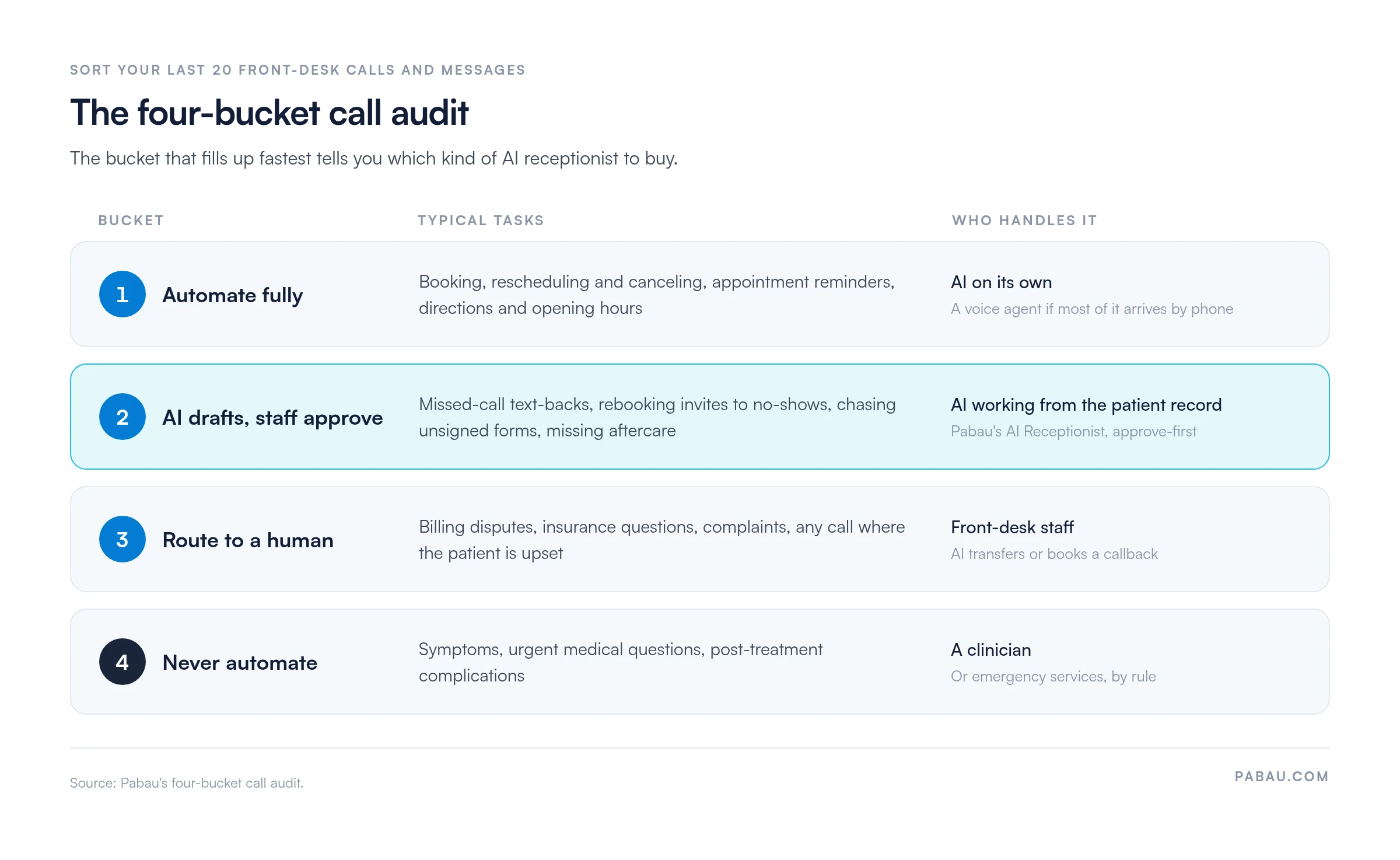
Voice AI for healthcare answers routine patient calls at any hour and passes every other call to a person, through rules you set before launch.
Write those rules down before go-live, and test each one with a staff member playing the patient.
Pabau’s AI Receptionist answers out-of-hours calls and books, reschedules or cancels live on the call, so nobody returns the call next morning. If a call still goes unanswered, the AI Receptionist texts the caller back. Patients can also book themselves at any hour through Pabau’s online booking.
Standalone phone tools usually keep call logs and transcripts in their own portal until they sync. With Pabau, a booking made at midnight is on the morning schedule with its intake answers attached.
Reminders cut no-shows, but recovery is what refills the slot. A useful AI receptionist does both.
Pabau’s automated workflows tie the reminder sequence to the appointment itself. A booking triggers a confirmation, a pre-visit form and reminders at the intervals you set. A common pattern is a 48-hour SMS, a 24-hour email and a same-day reminder.
Recovery is the step generic reminder tools skip. Pabau’s AI Receptionist handles it in four ways:
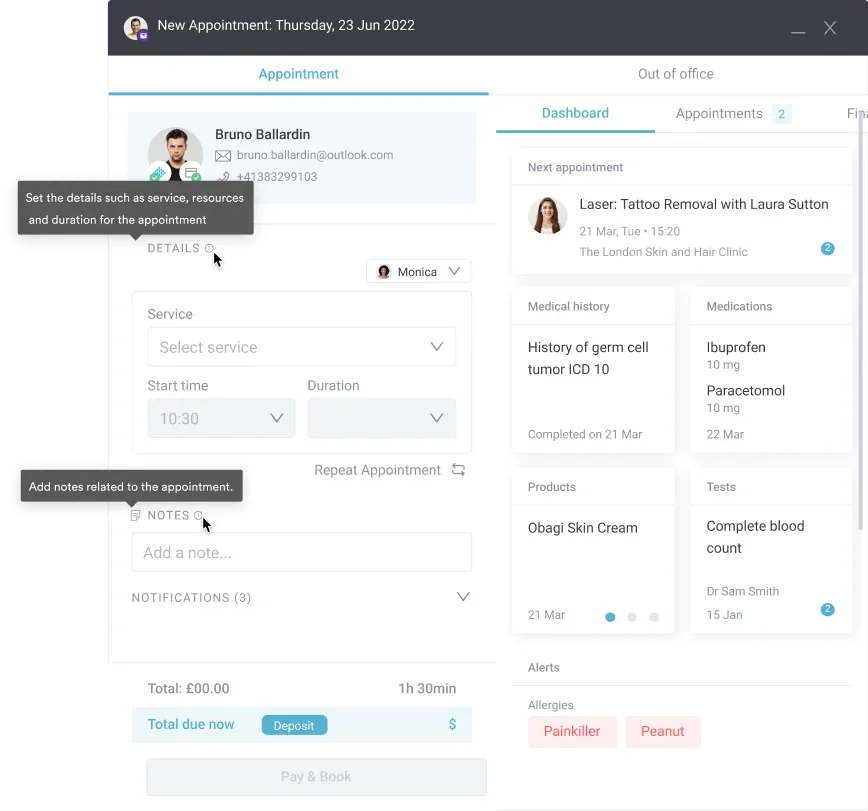
Standalone tools send reminders well too. The catch is the trigger, because a standalone reminder depends on your EHR calendar syncing to the AI tool. When that sync fails, reminders go out for slots that no longer exist.
Every AI receptionist can send intake forms. What varies is where the answers end up, and who chases the missing ones.
With Pabau’s digital intake forms, patients complete medical history, consent and pre-visit questions before they arrive. The answers land in the patient record the clinician opens. Pabau’s AI Receptionist then chases forms still incomplete shortly before the appointment. It re-checks every hour until the form is done or the visit starts.
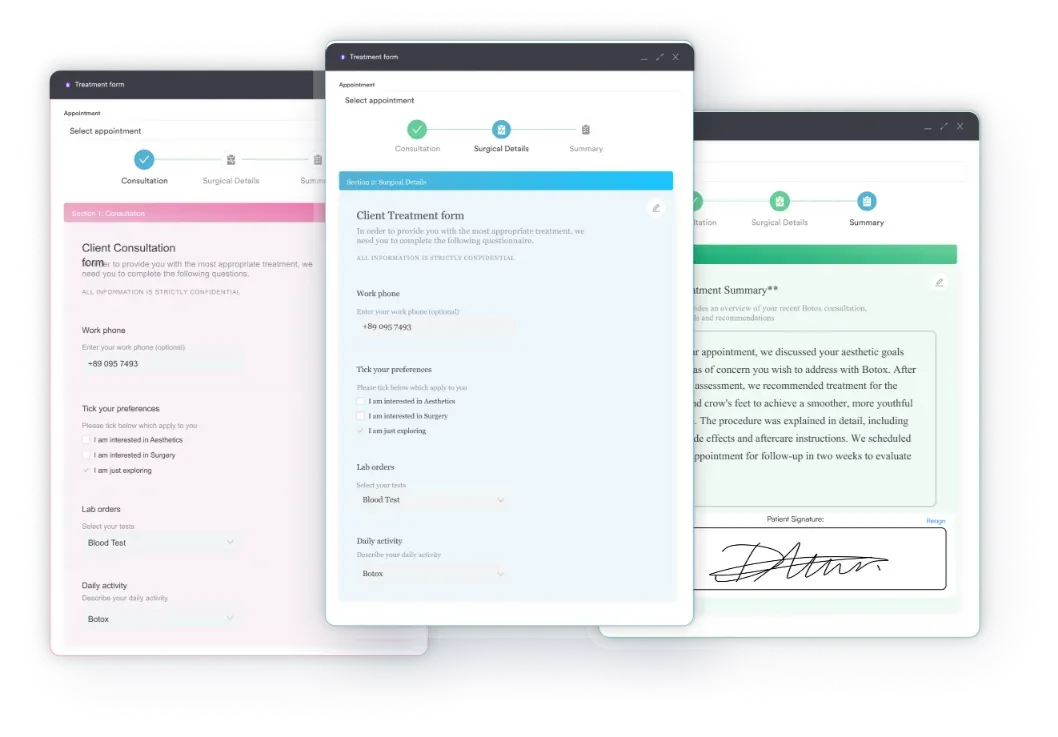
With a standalone AI receptionist, intake answers often sit in the vendor’s portal until they sync or someone moves them by hand. A patient who fills in forms at 8 PM may not be in the clinician’s record by a 9 AM appointment.
A standalone AI receptionist is only as useful as what it writes back to your EHR, so ask vendors which fields sync.
The table shows what typically moves under each approach. Treat the standalone column as a list of questions for the vendor’s demo.
| Data | Standalone tool via API | Platform-native (Pabau) |
|---|---|---|
| Appointments | Written to the EHR calendar, if the integration supports your EHR | Same calendar, no sync step |
| Patient demographics | Read or created, depending on the connector | Same patient record |
| Intake answers | Often held in the vendor portal, then pushed or exported | Saved straight to the patient record |
| Consent forms | Usually out of scope | Signed forms stored against the patient |
| Payments and deposits | Rarely handled | Invoices and deposits in the same account |
| Communication log | Call logs and transcripts in the vendor’s portal | Messages on the patient record, with an audit row for each agent action |
Integration also costs time and money. OmniMD’s own website quotes 2 to 6 weeks of implementation, depending on practice size. MedReception.ai’s self-serve Studio plan charges $1,500 one time plus $99 a month to add EMR scheduling.
Pabau’s scheduling, forms and records share one database, so there is no connector to maintain. Tools outside Pabau connect through its native integrations, Zapier, Make or the open API. When a sync does break between two vendors, you also deal with two support teams instead of one.
Choosing a HIPAA-compliant AI receptionist starts with a Business Associate Agreement (BAA), because any tool handling calls, schedules or intake is handling protected health information.
Protected health information, known as PHI, includes call recordings and transcripts. HIPAA has no certification body, so “HIPAA certified” is a marketing phrase. What protects your practice is the BAA plus documented safeguards under the HIPAA Security Rule. Check each of these before go-live:
Ask about contract terms on the same call: the minimum term, the cancellation notice and what happens to your recordings when you leave. For a wider shortlist, see our guide to HIPAA-compliant AI tools.
Pabau’s HIPAA compliance documentation covers encryption, access controls and audit logs. Each action an AI agent takes in Pabau carries an audit row showing what it did, when, to whom and why.
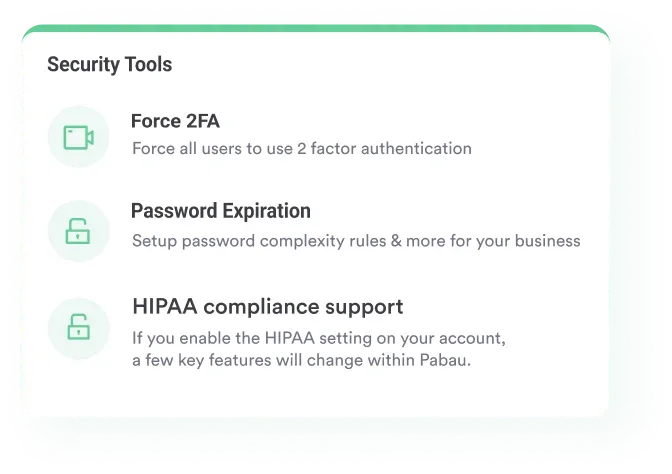
Running a standalone AI receptionist beside a separate EHR means PHI flows through two systems and two BAAs. Keeping it inside one system boundary simplifies your compliance documentation and your breach response plan.
An AI medical receptionist costs $149 to $1,495 a month on vendors’ published plans, against about $3,170 a month in base pay for one receptionist.
Front desk plans from Freed start at $149 a month. MedReception.ai charges $299 a month self-serve, or $495 to $1,495 a month for managed plans with 500 to 2,000 included minutes. Overage on its managed plans runs $0.95 to $1.25 per minute.
The US Bureau of Labor Statistics puts median receptionist pay at $38,010 a year, or $18.27 an hour, in May 2025. That figure is before benefits and payroll tax.
| Option | Typical pricing model | Published price | Source |
|---|---|---|---|
| Standalone voice agent, managed | Monthly plan with included minutes, plus overage | $495 to $1,495 a month, plus $0.95 to $1.25 per extra minute | MedReception.ai |
| Standalone voice agent, self-serve | Flat monthly fee, and you configure it | $299 a month with no setup fee, plus $1,500 one time and $99 a month for EMR scheduling | MedReception.ai |
| AI front desk product | Monthly subscription | From $149 a month | Freed |
| Pay-per-outcome voice agent | Charged per appointment the agent manages, with no upfront fee | Pricing on request | Zocdoc (Zo) |
| EHR-bundled AI front desk | Part of a custom EHR quote | Pricing on request | OmniMD |
| In-house medical front desk receptionist | Salary plus benefits | $38,010 a year median, or $18.27 an hour, before benefits | US BLS, May 2025 |
| Pabau AI Receptionist | Engage Plus add-on, per location, unlimited users, with AI call minutes and messages on credits | $130 a month per location | pabau.com |
The cheapest AI receptionist on paper is not always the cheapest to run. On MedReception.ai’s $299 Studio plan, adding EMR scheduling takes year one from $3,588 to $6,276. A tool that cannot write to your records also leaves staff copying data across, which is the labor you meant to cut.
Check what your staff will see each morning, too. An AI receptionist app that shows overnight bookings, drafts and transfers in one queue saves more time than a cheaper tool behind a separate login.
Pabau’s AI Receptionist comes with Engage Plus, an additional add-on that also brings WhatsApp and a cloud phone system. Every Pabau subscription includes the full core platform, with the shared inbox for email, SMS and web chat built in.
AI will not replace a medical front desk receptionist, because it takes the routine and drafted work while billing, complaints and clinical calls stay human.
In four-bucket call audit terms, AI owns bucket 1 and drafts bucket 2. Buckets 3 and 4 need a medical receptionist’s judgment, or a clinician. What changes is the shape of the job. The medical receptionist starts the day approving drafts and returning flagged calls, rather than clearing voicemail.
Pabau positions its own agent the same way. The AI Receptionist covers evenings, weekends and busy-day overflow, and your team handles the conversations that need a person.
Before you sign with any AI medical receptionist, get three answers in writing: the signed BAA, the minimum contract term and the cancellation notice. A vendor that hesitates on any of the three is telling you something about the relationship.
Choose an AI receptionist for medical office work by your four-bucket call audit first and practice size second, since size changes how much integration costs.
Solo practitioners often try a generic AI receptionist for small business first. Those tools answer the phone well, but they rarely tell a new-patient consult from a follow-up. They also struggle once bookings have to write to a clinical record.
| Practice type | Best fit | Why |
|---|---|---|
| Solo or one to two clinicians | A low-cost standalone tool, or Pabau if you want one system from day one | Call volume is lower, so the deciding factor is whether bookings must land in your clinical record. |
| Small group of 3 to 10 clinicians | Pabau | More staff and more bookings make sync errors and double entry expensive. |
| Multi-location group | Pabau | Each location adds another integration point for a standalone tool, while one platform shares records and rules across sites. |
| Existing EHR you are keeping, phone-heavy | Standalone voice agent | A tool like OmniMD or Zocdoc’s Zo layers voice handling on top without a migration. |
The tie-breaker is the audit. A phone-heavy bucket 1 points to a voice agent at any size. A full bucket 2 points to a platform-native agent, and that pull gets stronger with each clinician you add.
In most practices, the front desk is a relay station. Someone answers the phone, books the slot and emails a form. Then they re-type the answers and call the day before to confirm.
Pabau’s AI Receptionist takes that relay work off the list. It answers out-of-hours calls and books live, texts back missed callers, invites no-shows to rebook, chases unsigned forms and sends missing aftercare. Each action starts as a draft you approve, and you switch a skill to auto-approve once it earns your trust.
Because the agent works inside Pabau, its work lands where your clinicians already are. Pabau Scribe, our AI medical scribe, drafts the consultation note into the same patient record the AI Receptionist booked. Structured onboarding sets up your booking rules, forms and aftercare first, so the agent starts from your practice’s own way of working.

Pabau’s AI Receptionist answers out-of-hours calls, rebooks no-shows and chases unsigned forms from the patient record. You approve each draft until you trust the skill.

Run the four-bucket call audit before you take a single demo. Twenty calls are enough to show whether your practice loses patients on the phone or after it.
If bucket 1 calls swamp your lines, a standalone voice agent is the fastest fix, and its published plans cost less than a new hire. If bucket 2 is full, a phone bot will answer more calls and recover very few empty slots.
The trade-off to remember is integration. Each tool you bolt on is another sync to maintain, while an agent inside your practice platform starts from the record. Book a demo to see how Pabau’s AI Receptionist turns missed calls and no-shows back into booked appointments.

Wondering how far AI can go with the calendar itself? AI patient scheduling walks through how automated booking, rescheduling, and waitlist management work in practice.
Want the patient-facing side of front-desk automation? AI patient engagement covers how automated messaging keeps patients informed between appointments.
Weighing whether AI is right for your practice? Pros and cons of AI breaks down AI’s benefits, like faster diagnosis, against risks such as data privacy and bias.
Comparing AI tools beyond the front desk? Best AI practice management tools compares the platforms that automate scheduling, records and billing.
Curious where AI sits inside the clinical record? AI EHR (or AI EMR) explains what automation is doing to charting, documentation, and record keeping.
An AI medical receptionist is software that answers patient calls and messages, books appointments, sends reminders and collects intake forms without a staff member. It uses voice AI or text automation and works from your live schedule. That happens either through an EHR integration or inside your practice platform.
Only when the vendor signs a Business Associate Agreement (BAA) and runs the required safeguards, because HIPAA has no certifying body. Ask for the BAA, the encryption details and the call-recording retention policy before any AI touches patient data.
Yes. Standalone voice agents answer at any hour, and Pabau’s AI Receptionist answers out-of-hours calls and books live on the call. Neither replaces clinical emergency response, so set rules that send urgent calls to a clinician or emergency services.
No. AI takes routine booking, reminders and drafted follow-ups off the front desk. A medical front desk receptionist still handles billing disputes, complaints and upset patients, and clinicians handle clinical calls.
Published plans run from $149 a month for Freed’s front desk product to $1,495 a month for MedReception.ai’s top managed tier. The cheapest AI receptionist can cost more once you add EHR scheduling, overage minutes and staff time spent copying data.
The best fit depends on where your calls go, so run the four-bucket call audit first. A phone-heavy routine load suits a standalone voice agent. Follow-up, rebooking and form work suits an AI receptionist for medical office teams built into the practice platform, such as Pabau.
For most practices, yes, as long as it matches the work your front desk does day to day. The four-bucket call audit tells you which kind to buy: sort your last 20 calls and buy for the bucket that fills fastest.
Yes, especially multi-step sequences sent by SMS and email with a reply-to-confirm step. Reminders work best when the reminder engine and the calendar read the same record, so a moved or canceled appointment stops its reminders automatically.
A virtual receptionist is usually a person working remotely who answers calls and books appointments for your practice. An AI receptionist is software doing the same routine tasks around the clock. Virtual receptionists handle judgment calls better, while AI costs less per call and can answer several calls at once.