7 Best Fresha alternatives for salons and med spas (2026)
Fresha alternatives fall into two camps, and the split decides your monthly bill...

Last Updated: Oct 6, 2026

AI patient scheduling automates how patients book, confirm, reschedule, and cancel appointments, so they can self-serve around the clock and your front desk spends less time on the phone.
The most reliable wins are fewer no-shows and hours of admin saved each week, not a chatbot for its own sake.
There’s a spectrum, from full AI voice and chat agents to everyday scheduling automation. Most private-pay practices get the outcomes they want from the automation end.
When you compare tools, look at how scheduling connects to the rest of your practice, records, payments, forms, and follow-up, not just the booking screen in isolation.
AI patient scheduling uses software to automate how patients book, confirm, reschedule, and cancel appointments, often through chat, text, or voice, and around the clock. For most practices, the real win is cutting the phone tag, no-shows, and empty slots that drain revenue every week, not a robot receptionist.
Those two ends get sold under one label, which is where most comparisons go wrong. Practice management software like Pabau keeps them apart. The scheduling automation in this guide is one thing. Its AI agents for healthcare are another, hired by role, including an AI Receptionist that answers out-of-hours calls and books on the call. Working out which of the two you need is most of the buying decision.
This guide covers what AI patient scheduling actually is, how it works, the benefits worth caring about, and what to look for when you compare tools. We’ll also show where practice management software like Pabau fits, and where it doesn’t try to be something it isn’t.
AI patient scheduling is software that handles appointment booking and management with little or no staff involvement.
At the advanced end, it uses natural language processing (NLP), the technology that lets software understand everyday speech and text, so patients can book by talking or messaging much like they would with a receptionist. At the simpler end, it’s smart automation: online self-booking, automated reminders, and rules that fill cancellations on their own.
Both get grouped under the same label, but they solve slightly different problems:
For a broader look at the category, our guide to patient scheduling software breaks down the options, and our overview of AI in healthcare software covers where the technology is genuinely useful today.
Whether it’s a full AI agent or smart automation, the booking flow follows the same steps. Here’s what happens when a patient books without your team touching the keyboard:
Automated scheduling earns its keep in what it frees up for your team, not the technology itself. The four benefits that matter most:
Automated reminders, easy self-rescheduling, and deposits taken at booking all chip away at no-shows, so fewer slots go to waste and your revenue is more predictable. Our guide on reducing no-shows goes deeper on the tactics for improving your no-show rate.
By some estimates, nearly half of booking requests come in outside office hours. With online self-booking, patients reserve a spot at 9pm on a Sunday instead of waiting for Monday, so you capture bookings you’d otherwise lose to voicemail.
When the software handles booking, reminders, rescheduling, and waitlist fill, your team stops living on the phone, so they can focus on the patients in front of them instead of the calendar. See how practices chain these steps together in our guide to clinic revenue automations.
Automated waitlists and recall keep the schedule full without manual chasing, so a last-minute cancellation becomes a filled slot rather than lost income. Our waitlist management guide and patient recall software guide show both in action.

See how smart online booking, automated reminders and waitlists, and Pabau Scribe work together in one connected platform. Book a 30-minute demo tailored to your practice type.

Most tools can show a calendar and take a booking. The differences that matter show up in everything around the booking. If you’re moving off a salon-first system, our list of Phorest alternatives shows how platforms compare on these points. When you’re comparing options, check for:
That last point is the one people underestimate. A booking screen that doesn’t talk to your patient records just moves the admin somewhere else. The value is in the whole workflow connecting, not in the scheduling widget alone.
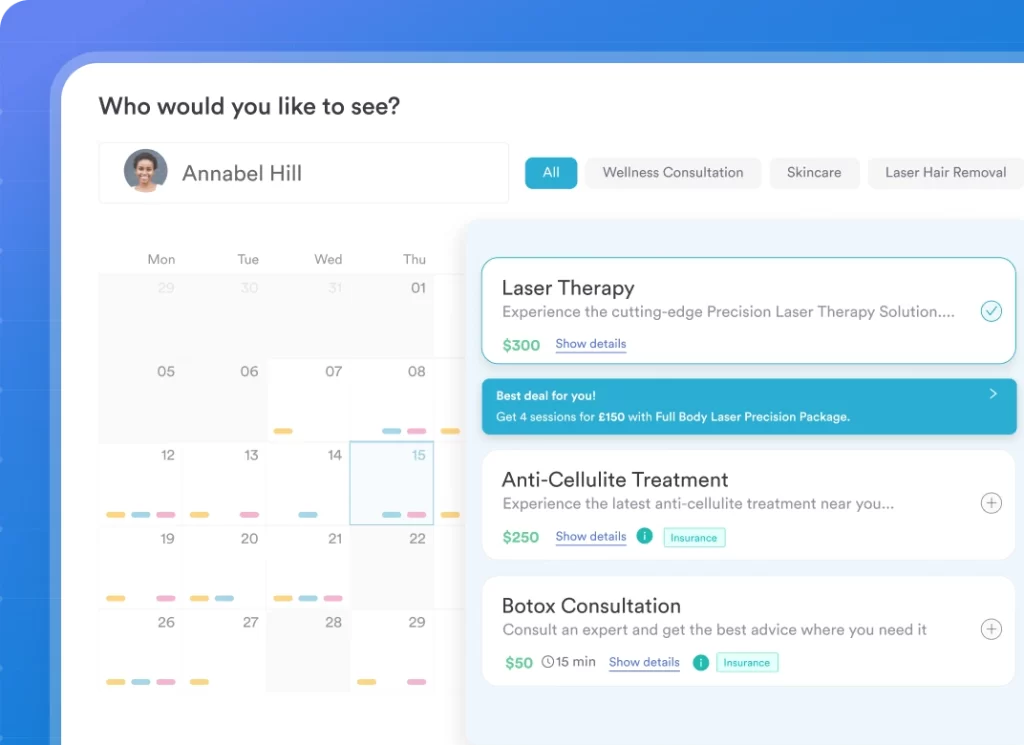
Pabau is all-in-one practice management software built for aesthetic, wellness, private practice, and multi-specialty businesses. It isn’t a standalone AI voice agent, but Pabau does offer AI agents for practices that answer out-of-hours calls and rebook no-shows. What it does is automate the scheduling work that drains your week, and connect it to the rest of how your practice runs.
On the scheduling side, that means:
Because it’s all in one system, a booking isn’t a dead end. It connects to the patient record, payments, and marketing, so you’re not exporting data between tools that were never designed to talk to each other. You can explore the scheduling side in more detail on our online booking and automation pages pages.
Where Pabau does use AI is in clinical documentation. Pabau Scribe, our AI scribe, listens during the visit and drafts structured notes for you to review and sign off, so you spend less time typing and more time with patients. You can see how it works on our AI scribe page.
Before you commit to any scheduling tool, run the demo through three real scenarios: (1) a new patient booking their first visit on a phone at 9pm, (2) an existing patient rescheduling 12 hours out, and (3) the waitlist auto-filling a canceled slot. The tool that handles all three without a staff member touching the keyboard is the one that will actually move your numbers.
Powerful scheduling software is only as good as its setup. The practices that get the most from it are the ones that configure their booking rules, reminders, forms, and payment flows properly from the start, rather than switching on a booking link and hoping.
That’s why Pabau doesn’t offer a free trial. Instead, you get structured onboarding: your data is migrated for you, and a dedicated coordinator helps set the system up around how your practice actually runs, so you’re set up to succeed rather than left to figure it out alone.
Choosing scheduling software comes down to one question: which tool automates the most of your booking, reminders, and follow-up without forcing you to stitch together three other systems?
For aesthetic, wellness, private practice, and multi-specialty businesses, practice management software like Pabau handles that automation and connects it to your records, payments, and marketing, with Pabau Scribe drafting your clinical notes on top.
For most practices, the real question is whether your scheduling, reminders, and follow-up run themselves and connect to everything else, not whether you need a futuristic AI receptionist. Get that right and the no-shows, the phone tag, and the empty slots take care of themselves.
If you’d like to see how that works inside a real practice workflow, book a Pabau demo and we’ll walk through your specific patient journey.

Want AI to handle documentation too? Best AI medical scribe tools ranks AI medical scribes for independent and mid-size practices ahead of health-system platforms.
Wondering how AI could draft your notes? AI clinical documentation explains how ambient AI drafts notes during the visit and the compliance rules you cannot skip.
Weighing an AI EHR for your practice? AI EHR guide explains what ambient scribing does and what to check before you buy an AI EHR.
Weighing the broader AI question? AI in healthcare software covers the trade-offs that matter beyond the marketing claims.
Yes. There are dedicated AI scheduling tools that use voice and chat agents to book appointments in plain language, and there’s practice management software with built-in scheduling automation, such as online self-booking, automated reminders, and waitlist auto-fill. Most practices get the outcomes they want, fewer no-shows and less admin, from the automation approach, especially when it’s connected to their patient records and payments.
There’s no single best tool, because it depends on your practice. High-volume health systems fielding constant calls may benefit from an AI voice agent, while private-pay practices usually get more value from all-in-one practice management software where scheduling connects to records, payments, and marketing. The right choice is the one that automates your booking, reminders, and waitlist without adding another disconnected tool to reconcile.
Patients book, reschedule, or cancel through your website, a link, chat, or voice, and the software checks live availability, confirms instantly, sends automated reminders, and fills cancellations from the waitlist. It can also request intake forms, consent, and deposits before the visit, so the appointment is set up correctly without staff involvement.
It can. Automated reminders, easy self-rescheduling, and deposits taken at booking all reduce no-shows, and automated waitlists recover the slots that do open up. The effect is most reliable when reminders and follow-ups are connected to the patient record rather than run from a separate tool.
Good scheduling and practice management software is built on HIPAA-compliant infrastructure and can provide a signed business associate agreement (BAA) where you need one. Always confirm data protection, access controls, and audit trails with any vendor before you store patient information in their system.