Guided notes are structured note-taking templates that give learners an outline with blank spaces to fill in during a lecture, lesson, or clinical presentation. Unlike blank paper, guided notes pre-organize the information, reduce cognitive load, and help learners tell key concepts from supporting detail. Research from Glodowski and Thompson (2018) and Konrad et al. (2009) backs this up. Students using guided notes produce more accurate and complete notes than students working from blank paper.
Whether you design lesson materials, structure patient education, or deliver clinical training, guided notes keep learners focused on what matters. This guide covers what guided notes are, why they work, and how to build one. It shows how to use them in a classroom, practice, or training room. And it sets out exactly what the free form below does and does not give you.
Template details
Template type
Template
Format
Printable PDF, 3 pages
Sections
6 sections
Fields to complete
34 fields
Best for
Clinical guides
PabauCLINICAL FORM TEMPLATE
PLAN
PATIENT GOALS
PabauCLINICAL FORM TEMPLATE
Guided notes
PATIENT INFORMATION
CHIEF COMPLAINT
PHYSICAL ASSESSMENT
PDF
Free download
Download your free Guided notes
A blank, three-page note form with labeled sections for patient information, chief complaint, physical assessment, diagnostic testing, plan, patient goals, and additional notes. Nothing is pre-filled, so you add the headings, prompts, and blanks that fit your own session.
PDF · 3 pages · 120 KB•No sign-up needed•Updated September 2026
Generate it. Send it. File it automatically.
Turn this template into a Smart Form
Start from scratch, or upload this PDF or any form you already use, and Pabau's AI Form rebuilds it with tick boxes, text fields and a signature. Attach it to the treatment once, and every patient gets it on time.
Generate with AI from a PDF, Word file or photo
Precare before the visit, aftercare after checkout
AI Form rebuilds the consent, history and aftercare forms you already use. You review each one, then publish.
Save hours every week
Patients complete forms on their phone before they arrive, so the front desk stops retyping paper.
Stay audit-ready
Every signed form is versioned and attached to the treatment record, ready when you need it.
Ask patients once
Set how long a consent stays valid. Returning patients skip forms they have already signed.
Supports HIPAA and GDPR compliance•AES-256 encryption•4.8 on G2•4.7 on Capterra•Trusted by 4,000+ practices worldwide
Key takeaways
Guided notes are pre-organized outlines with blank spaces that scaffold learning while keeping learners actively engaged.
Research-backed benefits include more accurate note-taking and better completion, especially for dense or fast-paced material.
Effective guided notes balance scaffolding with cognitive challenge. Over-scaffolding reduces learning gains once learners stop thinking.
The free form on this page is a blank skeleton, not a pre-filled lesson outline, so you write the prompts yourself.
A guided note that becomes part of the patient record must meet the same documentation rules as any clinical note.
Found our content helpful?
What is inside the downloadable form
The PDF above is a blank, three-page note form built around a clinical visit. It gives you a skeleton to complete rather than a finished handout.
Each page carries labeled headings with open writing space beneath them:
Patient information: name, date of birth, gender, date of visit, attending physician, medical history, current medications, and pre-existing conditions.
Chief complaint: space for the presenting problem and any other subjective observations.
Physical assessment: vital signs, physical examination, diagnostic testing, and interpretations.
Plan: further assessment, treatment plan, and referrals.
Additional notes: one open block for whatever the other sections miss.
The file holds no lecture outline, no pre-filled key concepts, and no blanks tied to a specific topic. Those choices are yours, and the sections below walk through how to make them.
There are two ways to use it. Print it and write your own headings and partial sentences into the open space before a session. Or fill one copy in yourself as a worked example, then hand learners a blank copy to complete alongside you.
What are guided notes and how do they work?
Guided notes consist of an instructor-prepared outline that structures lesson or presentation content, with key information already in place. Blank spaces sit where learners fill in supporting details, examples, or answers. Those blanks force active processing: learners must listen, interpret, decide what matters, and record it. That is more demanding than transcribing from a blank page, and more guided than building an outline from scratch.
The mechanism differs from traditional note-taking, where learners decide what to record. With guided notes, the instructor sets the organizational structure and the key concepts. Learners contribute the examples, explanations, or connecting details. A heart anatomy template might show the chambers, vessels, and valves, then ask learners to write the function of each part.
Why scaffolded note-taking works
Guided notes help most when material is dense, fast-paced, or conceptually complex. Several peer-reviewed studies support their use:
Accuracy and completeness: Glodowski and Thompson (2018) and Greenfeld et al. (2020) compared guided notes with blank paper. Learners using guided notes recorded more accurate information and completed their notes more thoroughly.
Special education support: Konrad et al. (2009) documented that guided notes lower barriers for students with disabilities, ADHD, or learning difficulties. They remove the double demand of judging importance while also transcribing.
Active engagement: When designed well, guided notes keep processing active. Learners do not copy passively. They select, interpret, and record information in their own words.
Retention and recall: Structured notes help learners organize information into meaningful patterns, which improves both immediate retention and long-term recall.
These benefits are strongest in concept-heavy domains such as science, mathematics, medicine, and clinical training, where terminology and relationships pile up quickly.
Guided notes vs. cloze notes: what is the difference?
Guided notes and cloze notes are often confused because both use blanks. They differ in structure and purpose:
Feature
Guided notes
Cloze notes
Structure
Pre-organized outline with blanks embedded throughout
Continuous text with individual words or short phrases deleted
Blank size
Larger blanks for sentences, ideas, or details
Small blanks for individual vocabulary or short answers
Cognitive demand
Moderate to high; requires selecting and articulating ideas
High; requires recall of specific terms or facts
Best for
Conceptual learning, complex material, mixed ability groups
Light to moderate; structure guides, but content is learner-generated
High; heavy scaffolding, minimal choice
Choose guided notes when you want to scaffold the structure and leave room for interpretation. Choose cloze notes when you want to drill specific vocabulary or facts. Many teachers use both in a single lesson, depending on what they are teaching.
Five formats to choose from
Guided notes come in several formats, each suited to different content and learner needs:
Fill-in-the-blank outline: the most common format. Headings and subheadings are pre-printed, and learners fill in details, examples, or explanations under each one.
Skeletal or partial outline: a framework showing only main sections and topic headers. Learners complete the structure and the content beneath each header.
Cornell-style guided notes: the page splits into two columns, with questions or prompts on the left and space for responses on the right.
Tiered or differentiated scaffolding: several versions of the same content at different scaffolding levels. Version A pre-fills the most; version C leaves the most blank for advanced learners.
Graphic organizer format: information sits in diagrams, concept maps, or flowcharts with blanks to complete, rather than in a prose outline.
Format follows your audience, subject, and learning objectives. In clinical settings, the fill-in-the-blank outline and the Cornell layout work well. Both mirror the order a clinical record already uses, so learning habits carry straight over into professional note-taking.
7 examples across subject areas
Concrete examples show how guided notes look in practice:
Mathematics (algebra): a template on quadratic equations shows the standard form, the factoring method, and the formula. Blanks follow for each step of a worked example.
Science (biology): a template on cellular respiration lists the stages as headings, with blanks for the inputs, outputs, and ATP yield of each one.
History: a template on the Civil War lists causes, key events, and consequences as headings. Learners add specific battles, dates, and political decisions.
Language arts (literature): a character analysis template prompts for name, role, key traits, motivations, and turning points as learners read.
Healthcare and clinical teaching: a clinical progress notes template keeps presenting complaint, history, vital signs, findings, and clinical impression in a consistent order.
Professional training: a software session uses a template showing windows and workflow steps, with blanks for shortcuts, menu paths, and common errors.
Language learning: a Spanish template lists common verbs and tenses, with blanks for learners to conjugate each verb as the pattern is explained.
How to create guided notes: step-by-step
Turning your existing slides or notes into a guided notes template is straightforward:
Start with your existing content. Take your lecture notes, slide deck, or chapter, and identify the key concepts, headings, and structure you want to communicate.
Create an outline. Extract the main ideas and arrange them hierarchically, from main topics down to supporting details. This becomes the skeleton.
Decide what to pre-fill. Ask which information learners need as context before they can think. Pre-fill that. In a math template, you might print the formula but leave the working blank.
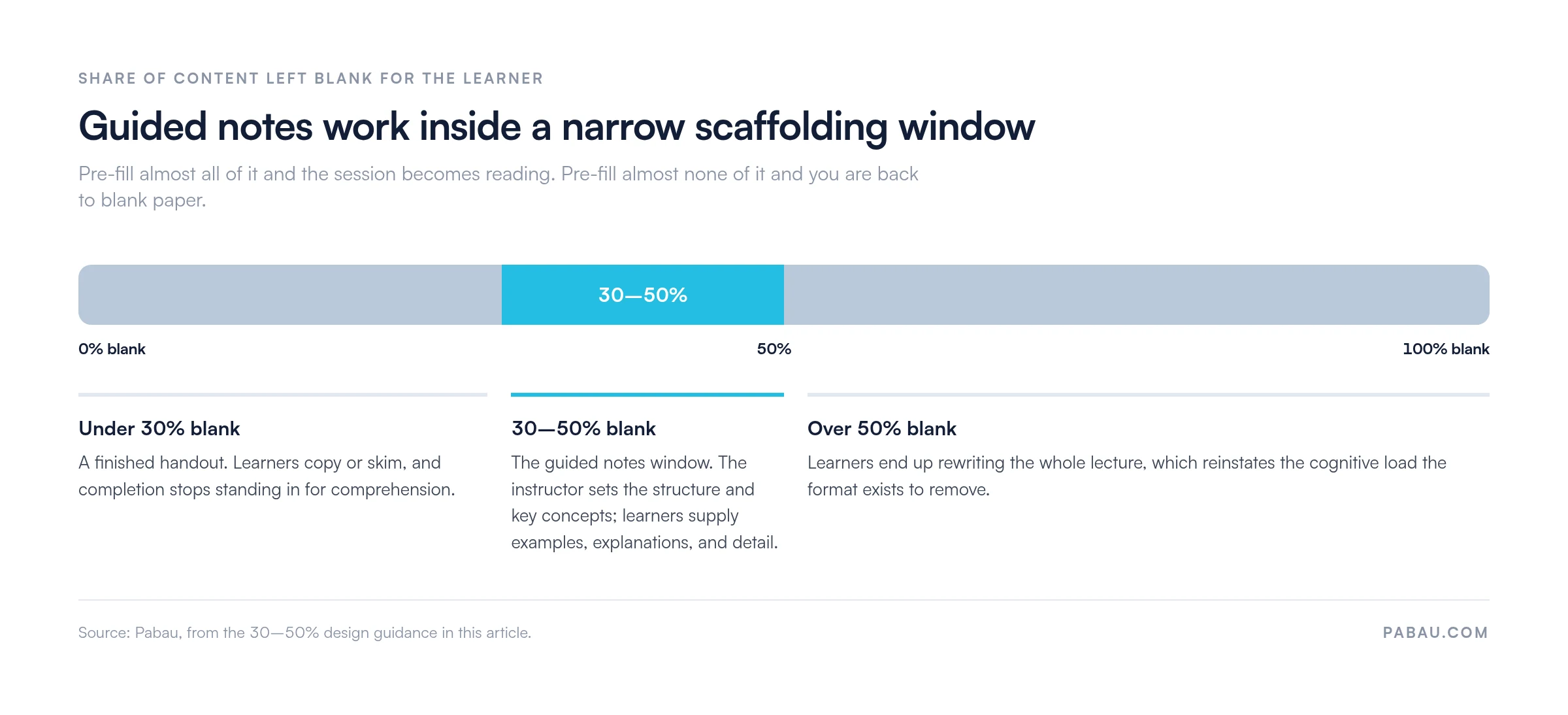
Place the blanks deliberately. Avoid both extremes. Too many blanks and learners rewrite your whole lecture. Too few and they read passively. Aim for roughly 30-50% of content as blanks.
Use white space. Leave enough room to write answers, show working, or sketch a diagram. Cramped pages discourage engagement.
Add visual elements. Include diagrams, flowcharts, tables, or images that support the outline and help learners organize what they hear.
Create multiple versions (optional). Tiered versions suit mixed-ability groups: heavy scaffolding for learners who need support, minimal scaffolding for those who do not.
Step four is where most templates come unstuck, and the workable range is narrower than it looks. The scale below shows what happens either side of it.
Both ends of the scale fail for opposite reasons. The 30-50% window comes from this article’s own design guidance.
Delivery tips that keep learners writing
Even a well-designed template needs thoughtful delivery:
Pace the presentation. Do not rush. Pause after each section so learners can complete their blanks, which keeps them writing rather than skim-reading.
Ask for their own words. Tell learners to write answers in their own phrasing instead of copying the board verbatim. That alone deepens processing.
Integrate with follow-up activities. Use completed notes as the basis for discussion, case studies, problem sets, or assessment, so note-taking stays a tool for thinking.
Adapt for learners with disabilities. Offer a digital version for anyone with fine motor or writing difficulties, and follow accessible design principles. The same reasoning drives patient intake software, which lets people complete forms on their own device at their own pace.
Support remote and hybrid sessions. Remote learners juggle technology, listening, and writing at once. A ready-made structure removes one of those loads.
Can too much scaffolding stifle learning?
A fair criticism of guided notes is that a poorly designed template can reduce thinking rather than support it. Catlin Tucker and others have warned that when a template pre-fills too much, learners slip into copying without understanding. The antidote is intentional design:
Keep the thinking challenge alive. Blanks should require interpretation or application. “Write the next step in the process” beats “write the formula” when the formula is already printed.
Mix blank sizes and types. Vary short-answer blanks, longer response spaces, and diagram or worked-example blanks. Variety holds attention.
Use them as a foundation, not a ceiling. Guided notes are scaffolding for one part of the lesson. Pair them with discussion, problem-solving, peer teaching, or hands-on work.
Check understanding. Completion is not comprehension. Ask follow-up questions during the session, or collect a few sheets to review afterwards.
Solicit feedback. Ask learners whether the template helped or got in the way, then adjust the scaffolding accordingly.
Who the form is helpful for
Guided notes templates apply across sectors and roles:
Educators and teachers who design curriculum for K-12, higher education, or vocational training and want a scalable way to scaffold mixed-ability groups.
Mental health practitioners who run psychoeducation sessions on coping strategies or treatment protocols and need a consistent structure.
Healthcare clinicians (physicians, nurses, allied health) who teach patients or trainees and want a template that doubles as documentation.
Corporate trainers and L&D professionals who deliver onboarding, compliance, or development training and need every attendee to capture the same key points.
Clinical educators who supervise residents, fellows, or students and want to build good note-taking habits early.
Benefits beyond the individual learner
A shared template pays off at team level too:
Consistency and standardization. When a whole cohort works from one template, you can review notes side by side and see which concepts nobody managed to record.
Audit and compliance readiness. In healthcare and regulated training, a standard template keeps required information in the record, which supports audits and quality reviews.
Engagement and agency. A well-judged template keeps learners thinking rather than copying, which lifts both motivation and depth of learning.
Structured templates also create a shared language across classrooms, training cohorts, and patient education programs.
Rolling the format out across your practice
Rolling guided notes out across a classroom, practice, or training program takes a few operational steps:
Pick one recurring session. Choose a lecture, tutorial, or patient education appointment you deliver often, so the effort of building the template pays back.
Draft the outline from material you already have. Lift the headings straight from your slides, protocol, or care pathway.
Decide where the blanks go. Leave out the details you want the learner to supply, and keep the structure itself visible.
Pilot it once. Watch where people stall, and note which blanks nobody managed to fill.
Revise, then store the final version centrally. A shared digital folder or form library keeps everyone on the same edition.
Review it each term or quarter. Content moves on, and a stale template quietly teaches outdated material.
Documentation requirements once a note enters the record
A guided note stops being a teaching aid the moment it describes a patient’s care. From that point it is a clinical record, and the same documentation rules apply to it as to any other entry.
Attribution and timing. Every entry names who wrote it and when the care took place. A trainee’s note also needs a dated countersignature from the supervising clinician.
No unexplained blanks. An empty prompt reads to a reviewer as care that was never delivered. Complete each section, or mark it “not applicable” before the note is filed.
Prompts yes, findings no. Pre-printed headings are fine. Pre-filled observations are not, because an auditor is looking for findings recorded for this patient on this visit.
Visible corrections. Amend an entry with a dated addendum rather than overwriting it. Erasing the original wording breaks the audit trail.
Retention and access. Keep completed notes for the period your state board or regulator requires. Limit access to the care team, in line with the HIPAA minimum necessary standard.
Where the same visit also needs a narrative entry, a SOAP progress notes template gives you a structure reviewers already recognize. Run the guided note alongside it rather than in place of it.
Teaching notes that never touch a patient chart carry none of this. Decide which of the two you are producing before the session starts, because retrofitting compliance afterwards rarely works.
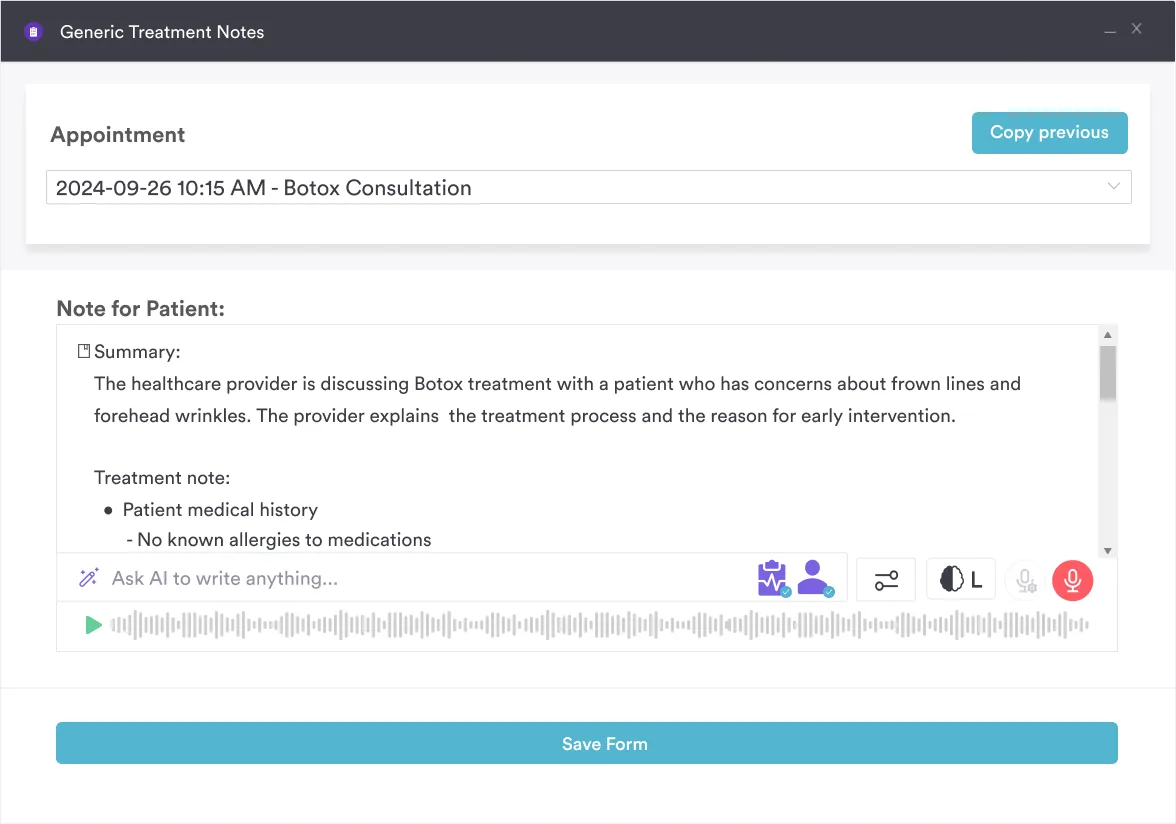
Pabau Scribe, our AI scribe, drafts the note from the consultation, so the clinician only completes the prompts the template leaves open.
How Pabau keeps note templates consistent across a practice
Most practices keep teaching and consultation templates in a shared drive. Versions drift apart, someone prints last year’s copy, and the notes that come back no longer match the record system.
Practice management software like Pabau replaces the printed sheet with a digital form. You build the structure once and attach it to the right appointment type. It then opens already scoped to that visit, and the completed form saves into the patient record with nothing to re-type.
Pabau Scribe, our AI scribe, drafts the narrative from the consultation itself. The clinician checks that draft against the template’s headings and completes whatever the scribe could not capture. Teaching practices get a second benefit. Every trainee works from the same structure, so supervisors can compare notes across a cohort without chasing paper.
Standardize documentation across your practice
Pabau’s digital forms and AI-assisted notes keep one version of every template in use, so your team documents the same way on every visit.
Guided notes earn their keep when the structure does the organizing and the learner still does the thinking. Pre-fill too much and you have handed out a reading exercise. Pre-fill too little and you are back to blank paper.
Start with one session and aim for roughly a third to a half of the content as blanks. Then let the room tell you where to adjust. The form above gives you the empty scaffold. Deciding what to leave out is the part worth your time.
The same discipline pays off in the patient record. Book a demo to see how Pabau turns your note templates into digital forms your whole team fills the same way.
Continue your research
Need the clinical version of this structure?Clinical progress notes template shows how to record each visit in a consistent, reviewable format.
Looking for another structured note format?Focus charting explains the DAR method and when it beats a plain narrative note.
Want notes that hold up to review?Nursing documentation covers the standards a completed entry has to meet.
Documenting progress across several sessions?SOAP progress notes shows how the SOAP structure holds up over a course of care.
Choosing a system to store your templates?Clinical notes software walks through what to look for before you commit to one.
Frequently asked questions
What are guided notes and how do they differ from regular note-taking?
Guided notes are pre-organized outlines with strategically placed blank spaces that structure learning while maintaining active engagement. In regular note-taking, students start from a blank page and decide what matters. Guided notes scaffold the organization instead, and ask students to supply details, examples, or explanations. This reduces cognitive overload while keeping thinking active.
Can guided notes be used for self-paced or online learning?
Yes. Guided notes work well for self-paced and online learning. Offer them as digital forms, such as a PDF, a Google Doc, or a structured form tool. Learners then complete them while they watch recorded lectures or read. Digital versions also reduce barriers for students with fine-motor or writing challenges and allow for auto-saving and feedback.
Do guided notes count as clinical documentation?
Only when they record a patient’s care. A note used purely for teaching stays outside the chart. Once a completed form describes assessment, findings, or a plan for a named patient, it is a clinical record. It then needs an author, a date, a countersignature where a trainee wrote it, and no unexplained blanks. Store it for the retention period your state board or regulator sets.
How do I avoid over-scaffolding with guided notes?
Design templates that require interpretation and application, not just copying. Ask students to fill in next steps, apply concepts to new examples, or explain relationships rather than transcribing information already visible. Integrate guided notes with discussions, problem-solving, or hands-on activities. Solicit student feedback on scaffolding level and adjust templates based on what learners tell you works best.


 Despina Petrushevska