Monika Lazarevska
Sugar-free diet food list
Download your free sugar-free diet food list A two-page checklist of sugar-free ...

1
Last Updated: Nov 2, 2026
Free PDF 3 pages, print-ready Clinician-reviewed
A missed equipment check rarely causes trouble on its own. It’s the pattern, the same step skipped week after week, that ends in a cancelled appointment or a failed inspection. Healthcare practices run through dozens of small tasks every day. Unlock the door, check the equipment, restock supplies, lock up the patient records at night.
A daily checklist turns that routine into something every team member follows the same way. It doesn’t matter whether they’ve worked there ten years or ten days. Build one well, and it becomes proof that safety and compliance checks actually happened.
A comprehensive organizational tool designed to help healthcare professionals maintain consistent standards and operational excellence in their practice. This systematic approach ensures that essential tasks, safety protocols, and quality measures are completed each day, supporting both clinical effectiveness and regulatory compliance.
Start from scratch, or upload this PDF or any form you already use, and Pabau's AI Form rebuilds it with tick boxes, text fields and a signature. Attach it to the treatment once, and every patient gets it on time.
AI Form rebuilds the consent, history and aftercare forms you already use. You review each one, then publish.
Patients complete forms on their phone before they arrive, so the front desk stops retyping paper.
Every signed form is versioned and attached to the treatment record, ready when you need it.
Set how long a consent stays valid. Returning patients skip forms they have already signed.
Supports HIPAA and GDPR compliance AES-256 encryption 4.8 on G2 4.7 on Capterra Trusted by 4,000+ practices worldwide

A daily checklist is a structured task list that healthcare staff complete at the start, throughout, and end of each workday to ensure consistent operations, patient safety, and regulatory compliance.
Daily checklists prevent missed critical tasks, reduce operational errors, create audit trails for CQC or HIPAA inspections, and help staff stay accountable across multiple roles and practice locations.
Key items include opening room checks, equipment readiness, patient flow verification, housekeeping and infection control, clinical assessments, and closing procedures such as data backup and security lockdown.
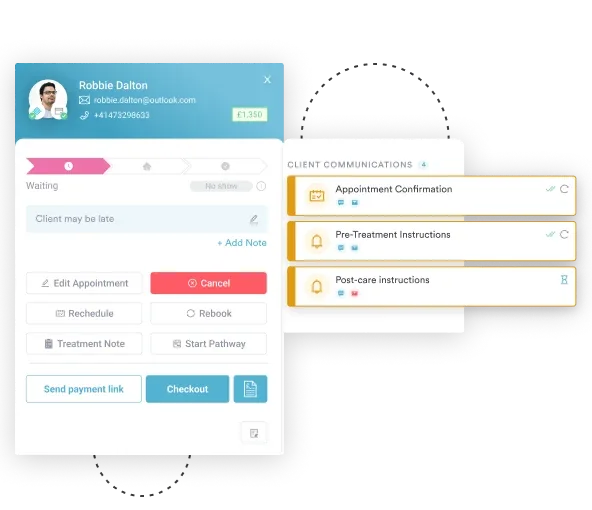
Pabau lets practices schedule recurring daily checklists to fire automatically at a set time each day, then track which tasks are completed, outstanding, or overdue.
A daily checklist is a task list that healthcare staff complete at scheduled intervals, typically at opening, before or between appointments, and at closing, to verify that essential operations, safety protocols, and quality standards are met.
Unlike a one-time project checklist, a daily checklist repeats every workday, keeping standards consistent across shifts and team members. Each completed task gets logged, creating a timestamped record that helps show regulatory readiness during CQC inspections or HIPAA compliance reviews.
Clinical purpose: a daily checklist confirms that patient-facing areas are safe and hygienic, clinical equipment is calibrated and ready, patient records are secure, and staff are prepared to deliver care. Operational purpose: it verifies that scheduling systems are running, payment processing is active, intake forms are loaded, and IT infrastructure is secure.
Compliance purpose: it documents that staff completed required safety checks and understood their regulatory obligations.
Staff who rely on memory alone inevitably miss critical tasks, sometimes for weeks. A written, repeating daily checklist removes the guesswork and creates accountability. Here’s why they matter in healthcare settings:
The specific items depend on your practice type, whether that’s aesthetics, mental health. Here’s what a comprehensive daily checklist covers:
A good patient management system files each completed scale under the right patient automatically.
Building your own daily checklist takes one to two hours and needs input from multiple team members. Follow this process:
Paper checklists beat no checklist, but they come with real overhead: printing, collecting signatures, filing, and hunting for the right sheet when an auditor asks for proof. Practice management software like Pabau removes that overhead. Its task automation tools turn your daily checklist into a recurring digital workflow. Here’s what that looks like in practice.
Recurring tasks trigger automatically. Set a task to fire at the same time every day, say 7:45 AM for opening checks, and it lands on the right person’s list without anyone setting a manual reminder. You can assign each task to a role or a specific staff member, so ownership is clear before the shift starts.
Track completed tasks against outstanding ones. Your practice management dashboard shows what’s done and what’s still open, instead of relying on someone’s memory of what got missed. Filter by task, role, or date range to spot patterns across a week or a month, not just a single shift.
See the picture without chasing anyone. Managers can check the dashboard and see straight away if opening checks aren’t finished, instead of discovering it mid-morning. The same visibility surfaces training needs. If one staff member regularly leaves tasks incomplete, that’s a conversation worth having before it turns into a bigger problem.
A daily checklist is only as useful as the habit behind it. Start with the template above, adjust it to fit your practice’s real workflow, and get feedback from the people who’ll use it every day. Paper works, until a sheet goes missing or nobody can find last month’s records when an inspector asks for them.
That’s usually the point where practices look at software to carry the load. With Pabau, the same opening, throughout-day, and closing checks fire on schedule, get assigned to the right person, and stay tracked in one place instead of scattered across paper and memory.
If you want to see how that would work for your practice, book a demo and we’ll walk you through it.

Comparing EHR options built for outpatient clinics? best outpatient EMR software Compares features, pricing, and pros and cons for clinics choosing an outpatient EMR.
Weighing a cloud-based EHR for your practice? best SaaS EHR software Compares six cloud-based platforms on pricing, standout features, and the practice types each fits.
Thinking about moving to a new EHR? guide to switching EHR systems Walks through the signs a practice has outgrown its EHR and how to plan the transition.
Wondering who owns your EHR day to day? who manages electronic health records Explains the roles and responsibilities behind keeping an EHR system running.
Thinking beyond the daily checklist? medical practice business plan template covers market analysis, financial projections, operational strategy, and compliance requirements for your practice.
A daily checklist covers opening tasks like equipment checks and restocking, throughout-day tasks like room cleaning and record updates, and closing tasks like data backup and cash reconciliation. Keep hygiene, equipment, and data security checks in every version.
Review it quarterly, or sooner if your workflow changes: new equipment, a new role, or a regulatory update. Give staff one to two weeks with any new checklist, then gather feedback on what’s confusing or missing.
A to-do list holds one-off tasks, like calling a supplier about an invoice. A daily checklist is the same operational and safety checks, repeated by the whole team, every day. To-do lists flex. Daily checklists don’t, by design.
A standalone app like Notion can track tasks, but it won’t connect to patient records, appointments, or payments. A checklist built into your practice management software uses that same live data, so nothing gets entered twice.
The CQC, HIPAA auditors, and state boards want proof the checks happened. A digital checklist logs who completed each task and when, so you can pull up the record instead of digging through paper sign-off sheets.
No. An activities of daily living (ADL) checklist tracks a patient’s ability to bathe, dress, or eat, a clinical assessment tool. A daily operational checklist covers your practice’s tasks, like opening and closing. Some practices use both.