Physician credentialing checklist
A physician credentialing checklist lists every license, certificate, verificati...

Last Updated: Oct 23, 2026

An action plan template breaks down clinical and business goals into specific, measurable, assigned tasks with clear deadlines and progress checkpoints.
SMART goals (Specific, Measurable, Achievable, Relevant, Time-bound) are the foundation of any effective action plan template for healthcare operations.
Healthcare action plan templates must include ‘what’ (task), ‘who’ (owner), and ‘when’ (deadline) as three vital elements for team accountability.
Pabau’s automated workflows and team management tools turn action plan templates into live, tracked systems that practices can monitor in real time.
A structured template for turning practice goals into specific, assigned, and time-bound tasks, with built-in fields for owners, deadlines, and progress tracking.
Download templateAn action plan template is a structured document that transforms goals into step-by-step, trackable tasks. Healthcare practices use action plan templates to align team efforts, set measurable objectives, and monitor progress toward clinical and operational outcomes.
An action plan template is a documented roadmap that converts strategic goals into executable steps. According to HeadStart.gov, action plans include three vital elements: ‘what’ (the task), ‘who’ (the responsible person), and ‘when’ (the completion deadline).
In healthcare settings, an action plan template serves multiple purposes: documenting patient care protocols, mapping practice expansion milestones, structuring staff training workflows, and tracking treatment compliance. The template format ensures any team member can follow the plan step-by-step without ambiguity.
Unlike generic to-do lists, action plan templates build in accountability structures, deadlines, and measurable progress markers. This is especially critical in regulated healthcare environments where HIPAA, GDPR, and CQC frameworks require documented planning and oversight.
Using an action plan template follows a five-step operational workflow:
When you build the action plan into your team management system instead of a standalone spreadsheet, the owners, deadlines, and status updates all live where your team already works, so nothing depends on someone remembering to open a separate file.
Here is the template filled in for one goal, so you can see how the blank fields turn into assigned work. The goal sits at the top, and each task carries an owner, a deadline, and a status the team updates as it goes.
Goal (SMART): reduce the patient no-show rate from 18% to 12% by the end of Q2.
| Task (what) | Owner (who) | Deadline (when) | Status |
|---|---|---|---|
| Analyze three months of no-show data by day, time, and treatment | Practice manager | Week 1 | Not started |
| Turn on automated SMS and email appointment reminders | Front desk lead | Week 2 | Not started |
| Add a one-tap confirm-or-reschedule link to every reminder | Front desk lead | Week 3 | Not started |
| Require a deposit on high-value treatment bookings | Practice owner | Week 4 | Not started |
| Review the no-show rate and adjust reminder timing | Practice manager | Weekly | Not started |
The same structure works for any goal, whether you are onboarding new patients, training staff, or opening a second location. Swap the goal and the tasks, then keep the owner, deadline, and status columns.
Filing completed forms in patient management software keeps documentation consistent across your whole team.
Action plan templates serve healthcare teams across multiple specialties and practice models.
Across all these settings.
Structured action plan templates deliver concrete operational and clinical benefits.
Clarity and alignment. Team members see exactly what is expected, by when, and who is doing it. Misalignment is a common reason deadlines slip. When the action plan is transparent and accessible, everyone works from the same version.
Accountability. Assigning owners to tasks creates responsibility. Weekly or monthly progress reviews hold teams accountable without blame. The focus stays on blockers and support, not fault.
Measurable progress. Action plans with SMART criteria turn vague goals into measurable checkpoints. Instead of ‘improve patient retention.
Risk reduction and compliance. Documented action plans satisfy regulatory expectations. They evidence that your practice operates with intention and oversight, not reactively.
Faster execution. Teams that track action plans inside a practice management platform tend to move through tasks faster than teams managing the same work across email threads and spreadsheets, since updates, owners, and deadlines all live in one place instead of scattered across tools.
SMART goals are the accepted standard for action plan goal-setting across healthcare, non-profit, and business sectors.
Setting SMART criteria at the start, rather than bolting them on mid-project, ties every task back to a measurable goal, so progress reviews always have something concrete to check against.
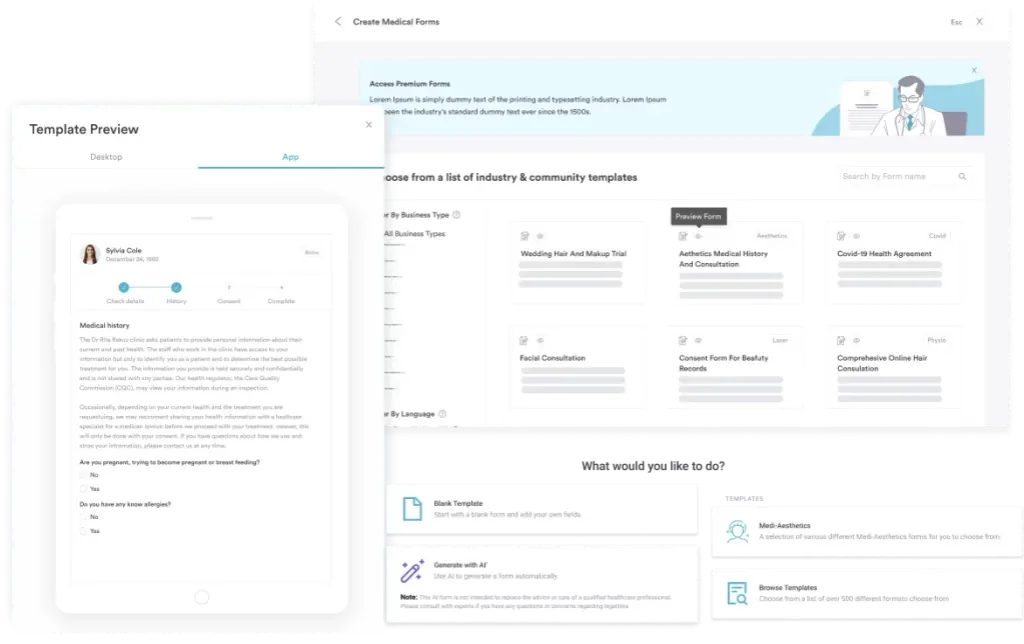
Practice management software like Pabau turns a static action plan template into a live system, so you can see progress without chasing anyone for updates. Instead of manually updating a spreadsheet.
You can also collect action plan data through digital forms.
Track action plan progress weekly, not monthly. Weekly check-ins surface blockers before they derail timelines, allow quick course correction, and sustain team momentum. Monthly reviews come too late to adjust, and daily updates create noise. Weekly is the sweet spot for most clinic action plans.
Patient onboarding action plans: New patients complete an intake form, meet the clinician, sign consent documents, and receive their treatment plan, all by their first visit. An action plan template assigns each step to staff roles (receptionist, clinician, nurse) and sets 48-hour completion targets, ensuring no patient slips through administrative cracks. When intake flags withdrawal risk, staff can move straight to a nursing care plan for alcohol withdrawal within that 48-hour window.
Treatment compliance action plans: For chronic conditions or multi-session treatments, an action plan template documents the full care pathway: initial assessment, treatment sessions, progress measurement, and follow-up intervals. Med spas use these to track course-of-care packages. Psychiatric teams can extend that pathway into a bipolar disorder nursing care plan for tracking mood episodes and medication monitoring.
Practice growth action plans: Expanding to a second location, hiring new staff. A structured action plan template prevents scope creep and ensures stakeholder alignment on milestones.
Crisis management action plans: Mental health practices and wellness centers use action plan templates like the Wellness Recovery Action Plan (WRAP) to help patients identify personal warning signs, define coping strategies, and name support resources. These templates become part of the clinical record and patient safety protocol. A schizophrenia nursing care plan builds on that structure, pairing NANDA diagnoses with the interventions and monitoring a care team needs.
Couples therapy action plans: Therapists assign exercises between sessions, then review the completed work at the next appointment. A relationship workbook supplies those exercises, and the action plan records which ones each partner owns and when they are due.
An action plan template turns abstract goals into executable, tracked, accountable steps. Anchoring the plan in SMART criteria and keeping it inside your practice management system, rather than a static file, gives the whole team one clear view of what is due, who owns it, and what is finished.
Download the action plan template above and adapt it to your practice’s needs. Use Pabau’s clinic dashboard to monitor progress in real time, assign tasks to team members, and keep your action plan responsive to changing priorities.
Want to see how Pabau’s dashboard keeps your team’s action plan on track day to day? Book a demo and we’ll walk you through it.

Supporting a client who hears voices? Auditory hallucinations worksheet lets a client rate distress, work through sensory grounding, and list five support contacts.
Need a way to measure clinical outcomes? CORE-OM questionnaire gives you the full 34-item scale covering four domains, including the six risk items.
An action plan template is a structured document that breaks down goals into specific tasks, assigns owners, sets deadlines, and tracks progress. It converts strategy into step-by-step, measurable actions any team member can follow.
The three vital elements are ‘what’ (the specific task), ‘who’ (the responsible owner), and ‘when’ (the deadline). These three components ensure clarity, accountability, and measurable progress.
SMART goals are Specific (define exactly what success looks like), Measurable (use numbers), Achievable (realistic given resources), Relevant (aligned to strategy), and Time-bound (named deadline). Example: ‘Reduce patient wait time from 15 to 8 minutes within the next 90 days.’
A healthcare action plan should include: goal statement, SMART criteria, list of tasks, task owners, deadlines, resource requirements, dependencies between tasks, progress checkpoints, and a review schedule (weekly or monthly). For regulated settings, document compliance with HIPAA or GDPR requirements.
Weekly reviews are optimal for most practice action plans. Weekly cadence surfaces blockers before they derail timelines and allows quick course correction. Monthly reviews often come too late, and daily updates create noise. Weekly strikes the right balance for sustained momentum and accountability.
The five steps are: define a SMART goal, break it into specific action tasks, assign an owner and deadline to each task, note the resources and dependencies each task needs, and review progress on a set cadence, ideally weekly. Following them in order keeps the plan executable.