Tanja Lepcheska
Pain medication chart: Strength tiers, DEA schedules and free PDF
What is a pain medication chart and how do clinicians use it? A pain medication ...

2
Last Updated: Nov 4, 2026
Free PDF 2 pages, print-ready Clinician-reviewed
AcceleDent is an FDA-cleared orthodontic acceleration device that works alongside active braces and Invisalign treatment.
If your practice offers it, the clinical decision is the easy part. The paperwork and the follow-up are what decide whether patients use the device as prescribed.
This guide covers how the device works, the current specifications, and the five steps for folding it into your workflow. The downloadable bundle at the top gives you a consent form and the patient-facing instructions to go with it.
A ready-to-use patient consent form covering the device mechanism, SoftPulse Technology, daily usage expectations and informed consent disclosures. It comes with the provider-side integration workflow for braces and Invisalign cases.
Start from scratch, or upload this PDF or any form you already use, and Pabau's AI Form rebuilds it with tick boxes, text fields and a signature. Attach it to the treatment once, and every patient gets it on time.
AI Form rebuilds the consent, history and aftercare forms you already use. You review each one, then publish.
Patients complete forms on their phone before they arrive, so the front desk stops retyping paper.
Every signed form is versioned and attached to the treatment record, ready when you need it.
Set how long a consent stays valid. Returning patients skip forms they have already signed.
Supports HIPAA and GDPR compliance AES-256 encryption 4.8 on G2 4.7 on Capterra Trusted by 4,000+ practices worldwide

AcceleDent is an FDA-cleared supplemental orthodontic device that uses SoftPulse Technology, a 30 Hz micropulse, to speed up bone remodeling during active treatment.
Patients bite on the mouthpiece for 20 minutes a day, and manufacturer-sponsored studies report treatment time falling by up to 50%.
AcceleDent Optima, cleared in 2017, is the current generation and replaced the earlier Aura model.
Informed consent, patient selection and appointment workflow decide whether the device earns its place in a treatment plan.
Practice management software like Pabau covers the paperwork side, with customizable consent forms, automated reminders and a patient portal.
AcceleDent is a battery-powered supplemental device that patients use during active orthodontic treatment with braces or Invisalign. A custom-fit mouthpiece delivers gentle micropulses to the teeth and the surrounding alveolar bone. The mechanism is called SoftPulse Technology, and it operates at 30 Hz, or 30 cycles per second.
Those micropulses are intended to stimulate bone remodeling pathways, so teeth move through bone faster than with braces alone. The FDA granted the original 510(k) clearance on November 22, 2011, as a Class II device supplemental to conventional orthodontics.
Clinical study data, mostly from OrthoAccel-sponsored research, reports treatment time falling by up to 50% with consistent daily use. That claim is why the device became an attractive add-on for practices that want to compete on treatment length.
The device delivers calibrated micropulses at 30 Hz to the teeth and the periodontal ligament. Those vibrations are intended to stimulate osteoblast and osteoclast activity in the alveolar bone, which is the process that lets teeth move.
Braces or aligners supply the force. With the micropulses added, bone resorbs on the pressure side and rebuilds on the tension side faster than with force alone.
Patients bite gently on the custom mouthpiece for 20 minutes a day. That daily protocol carries the entire claim, because inconsistent use cuts the potential benefit sharply. Reminders and follow-up on the practice side are what keep a case on schedule.
AcceleDent Optima, cleared by the FDA in 2017, is the current generation and it replaced the earlier Aura model. Optima keeps the same 20-minute daily protocol and the same 30 Hz frequency, with updated SoftPulse Technology and a revised mouthpiece.
Aura units are still in circulation, so check which generation a patient has before you write their usage instructions. Clinical evidence for either generation comes from the same body of AcceleDent research. Verify the current published studies with the manufacturer or in the orthodontic journals.
The mouthpiece accommodates traditional fixed braces, clear aligners such as Invisalign, and hybrid approaches. The device is not appliance-specific. What matters is the micropulse reaching the teeth, whatever force system is doing the moving.
AcceleDent supplements active orthodontic mechanics and does not replace them. The device straightens nothing on its own, so it only accelerates movement where conventional or aligner-based force is already applied.
AcceleDent holds FDA 510(k) clearance as a Class II supplemental orthodontic device, first granted on November 22, 2011. Clearance rests on substantial equivalence to existing orthodontic vibration devices, plus clinical data.
Most published efficacy studies are sponsored by the manufacturer, OrthoAccel Technologies, and independent peer-reviewed research is limited. Before you market the device, review the current literature in the American Journal of Orthodontics and Dentofacial Orthopedics and the Angle Orthodontist. You can also check the FDA 510(k) status yourself.
Safety data shows the device is generally well tolerated when used as directed. It is cleared for patients 12 years and older, so verify age limits against the current prescribing information.
Contraindications are limited, but they may include active periodontal disease, untreated caries, and certain implant or TMJ conditions. Candidacy stays a clinical judgment call.
VPro5, made by Propel Orthodontics, is AcceleDent’s main competitor in the orthodontic vibration market. Both devices hold FDA clearance, and they differ in frequency and in what they are cleared to do.
| Specification | AcceleDent | VPro5 |
|---|---|---|
| Micropulse frequency | 30 Hz | 120 Hz |
| Primary cleared use | Supplemental acceleration of tooth movement | Aligner seating |
| Manufacturer | OrthoAccel Technologies | Propel Orthodontics |
The frequency difference matters less than the cleared indication. Ask both manufacturers for head-to-head comparative data, and read the specific claims each one makes before you commit to a device.
Adoption comes down to who you select and what you document. The five steps below are where the practice-side work sits, and the consent form is step two of five.
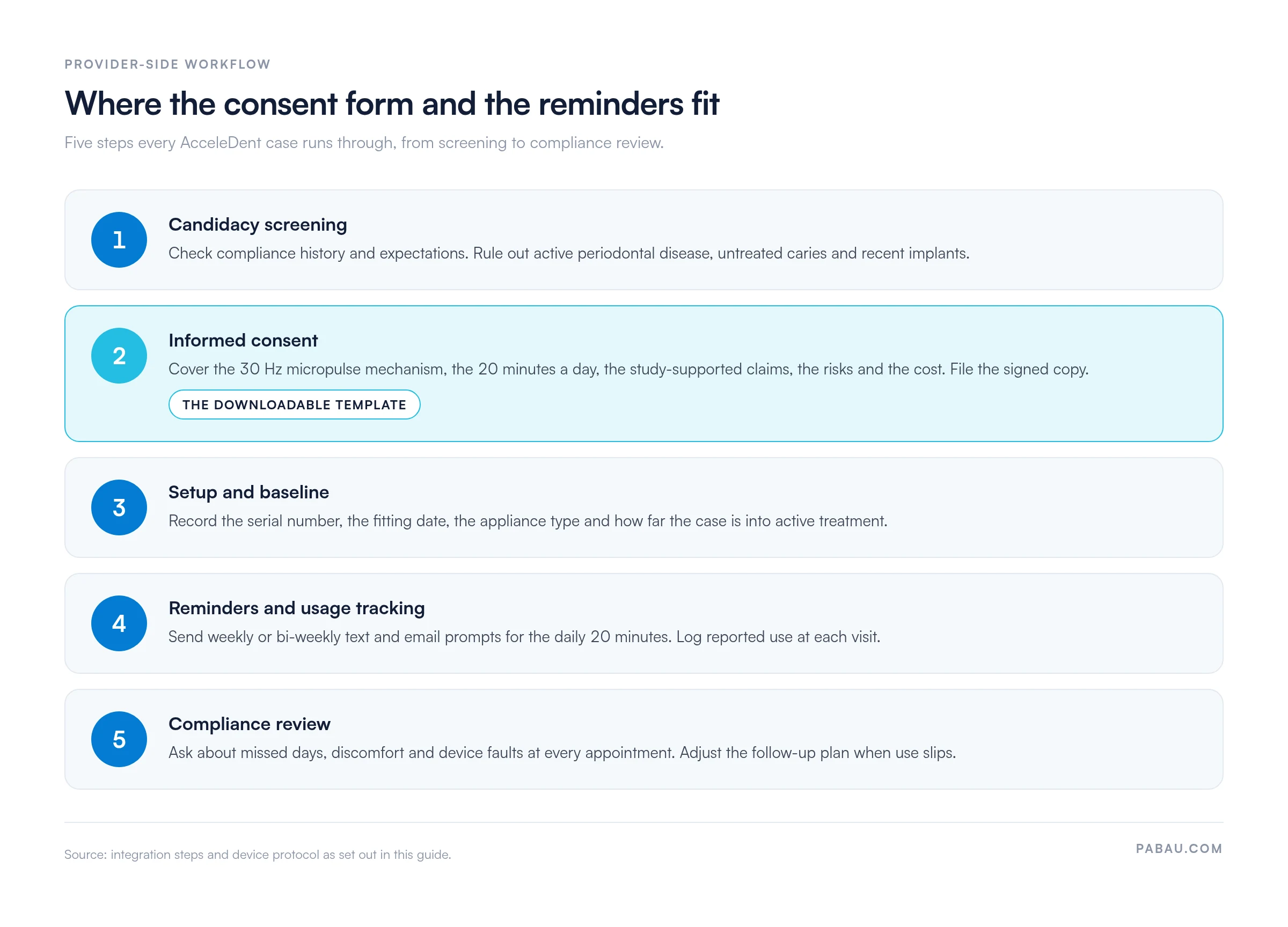
Log the device in your practice management system rather than on a paper sheet. Patient communication portals can carry the instructions, the usage reminders and the progress updates. Documenting use at every visit is what demonstrates the value of the add-on when a patient questions the fee.
The device is sold or leased to patients through several channels, and practice acquisition models vary. Some practices buy devices outright and build them into the treatment fee. Others run loaner programs through OrthoAccel, or send patients to buy direct.
Device cost varies by region and distributor, so contact OrthoAccel for current pricing. Patient out-of-pocket cost typically runs $1,500 to $3,000 to buy, or $300 to $500 a month on a lease. Treat both as estimates and confirm them with the manufacturer.
Clarify reimbursement with insurers before you offer the device. Most dental plans do not cover AcceleDent as a primary benefit, though some allow it as a patient-elected add-on. Documentation of medical necessity and clearance status helps when an insurer asks.
The downloadable bundle at the top of this guide includes a full patient consent form and a provider-facing integration checklist. An effective consent document covers seven areas:
Keep the wording readable for a lay audience, leave time for questions, and retain the signed copy in the chart. Our dental treatment consent form covers the same ground for restorative cases, so the two can share one signing workflow.
Pair the consent form with the one-page patient FAQ sheet in the bundle. It answers the questions patients ask at the chair about daily use, timing, compatibility with their appliance, and how long treatment should now take.
Keep records of device use and clinical outcomes as the case runs. At each orthodontic visit, document four things:
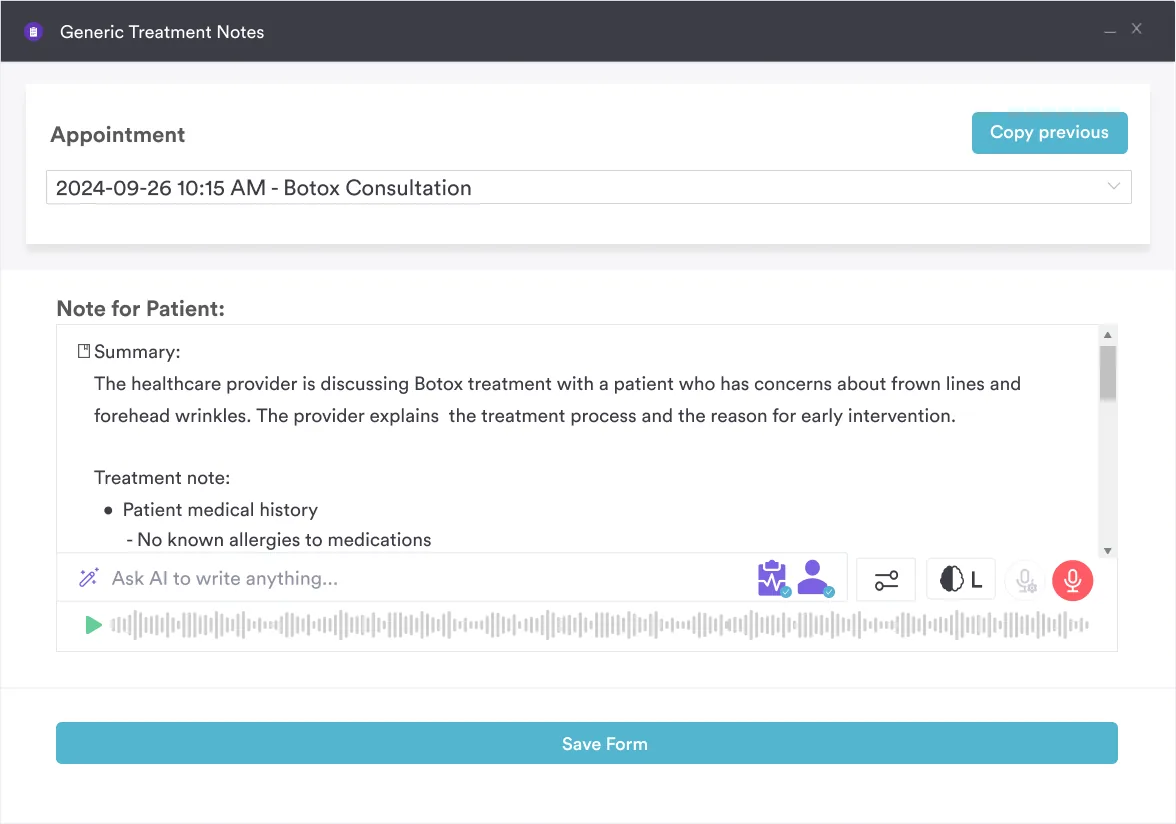
That record does two jobs. It shows what the device is doing for this patient. It also gives you a data trail if a fee is disputed or an insurer asks. An AI medical scribe can take note entry off your hands without thinning the detail.
Beyond the signed form, hand patients written material covering four points:
The bundle includes a patient instruction card and an appointment reminder workflow you can import into your practice management system. Send a short check-in message every few weeks, so the habit survives past the first month.
Most practices run this on paper and goodwill. The consent form gets printed, signed and scanned. Usage is a question asked at the chair, and the answer lands in a free-text note that nobody can report on later.
Practice management software like Pabau moves that into one record. The consent form goes out as a digital form the patient signs before the fitting, and the signed copy files itself against the chart. Automated text and email reminders carry the daily 20-minute prompt.
Usage then gets logged as structured data at each visit, so you can pull a list of patients whose compliance is slipping. Every Pabau subscription includes the forms, the reminders and the patient portal, so none of this sits behind an upgrade.
The outcome is a case file that answers both questions a parent or an insurer might ask. Did the patient consent, and did the patient use the device as prescribed?

Pabau’s digital consent forms, automated reminders and patient portal handle AcceleDent paperwork from signature to compliance review. Your team stops chasing scans and paper usage logs.

AcceleDent buys treatment time only when the patient uses it every day, so the device is only as good as your follow-up. The clinical decision is the easy half of the offer.
Screen for compliance history before you offer it, put the claims in writing, and build the reminders before the first device leaves the practice. Do that, and a disputed fee or an insurer query has a documented answer waiting.
The trade-off worth remembering is the evidence base. Most of it is manufacturer-sponsored, so promise a shorter treatment carefully and let the consent form carry the caveat. Book a demo to see how Pabau handles the consent forms, reminders and usage records behind an AcceleDent program.

Need a consent form for restorative work too? Dental treatment consent form covers treatment description, risks and cost disclosure for general dental cases.
Treating a patient under 18? Consent to treat minor form captures the guardian and authorized caregiver details your chart needs before the fitting.
Fitting an appliance rather than a device? DNA appliance template bundles the intake form, the consent form and the progress notes for appliance therapy.
Charting the case before treatment starts? Tooth charts gives you a printable chart for recording existing restorations and tracking movement.
Onboarding a new orthodontic patient? Dental new patient form collects registration, medical history and insurance details before the first appointment.
AcceleDent is an FDA-cleared supplemental orthodontic device that applies gentle 30 Hz micropulses to the teeth and surrounding bone via a custom mouthpiece. These vibrations are intended to stimulate bone remodeling, potentially accelerating tooth movement when used 20 minutes daily alongside braces or Invisalign.
Yes. AcceleDent holds FDA 510(k) clearance as a Class II medical device, first granted on November 22, 2011. It has been studied for safety and is generally well tolerated, and serious adverse events are rare. Contraindications include active periodontal disease and untreated caries, so individual suitability stays a clinical judgment call.
Patients use the device for 20 minutes a day. Consistent daily use is critical to the intended benefit, so emphasize the commitment during patient education and the consent discussion.
Yes. AcceleDent is compatible with clear aligners, including Invisalign, and with traditional fixed braces. The mouthpiece delivers micropulses to the teeth whatever mechanical force system is in place.
AcceleDent Optima, cleared by the FDA in 2017, is the current generation and it replaced the earlier Aura model. Optima keeps the same 20-minute daily protocol and the same 30 Hz frequency, so check which unit a patient holds before you write usage instructions.
Device cost and patient pricing vary by region and by acquisition model, whether purchase or lease. Patient out-of-pocket cost typically runs $1,500 to $3,000 to buy, or $300 to $500 a month on a lease. Most dental insurance does not cover the device, so clarify reimbursement before you offer it.
AcceleDent runs at 30 Hz and is cleared for supplemental acceleration of tooth movement. VPro5 runs at 120 Hz and is cleared primarily for aligner seating. Both hold FDA clearance, so review the manufacturer claims carefully when you pick a device for your practice.
Poor patient compliance and thin informed consent are the two most common barriers. Address both with clear written documentation, automated reminders, and a usage question at every follow-up appointment.