CCSD code G5100: Bypass of duodenum billing guide
CCSD code G5100 bills a bypass that leaves the duodenum in place CCSD code G5100...

Last Updated: Oct 16, 2026
S0194 is the HCPCS Level II code for a dialysis/stress vitamin supplement, oral, 100 capsules. It covers renal multivitamins that replace the B vitamins, vitamin C and folic acid lost during dialysis. One unit equals one 100-capsule supply.
The payer decides whether it gets paid. CMS lists S0194 with coverage code I, so traditional Medicare won't pay it. State Medicaid programs and some commercial and Medicare Advantage plans do, often with prior authorization. Getting the payer, the authorization and the unit count right is what turns a dispensed supply into a paid claim.
Let Pabau's smart automation suggest the right codes, reduce claim denials, and keep your practice compliant—effortlessly.
Automate repetitive tasks and focus on what matters most—your patients.
Reduce coding errors and ensure compliance with the latest regulations.
Clean claims, fewer denials, and faster reimbursements.
Powerful insights and reporting to help your practice thrive.
HIPAA compliant SOC 2 certified GDPR-compliant Trusted by 4,000+ clinics worldwide

HCPCS code S0194 bills an oral dialysis/stress vitamin supplement, and one unit equals one 100-capsule supply.
Traditional Medicare doesn’t pay S-codes, so S0194 claims go to Medicaid, Medicaid managed care, or commercial plans that accept them.
Common S0194 denials come from missing prior authorization, wrong unit counts, unsupported diagnoses, and payers that reject S-codes.
Read the denial code on the remittance before you appeal, because each denial reason needs a different fix.
Pabau, the practice management platform we build, submits and tracks claims through Claim.MD in the US, so denials surface early.
HCPCS code S0194 covers an oral dialysis/stress vitamin supplement, billed per 100 capsules. It’s a Level II S-code, one of the temporary national codes created for payers other than Medicare. The CMS HCPCS Level II system gives it coverage code I, which means Medicare won’t pay it.
The code has been active since April 1, 2004, and it’s still valid in 2026. Medicaid programs and commercial plans use it to pay for renal multivitamins dispensed to dialysis patients.
The unit math is simple, and it’s also where many S0194 claims go wrong. Here’s how it works on the claim:
A supply that isn’t a multiple of 100 is where billers get stuck. Payers handle partial units differently, so ask the plan how to report one before you dispense. Then record the dispensed count in the chart and match it to the units field on the CMS-1500 or 837P.
The descriptor says “oral,” and that word matters. IV or injectable vitamins given during dialysis use other HCPCS codes, never S0194.
S0194 is for patients with end-stage renal disease (ESRD) on maintenance dialysis. Dialysis pulls water-soluble vitamins out of the blood along with waste. That includes the B vitamins (B1, B2, B6, B12), vitamin C and folic acid. A renal-specific oral supplement replaces those losses in patients already at high nutritional risk.
Payers want an ICD-10-CM code that backs up that need. These are the ones you’ll pair most often:
Pairing N18.6 or Z99.2 with S0194 is standard nephrology billing. Still, pick the code the chart supports, not the one you used last month. A diagnosis that doesn’t match the record is one of the quickest ways to get the claim sent back.
Who pays is the first question on every S0194 claim, so settle it before you dispense. The AAPC HCPCS code reference lists S-codes as non-Medicare codes, which makes it a useful starting point.
For a patient with only traditional Medicare, no appeal or extra documentation will get S0194 paid. Check for secondary coverage, such as Medicaid. If there’s none, tell the patient the cost is theirs before you dispense.
Prior authorization (PA) rules for S0194 depend on the payer and the plan. Medicaid programs and managed care plans that cover renal supplements often require it. If your team is new to this, our guide to the prior authorization process walks through a request from start to finish.
File without a required PA and the claim usually comes back as CO-197, meaning authorization is absent. A PA number that’s missing or invalid on the claim draws CO-15 instead. Clinical arguments rarely fix either one, so get the authorization first.
A PA request for S0194 usually needs:
Approval windows vary. Some Medicaid programs approve 90 days, while others approve 12 months for stable ESRD patients. Track each expiry date and re-authorize before it lapses. Otherwise, a clean refill claim can still deny mid-cycle.
Most S0194 documentation problems can’t be fixed once a denial arrives, because the record has to exist on the date of service. That’s why medical billing compliance starts at the point of care, not at the claim.
Keep these in the record for every S0194 claim:
Keep the file for your state Medicaid program’s retention period, which is often five years or more. In a post-payment review, the record is your only evidence.
Before you submit, reconcile the dispensing log against the claim. Divide the capsules dispensed on the date of service by 100 and confirm the result matches the units billed. If the count isn’t a clean multiple of 100, ask the payer how to report it before the claim goes out.
An S0194 claim passes six checkpoints, and each one lines up with a specific denial. Claims software can handle submission and status tracking, but someone still has to run these checks.
The chart below shows which denial each step prevents.
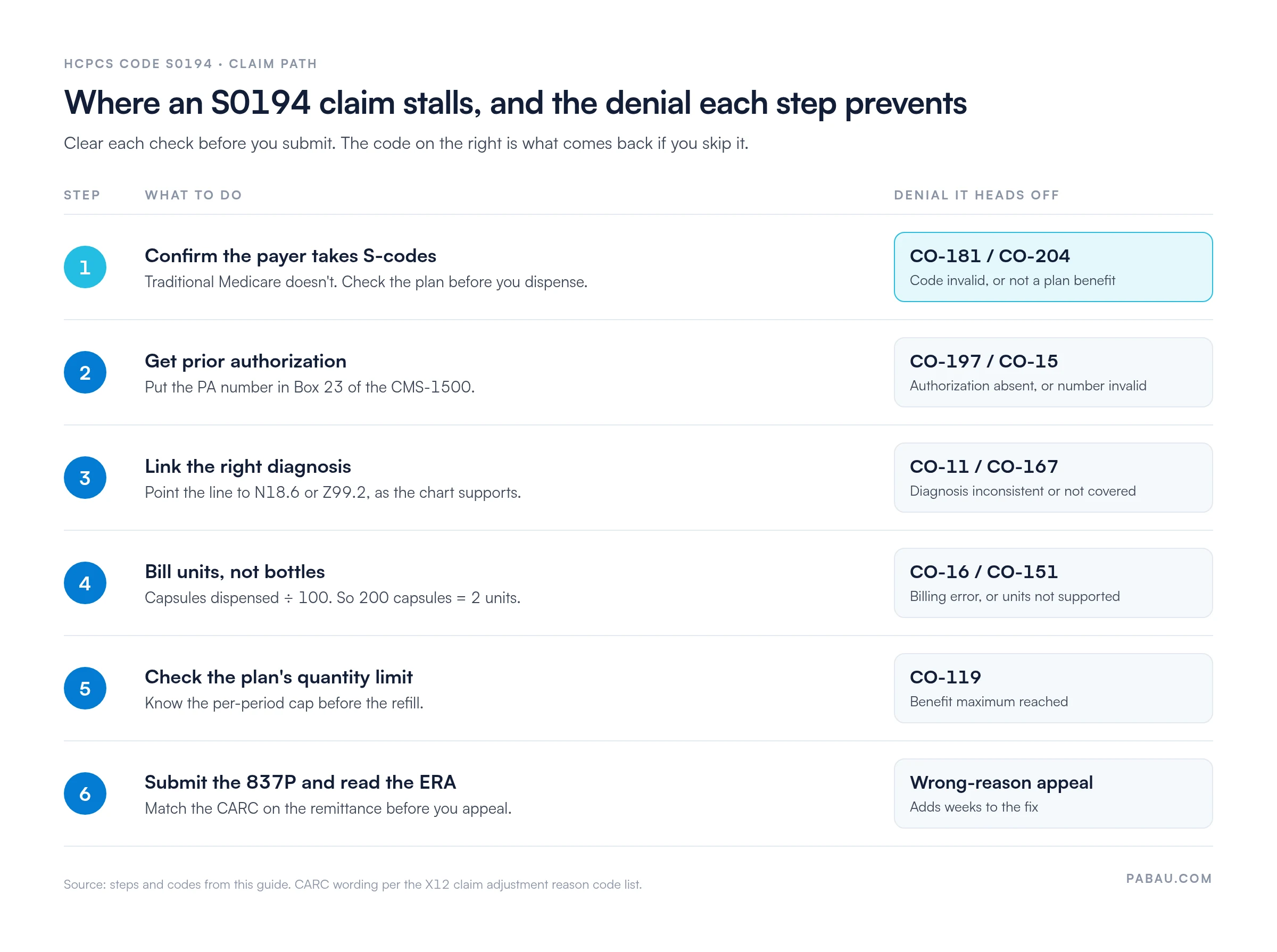
Run through this list for every S0194 claim, including refills:
A claim that clears this list has few reasons left to deny. For the wider view, revenue cycle management shows how each claim’s status feeds back into your billing process.
S0194 denials follow a predictable pattern. Start by matching the claim adjustment reason code (CARC) on the remittance to its cause. Each cause needs a different fix, and our list of medical billing denial codes explains what each CARC means.
An appeal aimed at the wrong reason can add 30 to 60 days to the fix. And when a payer doesn’t accept S-codes at all, a clinical appeal won’t work. Correct the billing instead, or tell the patient the cost before the next refill.
When the same denial keeps returning, treat it as a process problem. Our guide to denial management in healthcare shows how to track root causes across claims.
S0194 sits near several drug and nutrition codes that get swapped in by mistake. Knowing the difference stops you sending a code the payer won’t take. The PGM Billing HCPCS lookup tool lets you check neighboring Level II descriptors for free.
Some payers instruct practices to bill J3490 when they don’t recognize S0194. That line needs an invoice showing the product, the NDC and the unit cost. The payer then prices it from the invoice. Other payers deny J3490 when a specific code exists, so get the instruction in writing before you switch.
There’s no national Medicare rate for S0194. CMS doesn’t assign relative value units (RVUs) or a national allowed amount to S-codes, because they sit outside the Medicare Part B benefit.
Medicaid rates appear in each state’s fee schedule on the state Medicaid agency website. States usually update them once a year. Some pay invoice cost plus a dispensing fee, while others pay a fixed rate. The NLM HCPCS Level II API lets you confirm the code is valid for the current year.
Commercial and managed care plans pay their contracted rate. You’ll find it in your provider contract or the plan’s fee schedule tool. Check it every year, because S-code rate changes are easy to miss in update notices.
Then watch what posts. If allowed amounts keep landing below the contracted rate, look for a unit-count or payer-acceptance problem before you write off the difference. Our medical billing primer walks through the full cycle from charge to payment.
Ask each payer for its S0194 allowed amount in writing once a year. Keep a payer-by-payer rate table for your nephrology codes. If a remittance posts an amount more than 10% off your table, investigate before posting the adjustment. It may be a processing error rather than a rate change.
Many nephrology teams still track S0194 authorizations in spreadsheets and chase claim status by phone. That’s how an expired PA or a quiet denial goes unnoticed until the refill.
Pabau, the practice management platform we build, includes denial-tracking claims management. It pre-fills the CMS-1500 from the patient record. It also checks that required fields, like the authorization number, are complete before you send.
In the US, claims go out through Claim.MD. Your team gets eligibility checks, claim status tracking and ERA posting in the same system. So when a CO-197 or CO-16 comes back, it shows up next to the patient’s record, ready to fix.
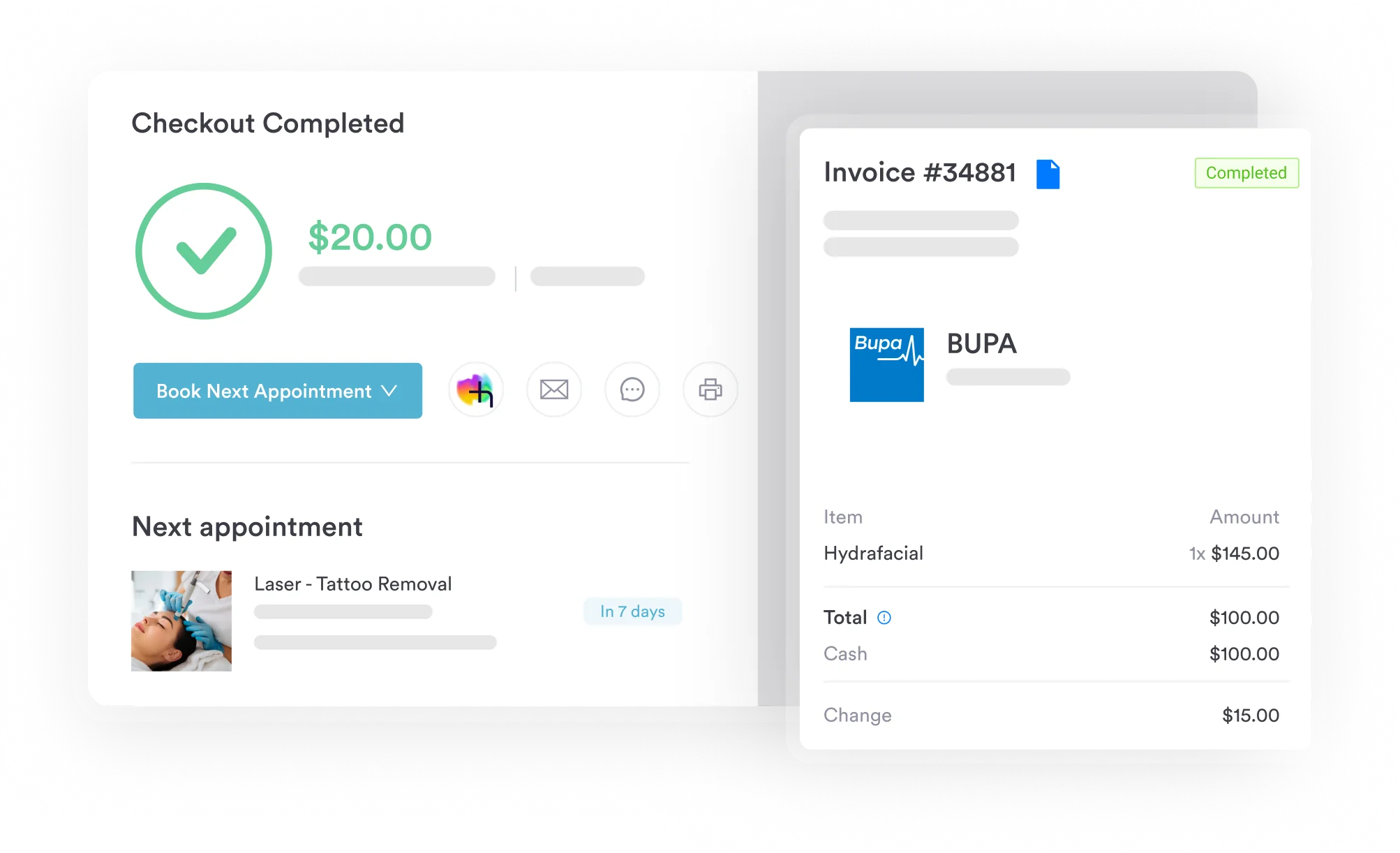

Pabau’s claims software pre-fills claims from the patient record, checks required fields like authorization numbers, and tracks each S0194 claim through to payment.

S0194 rewards billers who do their checking up front. Confirm the payer, secure the authorization, and bill units that match the dispensing log. Do that, and the denials in the table above mostly stop arriving.
The trade-off is a few minutes of front-desk work before each refill. That still costs less than reworking a denied claim two months later, after the patient has taken the capsules.
Want authorizations, claims and payments tracked in one place? Book a demo to see how Pabau handles renal supplement claims from submission to payment.

Need to understand how claim denials are tracked and appealed? Denial management in healthcare covers the full process for finding denial root causes and building an appeal workflow.
Looking for a structured guide to clean claim submission? Clean claim submission outlines the pre-submission checks that keep HCPCS claims from coming back as avoidable rejections.
Want to read the remittance before you appeal? Electronic remittance advice (ERA) explains how to read the adjustment codes that tell you why a claim paid short.
Billing other dialysis supplies too? HCPCS code A4929 covers coverage and billing for dialysis tourniquets.
Want to review the revenue cycle behind supplement billing? Revenue cycle management explains how supplement coding fits into the end-to-end billing workflow for specialty practices.
Coverage code I means the code isn’t payable by Medicare. CMS assigns it to codes that Medicare won’t pay, including S0194. It doesn’t stop Medicaid or commercial plans from accepting the code.
Yes. S0194 has been active since April 1, 2004, and it’s in the 2026 HCPCS code set. S-codes are temporary, though, so check each annual update for deletions or replacements.
The HCPCS descriptor doesn’t call for one. Some Medicaid programs and commercial plans set their own modifier rules for drug codes, so check the payer’s billing manual before you submit.
Many Medicaid programs ask for a National Drug Code (NDC) on drug-related claim lines. Requirements vary by state and plan, so confirm with the payer. If the payer has you bill J3490 instead, plan on reporting the NDC.
Yes. Medicare doesn’t pay S0194, so the patient can pay out of pocket. Tell them the price before you dispense, and note that conversation in the chart.