HCPCS code L0638: Custom fabricated LSO billing guide
HCPCS code L0638 is a brace built for one patient HCPCS code L0638 is the Level ...

Last Updated: Nov 2, 2026
A9999 is the HCPCS Level II code for a miscellaneous DME supply or accessory, not otherwise specified. Suppliers use it only when no other HCPCS code describes the durable medical equipment supply or accessory they provided.
Medicare sets no fixed fee for it. The DME MAC prices each claim through individual consideration, usually from the supplier's invoice. Because the NOS designation invites overuse, A9999 often lands on items that already have a specific code, and those claims get denied. Getting paid depends on proving three points: no specific code fits, the item is medically necessary, and the invoice supports the price.
Let Pabau's smart automation suggest the right codes, reduce claim denials, and keep your practice compliant—effortlessly.
Automate repetitive tasks and focus on what matters most—your patients.
Reduce coding errors and ensure compliance with the latest regulations.
Clean claims, fewer denials, and faster reimbursements.
Powerful insights and reporting to help your practice thrive.
HIPAA compliant SOC 2 certified GDPR-compliant Trusted by 4,000+ clinics worldwide

HCPCS code A9999 covers DME supplies and accessories with no specific HCPCS code, so it is a last resort rather than a catch-all.
Medicare has no fixed fee for A9999, and the DME MAC prices each claim individually, usually from the supplier’s invoice.
Billing A9999 when a specific code exists gets the claim denied, so search the current HCPCS file and quarterly updates first.
Use GA, GY or GZ where the ABN or expected-denial situation applies, and KX only where an LCD requires it.
Claims software such as Pabau pre-fills claims from the patient record, checks required fields before Send, and submits US claims through Claim.MD.
HCPCS code A9999 is the Level II code for a miscellaneous DME supply or accessory, not otherwise specified. It applies only when no other HCPCS code describes the durable medical equipment (DME) supply or accessory you provided. CMS maintains the code set, and the “not otherwise specified” (NOS) label tells the payer the item has no identifier of its own.
Payers read that label as a request for individual review. So every A9999 line needs paperwork that a coded item never would. If you’re still learning how medical billing works, treat A9999 as a manual claim from start to finish.
The code is active, and CMS reviews it in each annual HCPCS update. There is no fixed Medicare payment rate attached to it, because every item billed under it is different.
A9999 covers DME supplies and accessories that have no specific HCPCS Level II code. The key words are “not otherwise specified.” If CMS has created a dedicated code for an item, that code must be used, even when A9999 feels quicker.
Nebulizer accessories, standard wheelchair cushions and crutch accessories all have codes of their own. So check the current CMS HCPCS annual code file before you reach for A9999.
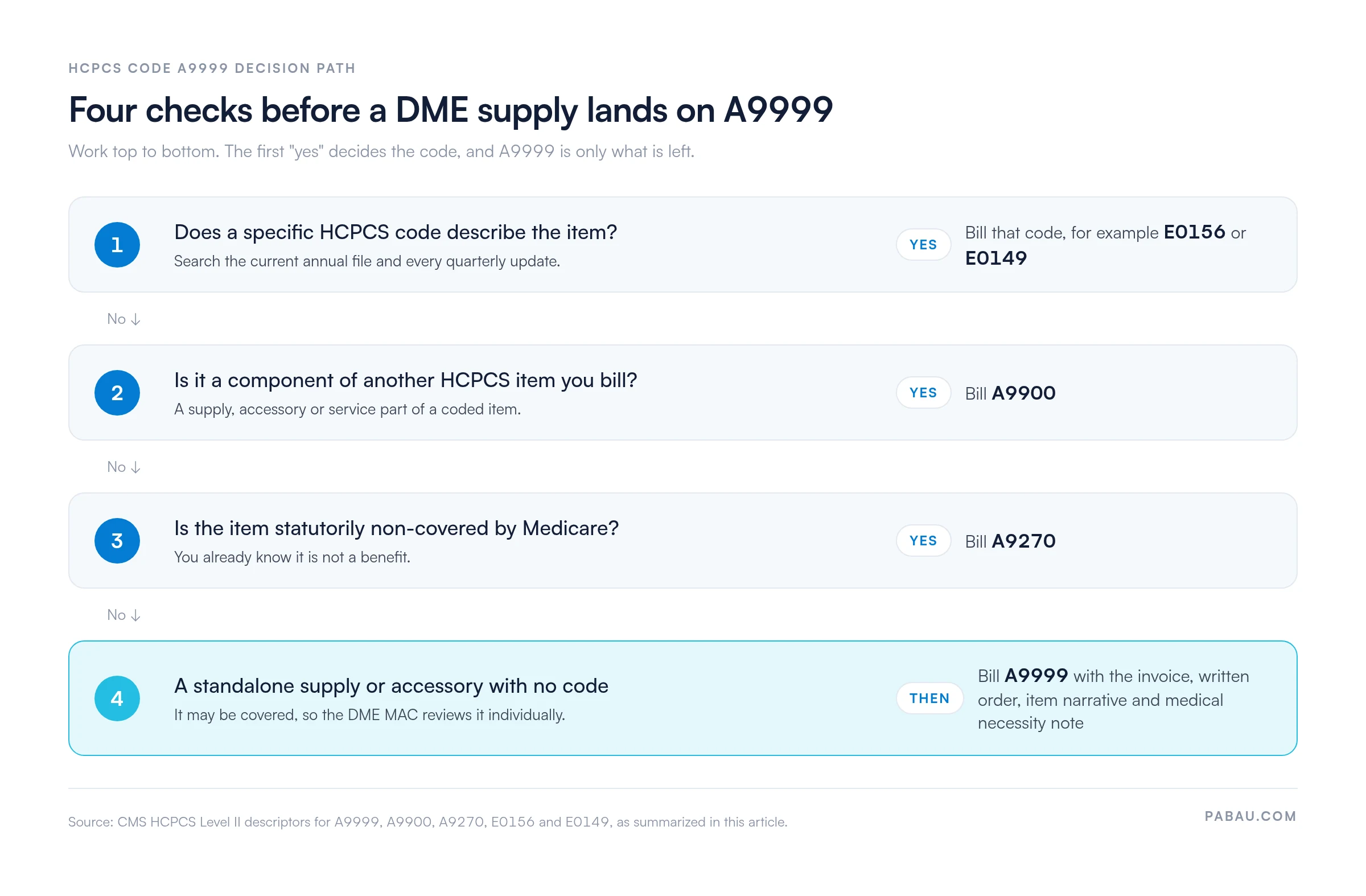
Three codes cause most of the confusion around A9999: A9900, A9270, and the named E-series accessory codes. Each one answers a different billing question.
The A9270 split matters most at audit. A9270 tells the payer you already know the item is not a benefit. A9999 says the item may be covered but lacks a code, so it goes to individual review rather than an automatic denial. Mixing the two up leads to wrong payment decisions and compliance exposure.
Run the four checks below in order, and the first “yes” settles which code goes on the claim.
Medicare pays no fixed rate for HCPCS code A9999. Instead, the claim is priced by the DME MAC through individual consideration, usually with reference to the supplier’s invoice. That makes these claims far heavier on paperwork than coded DME.
Good claims software for suppliers won’t pick the code for you. It does keep the required claim fields complete before the claim is sent.
Under Part B, the DME MAC asks three questions. Is the item medically necessary? Does it fall within a benefit category? And is there a valid reason no specific code applies? Expect a request for additional documentation on most A9999 claims.
Here’s how a well-built A9999 claim moves from order to payment:
Before billing HCPCS code A9999 to Medicare, call your DME MAC’s provider services line. Confirm that no specific code has been issued for the item in the current or upcoming HCPCS cycle. CMS issues quarterly HCPCS updates, so a code that didn’t exist in January may exist by April. Billing A9999 after a specific code is released, even within the same calendar year, is likely to be denied.
A9999 claims carry a heavier documentation load, because there is no LCD coverage checklist to validate them against. Sound medical billing compliance means these records sit in the patient file before the claim goes out.
Use GA, GY or GZ where the ABN or expected-denial situation applies, and KX only where an LCD requires it. A9999 has no coverage policy of its own, so KX rarely fits.
Whichever modifier you choose has to sit on the claim line, not only in the notes. That is one reason a clean claim review before each batch pays off.
Only append GY when you are certain the item is statutorily excluded. GY marks the item as statutorily non-covered, so Medicare will deny it and the patient may be billed. GA works differently, because it flags a possibly covered item with a signed ABN on file. When coverage is in doubt, issue an ABN and use GA.
HCPCS code A9999 does not appear in the DMEPOS fee schedule with a set payment rate. The items billed under it differ too much for one price. When payment happens, the DME MAC sets it case by case from the supplier’s invoice.
Medicaid rates vary by state plan. Some states copy Medicare’s invoice-based approach, while others cap miscellaneous DME at a maximum allowable. Commercial payers follow their own contracts, so check the contract and any prior authorization rule before you assume a rate.
The AAPC HCPCS code lookup and PGM Billing’s HCPCS lookup tool confirm the code’s current status. Neither returns a Medicare allowable for A9999, because none is published.
A9999 denials cluster around a predictable handful of causes. Strong denial management catches most of them before submission, rather than at redetermination.
A9999 appeals follow the standard five-level Medicare pathway. The difference is the packet, which needs more supporting material at every level than a typical appeal.
Two medical billing denial codes come up often on A9999 remittances. CO-4 means the procedure code is inconsistent with the modifier used, or a required modifier is missing. CO-50 means the payer judged the item not medically necessary.
CO-4 requires correcting or adding the modifier and resubmitting. CO-50 requires stronger medical necessity documentation.
A9999 coverage varies widely by payer. If you assume Medicare’s invoice-based approach applies everywhere, commercial claims get processed wrongly and Medicaid claims start coming back denied.
Commercial and Medicare Advantage plans often require prior authorization for NOS HCPCS codes. Many also route any miscellaneous-code claim to manual review. The CGS Medicare coding verification guidance gives DME suppliers direction for the CGS jurisdiction. Suppliers elsewhere should check with their own DME MAC.
Commercial payers often require prior authorization for any claim carrying a miscellaneous NOS code. If the payer contract requires it and the item has no specific code, get written authorization before the item is dispensed. A denial after dispensing is very hard to reverse on a miscellaneous code.
A missing piece on an A9999 claim usually means a return or a denial. So tick off each of these before the claim leaves your desk:
An A9999 claim depends on details spread across the order, the invoice and the patient file. Often a biller copies them into the claim form by hand, then checks every field a second time.
Pabau, the practice management platform we build, pre-fills the claim from the patient record instead. Its CPT and HCPCS code lookup libraries sit on the claim screen, and the Send button stays locked until required claim fields are complete.
In the US, claims go out through Claim.MD, with eligibility checks, remittance posting and claim tracking in the same workflow. Pabau won’t choose the code or the modifier for you. It keeps the claim complete, so your team spends less time chasing returns.

Pabau pre-fills claims from the patient record, offers CPT and HCPCS code lookup, and checks required fields before Send. US claims go through Claim.MD with eligibility checks, remittance posting and claim tracking.

Treat A9999 as a last resort you have to prove. Once you can show the code search, the order, the invoice and the necessity statement, an individual review has little left to question.
The trade-off is time. Each A9999 claim takes longer to build than a coded one, and a code released mid-year can undo that work. So recheck the HCPCS file before every A9999 claim, especially in the weeks after a quarterly update.
Book a demo to see how Pabau pre-fills claims and checks required fields before your next DME claim goes out.

Need to understand how DME denials escalate? Denial management in healthcare covers the full redetermination pathway and strategies for reducing write-off rates.
Wondering how the HCPCS modifier rules affect your bottom line? Clean claim submission breaks down the modifier and documentation requirements that determine first-pass acceptance rates.
Looking for the billing compliance framework behind NOS codes? Medical billing compliance outlines the audit risk areas that apply when miscellaneous codes are used frequently.
Weighing A9999 against its sister code? HCPCS code A9900 explains when a supply counts as a component of another billed item.
A9999 is for a miscellaneous DME supply or accessory. E1399 covers miscellaneous durable medical equipment itself. If the item is the equipment rather than a part or supply for it, E1399 is the closer fit. Neither applies when a specific code exists.
Name the item, its manufacturer, its model or part number, and what it does. Add the equipment it serves and the price from the invoice. A vague narrative such as “DME supply” usually gets the claim returned.
Yes, but put each distinct item on its own claim line. Give every line its own narrative, quantity and price, so the DME MAC can price each item separately.
Yes. A9999 has been part of the HCPCS Level II code set since January 1, 2004, and it remains active. CMS reviews it in each annual update, so confirm its status in the current file.
It depends on the payer. Many commercial and Medicare Advantage plans require prior authorization for NOS codes like A9999. Check the plan’s rules before you dispense the item, and keep the approval in writing.