Healthcare policy management software: Pabau vs dedicated tools
Healthcare policy management software helps a healthcare organization write, app...

Last Updated: Oct 29, 2026

HIPAA compliant email means any message carrying PHI meets the Security Rule’s safeguards: encryption in transit, encryption at rest, access controls, and audit logging.
A signed Business Associate Agreement (BAA) with your email provider is required under HIPAA Section 164.308(b) before you transmit any PHI.
Standard Gmail and Outlook accounts are not HIPAA compliant out of the box.
Google Workspace and Microsoft 365 can be configured for compliance, but only with a signed BAA and the right security settings.
Practice management software like Pabau keeps patient communication inside one platform, with a secure client portal, automated reminders, and digital consent forms.
Most practices assume their email setup is good enough until an audit or a breach notice proves otherwise. The HHS Office for Civil Rights received over 700 large healthcare data breach reports in 2023. Many of them trace back to unprotected electronic communications.
Email is one of the easiest places for protected health information (PHI) to leak. The penalties scale fast. Civil fines now run from $141 per violation to more than $2.1 million a year in a single violation category.
This guide covers what HIPAA compliant email requires, where practices get it wrong, and how to check whether your own setup holds up.
HIPAA compliant email is any email system that protects PHI in line with the HIPAA Security Rule under 45 CFR Part 164. It applies to covered entities and their business associates whenever a message contains individually identifiable health information. Covered entities include healthcare providers, health plans, and clearinghouses.
Standard consumer email services do not meet that bar. Say a clinician sends a patient’s diagnosis from a personal Gmail account. That message travels through servers with no enforceable access controls and no audit trail. No signed agreement obligates that provider to protect the data either.
HIPAA compliant email requires five technical conditions at once:
The HIPAA Security Rule (45 CFR §164.302-164.318) classifies email security controls as either “required” or “addressable.” That distinction decides how much documentation an auditor expects from you. A paperless HIPAA compliant practice still has to address every category below.
One nuance matters here. HIPAA does not make encryption strictly mandatory, because it sits in the “addressable” category. A covered entity can document a reasonable alternative instead. In practice, OCR auditors rarely accept “we chose not to encrypt” without strong justification, so treat encryption as effectively required.
Under HIPAA Section 164.308(b), a covered entity must hold a signed BAA with any vendor that creates, receives, maintains, or transmits PHI on its behalf. Email providers do all four. Choosing a provider that refuses to sign a BAA is the same as choosing non-compliance.
This is where practices hit their first problem. Free consumer Gmail and personal Outlook accounts are not eligible for BAAs, and neither are most low-cost shared email hosting services. For medical office HIPAA compliance, getting that agreement signed is step one.
Read the whole BAA before you sign it. Three clauses decide how much protection you get:
These two encryption types solve different problems, and confusing them leaves half your PHI unprotected.
TLS (Transport Layer Security) encrypts the connection between mail servers while a message travels from sender to recipient. Think of an armored truck. The package is safe in transit, but once it sits in the warehouse it may or may not be protected. Most modern mail servers support TLS, though opportunistic TLS can fall back to unencrypted delivery when the recipient’s server does not.
AES-256 encryption at rest protects the message after it lands. If an attacker reaches the server or the storage media, the messages stay unreadable without the decryption key. HIPAA compliant email needs both layers.
End-to-end encryption (E2EE) goes further. The message is encrypted on the sender’s device and decrypted only on the recipient’s. Even the email provider cannot read the content. E2EE gives the strongest protection, but the recipient needs compatible software or a decryption portal, which complicates patient-facing messages.
Standard Gmail is not HIPAA compliant. Google Workspace, formerly G Suite, can form part of a compliant setup from the Business Starter tier upward. That only holds once Google signs a BAA and your admin configures the security settings, including Vault, data loss prevention rules, and two-factor authentication.
Even then, Google Workspace is not end-to-end encrypted. Google holds the encryption keys, so Google could technically reach message content. HHS certifies no email platform as HIPAA compliant, and the burden sits with the covered entity rather than the provider.
Personal Outlook.com and Hotmail accounts are not HIPAA compliant. Microsoft 365 Business and Enterprise plans are a different story. Microsoft signs a BAA for qualifying subscriptions, and a correctly configured tenant can support HIPAA-compliant workflows.
Configuration is not automatic. A practice using Microsoft 365 for PHI email has four jobs to finish:
Leave any of those unfinished and the practice stays exposed, even with a signed BAA in place.
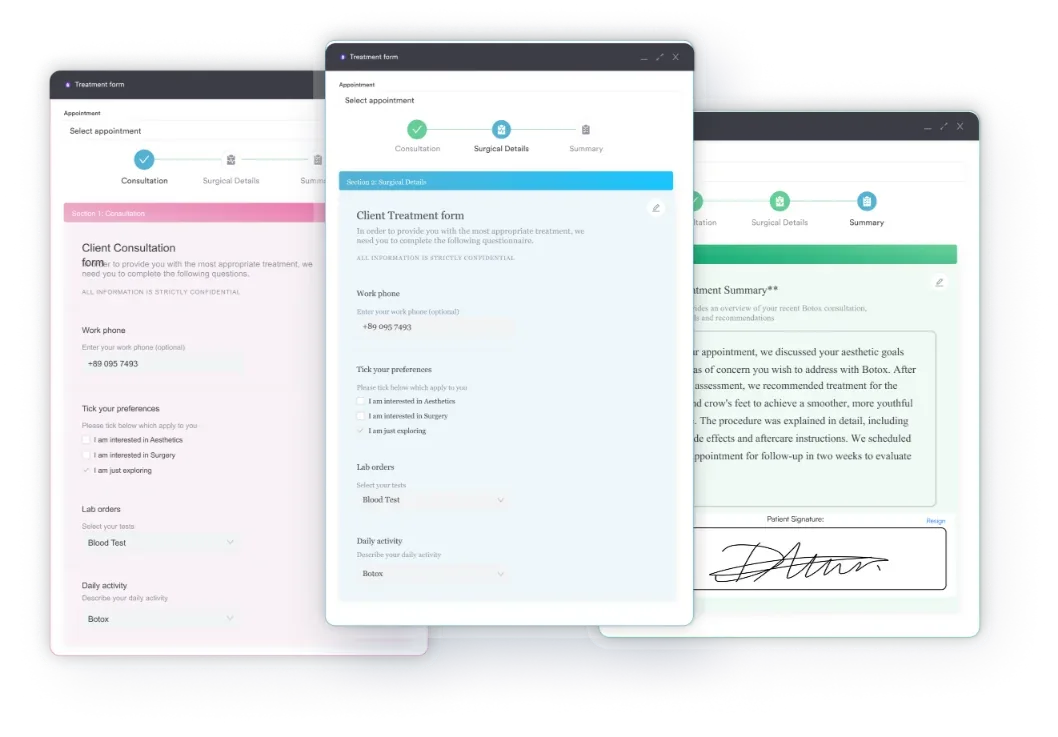
Patients can ask for unencrypted email, and you may agree. HHS confirmed in its 2008 FAQ that a provider may comply once the patient has been warned of the risks. The key word is “documented.” The warning has to be given, and the acknowledgment has to be recorded. A digital consent form is the cleanest place to capture it in writing.
Consent does not waive your other HIPAA obligations. You still keep audit logs, apply the minimum necessary standard to what you share, and comply with the Privacy Rule. Consent removes the encryption barrier for one channel. It does not create a general PHI-sharing exemption.
A practical documentation checklist for patient email consent looks like this:
OCR enforcement actions name email as the vector again and again. The patterns repeat often enough that you can audit against them.
Three of those five come down to staff habit rather than software. Regular HIPAA training for employees is what stops a busy clinician from reaching for a personal inbox on a Friday afternoon.
OCR civil penalties rise with annual inflation adjustments. Tiers 1 through 3 run from $141 to $71,162 per violation. Willful neglect left uncorrected sits in Tier 4, at up to $2,134,831 per violation. The annual cap lands between roughly $2.13 million and $2.19 million per violation category.
The rules above are easier to apply as a sequence than as a checklist. Run each message through four questions before you hit send.
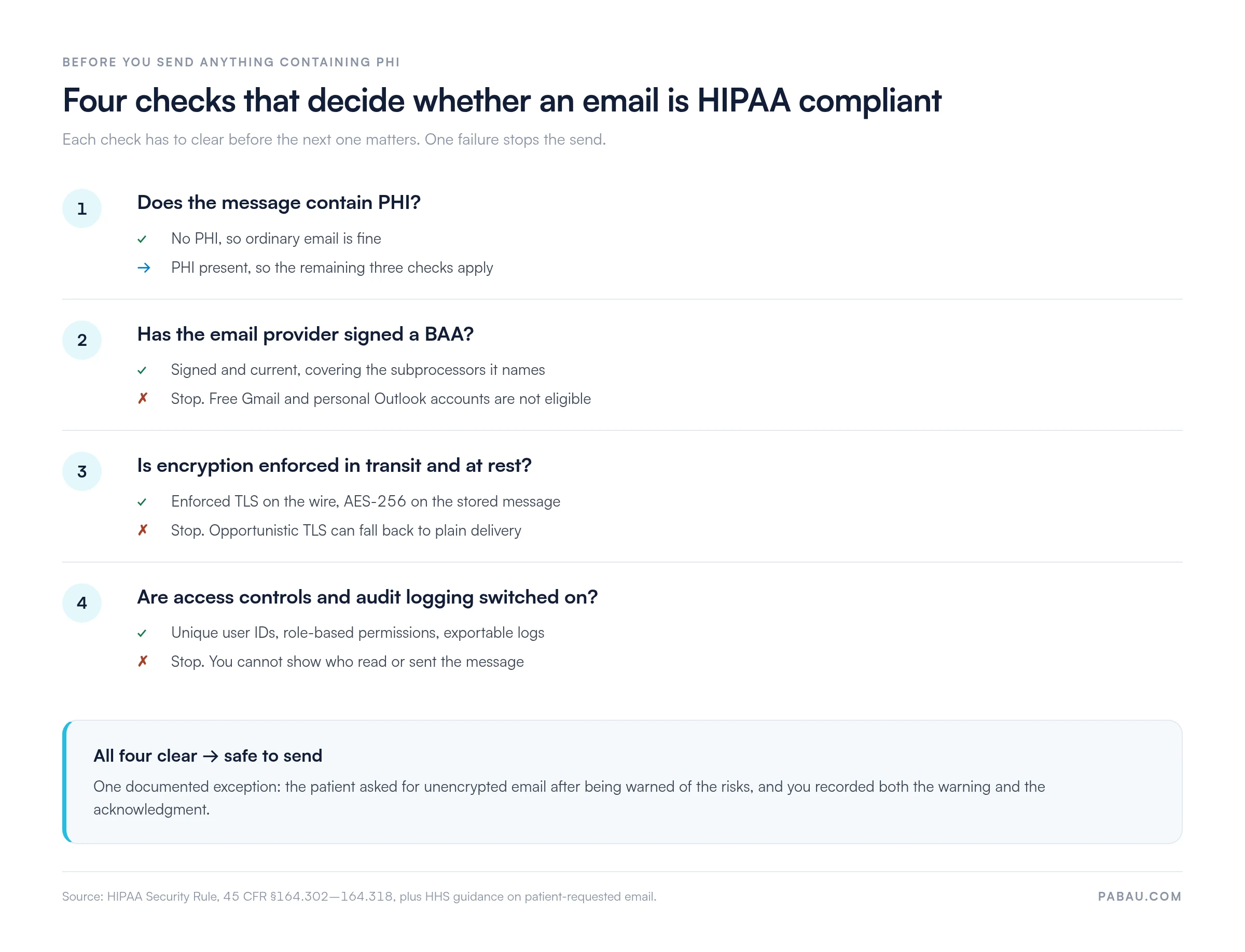
Audit your email setup quarterly. Pull 20 outbound messages from clinical staff and check each one. Does it contain PHI? Was the recipient’s server TLS-capable? Is your provider’s BAA still current? The review takes 20 minutes and surfaces problems long before an auditor does.
The market offers dozens of options. Use the framework below to compare them on the criteria that decide compliance, rather than on marketing claims.
Small and independent practices should also ask whether the provider connects to their practice management system. An email tool that cannot reach patient records forces staff to copy and paste PHI between platforms.
That manual step is where exposure starts. If you would rather solve the problem at the platform level, dedicated HIPAA compliance software covers documentation, training records, and risk assessments alongside communication.
Email is one of several vendors that touch PHI, and the same questions apply to each one. Our HIPAA software evaluation checklist carries the encryption, access control, and BAA tests across every system in the practice.
Dedicated HIPAA email tools make transmission safer, and they stop there. Clinical staff still have to remember which tool to use, and PHI still flows outside the clinical record.
The practice also manages a second vendor and a second BAA. Practice management software like Pabau takes a different route, keeping patient communication inside the platform instead of an external inbox. That route keeps secure email beside texts and calls in the same patient inbox, where staff already work.
The secure client portal gives patients a private channel for appointment confirmations, pre-treatment instructions, and care summaries, with no PHI leaving the system. Appointment reminders, recall messages, and follow-ups all send through that channel rather than unprotected email.
Access controls, audit logging, and a BAA covering patient data across the system come with every subscription. Pabau’s compliance management software stores the documentation for those controls beside the records they protect. An audit request stops being a week of searching.
Keeping internal staff messages in the same clinical environment also cuts the chance of PHI drifting into personal accounts. Every message, form submission, and patient interaction stays in one auditable system rather than scattered across vendor environments.

Pabau handles patient communication through a secure client portal, digital consent forms, and automated reminders, so PHI never has to travel through an external inbox. Book a demo to see the full workflow.

HIPAA compliant email is not a product you buy once and forget. It is a configuration you keep maintaining, and one weak link undoes the rest. A signed BAA means very little if opportunistic TLS quietly drops a message to plain delivery.
The trade-off worth remembering is convenience. Every layer you add makes email a little harder for staff to use, and staff route around tools that slow them down. That is the argument for keeping patient communication inside the system that already holds the record.
If your setup fails one of the four checks today, fix that one first and document the fix. Book a demo to see how Pabau handles secure messaging, automated reminders, and consent documentation in a single workflow.

Concerned about what happens if something goes wrong? What to do if you violate HIPAA walks through the disclosure and remediation steps OCR expects.
Need to brief the whole team, not just the admins? HIPAA training for employees sets out what every staff member needs to know before touching PHI.
Worried about the records behind the inbox? EHR security explains the controls that protect the clinical record your email messages draw from.
HIPAA compliant email is any email system that protects protected health information (PHI) in line with the HIPAA Security Rule. That means encryption in transit and at rest, enforced access controls, audit logs, and a signed Business Associate Agreement with the provider.
Yes, with conditions. HHS guidance confirms that providers may email patients, including unencrypted email. The patient has to request it after being warned of the risks, and the provider must document both the warning and the acknowledgment.
Standard Gmail (@gmail.com) is not HIPAA compliant and is not eligible for a Business Associate Agreement. Google Workspace supports HIPAA-compliant workflows from the Business Starter tier upward, once Google signs a BAA and an admin configures the security settings. It does not offer end-to-end encryption.
Personal Outlook.com accounts are not HIPAA compliant. Microsoft 365 Business and Enterprise subscriptions can be configured for HIPAA compliance once Microsoft signs a BAA. The practice also has to enable multi-factor authentication, audit logging, and data loss prevention policies.
No widely available free email service meets HIPAA requirements. Free tiers of Gmail, Outlook, and similar services are not eligible for BAAs. Some dedicated HIPAA email providers offer low-cost entry plans, but a paid subscription with a signed BAA is the minimum starting point.
Sending PHI through a non-compliant channel is a HIPAA violation. OCR civil penalties run from $141 per violation at the lowest tier to $71,162 for knowing violations. Willful neglect left uncorrected reaches $2,134,831 per violation, with an annual cap near $2.13 million to $2.19 million per category. Repeated patterns can also trigger a corrective action plan.