
 Monika Lazarevska

Emotional intelligence scale: Free PDF and how to score it
Download your free emotional intelligence scale A three-page questionnaire with ...

Last Updated: Nov 2, 2026
Free PDF 3 pages, print-ready Clinician-reviewed
A HIPAA audit checklist is a self-review of your administrative, physical and technical safeguards, recording a named owner and dated evidence for each item. It also covers the Privacy Rule, breach notification and business associate agreements, so one pass tests the whole program.
Its job is to show you the weak points before an OCR document request, a patient complaint or a breach does. Work through it with the people who run each process, and log every failed item with an owner and a fix date. Then keep the signed copy with your policies for six years.
A three-page checklist covering the HIPAA Privacy, Security, Breach Notification and Omnibus rules, plus documentation, periodic audits and an action plan. It closes with a compliance officer sign-off and date.
Start from scratch, or upload this PDF or any form you already use, and Pabau's AI Form rebuilds it with tick boxes, text fields and a signature. Attach it to the treatment once, and every patient gets it on time.
AI Form rebuilds the consent, history and aftercare forms you already use. You review each one, then publish.
Patients complete forms on their phone before they arrive, so the front desk stops retyping paper.
Every signed form is versioned and attached to the treatment record, ready when you need it.
Set how long a consent stays valid. Returning patients skip forms they have already signed.
Supports HIPAA and GDPR compliance AES-256 encryption 4.8 on G2 4.7 on Capterra Trusted by 4,000+ practices worldwide

A HIPAA audit checklist tests your privacy, security and breach safeguards, with a named owner and dated evidence for each item.
HHS requires an ongoing security risk analysis but sets no fixed annual date for it.
In an OCR desk audit, you get 10 business days to upload the documents requested.
Business associates have been directly liable under HIPAA since the HITECH Act.
Beside every item, write the owner, the date checked and pass or fail, because the PDF itself has checkboxes only.
A HIPAA audit checklist is a list of verifiable items that show whether your safeguards exist, work and have a named owner. Each item maps to a rule, such as the HIPAA Security Rule requirement for access controls, or to a policy your team must follow.
Passing it does not make you certified. HHS does not certify practices as HIPAA compliant, and no checklist guarantees compliance. Its value is surfacing weak points before OCR, a patient complaint or a breach does.
The completed checklist is itself HIPAA documentation. You generally must keep it for six years from creation or its last effective date, under 45 CFR 164.316(b)(2) and 164.530(j).
Any covered entity or business associate that handles protected health information must meet the Security Rule. A provider becomes a covered entity when it conducts standard electronic transactions, such as claims or eligibility checks, directly or through a billing service.
That test decides it for med spas. A cash-only med spa that never sends those transactions usually sits outside HIPAA, though state privacy law may still apply. One that bills insurers electronically for medical treatments is a covered entity, and the full checklist applies.
Size changes who does the work, not what gets checked. A four-clinician practice might split the checklist between a practice manager, an IT contractor and a clinical lead. A solo therapist may finish it in an afternoon, though the same items still apply.
Work through the checklist with the people who own each process, not alone at a desk. Five steps keep the review practical:
The PDF gives each item a checkbox and nothing else, so add the detail an auditor looks for. Beside each item, write the owner’s initials, the date you checked it and where the evidence is kept.
Its action plan section is three checkboxes with no room for detail. List every failed item on a separate sheet with its owner and fix date, and keep that sheet with the signed checklist.
The PDF follows the HIPAA rules in order, from Privacy to Omnibus, while the steps above work by safeguard group. Use this map to hand each section to the right owner.
The PDF leaves out three administrative safeguards that 45 CFR 164.308 requires. Write them into Section II yourself, under Security Policies and Procedures:
Keep the completed checklist with your policies. Re-run it after a new vendor, a new EHR or a staffing change, since each one reshapes your risk.
Once the review is done, the paper trail it leaves is worth more than the review itself. A completed checklist does three jobs for your practice:
That third job is the one auditors notice, and dating is a habit worth building from the first pass.
Date every checklist item, including the ones that pass. An auditor who sees a dated pass on access controls from last quarter will trust the file more than a blank box. Store the dated version alongside your policies so you can produce it on request, and schedule the next review before you close this one.
The HIPAA Security Rule groups its standards into administrative, physical and technical safeguards, plus organizational requirements and documentation rules. Each safeguard group needs its own section of the checklist. The table shows what to check and what evidence to keep.
Encryption is the row most likely to change. In January 2025, HHS proposed a Security Rule update that would make encryption required and drop the split between required and addressable specifications.
As of November 2026 it is still a proposal, and the federal regulatory agenda estimates final action for July 2027. Until a final rule is published, encryption stays addressable.
A security risk analysis is required under the HIPAA Security Rule, and it sets priorities for the rest of the checklist. Its job is to identify where electronic PHI could be exposed, how likely that is and how much harm it would cause.
HHS does not set a fixed annual date for the analysis. It expects an ongoing process, so revisit the analysis when systems, vendors or locations change. Our guide to the HIPAA risk assessment walks through scoring threats and likelihood in more detail.
An audit log records who accessed or changed electronic PHI, when they did it and what they did. Logs only help if someone reviews them, so the checklist should ask for a review schedule as well as proof the logs exist.
Ask whether logins, record views, record changes and exports are captured, and who reviews them. HIPAA requires you to keep documentation of required actions and assessments for six years. It sets no retention period for log review records, so filing them with that documentation for six years is good practice.
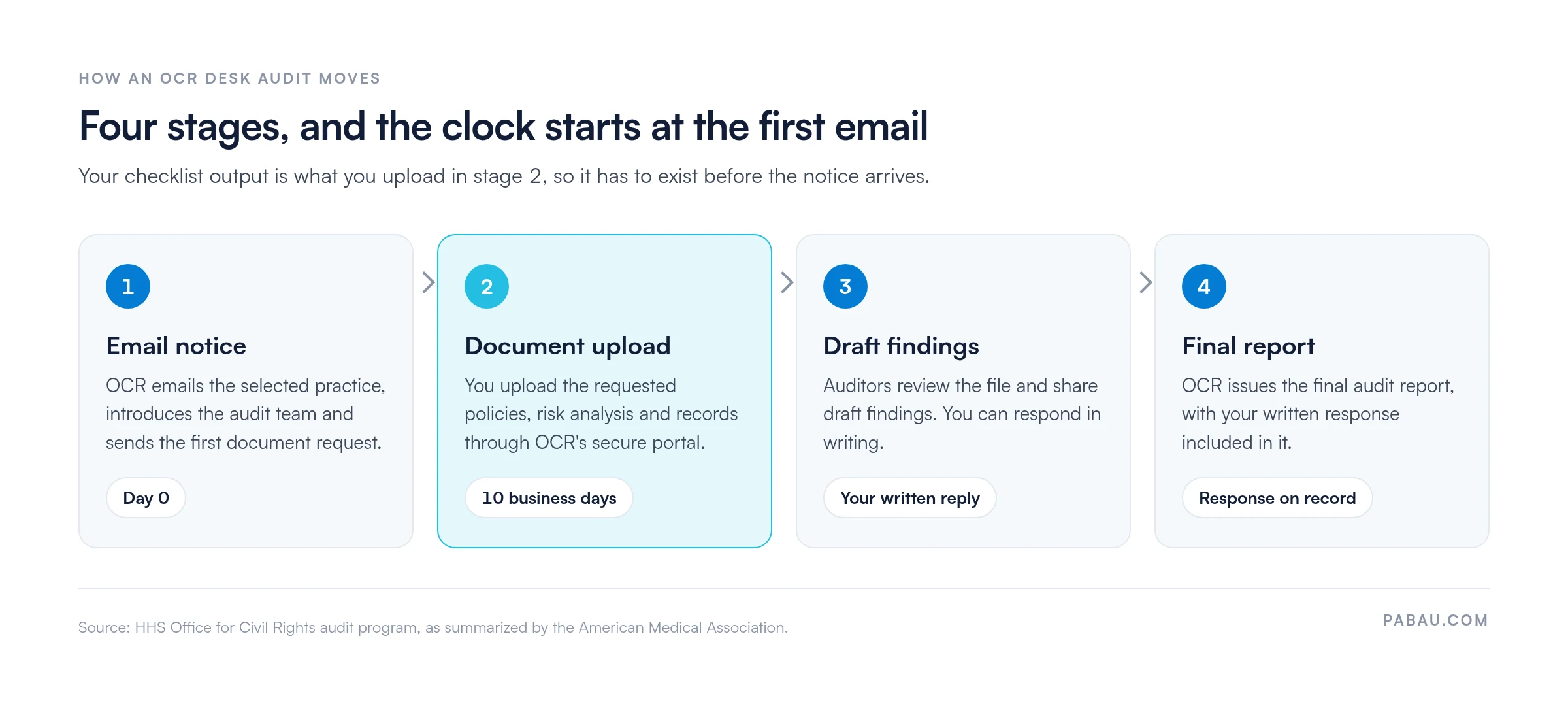
OCR’s published audit program guidance describes a short, document-driven process. The clock starts with the first email, which is why the checklist has to exist before an audit does.
Breach notification runs on its own clock. Affected patients must be notified without unreasonable delay, and no later than 60 days after you discover the breach, under 45 CFR 164.404.
A breach affecting more than 500 residents of a state or jurisdiction also needs notice to prominent media outlets serving that area, under 164.406.
Notice to HHS for a breach affecting 500 or more individuals is due within 60 days of discovery. For smaller breaches, notice to HHS is due within 60 days of the end of the calendar year in which you discovered them.
Read the breach notification rules before you need them, because state law can add stricter requirements, such as California’s CMIA. If you do find a violation, our guide to handling a HIPAA violation covers the immediate actions.
Ten business days is enough time to upload a file, not to build one. Have these ready in one folder before any request lands:
Practices with several sites should keep one folder per location and a shared index. Our guide to HIPAA for medical offices covers how multi-site teams split that work.
The same handful of problems turns up again and again, and most come down to ownership rather than technology. Training is a common one, because sessions happen but nobody records who attended.
Our guide to HIPAA training for employees covers what to log.
Take an illustrative three-room med spa that bills insurers electronically. The practice manager owns the administrative items, an IT contractor owns the technical ones and the lead clinician owns physical safeguards.
The first pass turns up three failures. The risk analysis predates the move to a new EHR, two receptionists share a login and the cloud backup vendor has no signed agreement.
Each failure gets an owner and a date. The manager books a fresh risk analysis within 30 days, and the contractor issues individual logins that week. The backup vendor signs before the next scheduled backup, and the next full review goes in the calendar.
In many practices the evidence an auditor wants is scattered. Training sign-offs sit in email, consent forms in a filing cabinet and access lists in a spreadsheet last updated two hires ago.
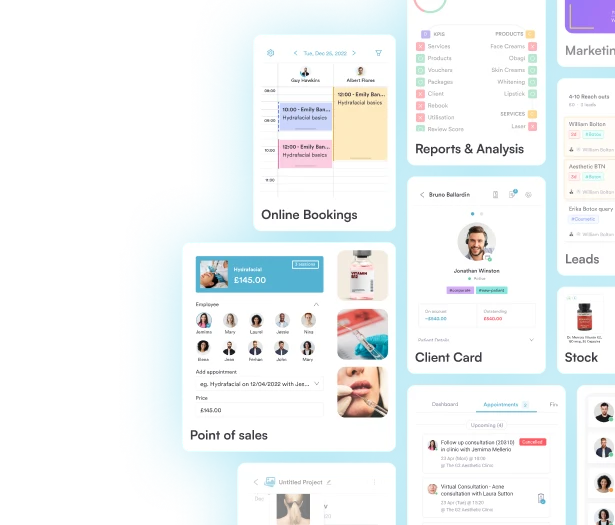
Pabau, the practice management platform we build, keeps much of that evidence in one system. Its compliance management software keeps a traceable audit trail, and role-based permissions control who can view, edit or export each part of a record.
Signed consent and intake forms land in the patient record through digital forms, time-stamped and ready to show. Pabau does not make a practice HIPAA compliant on its own, but it shortens the hunt for proof when a document request arrives.

Book a demo to see how Pabau’s audit trail, role-based permissions and digital forms keep your safeguard evidence organized in one place.
Run the checklist before anyone asks for it. The first pass will surface items with no owner and evidence that lives only in someone’s memory. Both are cheaper to fix now than inside a 10-business-day request window.
Date every result, pass or fail, and book the next review before you close this one. A new EHR, vendor or location is reason enough to run it early.
The trade-off is a few hours of staff time against an audit file you can hand over calmly. Book a demo to see how Pabau keeps your safeguard evidence ready for the next review.

Choosing software that handles PHI? HIPAA compliance software covers the vendor and safeguard questions to ask before you buy.
Vetting a new vendor? HIPAA compliant software checklist turns those questions into a form you can score.
Want to know what a violation costs? HIPAA violation penalties explains the penalty tiers and what moves a case between them.
Need an up-to-date privacy notice? Notice of privacy practices template gives you a starting draft for the document OCR often asks for.
Not sure how long to keep records? How long to keep medical records sets out retention periods for clinical records alongside HIPAA documentation.
The HHS Office for Civil Rights runs federal HIPAA audits of covered entities and business associates. Internal audits are run by your privacy or security officer, sometimes with an outside assessor.
Expect the security risk analysis and risk management plan first. Earlier desk audits also requested the notice of privacy practices, patient access request records and breach notification records.
The document stage moves fast, with 10 business days to upload what OCR requests. The desk audit then runs through draft findings, your written response and a final report.
Audit findings do not bring an automatic fine, because the program mainly aims to improve compliance. Serious findings can lead OCR to open a compliance review. Civil money penalties are tiered by culpability and adjusted for inflation each year.
Yes, if your practice is a covered entity or a business associate. The Security Rule is scalable, so a small practice can use a simpler checklist than a hospital, but the required safeguards still apply.