OSHA respirator medical evaluation questionnaire
The OSHA respirator medical evaluation questionnaire is the mandatory health for...

3
Last Updated: Oct 15, 2026
A HIPAA-compliant form builder collects patient information online under a signed Business Associate Agreement, or BAA. Encryption, role-based access, and audit logging sit behind it.
That agreement is what the rest of your compliance rests on. Without one, your vendor owes your patient data no legal duty, and the HHS Office for Civil Rights still holds your practice responsible. A free Google Form cannot be made safe for patient data, whatever settings you change.
Below you’ll find four ready-to-use templates and the five features to verify before you buy. There’s also a checklist to run before your first form goes live.
One PDF with four ready-to-use forms, covering patient intake, medical consent, HIPAA authorization, and a Notice of Privacy Practices. Each carries the consent language, signature blocks, and field-by-field notes you can adapt to your practice.
Download template
A form tool is only HIPAA compliant if the vendor signs a Business Associate Agreement, or BAA.
The five controls to verify are a BAA, 256-bit encryption, role-based access, audit logs, and signature capture.
Penalties run from $145 to $73,011 per violation, with an annual cap near $2.19 million per identical provision.
Fines are counted per violation, not per patient record, so a 500-record breach is not 500 separate penalties.
The four templates below cover patient intake, consent, authorization, and your Notice of Privacy Practices.
It captures patient information online and protects it to the standard federal law sets. Generic tools such as Google Forms, Typeform, and SurveyMonkey capture the same answers with none of that protection behind them.
Three differences do the work. The vendor signs a BAA, so the law reaches them as well as you. The data is encrypted, and access to it is restricted by role. And every view of a completed form is logged, which is how you prove compliance later.
HIPAA itself is the Health Insurance Portability and Accountability Act, a 1996 federal law. It binds covered entities, meaning providers, health plans, and clearinghouses. It also binds their business associates, meaning any vendor that handles protected health information, known as PHI, on their behalf.
So the moment a form tool stores a patient name, a date of birth, or a diagnosis, it becomes a business associate. That is a legal status, not a setting you switch on.
Three reasons make this worth getting right before the next patient books in.
Google Forms is the tool practices reach for first, and the one to walk away from. A standard Google Form carries no BAA, no audit logging, and no encryption built for PHI. Google Workspace at the enterprise level can be covered by a BAA, but a free or standard form cannot.
Verify these five before you sign a contract. A tool missing one of them is not compliant, whatever its marketing page claims.
These five controls do not all act at the same moment. Each one covers a different step of a single submission, which is why one missing control leaves one step exposed.
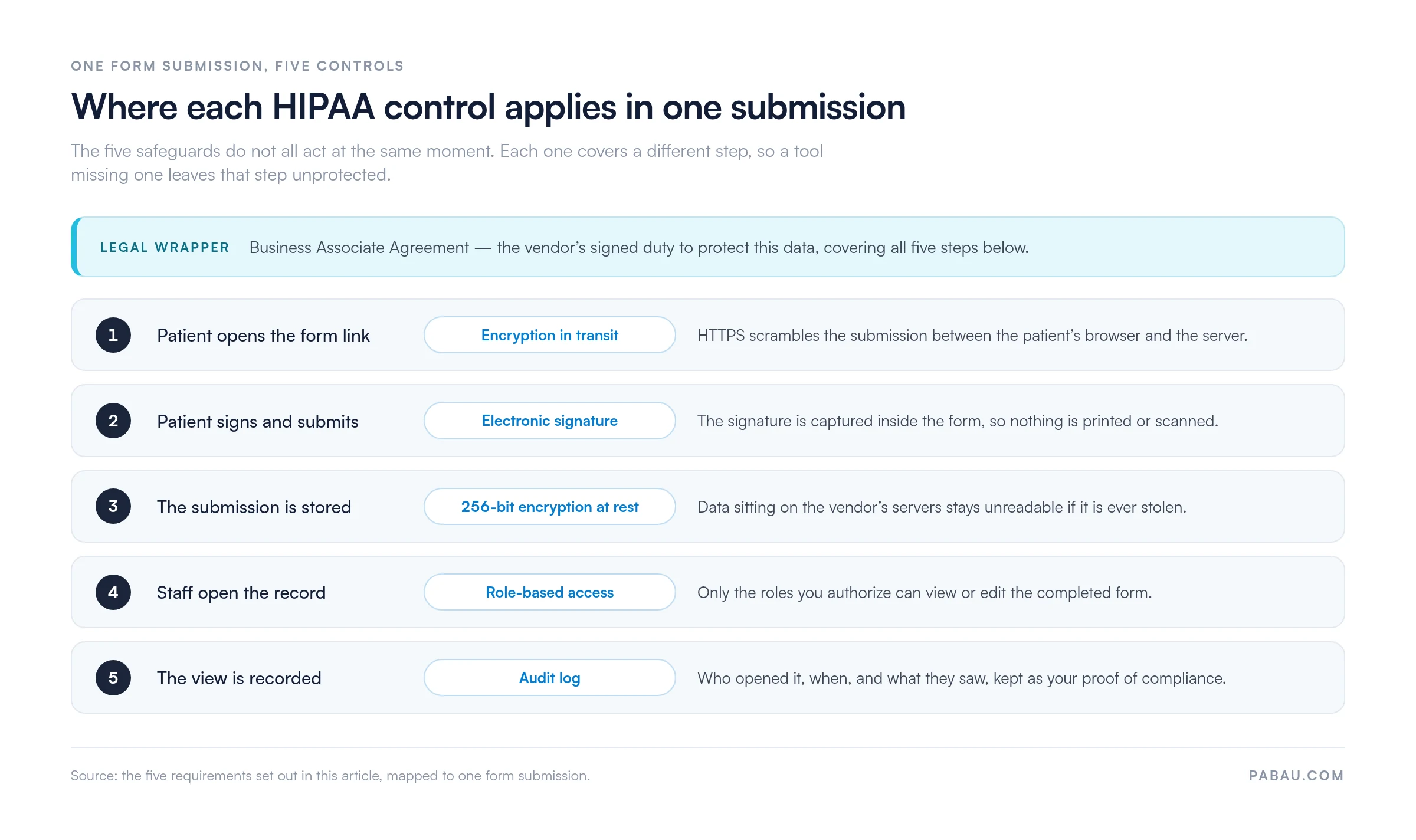
JotForm, FormDr, and HIPAAtizer clear all five. A standard Google Form and the free Typeform tier do not.
A Business Associate Agreement is a signed contract between your practice and the form vendor. It binds them to protect PHI under 45 CFR §164.502(e) and §164.504(e).
Without one, the vendor has no legal duty to your patient data. If a breach happens, enforcement lands on you as the covered entity, and you have no recourse against them. A BAA moves part of that accountability across.
Ask a vendor one question: do you offer a BAA? If the reply is not “yes, included” or “yes, on request”, move on to the next vendor.
And if they say the data is encrypted, so a BAA is not needed? Encryption is a control, not a contract. The Security Rule expects both, and only the contract is enforceable against the vendor.
Most compliant builders either include a pre-signed BAA or will sign yours on request. Getting it in writing takes one email, and it is the cheapest piece of compliance you will ever buy.
All four forms sit in the download above. Add your practice name and your own fields, then deploy each one in your practice management system or form builder. Every template carries the required consent language, signature capture, and retention guidance.
This one collects demographics, insurance details, medical history, medications, allergies, and an emergency contact at the first visit. Capture a signature confirming the patient has reviewed your Notice of Privacy Practices. Our guide to medical office HIPAA compliance shows where intake sits in the wider program.
A consent form records the patient’s agreement to treatment and their understanding of the risks. Informed consent is a matter of state law rather than HIPAA, so check what your state requires the form to say. Customize the treatment section for your specialty, whether that is injectables, laser, therapy, or IV infusion. A standalone consent for medical treatment template covers the same ground if you only need this one form.
An authorization lets your practice use or disclose PHI for a named purpose, such as billing, a referral, or sharing with a third party. HIPAA requires it to state what information, to whom, for how long, and under what conditions. This is where 45 CFR §164.508 applies, and the template meets its conditions for a valid authorization.
The Notice of Privacy Practices, or NPP, explains how your practice uses and protects patient information. You have to provide it at the first visit and record that the patient received it. The template covers your privacy policies, patient rights, complaint procedures, and a contact for privacy questions. A separate HIPAA privacy policy sits behind the notice and documents how your staff apply it day to day.
Run every candidate through six checks, in this order.
Two of those checks pull in the same direction. A form builder that already sits inside your compliance management software leaves one audit trail and one retention policy to maintain, instead of two.
If you are weighing whole platforms rather than a bolt-on form tool, our guide to HIPAA compliance software compares what each option covers. Score your shortlist against our vendor evaluation checklist, which covers the administrative, physical, and technical safeguards a system must clear before it holds PHI.
Ten items. Work through them once before launch, then again each quarter.
Four mistakes show up again and again once forms are live.
Print the checklist and revisit it whenever your forms change or someone leaves the team.
In a lot of practices, forms and records live in two different systems. A patient completes an intake form in one tool, a staff member downloads the result, then types it into the chart. That is a second vendor, a second BAA, a second audit trail, and one more copy of patient data to account for.
Practice management software like Pabau builds the forms inside the same system that holds the record. A submitted intake form lands on the patient’s file directly, so nobody re-keys it. Role-based access and audit logging belong to the platform, which means one set of controls covers the form and the chart together.
The practical difference shows up during an audit. One BAA covers the form data. One log answers who opened which record, and when. Every Pabau subscription includes the form builder, so none of this sits behind a higher tier.

Pabau’s digital forms capture intake, consent, and authorization, then file them straight onto the patient record. One BAA, one audit trail, and no re-keying between tools.

Compliance on a patient form comes down to one question. Has the vendor signed a BAA? Encryption, access controls, and audit logs all matter, but a vendor can switch those on at any time. The contract is what makes them enforceable.
So start with the templates above, then check the BAA on the tool you already use. If there isn’t one, the fix is a vendor change rather than a settings change. Keeping forms and records in one platform removes the problem instead of managing it.
Book a demo to see how patient forms, consents, and records stay in one compliant system.

Comparing platforms, not plug-ins? HIPAA compliance software walks through what each option covers and where coverage runs out.
Moving off paper forms entirely? Running a paperless practice under HIPAA covers the storage, access, and disposal rules that change once records go digital.
Worried a form has already leaked data? What to do if you violate HIPAA sets out the notification deadlines and the documentation you need to keep.
Setting a retention policy? How long to keep medical records explains the federal minimums and the state rules that usually run longer.
Yes, if the host stores or processes patient form data. A provider that only passes encrypted traffic through may count as a conduit and be exempt. A host that keeps a copy of the submission needs a signed BAA.
HIPAA requires six years for the documentation the rule itself mandates, such as your Notice of Privacy Practices and signed authorizations. Medical record retention is set by state law and often runs longer. Apply whichever period is longer.
Yes. Mobile submission is fine as long as the connection uses HTTPS and the vendor’s BAA covers mobile access. Ask patients to avoid public Wi-Fi, and never let staff photograph a completed form on a personal phone.
Usually yes. Once a healthcare provider collects an identifier in connection with care, it counts as protected health information. Treating every form on your practice website as in scope is the safer default.
Notify affected patients without unreasonable delay, and no later than 60 days after discovery. Breaches involving 500 or more people go to HHS within that same 60 days. Smaller ones are reported to HHS annually.