The best EMR software in Australia is the one that bills Medicare the way your practice already works. An electronic medical record (EMR) holds your clinical notes, but every platform here also runs bookings and billing.
Our top pick is Pabau, the all-in-one practice management system we build, for multi-specialty and aesthetic practices. High-volume GP practices are better served by Best Practice or MedicalDirector. Specialists should start with Genie or Clinic to Cloud.
A poor fit shows up fast, as rejected claims at reception and a painful second migration down the track. Below, we compare 10 platforms on specialty fit, Medicare claiming, deployment and published price.
Key takeaways
1. Pabau — best EMR for multi-specialty and aesthetic practices that want notes, booking, billing and marketing in one login.
2. Best Practice — the strongest native Medicare claiming for high-volume GP practices.
3. Clinic to Cloud — specialty templates and referral workflows for cardiologists, dermatologists and other specialists.
4. Genie — the desktop system that Magentus says more than half of Australian medical specialists run, with booking and invoicing built in.
5. MedicalDirector — the safest path to the cloud for GP practices with decades of legacy data.
6. Nookal — multi-location scheduling and reporting for allied health groups, from AUD $49 per practitioner.
7. Power Diary (Zanda) — exercise prescription and rehab plans for physiotherapy and sports medicine.
8. CorePlus — Medicare mental health item tracking for psychology practices.
9. Cliniko — the simplest, most transparently priced option for small allied health practices.
10. ZedMed — on-premise deployment that keeps rural GP practices running offline.
Found our content helpful?
The 10 best EMR software platforms in Australia, side by side
Every platform in the table runs clinical notes, scheduling and billing in one system. What separates them is the Deployment column, which shows whether the software can run on a server in your practice.
Prices come from each provider’s own website, checked in September 2026. Where a vendor publishes no price, the table says so. Practices outside Australia can compare wider options in our roundup of the best medical software.
Specialty-specific clinical templates and pathology integration
No published pricing
Limited public reviews
4
Genie
Specialist practices that want a desktop system
Desktop, on-premise server
Specialist booking, invoicing, custom forms and reporting
No published pricing
Limited public reviews
5
MedicalDirector
Established GP practices with legacy data
On-premise or cloud (Helix)
Cloud migration path from on-premise installs
No published pricing
Limited public reviews
6
Nookal
Allied health practices (physio, chiro, osteo, OT)
Cloud only
Multi-location management with franchise support
AUD $49/practitioner/month
4.5/5 (Capterra, 90 reviews)
7
Power Diary (Zanda)
Physiotherapy and sports medicine
Cloud only
Exercise prescription and treatment plan templates
AUD $29/month + GST
4.5/5 (G2)
8
CorePlus
Psychology and mental health
Cloud only
Medicare mental health item tracking
AUD $35/user/month + GST
4.4/5 (Capterra)
9
Cliniko
Small allied health practices wanting simplicity
Cloud only
Every feature on every tier, priced by practitioner count
US$45/month (one practitioner), US-dollar list price
4.7/5 (Capterra, 23 reviews)
10
ZedMed
Rural and remote GP practices
On-premise or cloud
On-premise option for unreliable internet
No published pricing
Limited public reviews
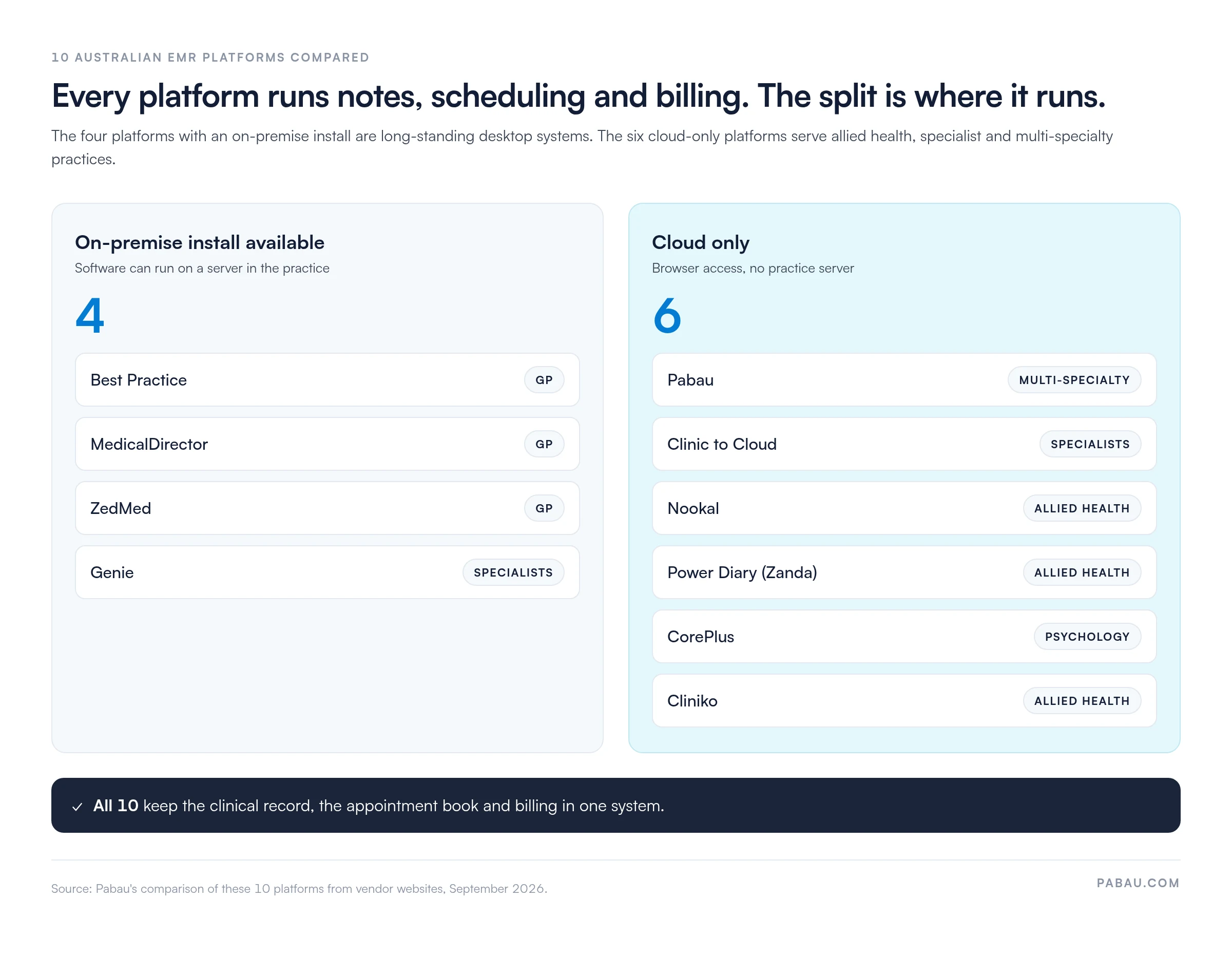
The four platforms with an on-premise install are long-standing desktop systems. Three are built for general practice and one, Genie, for specialists. The six cloud-only platforms serve allied health, specialist and multi-specialty practices.
Every platform here keeps the record, the calendar and billing together, so the practical split is whether it can live on your own server. Source: Pabau’s comparison of vendor websites, September 2026.
Pabau puts multi-specialty and aesthetic practices on one login
Rating4.7/5★★★★★Top pick
The bottom line
Pabau runs the clinical record and the front desk in one system, which suits practices mixing aesthetics, allied health and wellness.
Pabau is the best EMR software in Australia for multi-specialty and aesthetic practices that want notes, booking, billing and marketing in one login.
A Melbourne cosmetic medicine practice running Botox, dermal fillers and laser treatments needs different workflows from a physiotherapy practice. Both differ again from a family medicine practice. Pabau covers aesthetic medicine, wellness, physiotherapy, mental health, private GP and hybrid practices from one platform.
Pabau treats clinical documentation, scheduling, inventory, patient engagement and payments as one connected workflow. A patient booking Botox online triggers pre-treatment forms, reserves toxin units and books the injector. Aftercare instructions and a 12-week recall then go out automatically.
Pabau positions itself as an all-in-one practice management system, so the clinical record, calendar and invoices share one login instead of three.
Pabau Scribe, our AI scribe, turns the consultation conversation into structured SOAP notes, treatment summaries and patient-facing documents. Pabau Scribe also flags contraindications from the patient’s history and drafts a treatment plan summary for the Client Portal. Practitioners spend less time on notes after each consultation.
Key features
Pabau Scribe: Voice-to-text documentation that structures clinical notes, flags contraindications and drafts patient summaries.
Multi-industry templates: Pre-configured forms and treatment protocols for aesthetics, physiotherapy, mental health, wellness and private GP.
Injection plotting and photo management: Digital face mapping with dose tracking, treatment history overlays and standardised before-and-after photos.
Online booking and Client Portal: White-labelled booking with package purchases, memberships and secure document sharing.
Inventory and stock control: Stock tracking with reorder alerts, batch expiry management and treatment-to-stock linkage for accurate cost of goods.
Automated workflows: Recall, win-back, birthday and post-treatment campaigns sequenced across SMS and email.
Where Pabau shines
Multi-specialty flexibility: One platform handles aesthetic medicine, physiotherapy, mental health, wellness and private GP workflows. A Brisbane practice running injectables, physiotherapy and nutrition counselling works from one system.
Less documentation after hours: Pabau Scribe drafts the clinical note from consultation audio. Practitioners review and sign instead of typing from memory at the end of the day.
Cloud access from any device: There are no on-premise servers, and updates install automatically. A practitioner reviews records from home while reception manages the calendar on an iPad.
Where Pabau falls short
Medicare claiming via a partner integration: Pabau lodges Medicare and DVA claims through its Tyro Health connection. Medicare Benefits Schedule (MBS) item codes are built in. Claim status is tracked against the invoice, but GP practices used to one-click bulk billing need extra setup.
Newer to the Australian market: Best Practice and MedicalDirector carry 20+ years of local regulatory logic. Pabau configures Australian compliance per practice rather than by default.
Customer reviews
Pabau holds a 4.7/5 rating on Capterra (653 reviews) and a 4.7/5 rating on G2 (370+ reviews). Reviewers single out the combination of scheduling, clinical documentation, billing and marketing automation. Aesthetic and multi-specialty practices highlight injection plotting and photo management.
Who Pabau is best for
Multi-specialty practices combining aesthetic medicine, allied health and wellness under one roof
Cosmetic medicine practices scaling across locations with shared inventory and reporting
Physiotherapy and sports medicine practices that also offer wellness, nutrition or mental health services
Private GP practices that value patient engagement and automated recalls over native Medicare claiming
Pricing
Plan
Price
Who it’s for
Key inclusions
Starter and Solo
From AUD $62/month
One user
Full platform with every feature
Team to Enterprise
Priced by user count and location
Growing and multi-location practices
Full platform, data migration and structured onboarding
Pabau’s published Australian starting price is AUD $104 per month for one user. The region toggle on Pabau’s pricing page confirms this rate and the full breakdown.
Best Practice wins for high-volume GP billing
RatingN/A/5★★★★★
The bottom line
Best Practice is the default GP system for practices whose revenue runs on high-volume Medicare claiming.
Who it’s for
High-volume bulk billing GP practices
Regional practices wanting an on-premise option
Practices preparing for RACGP accreditation
PricingFrom $1,489.41/yearper full-time doctor, ex GST
Best Practice is the strongest pick for Australian GP practices that bulk bill heavily. Its Medicare claiming has been refined over two decades.
A solo GP in regional Queensland seeing 40 patients a day never leaves the clinical record to bill. Best Practice handles MBS item selection, real-time eligibility checks, bulk billing and direct claim submission to Services Australia.
Best Practice was purpose-built for Australian general practice. Its templates, medication database, pathology links and billing reflect the RACGP Standards for General Practices and Medicare rules. The appointment book, Medicare and DVA billing and Bp Comms SMS reminders all run in the same system as the clinical record.
Key features
Native Medicare claiming: Direct integration with Services Australia for real-time eligibility checks, bulk billing and MBS item validation.
ePrescribing: Built-in eRx connectivity with Australian prescription exchange services for digital scripts and Pharmaceutical Benefits Scheme (PBS) claiming.
My Health Record integration: Two-way exchange of shared health summaries, event summaries and discharge summaries.
Clinical decision support: SNOMED CT-AU and ICD-10-AM coded templates with alerts for drug interactions, contraindications and recalls.
Pathology and radiology integration: Direct feeds from Sonic, Healius and radiology networks into the patient record.
Appointment book and SMS reminders: A native appointment book, with Bp Comms sending SMS reminders to patients.
On-premise and cloud options: A local server for practices with connectivity concerns, or managed cloud hosting.
Where Best Practice shines
Medicare claiming expertise: Real-time eligibility checks stop rejected claims before submission. DVA, WorkCover and standard Medicare billing run from one workflow.
Deep pathology integration: Results from Sonic Pathology, Healius and regional labs land in the record, with abnormal results flagged for review.
RACGP accreditation support: Templates align with RACGP Standards. Audit trails, consent management and governance reports support each accreditation cycle.
Where Best Practice falls short
Limited allied health support: Best Practice is built for general practice. Physiotherapy, psychology and other allied health workflows need workarounds or another platform.
Dated interface: The clinical interface follows older design patterns. Staff used to modern cloud apps may take longer to get comfortable.
Customer reviews
Best Practice has little presence on Capterra or G2 because it sells only in Australia. Within the Australian GP community, Best Practice is widely regarded as the benchmark for practice software. Feedback praises Medicare claiming reliability and pathology integration, and the most common request is a modernised interface.
Who Best Practice is best for
General practices processing high volumes of Medicare claims every day
Rural and regional GP practices that want an on-premise option
Practices already built around Best Practice templates and pathology feeds
Practices that put RACGP accreditation and claiming accuracy ahead of interface design
Pricing
Plan
Price
Who it’s for
Key inclusions
Doctor, full time
AUD $1,489.41 per year, ex GST
Doctors working more than 25 hours a week
Bp Premier, ongoing updates, MIMS subscription and local support
Doctor, part time
AUD $893.65 per year, ex GST
Doctors working 25 hours a week or less
Bp Premier, ongoing updates, MIMS subscription and local support
Allied health
AUD $521.29 per year, ex GST
Allied health practitioners
Bp Premier, ongoing updates, MIMS subscription and local support
Best Practice publishes these Bp Premier prices on its website, effective from 1 July 2026. Volume discounts may apply to multi-user practices, and setup fees can apply to a managed data conversion.
Clinic to Cloud gives specialists deeper templates
RatingN/A/5★★★★★
The bottom line
Clinic to Cloud gives consultant practices specialty templates and referral workflows that GP systems don’t carry.
Who it’s for
Cardiologists, dermatologists and orthopaedic surgeons
Clinic to Cloud is the best fit for Australian specialist practices that need subspecialty templates, referral management and specialist MBS billing in one system.
A cardiologist managing post-procedure follow-ups, device data and subspecialty referrals needs different templates from a GP doing health assessments. Clinic to Cloud provides modules for cardiology, orthopaedics, dermatology, ophthalmology and other consultant disciplines.
The templates reflect each specialty’s terminology, examination protocols and treatment pathways. A dermatologist gets lesion mapping, biopsy tracking and dermatoscopy image management as standard features.
Key features
Specialty-specific templates: Pre-configured note structures for cardiology, orthopaedics, dermatology, ophthalmology and other specialties.
Pathology and imaging integration: Direct feeds from Australian pathology labs and radiology networks.
Referral management: Two-way referral workflows with GPs, automated acknowledgments and outcome reporting.
Device data integration: Connections to cardiac monitors, spirometry and diagnostic devices.
Medicare specialist billing: Support for complex MBS specialist items, procedural billing and hospital claims.
Multi-location practice management: Shared patient records across consulting rooms, day surgeries and hospital visiting rights.
Where Clinic to Cloud shines
Specialty template depth: An orthopaedic surgeon documents joint examinations with anatomical diagrams and procedure-specific templates instead of free text.
Referral network coordination: A cardiologist sends structured summaries that populate the referring GP’s record without manual entry.
Device integration: Spirometry results and ECG tracings flow into the record, so a respiratory physician reviews lung function without transcription.
Where Clinic to Cloud falls short
Limited general practice features: Clinic to Cloud is built for consultants, not high-volume primary care. Practices mixing GP and specialist work hit workflow limits.
Niche deployment: A smaller user base than Best Practice or MedicalDirector means fewer community templates and third-party integrations.
Customer reviews
Clinic to Cloud has little presence on international review platforms given its specialist focus. Australian specialists highlight the depth of the specialty templates and the referral workflows. Practices moving from paper specialist records report smooth migrations.
Who Clinic to Cloud is best for
Specialists such as cardiologists, dermatologists, orthopaedic surgeons and ophthalmologists needing subspecialty templates
Consultant practices managing referral networks and hospital visiting rights
Specialists bringing diagnostic device data into the clinical record
Multi-site specialist practices coordinating consulting rooms and day surgeries
Pricing
Specialist practice plans
Specialty templates, pathology integration, specialist billing and device connectivity
Contact sales / no published pricing
Clinic to Cloud doesn’t publish pricing on its website, and quotes follow a demo.
Genie keeps specialist records on your own server
RatingN/A/5★★★★★
The bottom line
Genie is the desktop practice management system that Magentus says more than half of Australian medical specialists run.
Genie is the pick for Australian specialist practices that want an established desktop system, with booking, invoicing and clinical records in one install.
Magentus, the company behind Genie, reports that more than half of Australian medical specialists use it. Its users span obstetrics and gynaecology, orthopaedic surgery, ophthalmology, plastic surgery, rheumatology, dermatology and paediatrics.
Genie runs on a server inside the practice, and staff work in a desktop application. Specialists who want the same vendor in a browser look at Gentu, a separate cloud product from Magentus.
Key features
Appointment book: Consultations and procedures booked from one appointment book.
Invoicing and claims: Invoices raised from the booking, with Medicare and health fund claiming.
Custom forms and checklists: Specialty-specific forms and checklists that the practice builds for its own workflows.
Clinical integrations: Connections to radiology, pathology and referral management systems.
Quick Reports: Reports on almost any data entered, without exporting to a spreadsheet.
Desktop deployment: Installed on an on-premise server, so the database stays inside the practice.
Where Genie shines
Specialist fit: Forms and checklists adapt to each specialty, so a surgeon and a rheumatologist sharing rooms each work in their own format.
Familiar to specialist staff: With more than half of specialists on Genie, new receptionists and practice managers often arrive already trained.
Reporting depth: Quick Reports pull figures on referrals, procedures or billing straight from the data the team has entered.
Where Genie falls short
Desktop only: Genie needs an on-premise server, so off-site access takes extra setup and backups are the practice’s job.
SMS as an add-on: Appointment reminders by SMS come as an add-on rather than as part of the core product.
Customer reviews
Genie has little presence on major international review platforms because it sells to the Australian specialist market. Its reach there is the strongest signal, with Magentus reporting more than half of specialists as users. Practices that want browser access usually compare it with Gentu.
Who Genie is best for
Medical specialists in private rooms, from surgeons to rheumatologists
Mixed-specialty practices that also run allied health services
Practices that want their database on their own server
MedicalDirector is the safest choice for established Australian GP practices that need to move decades of records to the cloud without rebuilding their workflows.
Practices that adopted MedicalDirector in the 1990s often still run it. Thirty years of patient data, templates and workflow tuning don’t migrate easily, so continuity has value of its own.
MedicalDirector offers on-premise deployment and a cloud product, MedicalDirector Helix. Helix combines practice management and clinical workflows in one interface. The desktop line pairs MedicalDirector Clinical with Pracsoft for billing and scheduling, on one shared database.
Key features
On-premise to cloud migration path: Practices move from local servers to cloud hosting without rebuilding templates or retraining staff.
Medicare claiming: Native MBS billing with real-time eligibility checks, bulk billing and DVA claiming.
ePrescribing: Electronic prescriptions with PBS claiming and drug interaction checking.
My Health Record integration: Shared health summary uploads, event summaries and two-way exchange.
Pathology integration: Results feeds from major Australian pathology providers with automated flagging.
Clinical decision support: SNOMED CT-AU and ICD-10-AM coded templates with interaction alerts and recall management.
Where MedicalDirector shines
Legacy data continuity: Practices with 20+ years of records move to the cloud with historical prescriptions, pathology results and notes intact.
Established GP workflows: New staff joining a MedicalDirector practice rarely face a steep learning curve.
Pathology provider relationships: Links with Sonic, Healius and regional labs keep result delivery reliable.
Where MedicalDirector falls short
Dated interface: The interface is functional but reflects older design patterns.
Cloud transition complexity: Moving to Helix needs planning, downtime coordination and workflow checks. Practices report multi-month timelines.
Customer reviews
MedicalDirector has little presence on international review platforms because it sells only in Australia. Local GPs recognise it alongside Best Practice as one of the two dominant general practice systems. Users stay for data continuity and pathology integration, and they cite the interface and cloud migration as concerns.
Who MedicalDirector is best for
Established GP practices with 10+ years of MedicalDirector data planning a cloud move
Practices that value data continuity and template preservation over a modern interface
Practices with reliable internet ready to leave on-premise servers
GP practices whose staff are trained on MedicalDirector and reluctant to retrain
Pricing
On-premise and cloud options
Clinical records, billing and flexible deployment
Contact sales / no published pricing
MedicalDirector doesn’t publish prices on its website, so request a quote for on-premise or Helix.
Nookal ties multi-site allied health groups together
RatingN/A/5★★★★★
The bottom line
Nookal gives multi-location allied health groups one calendar, one set of records and consolidated reporting.
Who it’s for
Physio, chiro, OT and speech therapy practices
Multi-location allied health franchises
Practices tracking outcome measures
PricingAUD $49/monthper practitioner, Essentials plan
Nookal is the best choice for Australian allied health groups running several sites, because scheduling, records and reporting consolidate across every location.
Nookal is built around physiotherapy, chiropractic, occupational therapy and speech therapy. Exercise prescription, treatment plan tracking and outcome measurement are core features instead of add-ons.
A physiotherapy group across Brisbane, the Gold Coast and the Sunshine Coast manages records, bookings and financial reports from one dashboard. For a group like that, cross-site scheduling and waitlist tools are the main draw.
Key features
Allied health templates: Pre-configured note structures for physiotherapy, chiropractic, occupational therapy and speech therapy.
Exercise prescription: Program builders with video demonstrations, progress tracking and a patient app.
Outcome measurement tools: DASH, NDI, Oswestry and other PROM tools with automated scoring.
Multi-location management: Shared records, cross-site scheduling and consolidated reporting for franchise groups.
Online booking: Patient self-scheduling with practitioner availability and automated confirmations.
Telehealth: Video consultations with screen sharing and digital whiteboarding.
Where Nookal shines
Exercise prescription workflows: Physiotherapists assign home programs from the clinical note, and patients log completion in the app.
Franchise management: A group sees consolidated revenue across five locations without spreadsheet work, while each site keeps its own calendar.
Outcome measurement integration: A practitioner records a DASH score at intake, six weeks and discharge, and Nookal charts the progress automatically.
Where Nookal falls short
Limited GP and medical specialist support: GP practices and medical specialists find the templates and billing structures a poor fit.
Medicare claims cost extra: Nookal includes Medicare integration on every plan but charges from $0.10 per claim. High-volume bulk billing adds a running cost.
Customer reviews
Nookal holds a 4.5/5 rating on Capterra (90 reviews). Users highlight multi-location management and exercise prescription as the main differentiators. Scheduling flexibility and practitioner productivity tools also score well.
Who Nookal is best for
Allied health practices in physiotherapy, chiropractic, occupational therapy or speech therapy
Multi-location allied health franchises needing shared management with site-level control
Physiotherapy practices prioritising exercise prescription and outcome measurement
Allied health practices offering telehealth that want video consults in the same system
Pricing
Plan
Price
Who it’s for
Key inclusions
Essentials
AUD $49 per practitioner/month
Most allied health practices
Online booking, clinical notes, invoicing, Medicare integration and reminders
Professional
AUD $59 per practitioner/month
Practices automating recalls and reporting
Essentials plus KPI dashboards, recall and waitlist automation, and two-way SMS
Enterprise
Contact sales
Multi-account groups
Professional plus API access, a dedicated account manager and priority support
Nookal’s website lists SMS from $0.07 per message and Medicare claims from $0.10 per claim on top of the subscription.
Power Diary (Zanda) builds rehab plans into the record
Rating4.5/5★★★★★
The bottom line
Power Diary, now Zanda, pairs rehab plans and exercise programs with a low published entry price.
Who it’s for
Physiotherapy practices
Sports medicine practices running return-to-play plans
Power Diary (Zanda) is the best fit for Australian physiotherapy and sports medicine practices that run structured rehab programs on a tight budget.
Power Diary, rebranded as Zanda in 2024, is built around rehab workflows. A sports medicine practice managing return-to-play protocols and outcome tracking gets tools designed for that work.
A patient recovering from ACL reconstruction receives a 12-week program with video exercises, progress milestones and automated check-ins. The whole program is coordinated through the clinical record.
Key features
Exercise library and prescription: A pre-built exercise database with videos, custom programs and patient app access.
Treatment plan management: Structured rehab protocols with milestones, review prompts and outcome measures.
Clinical assessment tools: LEFS, NDI and QuickDASH with automated scoring and progress tracking.
Online booking and patient portal: Self-service scheduling, treatment plan viewing and secure messaging.
Telehealth: Video consultations with screen sharing for exercise form review.
Billing and claims: DVA, WorkCover and private health insurance billing workflows.
Where Power Diary shines
Rehab-ready workflows: A practitioner builds a post-operative shoulder program in five minutes from pre-configured protocols.
Patient engagement tools: Patients log exercise adherence in the app, and practitioners review it at follow-up.
DVA and WorkCover billing: Structured claim workflows track documentation requirements and submissions for each case.
Where Power Diary falls short
Limited multi-specialty support: Practices mixing physiotherapy with medical or aesthetic services hit workflow limits.
Smaller integration ecosystem: Fewer third-party integrations than larger platforms, so custom accounting or lab links take extra work.
Customer reviews
Zanda (formerly Power Diary) holds a 4.5/5 rating on G2. Users praise the interface and the scheduling, invoicing and patient communication features. Some note that complex workflows need extra help during setup.
Who Power Diary is best for
Physiotherapy practices prioritising exercise prescription and treatment plans
Sports medicine practices managing return-to-play protocols and outcome measures
Physiotherapy practices with significant DVA or WorkCover patient volumes
Practices engaging patients through mobile exercise programs
Pricing
Plan
Price
Who it’s for
Key inclusions
Starter
AUD $29/month
One practitioner
1,000 appointments, telehealth, intake forms, billing and booking portal
Growth
AUD $59/month plus AUD $29 per extra practitioner
Growing and multi-location practices
Unlimited appointments and admin users, multiple locations and full reporting
Zanda’s Australian prices exclude GST. Add-ons include Telehealth Pro at $9 per practitioner and e-prescribing from $35 per practitioner per month.
CorePlus tracks Medicare mental health sessions for you
Rating4.4/5★★★★★
The bottom line
CorePlus automates the Medicare mental health session tracking that psychology practices otherwise run in spreadsheets.
Who it’s for
Psychology practices with many Better Access patients
CorePlus is the best pick for Australian psychology practices, because it tracks Medicare mental health items, session caps and treatment reviews automatically.
A psychologist managing 30 active patients under Better Access plans needs item number selection, plan expiry tracking and Medicare claiming in one place. CorePlus automates each of those steps.
When a patient reaches their sixth session under a mental health treatment plan, CorePlus prompts the review and flags the approaching cap. It also generates the review template. For community mental health teams, CorePlus is the closest fit on this list.
Key features
Medicare mental health automation: Item numbers selected by session type, with plan tracking and review reminders.
Psychology templates: Note structures for psychological assessment, CBT and other evidence-based approaches.
Outcome measurement tools: DASS-21, K10, ORS and other validated scales with automated scoring.
Online booking and telehealth: Patient self-scheduling, video consultations and a secure portal.
Billing and claims: Medicare and DVA claiming, private health insurance and payment plans.
Practice analytics: Session volume, revenue and practitioner productivity dashboards.
Where CorePlus shines
Session cap tracking: A practice administrator sees which patients are near their session cap without a spreadsheet.
Psychology outcome tools: DASS-21, K10, ORS and CORS scores feed progress charts automatically.
Telehealth billing: Video sessions generate the correct Medicare telehealth item numbers without a manual MBS lookup.
Where CorePlus falls short
Limited to psychology workflows: Allied health practitioners and medical specialists find the templates a poor fit.
Smaller integration ecosystem: Fewer third-party connections, so custom accounting or CRM links are limited.
Customer reviews
CorePlus holds a 4.4/5 rating on Capterra. Psychology practices highlight the Medicare mental health automation and outcome measurement tools. Users also praise session tracking and the review reminders that cut admin.
Who CorePlus is best for
Psychology practices with high volumes of Medicare mental health treatment plans
Practices tracking plan reviews and session caps across several psychologists
Mental health practices standardising outcome measurement
Cliniko is the best option for small Australian allied health practices that want a simple system with every feature included on every plan.
Cliniko is an Australian-founded platform used by more than 65,000 practitioners in 95+ countries. It serves physiotherapy, psychology, osteopathy, podiatry and speech therapy practices.
A solo physiotherapist in Perth and a three-practitioner psychology practice in Adelaide get the same feature set. Cliniko prices by practitioner count, and admin users and locations are unlimited on every plan.
Key features
Appointment scheduling: A clear calendar with automated SMS and email reminders to reduce no-shows.
Online booking: A patient booking portal linked to practitioner calendars and service availability.
Clinical notes: Customisable treatment note templates for allied health disciplines.
Telehealth: Built-in video consultations.
Invoicing and claims: Integrated billing with online payments, plus Medicare, DVA and health fund claims through Tyro Health.
Patient communications: Automated reminders, recalls and secure messaging.
Where Cliniko shines
Simplicity and ease of use: A practice manager onboards a new receptionist in hours rather than days.
Transparent pricing: Cliniko doesn’t gate features, so a growing practice adds practitioners without module upgrades.
Responsive support: Users consistently praise Cliniko’s support team.
Where Cliniko falls short
Claiming runs through a connected app: Medicare, DVA and health fund claims process inside Cliniko via Tyro Health. The practice needs a Tyro Health account and each practitioner’s provider number set up first.
Lighter clinical depth: Practices needing advanced exercise prescription, outcome measures or AI documentation will find more in Nookal or Pabau.
Customer reviews
Cliniko holds a 4.7/5 rating on Capterra (23 reviews), with steady praise for ease of use, reliability and support.
Who Cliniko is best for
Allied health practices in physiotherapy, psychology, osteopathy or podiatry that value simplicity
Solo practitioners and small practices wanting predictable pricing
Practices that want a platform new staff can learn quickly
Practices where scheduling, notes and billing matter more than deep specialty workflows
Pricing
Plan (practitioner count)
Price
Who it’s for
Key inclusions
1 practitioner
US$45/month
Solo practitioners
Every feature, unlimited admin users, locations and patients
2 to 5 practitioners
US$95/month
Small practices
Every feature
6 to 8 practitioners
US$145/month
Mid-size practices
Every feature
9 to 12 practitioners
US$195/month
Larger teams
Every feature
13 to 25 practitioners
US$295/month
Large practices
Every feature
26 to 200 practitioners
US$395/month
Groups and multi-site practices
Every feature
Cliniko shows prices in the visitor’s local currency; the figures above are its US-dollar list, checked in September 2026, and Cliniko does not publish AUD tiers or state GST treatment on that list. Every tier carries the same features, so headcount is the only pricing question. SMS costs 10 cents per message.
ZedMed keeps rural GP practices working offline
RatingN/A/5★★★★★
The bottom line
ZedMed keeps clinical records and claiming working when a rural practice loses its internet connection.
ZedMed is the best choice for rural and remote Australian GP practices. Its on-premise option keeps records and claiming working through internet outages.
Reliable high-speed internet doesn’t reach every part of rural Australia. A GP practice in outback Queensland where the NBN drops during storms still needs its clinical records.
ZedMed offers on-premise and cloud deployment, and the software is identical on both. Either way, scheduling, Medicare and DVA billing and Tyro payments run alongside the clinical record.
Key features
On-premise deployment option: A local server for practices with unreliable internet.
Medicare claiming: Direct MBS claiming, with claims queued offline until the connection returns.
ePrescribing: Electronic prescriptions with PBS claiming.
My Health Record integration: Shared health summary uploads when connectivity allows.
Clinical templates: SNOMED CT-AU and ICD-10-AM coded documentation with RACGP-aligned workflows.
Pathology integration: Results feeds from major pathology providers, stored for offline access.
Where ZedMed shines
Offline operation: The practice keeps documenting, prescribing and reading histories during an outage, and claims submit once the connection returns.
Rural deployment experience: Remote assistance and phone troubleshooting suit practices without on-site IT.
Control over updates: A practice schedules updates for after hours instead of accepting automatic cloud releases.
Where ZedMed falls short
On-premise infrastructure burden: Local servers need hardware, backups and security updates. Practices without in-house IT must manage disaster recovery themselves.
Slower feature development: A smaller team means slower releases in telehealth, patient engagement and digital workflows.
Customer reviews
ZedMed has little presence on major review platforms given its rural focus. Regional users call the offline capability and on-premise option essential. Rural GPs recognise the vendor for understanding remote healthcare delivery.
Who ZedMed is best for
Rural and remote GP practices with unreliable internet
Practices needing offline record access during outages
Practices with in-house IT capability to manage on-premise servers
GPs who prefer local data control over automatic cloud updates
Pricing
Cloud and on-premise
Rural and remote GP practices
Contact sales / no published pricing
ZedMed’s pricing page describes per-user subscriptions for cloud and on-premise but lists no figures.
Choosing EMR software in Australia starts with your specialty
Start with specialty fit, then weigh compliance, deployment, integrations and support. All 10 platforms here run notes, scheduling and billing, so those five factors decide the choice.
Specialty alignment sets the base functionality. GP platforms such as Best Practice, MedicalDirector and ZedMed embed Medicare claiming, pathology links and RACGP-aligned workflows. Genie and Clinic to Cloud add specialist forms, procedure booking and referral workflows. Pabau trades depth in one specialty for breadth across several.
Allied health platforms such as Nookal, Power Diary and CorePlus put exercise prescription, outcome measures and specialty billing first. Our guide to Australian allied health software compares that group in more depth.
Allied health practices should also check on-the-spot private health fund claiming through HICAPS, so a patient’s rebate comes off at checkout instead of a manual claim later. Practices seeing NDIS participants need invoicing that matches the NDIS price guide, a requirement for occupational therapists, speech pathologists and other NDIS providers. Our allied health software comparison covers how each platform handles both.
Medicare and regulatory compliance can’t be bolted on later. Your EMR has to handle MBS billing and PBS prescribing. It also needs My Health Record connectivity and compliance with the Australian Privacy Principles. Best Practice, MedicalDirector and ZedMed carry that logic by default, while international platforms such as Pabau configure it per practice.
Deployment model affects total cost and operational risk. Cloud platforms such as Pabau, Cliniko and CorePlus remove server costs but depend on the internet. On-premise installs such as ZedMed, Genie and Bp Premier keep local control. In exchange, the practice handles hardware, backups and update planning.
Rural practices should weight offline capability highest. AIHW primary care data shows regional and remote workforce shortages still keep rural access behind the cities. So before you sign, check what still works when the connection drops.
The integration ecosystem determines daily efficiency. Pathology feeds from Sonic and Healius, radiology, pharmacy and accounting connections cut manual entry. Best Practice and MedicalDirector deliver these out of the box, while smaller vendors need configuration. A practice processing 200 pathology results a week feels integration depth far more than one processing 20.
Implementation and support decide go-live success. Vendors with local teams and migration experience reduce the risk on switchover day. Our EMR conversion guide walks practice managers through planning that migration step by step.
A four-physio practice pays very different bills on each platform
Here’s a worked example using the published prices in this guide. Picture four full-time physiotherapists at one location, with Medicare claiming switched on.
Nookal Essentials: 4 × AUD $49 comes to AUD $196 a month (Nookal doesn’t state GST treatment), plus Medicare claim fees from $0.10 each.
Zanda Growth: AUD $59 plus three extra practitioners at AUD $29 comes to AUD $146 a month, excluding GST.
CorePlus Plus: 4 × AUD $49 comes to AUD $196 a month, excluding GST, with Medicare claiming included.
Cliniko: the 2 to 5 practitioner tier costs US$95 a month on its US-dollar list, which doesn’t state GST treatment for Australian billing.
The subscription is only part of the bill, though. A practice lodging 400 Medicare claims a month on Nookal adds at least $40 in claim fees. Add SMS and e-prescribing charges before you compare quotes. Our breakdown of EMR software costs goes further.
Do you need EMR and practice management in one system?
Every platform on this list already combines EMR and practice management software. So the question is how much of the front desk runs natively. Online booking, messaging, stock and marketing sit in the core system on some platforms and in partner apps on others.
A practice mixing injectables, physiotherapy and nutrition consults needs one calendar, one invoice run and one recall list across every service. That’s the job software for multi-specialty practices is built for.
On the other hand, a single-specialty GP practice often pairs its core system with an online booking partner such as HotDoc or HealthEngine. That setup works well when the billing workflow is already established.
These signs point to running more of the front desk inside the same system as the record:
Reception re-types patient details from the booking app into the clinical record.
Reminders and recalls run from a different system than the treatment notes.
Stock used in treatments lives in a spreadsheet.
Revenue per practitioner means exporting reports from two tools.
In practices we onboard, we see this most often after a practice grows from one service to three. The second login slows the team down long before either system reaches its limits. Before booking demos, ask each vendor which of those tasks run natively and which need a partner app.
Every Medicare claim passes five checkpoints in your EMR
General practice delivered 172 million health services to 22.6 million patients in 2024, according to the RACGP Health of the Nation 2025 report. Most of those services end in a Medicare claim. Your EMR decides how many get paid the first time.
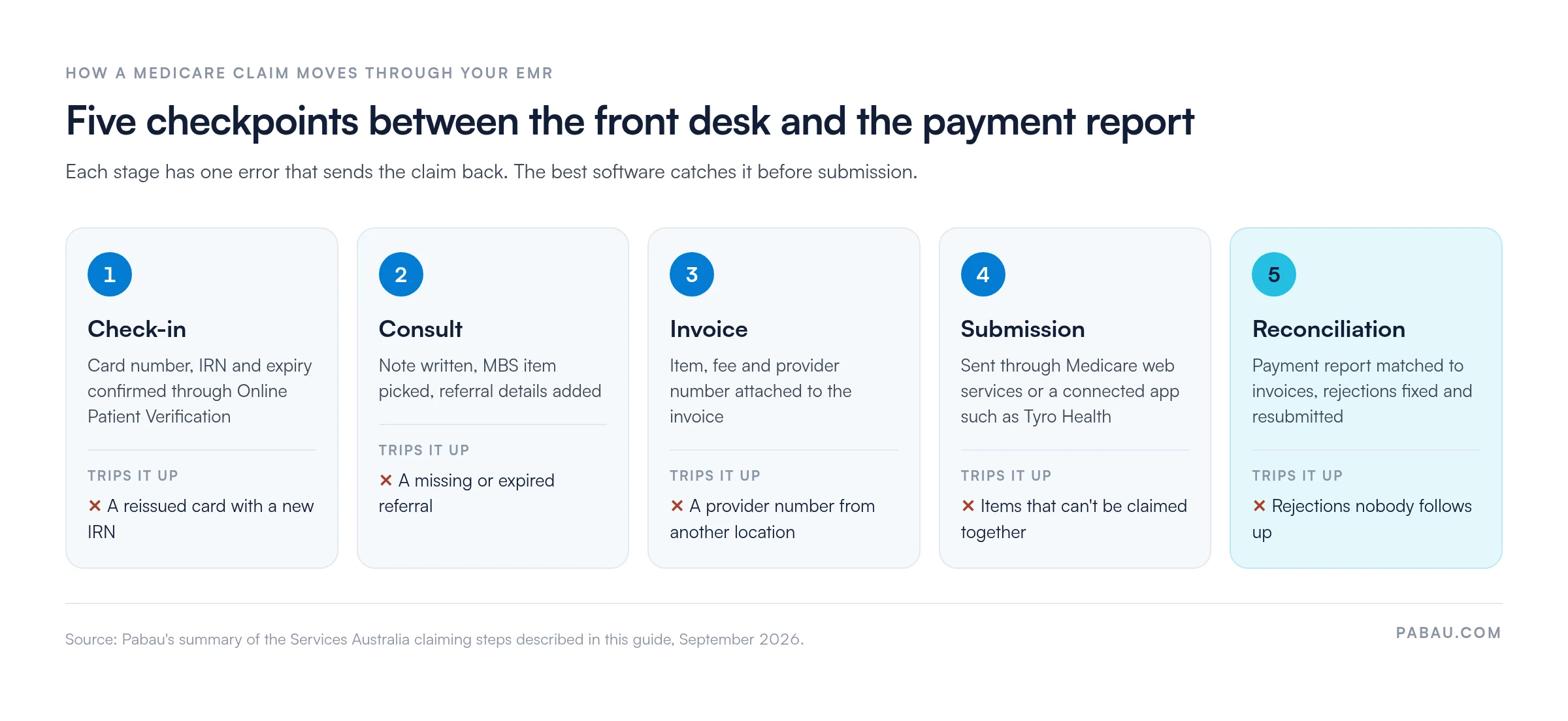
Here’s the path a claim takes, from the front desk to the payment report.
Check-in: Reception confirms the Medicare card number, the patient’s individual reference number (IRN) and the expiry date. Online Patient Verification checks those details with Services Australia before the consult.
Consult: The practitioner writes the note and picks the MBS item. Specialist and most allied health items also need the referral date, its length and the referring provider number.
Invoice: The item, fee and provider number attach to the invoice. The provider number has to match the location where the service happened.
Submission: The EMR sends the claim through Medicare web services or a connected app such as Tyro Health. A patient claim can pay the rebate straight into the patient’s account.
Reconciliation: Services Australia returns a report showing each claim as paid or rejected. Someone then matches payments to invoices and fixes the rejections.
Each checkpoint has one error that sends the claim back, and good software catches it before submission. Source: Pabau’s summary of Services Australia claiming steps, September 2026.
Five mistakes that send a claim back
The same few errors come up at reception week after week. Each one is cheaper to catch before submission than after.
A reissued Medicare card with a new IRN that nobody updated in the record.
A practitioner billing under the provider number for a different location.
A missing or expired referral on a specialist or allied health item.
An item limit already reached, such as the session cap on a mental health treatment plan.
Two items billed on the same day when MBS rules don’t allow them together.
A quick check before you submit saves a resubmission
Run through this list before a claim leaves the building:
The patient was verified through Online Patient Verification today.
The MBS item matches what the note describes.
The referral is attached, current and linked to the claim.
The provider number matches this location.
For a bulk billed claim, the patient’s assignment of benefit is recorded.
Use the same five checkpoints when you demo EMR software. Ask the vendor to run one test claim through them live. Then note which checks the software does for you, and which ones stay on your front desk’s list.
Pabau keeps the record, the calendar and the claim together
Multi-specialty practices often run a clinical record, a booking tool and a card terminal that don’t share data. Pabau replaces that patchwork with one system, so the appointment, the treatment note and the invoice sit on one patient record.
For Australian practices, Pabau lodges Medicare and DVA claims through its Tyro Health integration, with MBS item codes built in. Claim status is tracked against the invoice. That way, reception can see what’s outstanding and chase rejections without logging into another portal.
Pabau Scribe drafts the SOAP note during the consultation, and online booking takes deposits before the patient arrives. Every subscription includes every feature. Onboarding covers data migration with a dedicated Client Coordinator, so switching from a legacy EMR doesn’t land on your front desk.
Run your clinical records and front desk in one system
Pabau brings clinical records, scheduling, Medicare claiming through Tyro Health and patient messaging into one login for Australian multi-specialty practices. See how it handles your specialty mix.
Your next step is a demo, not another feature list. Take three vendors from the lane that matches your specialty, and give each one the same test claim.
Then watch where the claim stalls. A platform that verifies the patient, checks the referral and flags the provider number saves your front desk time every day. One that leaves those checks to staff costs you in resubmissions.
The trade-off to remember is where Australian compliance lives. Local GP platforms carry Medicare, PBS and My Health Record logic by default. International platforms such as Pabau configure it per practice, and in return run several specialties from one system.
If your practice mixes aesthetics, allied health and wellness, that single system saves more time than any one feature. Book a demo and bring a test claim, so you can watch Pabau handle Medicare and your specialty mix end to end.
What is the difference between an EMR and an EHR in Australia?
An EMR is one practice’s own clinical record, while an EHR is shared across providers. In Australia, My Health Record is the national EHR. Your EMR uploads summaries to it but keeps the full notes locally.
Does patient data have to be stored in Australia?
Not under federal law for a private practice’s own EMR. Australian Privacy Principle 8 still makes you accountable for how an overseas provider handles that data. NSW, Victoria and the ACT add their own health records laws, so ask each vendor where its servers sit.
How long do Australian practices need to keep medical records?
Keep adult records for at least seven years after the last visit. In NSW and Victoria, records of patients seen as children must be kept until they turn 25. Your EMR should archive closed records rather than delete them.
Is cloud EMR software secure enough for Australian practices?
Yes, if the vendor encrypts data, offers two-factor login and keeps audit trails. Under the Notifiable Data Breaches scheme, you must report an eligible breach to the OAIC and affected patients. Ask vendors how they would support you through one.
Do I need a PRODA account to claim Medicare from my EMR?
Yes, in most cases. Services Australia’s web services connect through PRODA, its online authentication system. Your practice links its PRODA organisation to the software, and the vendor then finishes the setup.