Monika Lazarevska
EHR ROI: How to calculate and maximize your return
EHR ROI is the financial return a practice earns on its electronic health record...

Last Updated: Oct 15, 2026
Free PDF 7 pages, print-ready Clinician-reviewed
A spa tracker pulls the numbers scattered across your diary, your card terminal, and your stock cupboard onto one page. Most spas already hold every figure in the tracker. Almost none can line them up and read them together.
That comparison is the whole point. One month’s utilization means little on its own. Next to last month’s, it tells you whether to hire, promote, or hold.
Below is a free printable template with five logs and a monthly KPI page. After it, you get what belongs in each log, the five numbers worth watching, and when manual tracking stops paying.
A seven-page printable tracker with the column headings already set up. It carries five printable logs, covering appointments, clients, revenue, inventory, and staff performance. A monthly KPI summary page sits at the back. Copy the headings into Excel or Google Sheets if you would rather work on screen.
Upload this PDF, or any form you already use, and Pabau's AI Form rebuilds it with tick boxes, text fields and a signature. Attach it to the treatment once, and every patient gets it on time.
AI Form rebuilds the consent, history and aftercare forms you already use. You review each one, then publish.
Patients complete forms on their phone before they arrive, so the front desk stops retyping paper.
Every signed form is versioned and attached to the treatment record, ready when you need it.
Set how long a consent stays valid. Returning patients skip forms they have already signed.
Supports HIPAA and GDPR compliance AES-256 encryption 4.8 on G2 4.7 on Capterra Trusted by 4,000+ practices worldwide

A spa tracker keeps appointments, clients, revenue, stock, and staff hours in one record, so you can see what changed month to month.
The free download is a printable PDF carrying all five logs plus a monthly KPI summary page.
Five KPIs do most of the work: utilization, rebooking rate, average client spend, revenue per therapist hour, and retail share.
Compare each month against your own previous months, since that history already accounts for your prices and your market.
Manual tracking stops paying once entry passes about five hours a week, which is where practice management software like Pabau takes over.
A spa tracker answers one question. Is the business growing? It gets there by holding five records side by side, covering appointments, clients, revenue, stock, and staff hours.
None of those five will be new to you. Your diary already knows who came in, and your card terminal already knows what they paid. Neither one puts those figures next to last month’s.
That comparison is what the tracker adds. Once you can see it, a handful of decisions get easier:
Most trackers fail in week two, not week one. Settling these five points up front is what keeps one alive.
The template is built around five logs. Each answers a different question, and each has its own rhythm.
The download carries all five as printable pages, plus a summary page that turns the totals into monthly KPIs.
Log every appointment with the date, therapist, service, duration, client, and price. Duration is the one people leave blank. It is also the column that produces your utilization rate. Booked hours only mean something against the hours you paid for.
One row per client. Record visits, total spend, average spend, the date of the last visit, and whether the next one is booked. That last column is your rebooking rate, and it moves before revenue does.
A client who has not been in for twice their usual interval has not left yet. They are close, though, and a call still works at that stage. If you are building the register from scratch, a spa intake form gives you the client details each row needs.
Keep treatment revenue and retail revenue in separate columns, then total them. Split that way, the log shows which of the two is growing. Retail is usually the one being under-sold.
Check the daily total against your card terminal before you file the sheet. When the two drift apart, the cause is nearly always a cash sale or a refund nobody wrote down. Daily checks also make spa payment reconciliation a five-minute job instead of a month-end hunt.
Record the product, opening stock, units used, closing stock, and the reorder point. Counting weekly is what stops a treatment being canceled on the day. Wait until a bottle runs dry and you find out in front of a client.
For each therapist, log hours worked, appointments completed, and revenue taken. Revenue per hour is the figure to bring to a schedule review. It holds up whether someone works two days a week or five.
The same column settles pay questions. If you are weighing booth rental against commission, you want a per-hour figure for each therapist before that conversation starts.
Five numbers do most of the work. They are the ones that change a decision about pricing, staffing, or what to promote this month.
Put the three percentage KPIs on one scale and they sit at very different heights, which catches people out.
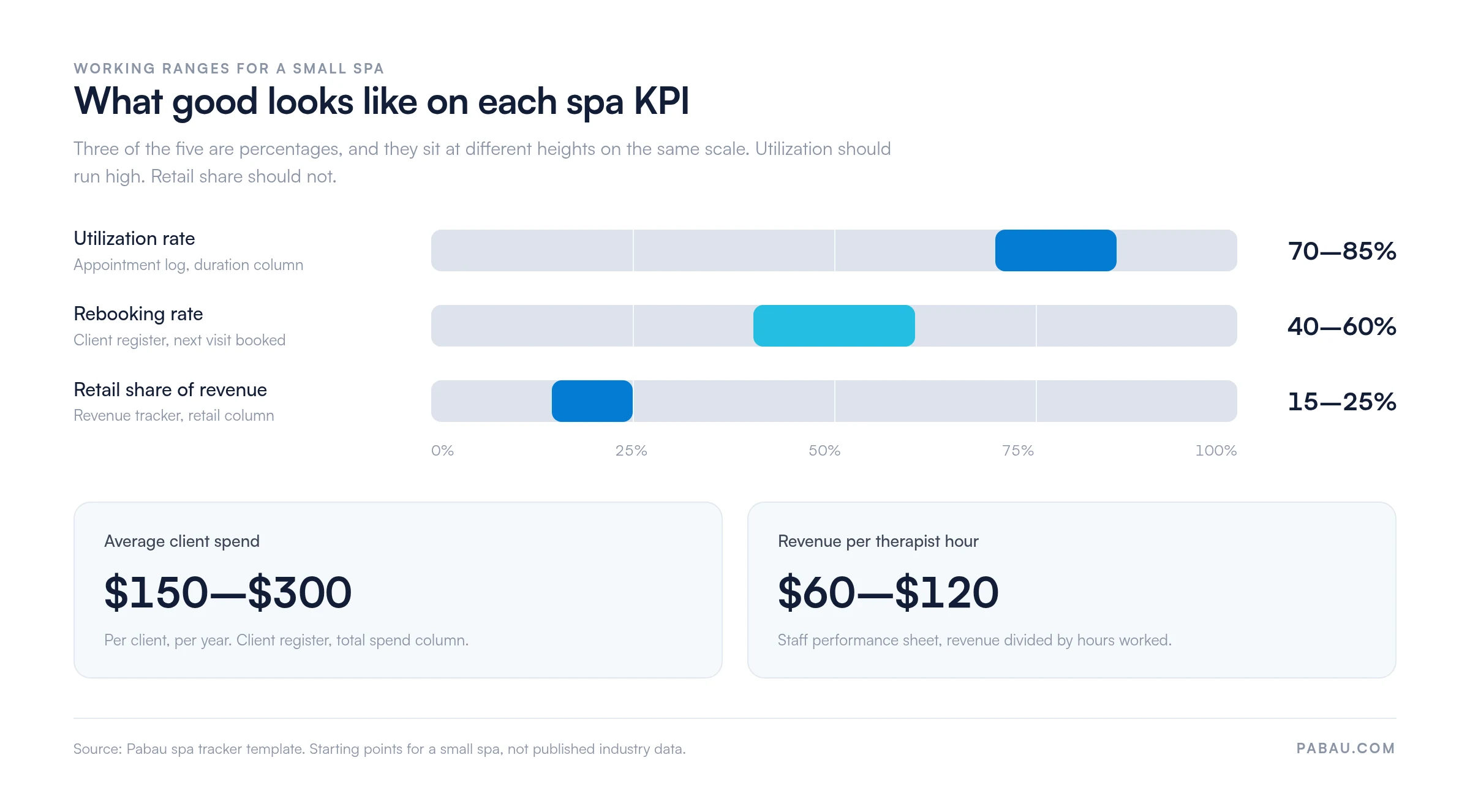
Treat that target column as a starting point for a small spa, not as published industry data. Once you have three months of your own figures, compare against those instead. That history already accounts for your prices, your menu, and your market.
Most trackers die the same way. Entry gets left until the end of the week, the week gets busy, and the sheet stops being worth reading.
Picture a spa reading 92% utilization in March and celebrating. The figure was that high because two therapists were off sick, so available hours fell. Utilization climbed while revenue dropped.
That is the first mistake, and it is the most common one. It happens when you read a ratio without checking the two figures underneath it. The other three are just as easy to make:
The download is a printable PDF, which suits a clipboard at reception and a pen between clients. If you would rather work on screen, rebuilding it as a spreadsheet takes about ten minutes.
Give each log its own tab. Copy the column headings from the PDF into the first row, then put a SUM formula under each number column. The KPI page becomes a sixth tab that reads from the other five.
Which platform you pick matters less than filling it in. Still, the two differ in ways worth knowing.
One to three therapists: Google Sheets is quicker to set up and free with a Google account. Four or more, or a second location: the spreadsheet starts to creak. Moving to all-in-one spa software removes the duplicate entry behind most of the errors.
A manual tracker has a working range. These are the signs that you have left it:
A spreadsheet costs nothing up front, then charges you in hours. At four therapists those hours add up to most of an admin wage. If you have reached that point, our round-up of the best software for spas compares what each platform covers.
Every figure in this tracker already exists somewhere in your spa on the day it happens. The work is the copying. Diary to sheet, card terminal to sheet, stock cupboard to sheet.
Practice management software like Pabau removes that step. Bookings, payments, stock movements, and therapist hours are recorded once, as they happen. The reports then read from those same records.
So Friday looks different. Instead of building the numbers, you read them. Utilization sits beside rebooking, retail sits beside treatment revenue, and the products due to run out are already flagged. Every subscription includes the reporting, across each location you run.

Pabau records bookings, payments, stock movements, and therapist hours as they happen, then reports on them. Your utilization, rebooking, and retail figures stay current without a weekly spreadsheet session.

Start with the printout and one month of honest entry. A single month of your own figures beats any benchmark, because it reflects your prices, your schedule, and your regulars.
After three months you have a pattern rather than a snapshot. From there the decisions get easier, from which service to promote to whose hours to extend.
A paper tracker only knows what someone writes into it. The week entry starts slipping is the week the numbers stop being worth reading. That is the moment to hand the job to software. Book a demo to see how Pabau keeps the same spa figures current without the weekly data entry.

Moving off paper soon? 9 best wellness clinic software platforms compares what each one covers for a spa or wellness practice.
Setting targets for next quarter? Esthetician business plan template turns your monthly figures into a plan you can work to.
Building the client register from scratch? Spa intake form template captures the client details each row needs at the first visit.
Whoever closes the till. They already have the day’s appointments and takings in front of them, so entry takes two minutes. Give one person the job rather than sharing it, and name a backup for their days off.
Yes, add two columns to the appointment log. Mark each booking as attended, canceled, or no-show, with the notice given. Those rows explain a weak utilization month that revenue alone will not. They also show whether deposits are worth introducing.
Log the sale on the day the money arrives, then log each redeemed session separately at a zero price. Revenue stays in the month it was paid, and utilization still counts the therapist hours used. Mixing the two makes package-heavy spas look unprofitable.
It can, since a clipboard at reception is readable by anyone walking past. Use client IDs rather than full names on the daily sheets, lock the register away overnight, and shred old pages. Keep identifying details in one system, not five.
No. It tracks operations, not tax. Your accountant still needs invoices, receipts, and bank records, which the tracker does not hold. What it gives them is a clean monthly split between treatment and retail revenue.