Monika Lazarevska
Referral management software: Track and close every referral
Referral management software in healthcare sends, tracks, and follows up patient...

Last Updated: Oct 26, 2026
Free PDF 1 page, print-ready Clinician-reviewed
The free printable receipt template below is a one-page form your front desk fills in the moment a patient pays. It captures the receipt number, the date paid, the payment method, the items paid for, and the amount received.
Those fields are what separate a receipt from an invoice. An invoice asks for money, so it carries a due date. A receipt confirms money has arrived, so a due date has no place on it. Hand over the wrong one and a patient who has paid reads it as another bill.
Get that right and your books, your tax records and the patient’s claim agree. The sections below cover each field, what to leave out, and how long to keep your copies.
A one-page printable receipt with fields for the receipt number, date paid, payment method, and itemized services. There is also room for the amount received, the balance remaining, the original invoice number, and a staff signature.
Start from scratch, or upload this PDF or any form you already use, and Pabau's AI Form rebuilds it with tick boxes, text fields and a signature. Attach it to the treatment once, and every patient gets it on time.
AI Form rebuilds the consent, history and aftercare forms you already use. You review each one, then publish.
Patients complete forms on their phone before they arrive, so the front desk stops retyping paper.
Every signed form is versioned and attached to the treatment record, ready when you need it.
Set how long a consent stays valid. Returning patients skip forms they have already signed.
Supports HIPAA and GDPR compliance AES-256 encryption 4.8 on G2 4.7 on Capterra Trusted by 4,000+ practices worldwide

A receipt confirms payment that has already been received, while an invoice requests payment that is still owed.
A receipt needs a receipt number, the date paid, the payment method, and the amount received.
A payment due date or a payment plan note belongs on an invoice, never on a receipt.
UK practices registered for VAT must show the VAT number, the VAT amount, and the VAT-inclusive total.
Practice management software like Pabau generates receipts inside the patient record, so the payment and the service stay together.
The template is a single A4 page, split into four labelled sections. It prints cleanly on US Letter as well, so the same file works on either side of the Atlantic.
Seen side by side, the four sections make the shape of the document obvious.
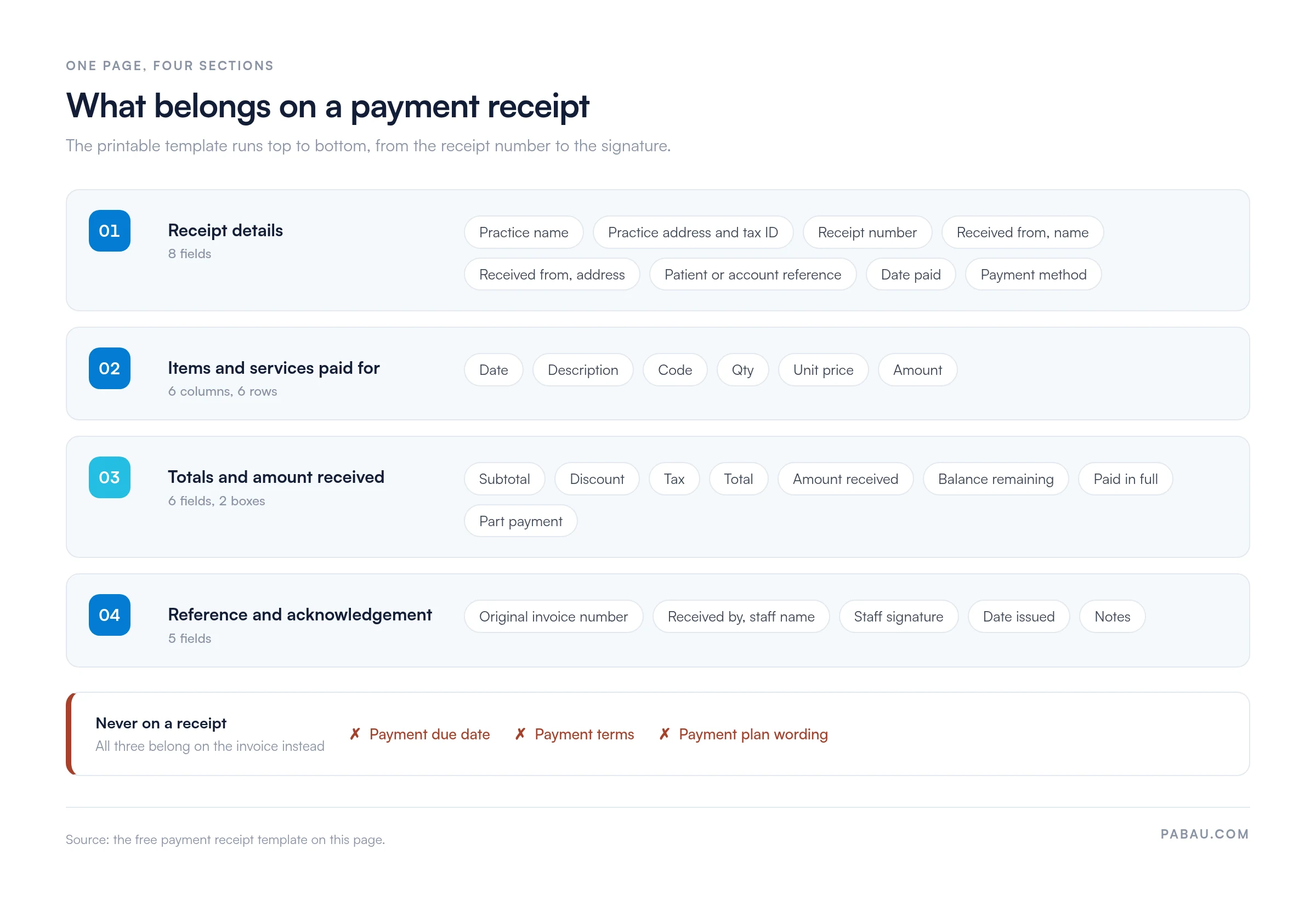
Notice what is missing. There is no payment due date and no payment terms box, because both belong on an invoice. Print them on a receipt and you tell a patient who has paid that they still owe you money.
A receipt is proof that money arrived. An invoice is a request for money that has not. Since the two look alike on the page, the fields below are the reliable way to tell them apart.
Part payments are the one case that blurs the line. A receipt for a part payment shows the amount received and the balance still remaining. It may also quote the invoice number it settles. Even so, it records money that has arrived, so it still carries no due date. The patient financial agreement sets the terms for that balance.
The test is simple. If the document asks the patient to pay by a certain date, you have issued an invoice, whatever the heading says. Our template spells that out in its own footer. The line confirms the amount was received, and states that the page is not a request for payment.
A complete receipt carries enough detail for the patient to use it and for you to reconcile it later. Run down this list before the patient leaves the desk:
Useful extras include the original invoice number, a notes line for follow-up or aftercare, and any discount applied. Payment terms stay off the page entirely.
One receipt layout stretches across every way a practice takes money. These are the variants you will meet at the desk:
Card payments taken over the phone need consent recorded before the charge, which is what a credit card authorization form is for. The receipt then confirms the charge went through.
Solo practitioners and small practices taking payment at the front desk get the most out of the form. Med spas selling treatments and retail products in one visit need the itemized table. So do therapy practices whose patients claim the cost back, and mobile practitioners who leave paper behind on the day.
A medical receipt often doubles as evidence for an insurance claim or a tax deduction. That gives it more work to do than a shop receipt, and the detail on it decides whether the claim gets paid. When the claim covers a dispensed drug, the insurer also wants a completed pharmacy claim form alongside the receipt.
Include the treatment name, such as dermal filler for the cheeks, along with the date of service and the practitioner’s credentials. Aesthetic practices often note the aftercare given at the same visit, which saves a second phone call later.
UK practices registered for VAT have a further duty. Show the VAT number, the VAT amount separately, and the VAT-inclusive total, since HMRC sets out what those records must carry. A receipt that hides the VAT line makes the patient’s own accounting harder.
Five steps take the template from download to a filed copy. Do the first two once, then repeat the rest with every payment:
Most receipt problems surface weeks later, when a patient queries a charge or the books refuse to balance. These four cause the bulk of them.
A fifth habit causes less trouble but wastes time. Writing the practice address by hand on every page adds up fast, so print it once on the batch instead.
Your copy of a receipt is an accounting record, so retention is set by tax rules rather than clinical ones. The two regimes most practices work to are short enough to memorize.
UK limited companies must keep their records for at least six years from the end of the accounting period they cover. In the US, the IRS advises keeping business records for at least three years, and longer in several situations.
Storage matters as much as the period. A receipt carries a patient’s name next to what they were treated for, which makes it protected health information, known as PHI, in the US.
Keep paper copies in a locked cabinet. Digital copies belong behind a login with access logs, at the same standard you would expect from HIPAA-compliant payment processing. A shared drive that the whole team can browse is the version to avoid.
Printing works while the volume is low. Once payments run into the dozens each day, the front desk rewrites the same practice details and numbers each receipt by hand. That paper then has to be filed, and found again when someone asks.
Practice management software like Pabau records the payment against the patient’s account and produces the receipt from it. The patient name, the service, the practitioner, the date paid and the amount all come from the record you already keep.
Each receipt is then stored against the patient’s file. A question about a payment from three months ago takes one search, not a trip to the filing cabinet. Payments taken on Pabau Pay, our card terminals, post straight to the patient’s account, so the amount and the method carry through without retyping.
Our practice management app keeps the payment, the receipt and the clinical note on one record, so month-end reconciliation runs from a screen. It also spares you the filing cabinet that going paperless is meant to empty.

Pabau records each payment against the patient’s account and produces the receipt from it, with the service, practitioner, date paid and amount already filled in. Receipts stay filed with the patient’s record for reconciliation and audit.

Use the template for the payments you take at the desk, and keep the invoice and the receipt as separate documents. A receipt closes a transaction. It never chases one.
Printing holds up while volume is low. Once you are reconciling a filing tray at month-end, generating receipts from the patient record saves more time than it costs. A practice management system ties the payment, the receipt and the clinical note to one patient. Book a demo to see how Pabau handles payments, receipts and reconciliation in one place.

Still chasing money after the visit? Patient collections sets out how to ask for payment earlier, so fewer balances run past the appointment.
Taking card details over the phone? The credit card authorization form records the patient’s consent before you charge the card.
Worried about card data sitting next to patient names? HIPAA-compliant payment processing explains what your payment setup has to protect.
Ready to stop numbering receipts by hand? Best medical practice management software compares the systems that generate them for you.
Yes. An emailed PDF carries the same information and the same weight as a printed page. Keep the sent email as your copy, and put the receipt number in the file name.
Reissue it from your copy and mark the new page as a duplicate. Keep the original receipt number rather than assigning a new one, so your records still show one payment.
Write the deposit in the amount received box, then show the rest of the price as the balance remaining. Tick part payment, not paid in full, and note what the deposit holds.
Not on its own. A terminal slip proves a card was charged, but it rarely names the patient or the service. Staple it to the receipt rather than handing it over alone.
Leave the original receipt as it is. Issue a separate refund receipt with its own number, the date refunded, and the amount returned. Your books then show both movements.