
 Despina Petrushevska

Managing expectations worksheet: free PDF to identify, assess and adjust expectations
What is a managing expectations worksheet? A managing expectations worksheet is ...

1
Last Updated: Nov 17, 2026
Free PDF 3 pages, print-ready Clinician-reviewed
A policy and procedure template is a structured document that records what your practice requires, why each rule exists, and who carries it out. Practices use one to keep written policies consistent, current and easy to evidence at an inspection or audit. This 3-page template splits each policy into the rule, a numbered procedure, a monitoring plan and a signed approval history. You can download the PDF below and fill it in or recreate it in your own document.
A 3-page PDF with header fields, a policy statement, a rationale, and Applies to, Sites covered and Exclusions fields. It adds a 10-step procedure table, a monitoring plan, an implementation checklist and an approval and version history block.
Start from scratch, or upload this PDF or any form you already use, and Pabau's AI Form rebuilds it with tick boxes, text fields and a signature. Attach it to the treatment once, and every patient gets it on time.
AI Form rebuilds the consent, history and aftercare forms you already use. You review each one, then publish.
Patients complete forms on their phone before they arrive, so the front desk stops retyping paper.
Every signed form is versioned and attached to the treatment record, ready when you need it.
Set how long a consent stays valid. Returning patients skip forms they have already signed.
Supports HIPAA and GDPR compliance AES-256 encryption 4.8 on G2 4.7 on Capterra Trusted by 4,000+ practices worldwide

A policy and procedure template gives every written policy the same structure, from the rule to the steps that carry it out.
The policy part records the statement, its rationale, who it applies to and what happens on non-compliance.
Policies state the rule and the reason, while procedures state the steps, the owner and the record each step produces.
Regular review dates help practices evidence current documentation at CQC or other inspections.
Pabau’s digital forms keep policy-linked consent and intake forms signed and stored on each patient record.
A policy and procedure template is a pre-built document that sets out the headings, fields and approval steps a practice needs for each written policy. In the US, the HIPAA Security Rule’s documentation standard requires covered entities to keep written policies and procedures and review them periodically.
The template separates the rule (the policy) from the working method (the procedure), so staff can see both in one record. Regulators and auditors look for policies that are documented, current and approved, and a shared structure makes them easier to produce.
In England, the Care Quality Commission (CQC) expects providers to have written policies and procedures that staff can follow. Its Regulation 17 guidance lists policies and procedures among the governance records that must be accurate and up to date. Written policies are one strand of clinical governance.
A policy states what the practice requires and why. A procedure states how the requirement is carried out, who does it and when. The table below shows the split.
A complete template includes seven core sections. Each one answers a question an auditor or new team member will ask. The PDF groups them into the five parts shown in the diagram below.
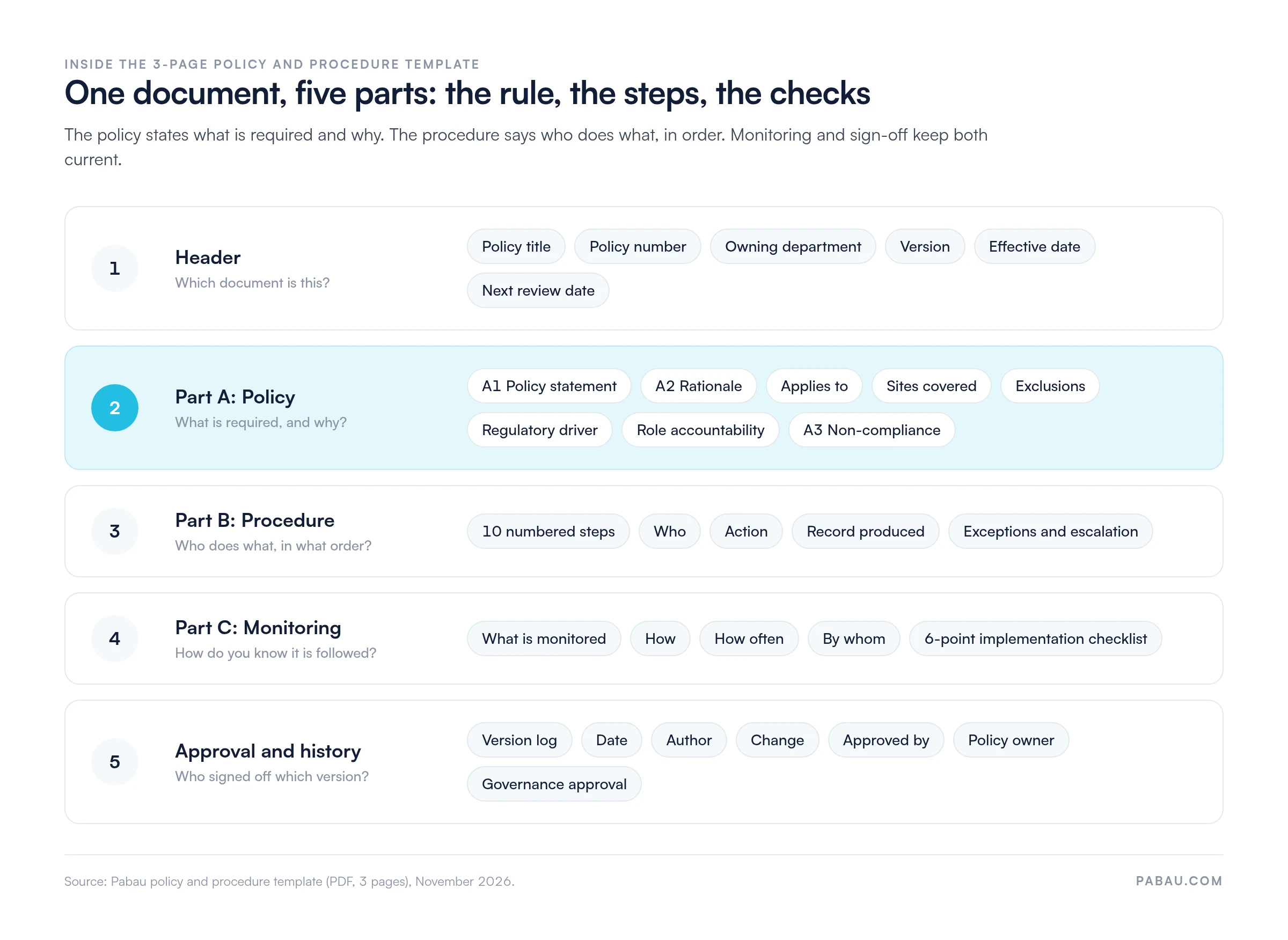
The PDF also carries a non-compliance section, an exceptions table with an escalation route, and an implementation checklist.
Record the policy title, a unique policy number, the owning department and the current version. The header also carries the effective date and the next review date. A clear policy number lets staff find the right document quickly and lets inspectors match it to a log.
The rationale names the regulation, standard, risk or value behind the policy in one or two sentences. The Applies to, Sites covered and Exclusions fields then set its scope, so nobody can claim the rule does not apply to them.
The policy statement sets the rule in plain language. The procedure steps then show staff how to meet it, in order. The template’s Record produced column names the evidence each step leaves behind, such as a signed form or a log entry. An inspector can then check the policy against what happens in the treatment room.
Part C of the template sets out what is monitored, how, how often and by whom. Feed those results into your clinical audit cycle, so a missed step turns into an action plan before an inspection finds it.
The implementation checklist covers the rollout. Staff are briefed, training is recorded, the handbook is updated, the old version is withdrawn, forms are updated and an audit is scheduled.
Set a review date when the policy is approved. Review policies at least annually as good practice, or sooner when regulation or workflow changes. CQC expects policies to be kept current.
Log every change in the version history so the current version and its predecessors stay traceable. Under HIPAA, covered entities keep this documentation for 6 years from its creation or the date it was last in effect, whichever is later.
Start with the risk or requirement the policy addresses. Then complete the template in the order below, so each section builds on the one before.
For most practices, the owner is the practice manager or clinical lead. Keep your own terms in the wording so staff recognize their everyday workflow.
Once a practice runs more than a handful of policies, tracking versions by hand gets harder. Healthcare policy management software keeps versions, owners and review dates in one place.
Most practices need a core set of policies. The same template structure works for each one.
A data protection policy names the types of patient data the practice holds, the lawful basis for processing, and who can access records. In the UK, the Information Commissioner’s Office (ICO) publishes guidance on the documented measures organizations are expected to keep.
US practices record their HIPAA safeguards the same way. Our HIPAA compliance policy template gives you a starting structure for those safeguards.
An HR policy sets expectations for conduct, attendance and grievances. In the UK, Acas publishes good-practice guidance on grievance and disciplinary procedures that many practices adapt for their own staff handbook.
An infection control policy states the hygiene standards, the equipment checks and the escalation route when something goes wrong. Record the steps clearly, because inspectors look for evidence that staff follow the written procedure.
When an incident does happen, log it on an incident report form. Then review the policy against what went wrong and update the procedure if a step failed.
The PDF covers the five parts described in this guide, from the header fields to the approval and version history. Print it and fill it in by hand, or rebuild the layout in your own document. Save each approved policy as its own version.
Many practices store policies as loose Word files and print the forms that go with them. Staff then chase signatures, scan the pages and check by hand that the right version reached each patient file.
Pabau, the practice management platform we build, turns those forms into digital forms attached to the treatment they support. Patients sign before the visit, and the signed copy saves to their patient record.
When a policy changes, update the form once, and new patients receive the current version from then on. Practices that want policies, consent and audits in one system can look at Pabau’s compliance software for practices.

Pabau’s digital forms attach consent and intake forms to the treatment they support. Patients sign before the visit, and each signed copy saves to their patient record.
A policy protects your practice only when staff can follow it and an inspector can see that they did. That is why the procedure steps and the records they produce matter as much as the policy statement.
Start with the policies an inspection would ask for first, such as infection control, data protection and complaints. Give each one an owner, a review date and a monitoring check, and withdraw old versions as you replace them.
Book a demo to see how Pabau keeps the forms behind your policies signed and filed on every patient record.

Comparing ways to manage dozens of policies? Healthcare policy management software weighs dedicated policy tools against running policies inside practice software.
Preparing for CQC registration? CQC registration cost in the UK breaks down the fees and the documentation the application asks for.
Writing a privacy policy for a US practice? HIPAA privacy policy template gives you a ready structure for the notice and the safeguards behind it.
Need a policy for emergencies on site? Emergency action plan sets out evacuation routes, roles and drills in one document.
Training staff on the policies you write? HIPAA training for employees covers what the training must include and how often to run it.
A policy and procedure template is a pre-built document that sets out the headings, fields and approval steps for each written policy. It keeps the rule and the working method in one consistent record.
Start with the rationale and who the policy applies to, then write the policy statement and the numbered procedure steps. Assign roles, set up monitoring, and have the approver sign it off with a version number.
Include the policy statement, its rationale, who it applies to, and roles and accountability. Add numbered procedure steps, a monitoring plan, version history, a review date and an approval block.
The Pabau template on this page is free to download as a PDF and is structured for practice use. Check that any template you adopt reflects current CQC, ICO, HIPAA or other applicable guidance for your location.