Free patient financial agreement template for practices
A financial agreement is the form a patient signs before treatment to confirm wh...

1
Last Updated: Oct 23, 2026
This onboarding checklist template takes a new hire from accepted offer to day 90 in five phases. Those phases are preboarding, the first day, the first week, the first month and the 30-60-90 day reviews. For healthcare employee onboarding, the template adds the patient-contact gate: The clearances that must be on file before a new hire has any patient contact.
Download the free onboarding checklist template below. Then use the role table further down to sort each task into before the gate or after it. That way, no new hire treats a patient while a clearance is still pending.
A one-page printable PDF with fields for the employee name, job title, department and completion date. It runs through before-you-start, main and before-you-finish checks, then logs any item not completed, with signature and checked-by lines.
Download template
An onboarding checklist template lists every task, owner and deadline between an accepted offer and a new hire working independently.
The patient-contact gate keeps the background check, license verification, exclusion screening and required safety training on file before any patient contact.
A 30-60-90 day plan gives each phase a goal and a check-in, while clinical staff move from shadowing to supervised to independent work.
Physicians and nurse practitioners add credentialing, privileging and payer enrollment, which should start as soon as the offer is accepted.
In Pabau’s practice software, each onboarding task gets an owner and a due date, and every clearance is filed to the staff record.
An onboarding checklist template is a reusable document listing every task, owner and deadline that takes a new hire from offer acceptance to independent work. Keep one master file as your template for new hire checklist copies, and open a fresh copy for each hire.
A good template covers three areas:
The same structure lines up with the four C’s from Talya Bauer’s onboarding report for the SHRM Foundation: Compliance, clarification, culture and connection. Later practitioner versions add a fifth C, usually confidence. Bauer’s report links that structure to faster adjustment and better retention.
In this template, paperwork and clearances cover compliance, and the 30-60-90 goals cover clarification. The mentor and team introductions build culture and connection. The shadow-to-independent ladder builds confidence, and it shortens the time to productivity because each step has a clear finish line.
Preboarding starts the moment an offer is accepted, and it should end with signed paperwork, working logins and every patient-contact clearance under way. Send the onboarding documents in the first few days after acceptance, so the slow checks have time to come back.
Role-based access deserves its own line on the checklist. A front-desk login that can open clinical notes falls short of HIPAA’s minimum necessary standard. Set permissions per role before day one, not after the first audit.
Practices running team management software can assign these tasks and track them automatically as soon as a new hire is added to the system.
The table lists each onboarding document, who supplies it, when it is due and what you keep as evidence.
The I-9 timing comes from USCIS, and the W-4 timing from IRS guidance to employers. Every other deadline in the table is set by the patient-contact gate rather than by a regulation.
The first day should cover a welcome meeting, tested logins and workspace, key policies, the handbook sign-off and meeting the assigned mentor. Keep orientation structured, so the new hire leaves knowing what tomorrow looks like.
For a front-desk hire, add a walkthrough of how patients get registered and how first consultations are booked. A new front-desk hire needs both before they take a call unsupervised.
First week. The new hire shadows experienced staff through the workflows they will own: Booking, check-in, records review and treatment protocols. Role-specific training and system navigation run alongside the shadowing.
First month. Independence grows. New hires work under supervision, meet their manager weekly and take on live cases, depending on the role. Safeguarding and infection control training should close by the end of month one.
For clinical staff, independence follows a three-step ladder. Each step needs a named sign-off before the next one begins.
No one starts the ladder until the patient-contact gate has closed for their role.
A 30-60-90 day onboarding plan splits a new hire’s first 90 days into three phases, each ending in a check-in with set goals. Agree the goals in writing on day one, so each check-in measures against something both sides signed up to.
Ninety days covers most front-desk and clinical roles. SHRM’s onboarding guide cites HR experts who recommend at least a full year. A year suits physicians and clinical leads, whose credentialing and payer work often runs past day 90.
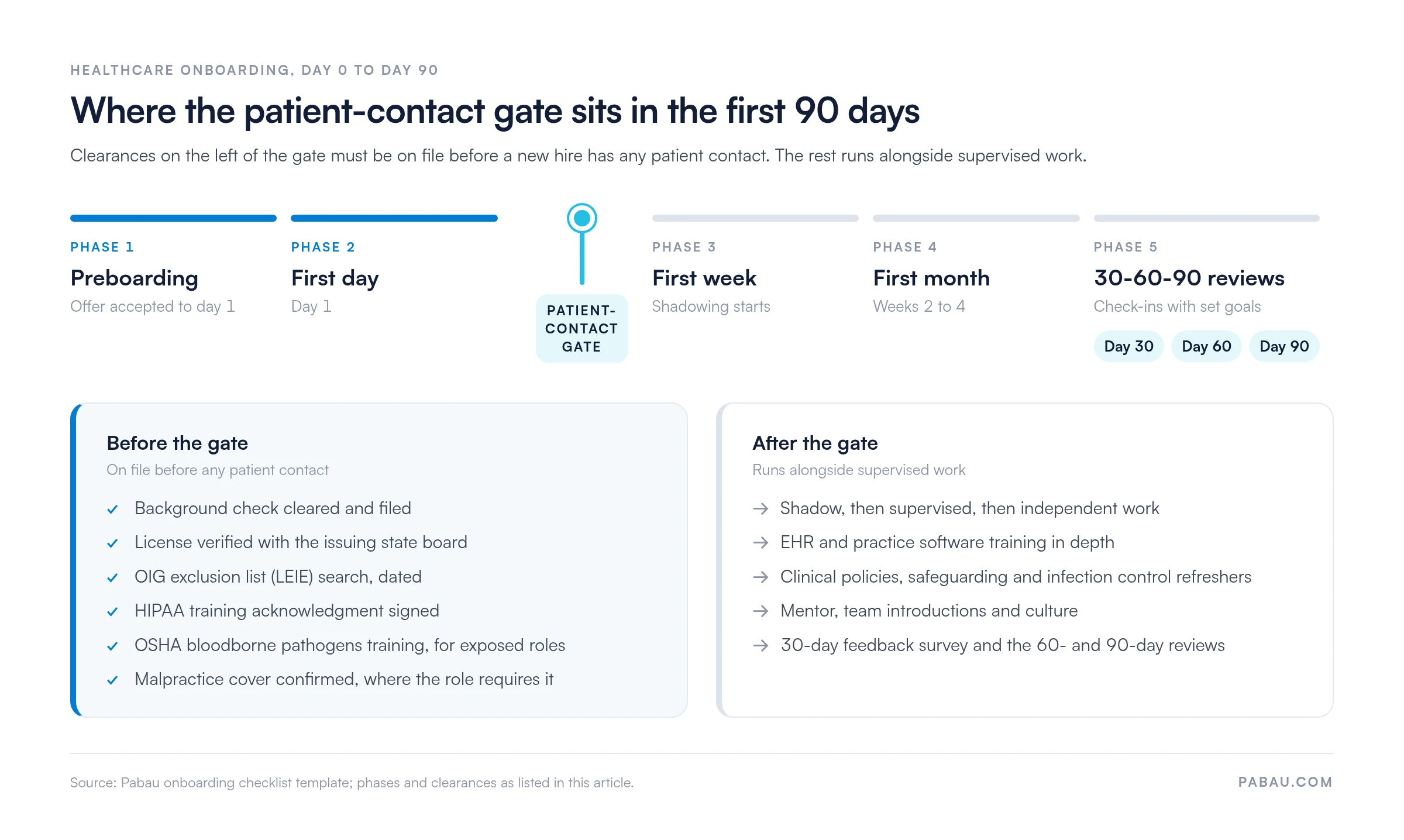
A healthcare onboarding checklist adds the clearances needed on file before patient contact: Background check, license verification, exclusion screening and required safety training. We call this the patient-contact gate.
Tasks before the gate must close before a new hire treats a patient, registers one or opens a patient record. Tasks after the gate run alongside supervised work. We’d rather see a start date move than see a new hire treat on a pending background check.
UK practices run the same gate with a DBS check and GMC, NMC or HCPC registration in place of state licensing.
The gate differs by role. The table shows what each role needs before patient contact, who signs it off and what can wait.
For a remote hire, read “patient contact” as the first login to patient records. The timeline below shows where the gate sits across the first 90 days.
A physician onboarding checklist template adds credentialing, privileging and payer enrollment to the standard staff checklist. Start those steps as soon as the offer is accepted, because payers and hospitals work to their own timelines.
Credentialing sits on both sides of the patient-contact gate. The license, DEA registration, NPDB query and malpractice cover close before the first patient. Payer enrollment can finish later, as long as no claim goes to that payer early.
Nurse practitioners follow the same credentialing path. A wound care NP, for example, needs the same license, NPI, NPDB and payer steps. State law sets their scope of practice and whether a collaborating physician is required.
Patient onboarding runs on its own checklist, from the booking to the first follow-up. The staff version runs for 90 days and uses different touchpoints.
Digital intake forms and automated workflows can trigger these steps as soon as a booking is created. The forms and reminders then go out without anyone chasing them.
A remote hire runs the same five phases, with equipment shipped ahead, video onboarding and tighter controls on patient data at home. Many practices now hire remote billing and admin staff this way.
A remote employee is part of your HIPAA workforce, so they sign your policies rather than a business associate agreement. A BAA is for an outside billing company or contractor handling patient data.
Standardize the process. Use the same template for every hire in the same role. Consistency lowers compliance risk and helps retention, because each new employee gets the same attention as the last.
Assign a mentor. Pair each new hire with an experienced team member for the questions they would not raise in a formal review. Peer learning shortens the time to independent work.
Automate the task assignment. Paper checklists slip as soon as two hires overlap. Practice management software can assign each onboarding task to an owner, track completion, and flag overdue items.
Gather feedback. Send a short new-hire feedback survey at the 30-day check-in. Ask what was confusing, missing or late, and update the template once a quarter from the answers.
Then track three onboarding measures. Set your targets from your own first few hires rather than borrowing someone else’s benchmark.
Download the PDF, turn it into an editable document, then add your roles, owners and dates. There is no separate Word or Excel file, so convert the PDF rather than looking for one.
You can reuse this employee onboarding template free of charge for non-clinical roles too. Delete the clinical clearances and keep the phases.
Most practices run onboarding out of a spreadsheet and a folder of scanned PDFs. The manager carries the open items in their head, and the record of who signed what sits in an email thread.
Pabau keeps the staff record and the onboarding tasks together, so the patient-contact gate is visible to the whole team. You assign each checklist item to an owner with a due date. The background check result, license verification and HIPAA acknowledgment are filed against that team member as they arrive.
Pabau sets permissions per role on the same staff record, so a new front-desk hire can’t open clinical notes they don’t need. Automated workflows create the preboarding tasks when a new team member is added. The manager chases exceptions instead of the whole list.
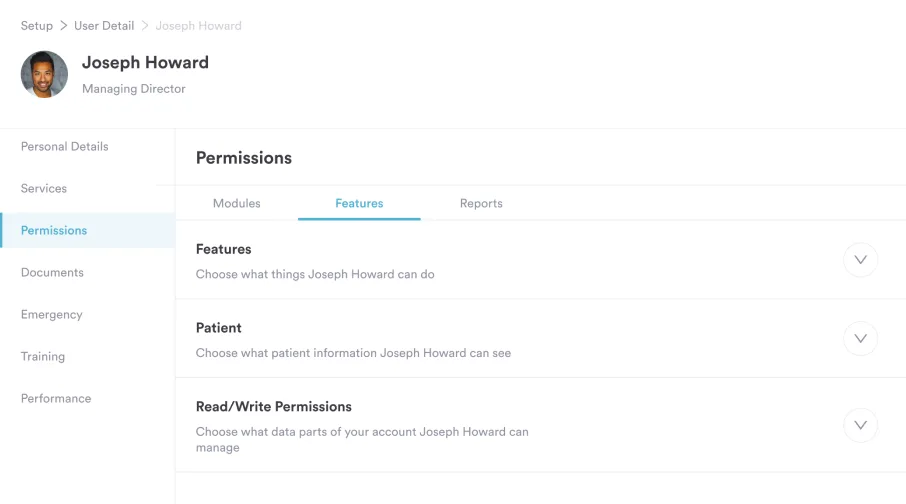
That leaves one place to answer the question an auditor asks. You can show that a named person was cleared, trained and signed off before they treated anyone.

Pabau assigns onboarding tasks to owners, files signed clearances against the staff record and flags each overdue item. New hires reach independent work sooner, with the patient-contact gate already documented.

The checklist itself is the easy part. Onboarding works when each item has a named owner and a date, and when someone notices the one that slipped.
The judgment that matters is where you draw the patient-contact gate for each role. Draw it carefully, and the rest of the 90 days can flex around the new hire without putting a patient at risk. Draw it loosely, and a fast start date turns into a liability.
Book a demo to see how Pabau tracks onboarding tasks, files each clearance and flags one that is overdue.

Still hiring for the role? LPN interview questions covers what to ask before an offer goes out.
Need the review that follows the 90 days? The annual review template gives you a structure for the first full-year appraisal.
Performance slipping after onboarding? A performance improvement plan sets out goals, support, and review dates in writing.
Documenting a difficult conversation? The employee counseling form records the issue, the agreed actions, and both signatures.
Losing people in their first year? Burnout in healthcare covers the workload patterns behind early resignations.
An onboarding checklist should include new-hire paperwork, IT and system setup, orientation, role training and check-ins at 30, 60 and 90 days. A healthcare practice also adds the patient-contact gate. That means a background check, license verification, exclusion screening and HIPAA training, all on file before any patient contact.
Most structured onboarding lasts 90 days, with check-ins at days 30, 60 and 90. Physicians and clinical leads often need longer, because credentialing and payer enrollment can run past day 90. Some HR experts recommend a full year for every role.
Employee onboarding brings a new staff member into the practice through clearances, training and check-ins over about 90 days. Patient onboarding runs from booking to the first follow-up, through intake forms, consent, confirmation and aftercare. Each one needs its own checklist.
Remote employees use the same five phases with a few changes. Ship equipment before day one, run training over video, and set role-based access to patient records before the first login. Then confirm the home setup meets your HIPAA security policy.
Track onboarding completion in a system that assigns each task to an owner with a due date. Practice management software, a CRM or a project tool can all do this. Check the completion rate at the 30-day review, so missed items surface early.
The 5 C’s of onboarding are compliance, clarification, culture, connection and confidence. Talya Bauer’s SHRM Foundation report named the first four. Later practitioner versions added confidence as the fifth, and some use “check back” instead.
A new healthcare hire needs the standard onboarding documents plus clinical clearances. The standard set is a signed offer letter, Form I-9, Form W-4, a direct deposit form and the handbook acknowledgment. Your healthcare onboarding checklist then adds a background check, license verification, an OIG exclusion search and a HIPAA training acknowledgment before patient contact.