Maja Popovska
Cervix length during pregnancy chart
A cervix length during pregnancy chart records cervical length in millimeters ag...

9
Last Updated: Oct 14, 2026
Free PDF 1 page, print-ready Clinician-reviewed
A pregnancy nutrition tracker is a daily log in which pregnant patients record food, drinks, and supplements against the nutrient targets set for pregnancy. The free template below covers folate, iron, calcium, protein, water, and calories, so you can spot a shortfall early and act on it.
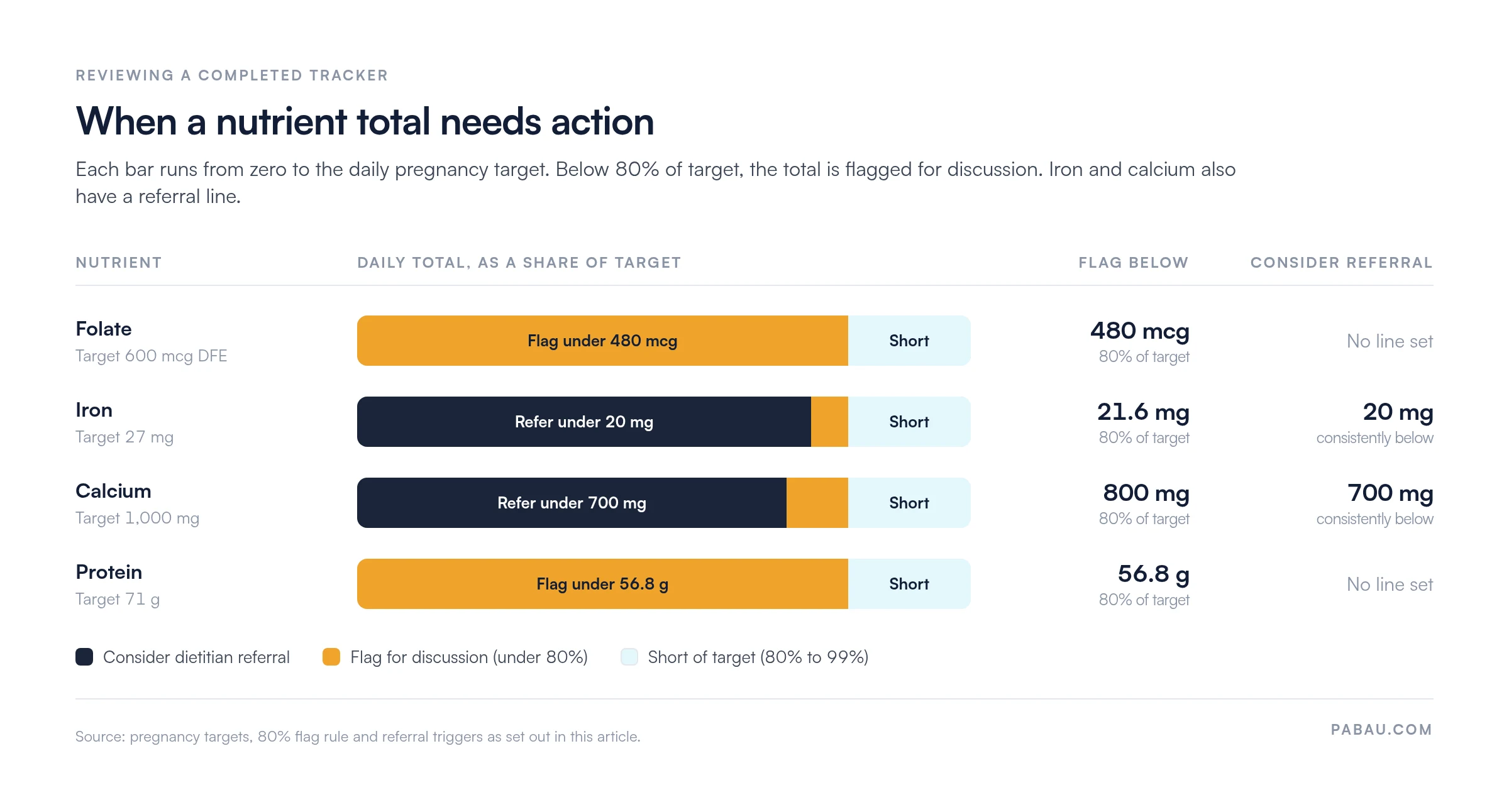
Patients fill it in at home for three to seven days before a prenatal visit. You review the totals together, flag any nutrient below 80% of its target, and file the log as evidence of nutrition counseling.
A printable log with patient details, gestation week, and a dated row for each meal, drink, or supplement. It ends with space for patterns noticed and questions to bring to the next appointment.
Start from scratch, or upload this PDF or any form you already use, and Pabau's AI Form rebuilds it with tick boxes, text fields and a signature. Attach it to the treatment once, and every patient gets it on time.
AI Form rebuilds the consent, history and aftercare forms you already use. You review each one, then publish.
Patients complete forms on their phone before they arrive, so the front desk stops retyping paper.
Every signed form is versioned and attached to the treatment record, ready when you need it.
Set how long a consent stays valid. Returning patients skip forms they have already signed.
Supports HIPAA and GDPR compliance AES-256 encryption 4.8 on G2 4.7 on Capterra Trusted by 4,000+ practices worldwide

A pregnancy nutrition tracker differs from a regular food log because it tracks pregnancy nutrient targets (folate, iron, calcium), not just calories.
Tracking supports early detection of nutrient deficiencies, ensures patients meet prenatal vitamin requirements, and creates documentation for your clinical record.
The free template includes daily meal logs, water intake, supplement tracking, and a weekly nutrient summary. Patients complete it at home and review it with you in appointments.
Clinicians can document nutrition counseling with ICD-10-CM Z71.3 (dietary counseling and surveillance), alongside Z34.- (supervision of normal pregnancy).
A pregnancy nutrition tracker is a structured log of daily meals, snacks, fluids, and prenatal supplements, checked against clinical nutrient targets. Unlike a standard food diary, it carries reference columns for folate (600 mcg DFE), iron (27 mg), calcium (1,000 mg), and calories. Patients see whether they meet each recommendation, not only what they ate.
The template works as a patient-facing tool and a clinical record at once. Patients print it and complete it at home. Your team reviews it during prenatal visits to spot shortfalls and counsel patients, then files it in your OB-GYN EHR as evidence of nutrition assessment.
Pregnancy raises the demand for several nutrients at once. The fetus draws calcium from maternal bone, folate from maternal stores, and iron from maternal blood. A shortfall in the mother therefore affects fetal growth and her own health. Tracking intake shows which patients miss their targets and need supplements or dietary changes before a deficiency develops.
Key reasons to track:
A completed tracker is evidence that you counseled the patient on nutrition, checked for deficiency, and documented the intervention. That record supports compliance, quality metrics, and patient safety.
This table shows the recommended daily allowance (RDA) in pregnancy, common food sources, and why each nutrient matters.
Most pregnant patients meet their protein, water, and calorie needs through diet alone. Folate and iron usually need a prenatal supplement on top of food to reach the target.
Folic acid supplements typically supply 400 to 800 mcg a day. The CDC recommends 400 mcg daily for anyone who could become pregnant. That’s why the tracker logs food and supplements side by side.
Patients complete the template at home over three to seven days before a prenatal appointment. You then review it together during the visit. The workflow has five steps.
Calorie demand increases as pregnancy progresses. This table shows the recommended additions to pre-pregnancy intake.
Counsel patients in plain terms: “Your body needs extra fuel as the baby grows. From the second trimester, that’s about two extra snacks a day. An apple with peanut butter, a yogurt, or a handful of nuts all work.”
Five habits turn the tracker from a handout into a clinical tool.
Put together, the 80% flag rule and the referral triggers give each nutrient three lines to check during the review.
For most practices, the paper template is the better starting point. A pregnancy app earns its place once it can sync with your EHR.
Why use the paper template:
Why recommend a pregnancy app:
The paper template needs no software integration and works for every patient, whatever their access to technology. It also keeps the review in the room with you. Once scanned, the completed tracker can be filed digitally alongside the patient’s other prenatal records.
Those records can include a pregnancy journal log, the one-page sheet patients use between prenatal appointments to note measurements and observations. The same file can also hold a cervix length chart, where each scan measurement is logged against the week of pregnancy.
A paper tracker works until it has to travel. The patient forgets it, the scan lands in the wrong folder, or the follow-up on low calcium never gets booked.
Pabau, the practice software we build for fertility and OB-GYN care, keeps that loop in one place. You can rebuild the tracker as a digital form and send it before the prenatal visit. The patient fills it in at home, and the answers file straight into their patient record.
During the visit, the logged intake sits next to your treatment notes, so the counseling note quotes the patient’s own numbers. Automated workflows can then remind the patient to repeat the log at 28 to 32 weeks.

Pabau’s digital forms collect the nutrition log before the visit and file it in the patient record. Your counseling notes and follow-up reminders sit in the same place.

A nutrition tracker only earns its place if someone reads it. A log that comes back unreviewed tells the patient nutrition is a side topic, and the shortfall it recorded goes unaddressed.
So pick one visit, usually the second or third, and make the review a fixed part of it. Check folate and iron first, because food alone rarely covers them. Then let the numbers decide between a supplement change and a dietitian referral.
The trade-off is effort. The log costs the patient a few minutes a day and costs you a few minutes per visit. That is cheap next to finding an iron shortfall late in the third trimester. Book a demo to see how Pabau collects prenatal nutrition logs digitally and files them in the patient record.

Monitoring blood pressure as well as calcium? Blood pressure pregnancy chart gives patients a template for logging readings between prenatal visits.
Ordering second-trimester screening? Alpha-fetoprotein (AFP) blood test covers the screen that helps detect neural tube defects.
Planning nutrition after delivery? Postpartum diet plan carries the same food-first approach into the weeks after birth.
Choosing a system for prenatal records? Best OB-GYN EHR systems ranks six options built for OB-GYN care.
Tracking shows whether pregnant patients meet the nutrient targets (folate, iron, calcium) that support fetal development and maternal health. Deficiencies in these nutrients are associated with anemia, preterm birth, neural tube defects, and hypertension. Early detection lets clinicians intervene with supplements or dietary counseling before complications develop.
First trimester: No additional calories beyond pre-pregnancy intake. Second trimester: Add 340 kcal per day. Third trimester: Add 450 kcal per day. For a patient with a pre-pregnancy baseline of 2,000 kcal, that means 2,340 kcal in the second trimester and 2,450 kcal in the third.
The four most critical are folate (600 mcg DFE/day), iron (27 mg/day), calcium (1,000 mg/day), and protein (71 g/day). Folate helps prevent neural tube defects, iron prevents anemia, calcium supports fetal bones, and protein supports fetal growth. Most patients meet protein targets through diet, but folate and iron usually need supplements.
The log should include meal-by-meal food descriptions and portion sizes, plus columns for folate, iron, calcium, and protein. Add daily totals compared against RDA targets, a water intake tracker, and a section for prenatal vitamins and supplements taken that day. A weekly summary helps identify patterns and deficiencies.
Yes, for most practices. The paper template avoids third-party data privacy concerns, keeps clinicians engaged with patients during appointments, and requires no software integration. Apps help if your EHR integrates with them and you want automated calculations and push reminders. Otherwise, the template is the simpler starting point.