Despina Petrushevska
Values exploration worksheet
Download your free values exploration worksheet A two-page printable form that o...

2
Last Updated: Nov 6, 2026
Free PDF 2 pages, print-ready Clinician-reviewed
A general information sheet is the first document most patients complete for your practice. It records who they are, how to reach them, what they take, and what they agree to.
This guide covers the fields the form needs, where it sits in your intake workflow, and the consent wording that satisfies UK and US rules. It treats the sheet as a living record, reviewed before every visit rather than filed once and forgotten.
A ready-to-use intake form covering personal details, contact information, medical history, allergies, current medications, and emergency contacts. It closes with consent and data-protection declarations for the patient to sign before their first appointment.
Start from scratch, or upload this PDF or any form you already use, and Pabau's AI Form rebuilds it with tick boxes, text fields and a signature. Attach it to the treatment once, and every patient gets it on time.
AI Form rebuilds the consent, history and aftercare forms you already use. You review each one, then publish.
Patients complete forms on their phone before they arrive, so the front desk stops retyping paper.
Every signed form is versioned and attached to the treatment record, ready when you need it.
Set how long a consent stays valid. Returning patients skip forms they have already signed.
Supports HIPAA and GDPR compliance AES-256 encryption 4.8 on G2 4.7 on Capterra Trusted by 4,000+ practices worldwide

A general information sheet captures patient demographics, medical history, and contact details at the first practice touchpoint.
An effective form covers personal details, medical history, allergies and medications, emergency contacts, and consent declarations.
Digital forms cut paper handling, reduce transcription errors, and feed straight into the patient record.
Review the completed sheet 24 hours before the appointment, then reconfirm the details at every visit.
Practice management software like Pabau sends the form after booking and files the answers automatically.
A general information sheet is a patient intake form that collects demographic and medical data before the first appointment. It captures name, date of birth, contact details, medical history, current medications, allergies, emergency contacts, and consent declarations. Medical practices, med spas, therapy practices, and private GPs all use one.
Unlike a specialized clinical assessment form, which documents one presenting complaint, this form is deliberately broad. It exists to establish accurate records, surface medical backgrounds, identify contraindications, and capture consent for treatment and data handling. Most healthcare settings collect it before the clinical consultation begins.
Under UK GDPR guidance from the Information Commissioner’s Office (ICO), health data on the form counts as special category data. That means explicit patient consent and secure storage are both required. The signed form is the consent record, which makes it a compliance document as much as an administrative one.
An effective form is split into clear sections, each collecting a distinct type of patient data. The template above uses four.
The consent section deserves the most attention. It needs a signature line confirming the patient has read and understood the form. Add a separate box for data-processing consent, plus optional boxes for marketing and appointment reminders.
In the UK, CQC regulation 17 requires accurate and complete records for every patient. The consent section is where you record what the patient agreed to. For treatments that need their own signed authorization, pair the sheet with a dedicated medical consent form.
Using the template takes five steps, from your first edit to the annual refresh. The timeline below shows where each one falls relative to the appointment.
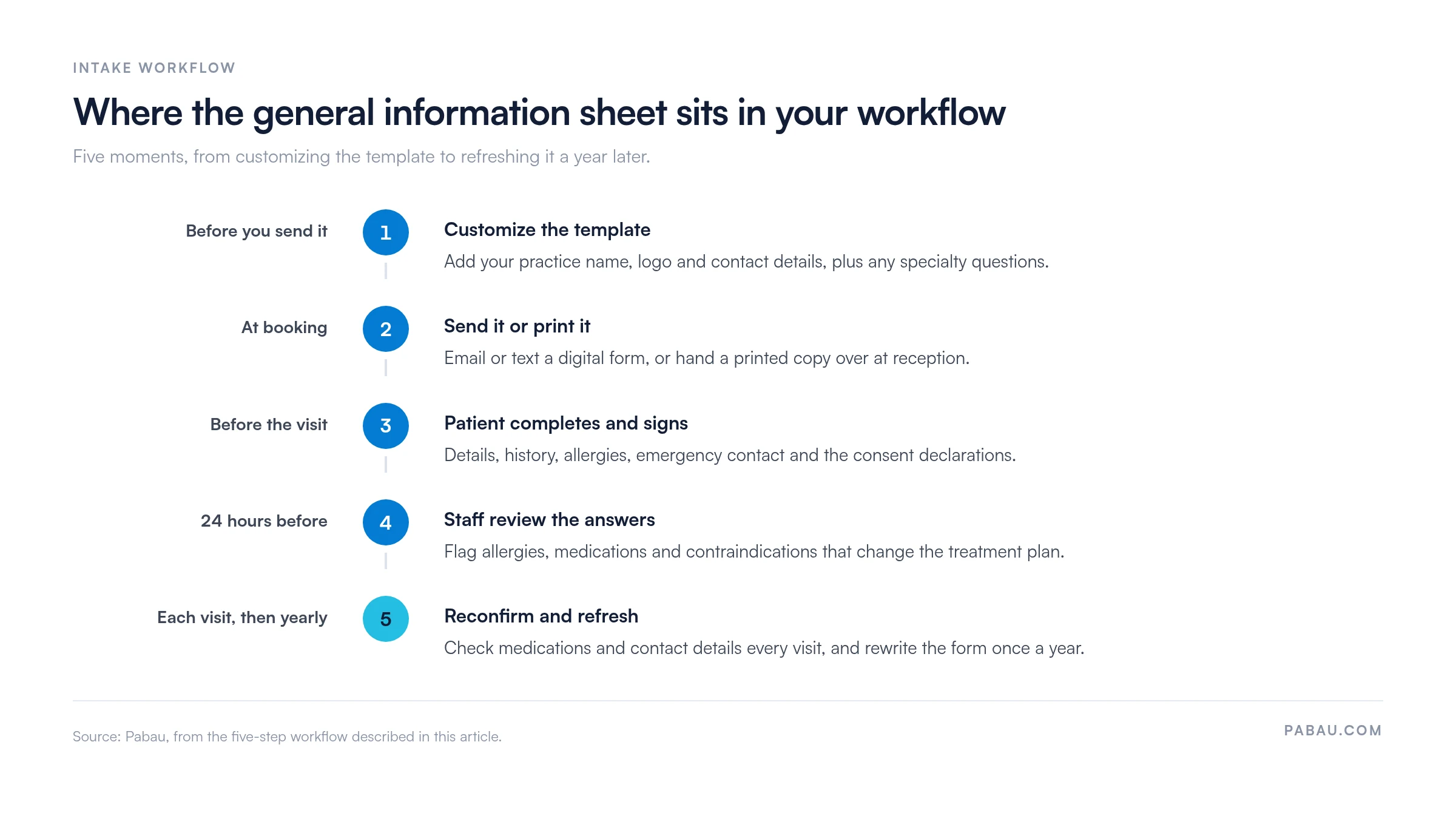
The sheet earns its keep as a living document, not a one-time admin task. It shapes clinical decisions at every visit. Two or three minutes of review before each appointment catches new medications, new allergies, and recent hospital admissions.
If the patient carries an emergency card, reissue it at that review so the card and the record show the same medications.
Plenty of practices still print and file their intake sheets. Going digital changes five things about the daily workflow.
The switch does not have to be disruptive. Your existing paper workflow can run alongside the new one. New patients get the digital form by email or text, while established patients stay on paper until their next visit.
A standardized form, on paper or on screen, gives your practice five operational wins.
Review your form every January, and again whenever the rules change. GDPR requirements for health data, CQC inspection standards, and consent wording all move. An outdated form has you documenting to a standard that no longer applies. Give one team member the job so it does not slip.
Practice management software like Pabau turns the general information sheet from a clipboard job into an automated step. Its paperless patient intake tools send the form, collect the answers, and file them without anyone re-typing.
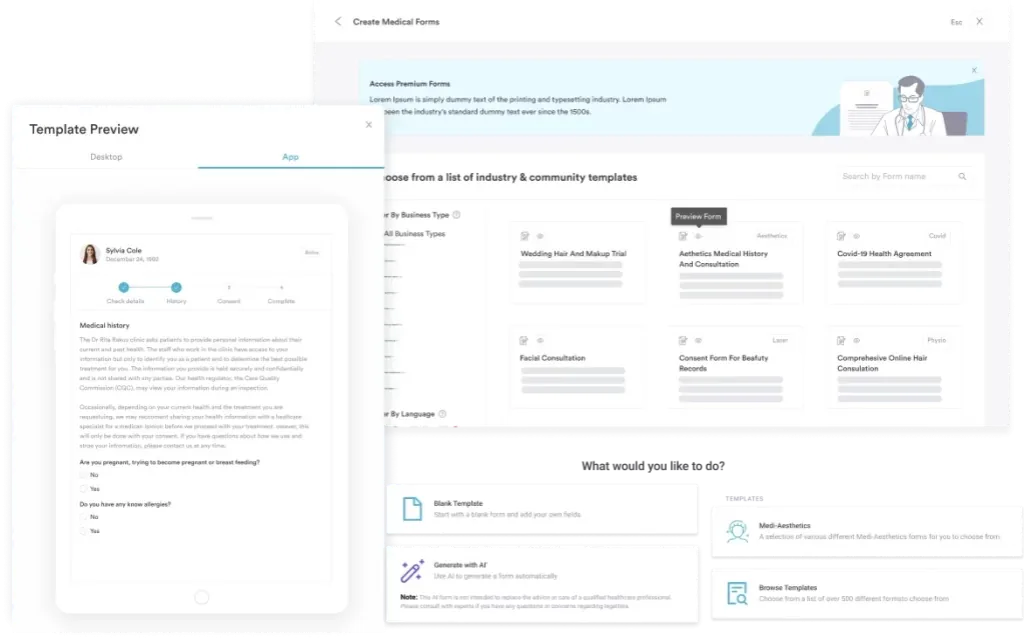
After a patient books, Pabau sends a customizable form by email or text. The form works on a phone, so patients complete it from home or the waiting room. Answers land in the patient’s encrypted record the moment they submit.
Staff get a notification when a form comes back, and the fields in the patient portal update on their own. No one re-types a single field.
The system captures consent explicitly. Patients must tick the data-handling and treatment-agreement boxes before they can submit. Pabau logs the timestamp and IP address, which gives you an audit trail if compliance is ever questioned.
When a patient’s medical history changes, staff can send a form-update reminder by text or email. That keeps records current at the start of each year, without anyone chasing patients by phone.

Send your general information sheet to patients as soon as they book. Answers file themselves into the patient record, so your front desk stops re-typing details.

A general information sheet is a small document with a long reach. It decides how much a clinician knows before the patient sits down, and it records the consent you may later need to prove.
Customize the template above, decide whether you are distributing it on paper or by email, and set a date to review it next January. The practices that get the most from it treat the sheet as a record they maintain, not a form they file.
Book a demo to see how Pabau sends, files, and refreshes patient intake forms for your practice.

Need consent captured at scale? Capture forms software sends custom intake forms after booking and stores every response in the patient record.
Collecting family history too? The family medical history form gives you a structured way to record hereditary risk alongside the general information sheet.
Working under HIPAA rather than GDPR? The HIPAA authorization form covers the disclosure permissions US practices need on file.
Reviewing your wider documentation setup? Clinical documentation software compares the tools that keep notes, forms, and consent records in one system.
A general information sheet is a patient intake form. It collects demographic data, medical history, and consent declarations before the first appointment. Completing it early gives the clinician an accurate baseline for safe, compliant care.
Four sections cover the essentials. Those are personal and contact details, medical history, emergency contact information, and consent declarations with a signature line. Most practices also ask for a preferred contact method and a marketing opt-in.
It does once three things are true. The form carries explicit consent boxes for storing and processing health data. Responses are encrypted in transit and at rest. An audit trail records the consent timestamp and the patient’s identity.
Yes. Digital forms cut data-entry time, reduce transcription errors, and feed straight into the patient record. You send them by email or text before the appointment, and patients complete them on any phone or tablet.
Reconfirm the details once a year, and whenever the patient reports a change in medical history, medications, or contact information. At each appointment, check that allergies, emergency contacts, and current medications are still accurate.
In the UK, CQC regulation 17 requires accurate and complete patient records, and UK GDPR governs how health data is stored. In the US, HIPAA requires a documented acknowledgment of privacy practices. A signed intake form supports all three.