Despina Petrushevska
Good character traits list
What is a good character traits list? A good character traits list is a structur...

3
Last Updated: Oct 30, 2026
Free PDF 2 pages, print-ready Clinician-reviewed
An employee performance management form is a written plan for one staff member’s role, goals, and support over a set review period. It records what the person is responsible for, how progress will be measured, and when each review happens.
Our free template is a two-page printable PDF with a date field and nine labeled sections. They run from employee details and roles through goals, training, supervision, metrics, risks, and employee feedback, ending with a review timeline. Each section is an open box, so you write the plan in your own words instead of ticking a generic rating scale.
Use it at the start of a review cycle, a probation period, or a change of role. At the end of the cycle, a separate evaluation form scores how the plan went.
A two-page printable PDF with a date field and nine open sections for one employee’s performance plan. It covers employee details, roles, goals, training needs, supervision, metrics, risks, employee feedback, and the review timeline.
Start from scratch, or upload this PDF or any form you already use, and Pabau's AI Form rebuilds it with tick boxes, text fields and a signature. Attach it to the treatment once, and every patient gets it on time.
AI Form rebuilds the consent, history and aftercare forms you already use. You review each one, then publish.
Patients complete forms on their phone before they arrive, so the front desk stops retyping paper.
Every signed form is versioned and attached to the treatment record, ready when you need it.
Set how long a consent stays valid. Returning patients skip forms they have already signed.
Supports HIPAA and GDPR compliance AES-256 encryption 4.8 on G2 4.7 on Capterra Trusted by 4,000+ practices worldwide

An employee performance management form sets one staff member’s role, goals, support, and review dates before a review cycle starts.
Our free template is a two-page PDF with nine open sections, which you print or fill in with a PDF editor.
Goals and metrics work best when they draw on figures the practice already records, so the review rests on evidence.
Use this form to plan the cycle, then score the outcome with a separate evaluation form at review time.
Pabau’s practice management software stores the completed plan against the staff member and puts each review date on a task board with an owner.
An employee performance management form is the agreed plan a manager and a staff member work from between reviews. It records the role, the goals for the period, the support each side commits to, and how progress will be judged.
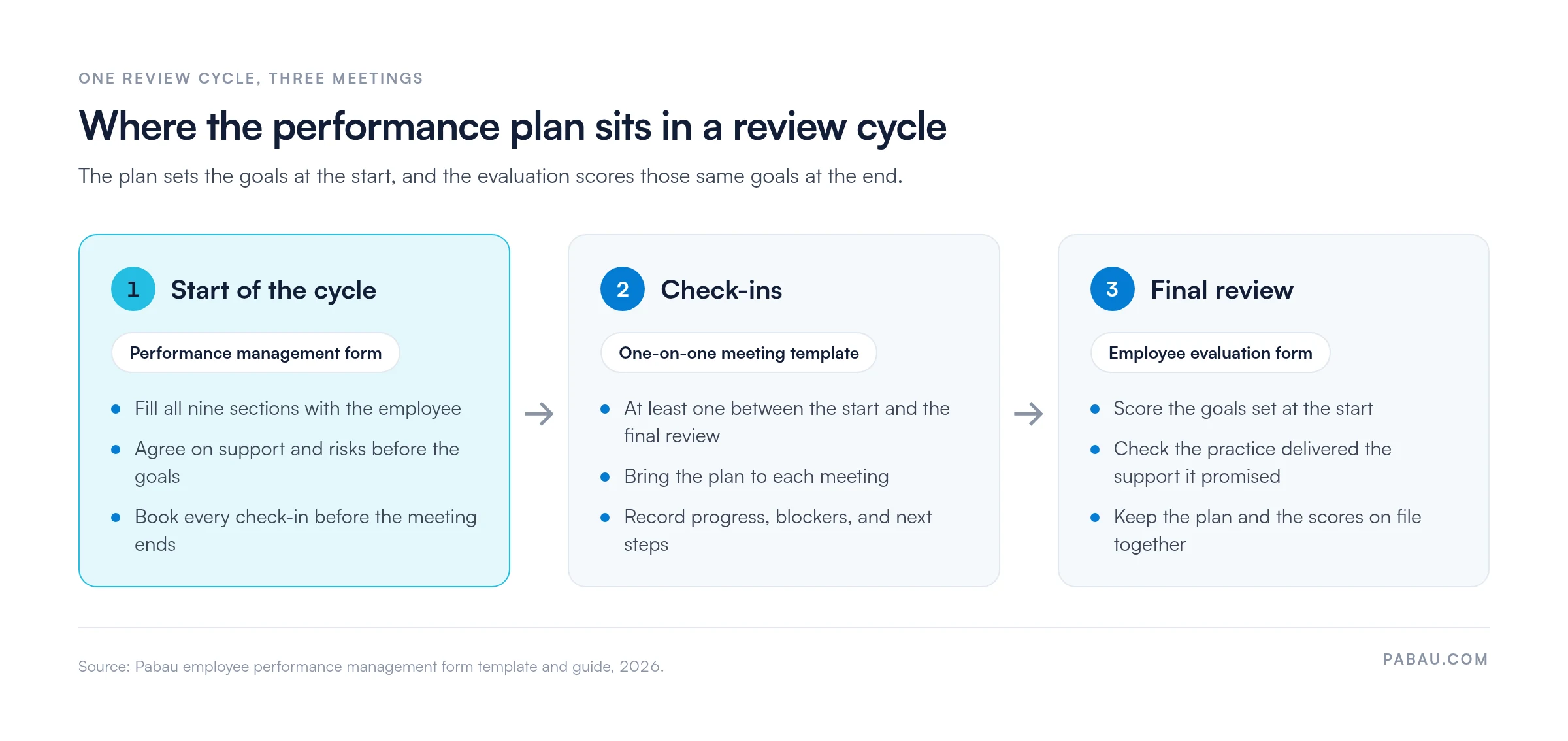
The plan looks forward, while an evaluation form looks back. You write the plan at the start of a cycle and score the same goals at the end. Keeping both on file shows how expectations were set and whether they were met. The cycle below shows which form each meeting uses.
The form opens with a date field, then gives you nine labeled sections. Each one is a blank box, so the list below explains what belongs in it.
The form has no rating scale and no signature lines. Add a signature and date line at the end if your practice wants written agreement to the plan.
Follow these six steps to turn the blank form into a working plan.
Write the employee feedback section in the employee’s own words during the meeting. A plan the employee helped draft is easier to hold them to at review, and harder to dispute.
If an ongoing concern needs formal terms, a performance improvement plan sets milestones, check-ins, and the consequences of no improvement.
A performance management form covers one stage of the employee cycle. The table shows where it sits next to the other staff templates in our library.
Looking for a form that collects a new hire’s personal and contact details? Use the employee info form template instead. This form assumes the staff record already exists.
A goal with no link to the role reads as an extra task. Write each goal against a duty you listed, so the employee sees why it matters.
Choose measures your systems already capture, such as hours worked, rebooking rates, or completed training. Evidence pulled from records is harder to argue with than a manager’s impression. The same recorded hours carry over to a monthly recognition award, where nominations judged from memory invite bias.
When that employee later applies elsewhere, those same records supply the concrete examples a staff reference letter needs.
The supervision section commits the practice as well as the employee. If you promise monthly supervision or a funded course, the review will ask whether you delivered it.
A plan with no dates tends to drift until the final review. Set at least one check-in between the start of the cycle and the final review, and record who attends.
Paper plans tend to end up in a drawer or a shared drive, while check-in dates live in a manager’s head. By review time, the plan is hard to find and the promised support is half remembered.
Pabau’s practice management app gives each staff member document folders for contracts, qualifications, and certificates. Upload the completed plan to the same place, so it sits with the employee’s other records.
Each check-in from the timeline section can go on Pabau’s task board with an owner and a due date. Automation rules create a chase when a due date passes, so a missed review gets flagged instead of forgotten.
For the metrics section, the Team Report brings together hours worked, commissions earned, and performance metrics. Roles and permissions control which staff members can open those records.

Store completed plans against each staff member and put review dates on a task board with an owner. Pull hours and performance figures from the Team Report.

A performance management form earns its place at the start of a cycle, while goals and support are still open to discussion. Fill all nine sections with the employee and date each check-in. The final review then becomes a check against an agreed plan.
The trade-off is time. A plan drafted together takes longer than one handed over, but it leaves a record of what both sides agreed. Book a demo to see how Pabau keeps staff plans, review dates, and performance figures in one place.

Ready to score the plan at the end of the cycle? Evaluation form for employee gives you a rating scale, a self-assessment, and signature lines for the review.
Need a structure for regular check-ins? One-on-one employee meeting template keeps progress updates and next steps on record between reviews.
Dealing with a specific performance issue? Employee counseling form documents the concern, the expected change, and the follow-up.
Collecting details from a new hire? Employee info form template covers the personal and contact details a staff record needs.
Has the concern reached a formal stage? Performance improvement plan template sets milestones, manager check-ins, and the consequences of no improvement.
It is a written plan that sets a staff member’s role, goals, training, support, and review dates for a set period. The manager and employee agree on it at the start of the cycle and work from it until the final review.
A performance management form plans the cycle, and an evaluation form scores it. You write the plan at the start of the review period, then rate performance against the same goals at the end.
It includes a date field and nine sections: employee details, roles and responsibilities, performance goals, development and training needs, and supervision and support structure. The other four are performance metrics and evaluation, challenges and risk mitigation, employee feedback and involvement, and timeline and review.
It is a printable two-page PDF, not a Word document or a fillable form. Print it and write by hand, or add text with a PDF editor.
Review it on the dates you set in the timeline section before the plan starts. A mid-point check-in plus a final review gives the employee time to act on feedback before they are scored.
No. The form has a date field but no signature lines. Add a signature and date line for the manager and employee if your practice wants written agreement to the plan.