Despina Petrushevska
Good character traits list
What is a good character traits list? A good character traits list is a structur...

3
Last Updated: Oct 30, 2026
Free PDF 2 pages, print-ready Clinician-reviewed
An employee of the month template gives practice managers a ready-made record for staff recognition. It has fields for the role, the award date, the responsible manager and sign-off. Download the PDF, add your practice name and logo, and fill in one copy for each month’s winner.
The template works best inside a simple routine. Post the criteria at the start of the month, collect nominations, and write down why the winner won. That written reason is what makes the award feel fair to the rest of the team.
A ready-to-use employee of the month template covering role, dates, responsible manager, review dates and sign-off. It downloads as a PDF, so add your practice name and logo before you print it.
Start from scratch, or upload this PDF or any form you already use, and Pabau's AI Form rebuilds it with tick boxes, text fields and a signature. Attach it to the treatment once, and every patient gets it on time.
AI Form rebuilds the consent, history and aftercare forms you already use. You review each one, then publish.
Patients complete forms on their phone before they arrive, so the front desk stops retyping paper.
Every signed form is versioned and attached to the treatment record, ready when you need it.
Set how long a consent stays valid. Returning patients skip forms they have already signed.
Supports HIPAA and GDPR compliance AES-256 encryption 4.8 on G2 4.7 on Capterra Trusted by 4,000+ practices worldwide

An employee of the month template is a structured document that practice managers use to nominate, recognize and record staff awards fairly and consistently.
A useful template records the role, nomination date, award criteria and manager sign-off, with optional space for an employee photo.
Gallup found that employees who don’t feel adequately recognized are twice as likely to say they’ll quit in the next year.
Pabau’s staff management software handles rotas, clock-ins and staff coordination across locations, so attendance-based criteria rest on recorded hours.
An employee of the month template is a pre-designed document for presenting monthly recognition to a standout team member. It combines a certificate with a short recognition record. It captures the employee’s role, the award date, the criteria they met and their manager’s signature.
A structured template keeps the award fair because every winner is judged and recorded the same way. It also leaves a paper trail you can draw on during an annual review. The whole team can see how the nomination process works, which takes the guesswork out of who wins and why.
The same paper trail helps months after the award. When a staff member asks you for an employee reference letter, you can quote the specific achievement that earned it. Vague praise with no examples carries much less weight.
The template does three jobs:
Five steps take you from a blank download to a presented award:
Any practice with three or more staff members benefits from a structured template. That includes:
Med spas, aesthetic and dermatology practices running multi-practitioner teams with estheticians, nurses and medical assistants. Skilled practitioners in these roles are in high demand, so keeping them matters.
Mental health and therapy practices, where clinician turnover breaks patient continuity. A stable team builds trust with patients and protects the therapeutic relationship.
Physical therapy and sports medicine practices with mixed clinical and administrative staff. A program that recognizes both groups strengthens collaboration between them.
Multi-location practices and franchises, where managers need one standard tool to recognize staff at every site. A common template means a winner in one location is judged the same way as a winner in another.
Supports retention. Gallup’s research on employee recognition found that employees who don’t feel adequately recognized are twice as likely to say they’ll quit in the next year. A monthly award is one regular, visible way to recognize people.
Strengthens practice culture. When staff see colleagues celebrated for specific achievements, they understand what excellent work looks like in your practice.
Reduces bias. Documented criteria make favoritism harder to hide. Criteria-based recognition feels fair, which helps morale across the team, not only for the winner.
Simplifies HR documentation. A signed, dated certificate adds positive feedback to the employee’s file. It sits alongside the harder records, such as a performance improvement plan, so reviews draw on the full picture.
The fairness of the program depends on how clear your criteria are. These criteria work well in healthcare settings:
Post the criteria at the start of the month and rotate the focus. January might highlight patient satisfaction, February teamwork and March initiative. The rotation means different people get recognized for different strengths.
A fair program runs on fixed dates and a written reason for every decision. The cycle below shows how one month fits together:
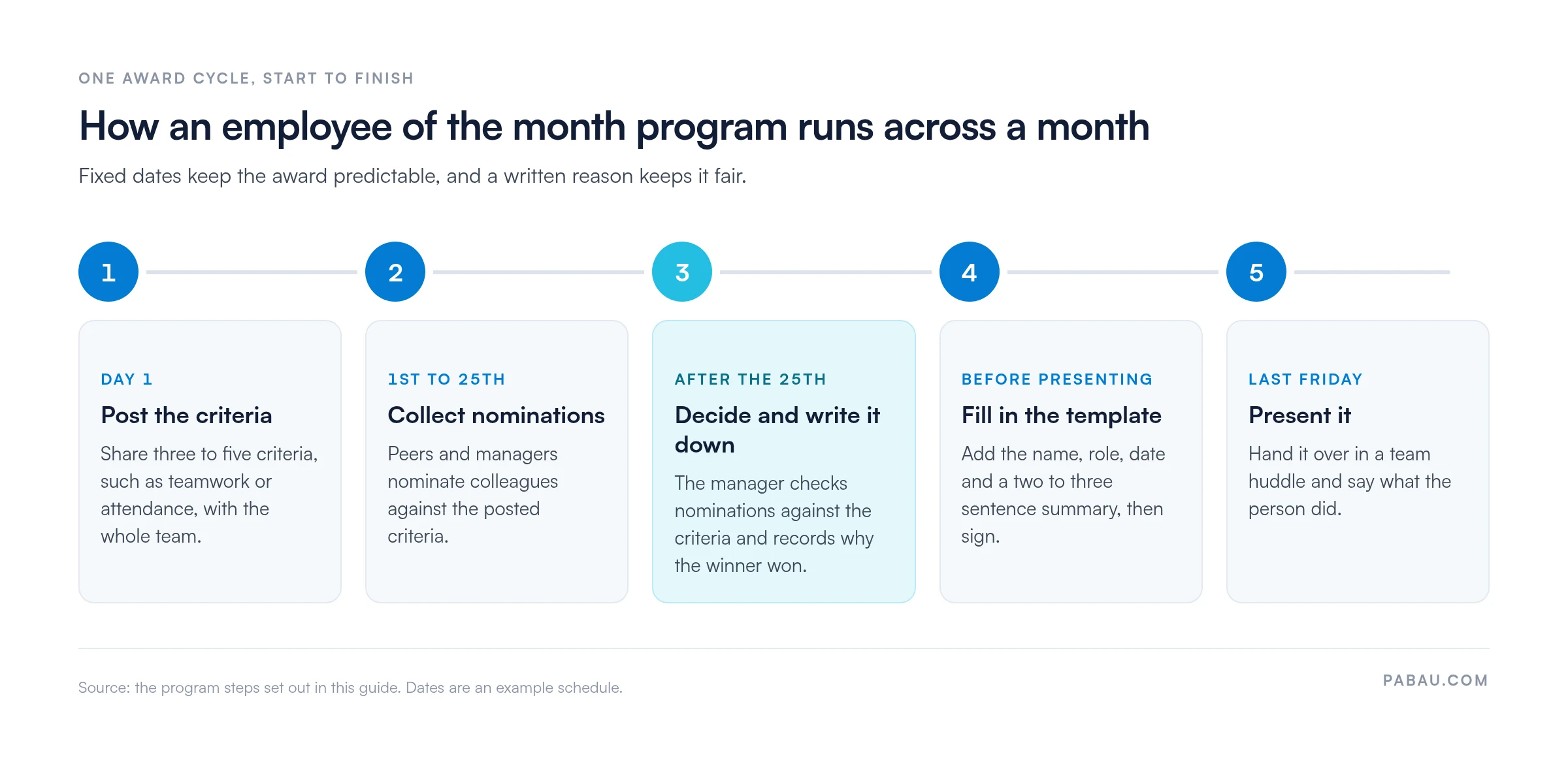
Use peer nominations plus manager input. Open nominations to the whole team, not just managers. Peers notice good work that managers might miss. Managers then review the nominations against the criteria and make the final call.
Rotate winners across departments. If your practice has clinical, administrative and support roles, track winners so each department is recognized over the year. A receptionist should win as often as a practitioner.
Document the decision. Write down why the employee won, naming the achievement and the criteria they met. This keeps the decision honest and shows the winner exactly what they did well.
Never skip a month. If awards appear only sporadically, staff stop paying attention. Lock the date into your calendar, such as the last Friday of each month.
The core fields work in several formats:
PDF: Open the downloaded template and add your practice name, logo and criteria. Save it as a master copy and fill in a new version each month with the winner’s details. Print it on cardstock for the presentation.
Canva: If you want more design freedom, search “employee of the month certificate” in Canva’s free library. Match the colors to your practice branding and keep the same fields as the PDF.
Digital display: Create a version sized for your waiting-room screen or website. A rotating staff spotlight extends recognition beyond the paper certificate.
Email and social media: Design a square graphic for Instagram or LinkedIn with the winner’s name and achievement. Sharing recognition publicly also shows potential hires how you treat your team.
Burnout is widespread among nurses and other clinicians, and feeling overlooked adds to it. Our guide to healthcare worker burnout covers the wider fixes. A monthly award is a low-cost step that tells staff their effort was noticed.
Recognition also supports patient care. Staff who feel valued are more likely to stay, and a stable team gives patients continuity. That continuity matters most in mental health and therapy practices, where the relationship between patient and therapist drives results.
Finally, recognition helps you avoid the cost of turnover. Replacing a clinical staff member often costs a significant share of their annual salary once recruitment, training and lost productivity are counted. A certificate and five minutes of team time cost very little by comparison.
Judging attendance and reliability from memory invites bias. Pabau’s staff management software tracks clock-ins, breaks and hours worked as they happen. The Team Report pulls hours, commissions and performance metrics into one view.
That gives you a record to check a nomination against before you sign the certificate. For groups with several sites, multi-location management keeps staff and schedules for every location in one place. Managers on the move can check the diary from Pabau GO, our iOS app for practitioners.
The award itself stays on the template. Pabau supplies the attendance and scheduling facts behind it, so the decision is easier to explain to the rest of the team.

Pabau’s staff management software tracks shifts, clock-ins and hours worked across every location. You can check attendance-based nominations against the record before you sign.

The template is the easy part. An employee of the month program works because of the routine around it. That means criteria posted on day one, fixed nomination dates and a written reason for every winner.
Start with next month. Pick three criteria, set the dates and commit to presenting the award even when the month was quiet. A program that runs every month earns trust, while one that appears only now and then fades quickly.
Book a demo to see how Pabau keeps rotas and staff hours on record, so your attendance-based awards are easy to justify.

Need one place to manage shifts and hours? Staff management software covers rotas, clock-ins and the Team Report, so staff scheduling and coordination sit in one system.
Handling a harder staff conversation? Employee counseling form gives you a structured record for corrective feedback.
Running multiple practice locations? Pabau’s multi-location management tools let you manage staff and schedules across all locations in one place.
Reviewing a team lead’s performance? Leadership assessment scores a leader against defined competencies.
Want a fuller performance record? Employee performance management form gives you a structured record of each employee’s performance.
Monthly is the standard and the easiest rhythm to sustain. Some larger practices run the award every two months or quarterly to avoid fatigue. Monthly still gives every staff member a reasonable chance to be recognized within a year, and consistency matters more than frequency.
Yes. The core fields (name, role, date, criteria, signature) work across formats. Print the certificate on cardstock, run nominations through a Google Form or Airtable, and design a poster version for display.
Yes, if the employee consents. A photo makes the certificate personal and gives the winner a keepsake. Many practices take a quick headshot at the presentation or use one from the staff directory.
Recognition still matters, but a monthly award can feel forced in a team that small. Consider a quarterly award or regular peer feedback in staff meetings. Documented recognition works at any size, and even a signed note from leadership shows someone their work was noticed.
Yes. Canva has a large free library of employee of the month certificate designs you can customize with your practice name, logo and colors. It’s quicker than editing a PDF if you prefer drag-and-drop design.