Maja Popovska
Anaphylaxis nursing care plan: Interventions and charting
What an anaphylaxis nursing care plan covers, start to finish An anaphylaxis nur...

1
Last Updated: Nov 2, 2026
Free PDF 2 pages, print-ready Clinician-reviewed
A daycare physical form is a health assessment a licensed provider completes before a child starts at a licensed childcare facility. It records the child’s exam findings, immunizations, and medical history. Most US states require it as a condition of both center licensing and enrollment.
The form links the clinician who examines the child, the parent, and the administrator who has to act on it. It flags conditions that need accommodation and confirms that required vaccinations are on record. That protects the child and gives the facility a documented health baseline to work from.
Clinicians own the clinical sections. Every state requires a physician, nurse practitioner. The facility then keeps the signed form in the child’s file for licensing inspections.
This guide lists the official form name and renewal window for five states. It also covers the errors that get a form sent back, and who is allowed to sign it.
This printable form covers child details, exam findings, immunization dates, allergies, medications, activity restrictions, and provider certification. Use it as a reference alongside the official version your state licensing agency publishes.
Start from scratch, or upload this PDF or any form you already use, and Pabau's AI Form rebuilds it with tick boxes, text fields and a signature. Attach it to the treatment once, and every patient gets it on time.
AI Form rebuilds the consent, history and aftercare forms you already use. You review each one, then publish.
Patients complete forms on their phone before they arrive, so the front desk stops retyping paper.
Every signed form is versioned and attached to the treatment record, ready when you need it.
Set how long a consent stays valid. Returning patients skip forms they have already signed.
Supports HIPAA and GDPR compliance AES-256 encryption 4.8 on G2 4.7 on Capterra Trusted by 4,000+ practices worldwide

A daycare physical form is a state-required health assessment that a licensed provider completes before a child starts childcare.
Every US state requires health documentation for childcare enrollment, but the form name, required fields, and renewal window differ by state.
The form covers child details, immunizations, exam findings, medical history, allergies, medications, restrictions, and the provider’s signature.
Forms are most often rejected for missing immunization dates, a missing signature, or an exam dated outside the state’s window.
Practice management software like Pabau stores each form against the child’s record and reminds you before it expires.
State forms differ in layout, but they all cover the same core sections:
Medication is the section that most often needs a second document. If staff must give a dose during the day, most facilities also ask for a medical needs form. The same provider signs it.
Many childcare providers manage two form types, one for enrolled children and one for facility staff. Mixing them up is a common licensing error.
Every US state requires health documentation for childcare licensing. Here is how five common states handle it:
Requirements are updated regularly, so confirm the current version with your state’s licensing agency before you print a batch.
Digital forms sit at the center of practice management software, feeding records, billing, and follow-ups from one entry.
All states require immunization records on the form. Which vaccines are needed depends on the child’s age and follows the CDC immunization schedule. Typical requirements include:
Some states allow medical or religious exemptions, and the form must record the exemption and its reason. Facilities must confirm that records are current before a child attends.
Completing the form takes coordination between the clinician, the parent, and the facility. Work through it in this order:
Paper calendars are where this step fails. Practices that see a steady stream of these visits set the renewal reminder against the child’s record instead.
State rules set out which professionals may complete the form. In most states, the list includes:
A few states let a registered nurse carry out the exam under protocol, but a physician signature is still required for the attestation. Check your state’s rules before you delegate.
These five problems account for most rejected forms:
Clear, complete entries keep forms out of the rejection pile and give staff something they can act on.
Ordering the findings that way also makes the note easier for the next clinician to reuse. A worked normal exam SOAP note shows how each body system reads once it is charted.
Both providers and parents can lean on federal and state sources. The American Academy of Pediatrics publishes child health supervision guidelines that line up with most state daycare requirements. Your state licensing office holds the official form, the fee schedule, and the compliance timeline. The federal state resource directory lists the office to contact in each state.
For practices covering several facilities. Moving to paperless documentation also removes the scan-and-file step entirely.
Licensing rules and immunization schedules both change, usually once a year. State agencies also revise their forms, so subscribe to updates from your health department and licensing office.
It also keeps a child from losing their place over an expired form.
Pediatric and family medicine practices that run a lot of these visits carry a heavy admin load. Dozens of forms sit at different stages, expiry dates live on a spreadsheet, and someone has to chase families for the follow-up.
Practice management software like Pabau puts those steps in one place.
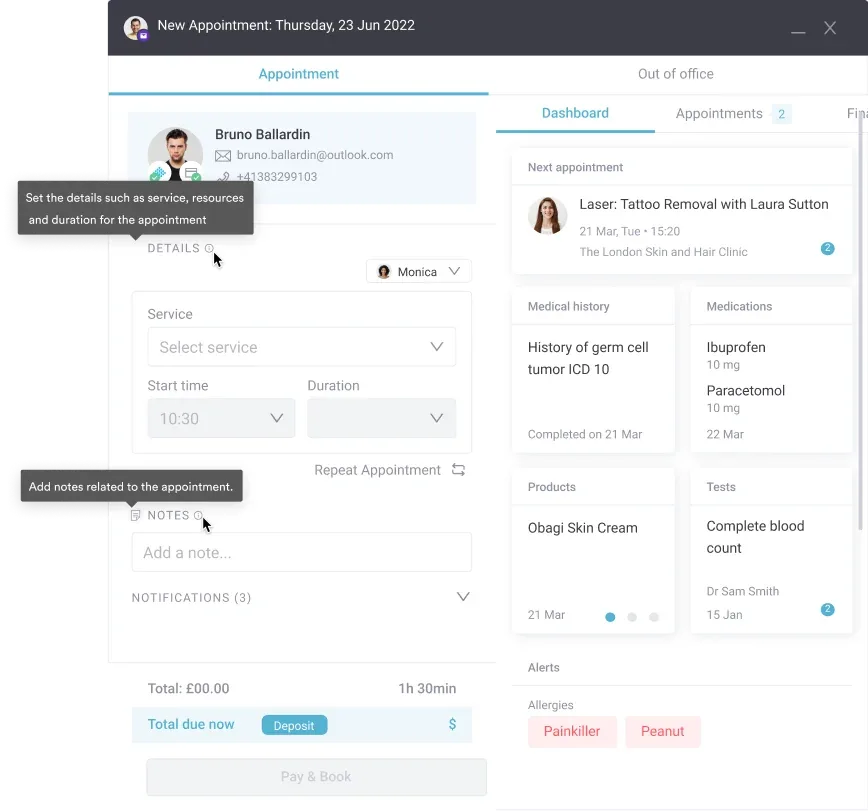
The clinician then adds exam findings and the signature, and the completed form saves straight to the child’s record.

Reminders go out 30 to 60 days before a form expires. You can also pull a list of every child whose paperwork is due.
The outcome is fewer expired forms, fewer calls from facilities, and no child sent home because paperwork lapsed.

Pabau stores each daycare physical against the child’s record and reminds your team before it expires. Facilities get the paperwork on time, and no one loses a place in care.

The daycare physical is a small document with an outsized effect on a family’s week. A missing date or an unsigned line means a second appointment, a second trip, and a child out of care in the meantime.
Accuracy costs far less than a rejection. Use your state’s official version, fill every field, and set the renewal date on the day you sign.
The template above gives you the sections to expect and a checklist to work from. Book a demo to see how Pabau tracks daycare physicals and renewal dates for pediatric practices.

Need a structured well-child review? Pediatric review gives you a section-by-section prompt sheet for the visit where the daycare form gets filled in.
Curious how quality care programs are measured? A quality-based health care programs guide explains how to build measurement systems that keep pace with patient delivery capacity.
Unsure what counts as a normal reading? Pediatric blood pressure chart gives the percentile thresholds by age, height, and sex for the vitals section.
Thinking about leaving the NHS for private practice? Leaving the NHS for private practice covers 11 concrete steps and the pension math for keeping your income steady.
Parents raising sleep concerns? Pediatric sleep questionnaire screens for the problems that often surface at a well-child visit.
A daycare physical form is a state-required health assessment that a licensed provider completes before a child enrolls in childcare. It records health status, immunizations, medical history, allergies, and any special needs. It works as both a clinical record and a licensing document.
Yes. Every US state requires some form of health documentation for childcare licensing. The form name, the required fields, and the renewal period differ by state.
Renewal periods are set by the state. California requires it within 12 months of enrollment, Pennsylvania requires annual renewal, and Ohio usually asks for a yearly update. Check with your state’s childcare licensing office for the exact deadline.
Yes, in most states. Certified nurse practitioners, physician assistants, and certified nurse midwives can carry out the exam and complete the form. They need a current license in that state. Some states still require a physician co-signature, so check your own rules.
The child cannot stay enrolled until the form is renewed. State law requires the facility to move them to inactive status or remove them from care. Parents should book a new exam and submit the updated form right away.
Your state’s childcare licensing agency or health department publishes the official template, and each state maintains its own. The template above covers the sections used across most states, so treat it as a reference and a checklist.