HCPCS code A4650: Surgical dressing billing guide
HCPCS code A4650: official descriptor and product definition HCPCS code A4650 is...

Last Updated: Oct 7, 2026
L1902 is the HCPCS Level II code for ankle orthosis, ankle gauntlet or similar, with or without joints, prefabricated, off-the-shelf.
The code is maintained by the Centers for Medicare & Medicaid Services (CMS). It is not a CPT code. CPT codes are maintained by the AMA and describe physician services. HCPCS Level II codes like L1902 cover durable medical equipment, orthotics, and supplies.
Three device characteristics define L1902. The orthosis treats the ankle only, it is prefabricated rather than custom-fabricated, and it is off-the-shelf. Off-the-shelf means the device needs no significant modification before it is dispensed.
An ankle gauntlet, a simple stirrup brace, or a lace-up ankle stabilizer that comes in standard sizes and is fit from stock qualifies. A device that is custom-molded, or that needs substantial modification for one patient, does not. Bill that device under a different L-code, such as L1940.
Let Pabau's smart automation suggest the right codes, reduce claim denials, and keep your practice compliant—effortlessly.
Automate repetitive tasks and focus on what matters most—your patients.
Reduce coding errors and ensure compliance with the latest regulations.
Clean claims, fewer denials, and faster reimbursements.
Powerful insights and reporting to help your practice thrive.
HIPAA compliant SOC 2 certified GDPR-compliant Trusted by 4,000+ clinics worldwide

HCPCS Code L1902 describes a prefabricated, off-the-shelf ankle orthosis or ankle gauntlet, with or without joints, billed by DME suppliers and orthotists.
Medicare coverage is governed by LCD L33686. A detailed written order (DWO) must be obtained before device delivery, not after.
L1902 is strictly for prefabricated off-the-shelf devices. Billing it for a custom-fabricated ankle orthosis is a coding error with audit and overpayment risk.
Practice management software like Pabau helps orthotics and DME teams track DWO status, apply the right modifiers, and submit clean claims.
Use this quick-reference table before billing. All fields reflect current CMS HCPCS Level II specifications.
DMEPOS fee schedules are jurisdiction-specific, so a national average is a starting point rather than a billing guarantee. The 2026 Medicare allowed amount for L1902 varies by DME MAC jurisdiction. It also varies by whether the device is purchased outright (NU modifier) or rented (RR modifier).
Four jurisdictions carry these claims. DME MAC Jurisdictions A and D belong to Noridian Healthcare Solutions. Jurisdictions B and C belong to CGS Administrators. Two suppliers in different states can therefore be paid differently for the same code. For current figures, check the CMS DMEPOS fee schedule before you submit.
Pull the jurisdiction-specific rate every time rather than working from a national average. A rate that looks correct for one DME MAC can produce quiet, systematic underpayment in another.
Medicare coverage for L1902 is controlled by LCD L33686 (Ankle-Foot/Knee-Ankle-Foot Orthosis). The LCD does not cover every ankle brace dispensed. The device has to meet a therapeutic goal, and the patient has to carry a qualifying condition.
That work happens before the brace leaves the shelf. Run insurance eligibility verification for the patient, then confirm that the recorded diagnosis sits on the LCD’s covered code list.
CMS treats L1902 as medically necessary when two conditions hold. The beneficiary has a condition amenable to treatment with an ankle orthosis, and the orthosis is expected to improve function, maintain it, or prevent deterioration.
General ankle weakness, a sprain without documented functional limitation, and prophylactic use without a supporting diagnosis all fail that test.
LCD L33686 is updated annually. Verify the covered and non-covered diagnosis lists in CMS’s own coverage resources before you bill, rather than trusting a list you saved last year.
Pairing L1902 with a diagnosis code outside the LCD’s covered list is the fastest route to an automatic denial. The table below lists commonly used ICD-10-CM codes that support medical necessity for L1902 under LCD L33686. It is not exhaustive, so check the full LCD for the complete code list before billing.
Laterality matters here. Reaching for an unspecified code such as M25.379, when the record names the affected side, is a common coding error. It also invites an additional documentation request.
Missing or incomplete documentation is the top reason L1902 claims draw additional documentation requests (ADRs) and then denials. CMS Policy Article A52457 and CGS Medicare prescriber education agree on the timing rule. The detailed written order must be obtained before the device is delivered.
A post-delivery order does not satisfy coverage requirements. That holds however clearly the patient’s medical need is documented elsewhere in the chart. So the DWO belongs on file before the device leaves the supplier, and CMS policy requires all of the following elements:
The supplier also keeps proof of delivery with the patient’s signature, plus evidence that the device fits the L1902 descriptor. Any modification beyond a minor size fitting can push the device out of the code.
Flag DWO status in your practice management workflow before dispensing. A short pre-delivery checklist, confirming the order date, diagnosis, practitioner signature, and device description, prevents the most common ADR triggers for L1902 claims.
Modifier errors on L1902 claims create two problems at once. Apply the KX modifier with nothing behind it and you have made a false attestation. Omit it when coverage criteria are met and the claim may reject. The table below shows which modifier to apply and when.
KX is the modifier to get right. Applying it attests that documentation on file supports every coverage requirement under LCD L33686. If an audit finds the record does not support coverage, that attestation creates compliance liability beyond the claim itself.
L1902 denials cluster around five recurring mistakes. Each one is preventable with a workflow check in the right place.
Track which denial reason codes show up most often on your L1902 claims, then trace each one back to its cause. That cause is usually a missing DWO element, a modifier error, or a diagnosis mismatch.
Our reference on denial codes explains what each rejection message is telling you.
The L1900 series runs from simple off-the-shelf ankle braces to fully custom-fabricated ankle-foot orthoses. Devices across that range can look alike while sitting in entirely different coding categories. The decision tree below routes a dispensed device to its code in three questions, and the table under it gives the descriptors.
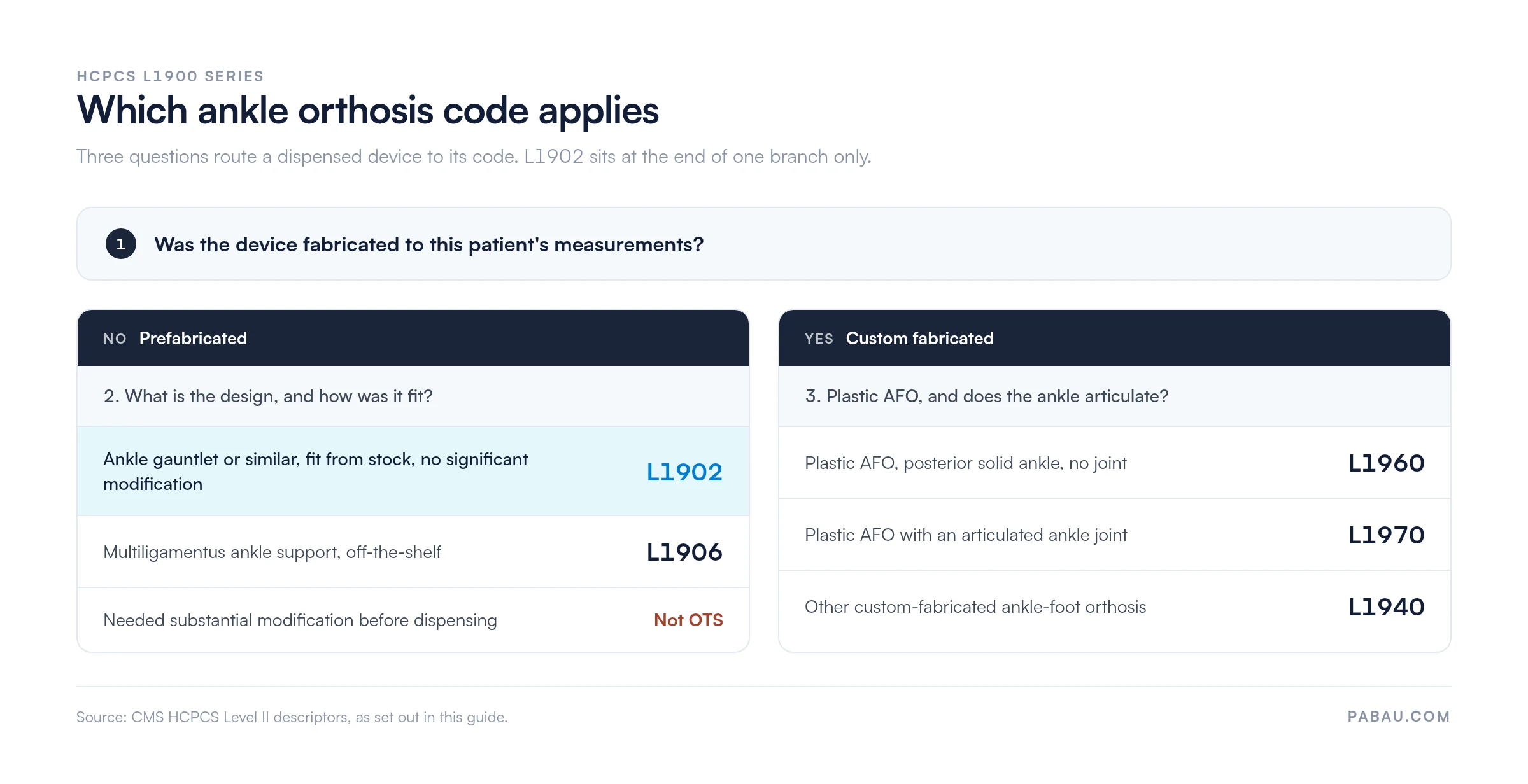
The L1902 and L1906 distinction causes the most confusion. L1906 names a multi-ligamentous design, while L1902 covers a broader set of prefabricated ankle orthoses and gauntlets. When the call is close, check the device’s PDAC classification or contact your DME MAC’s provider outreach team.
Further along that custom-fabricated range, L1950 names the spiral, Institute of Rehabilitative Medicine type plastic ankle-foot orthosis. L1990 names the custom double upright version, with free plantar dorsiflexion, a solid stirrup, and a calf band.
This workflow covers the full cycle for L1902, from the initial order through claim submission and any ADR response.
Run a quarterly audit of your L1902 claims. Pull every paid and denied claim, then cross-reference modifier use against the underlying documentation. A pattern of KX attestation without matching DWO completion is your highest compliance risk, and the most common trigger for a focused DMEPOS audit.
Most orthotics and DME teams track order status in a spreadsheet, or in the fitter’s memory. The signed order then gets chased after the brace has already gone out. That is the one sequence LCD L33686 does not allow, and it is where a clean claim quietly becomes an ADR.
Pabau moves that check into the workflow itself. Orders, diagnosis codes, and signed delivery confirmations sit on the patient record. The person handing over the device can see whether all three are present, without opening a second system.
The same record then follows the claim out the door. You can see which L1902 claims went out carrying KX, which came back denied, and which reason code keeps repeating. That turns the quarterly audit above into a report you can pull on any Monday morning.

Pabau’s claims management helps orthotics and DME practices track documentation status, apply the correct modifiers, and submit clean claims. See how it fits your billing workflow.

L1902 failures trace back to one of three things. An order arrived after the device, a modifier was applied without support, or the diagnosis sat outside LCD L33686. All three are settled before the claim is ever built.
So the work that decides payment happens at the point of dispensing, not in the billing queue. A supplier who will not release a device without a complete order removes most of its denial volume. Checking the diagnosis against the LCD on the same day removes more.
The trade-off is a slower hand-off at the counter. It buys back the weeks that appeals and ADR responses would otherwise cost. Book a demo to see how Pabau tracks L1902 documentation and denial patterns for DME and orthotics teams.

Want to understand the full claims lifecycle for DME billing? Medical claims clearinghouse overview explains how electronic claims move from submission through adjudication and payment.
Struggling with claim denials across your orthotic codes? Reading electronic remittance advice (ERA) shows how to interpret ERA files and identify denial patterns by HCPCS code.
Need more L1902 claims paid on the first pass? Clean claim requirements sets out what a payer checks before it releases payment.
Denials piling up across your L-series codes? Denial management in healthcare covers how to work rejections back to a root cause and rework them in order.
Building the documentation trail behind each claim? What a superbill is and how to use one shows which fields payers expect to see on the source document.
HCPCS Code L1902 is a Level II HCPCS code for a prefabricated, off-the-shelf ankle orthosis, ankle gauntlet, or similar device, with or without joints. DME suppliers and orthotists bill it to Medicare and commercial payers for patients with documented ankle instability, weakness, or functional limitation.
L1902 is a HCPCS Level II code, not a CPT code. CPT codes are maintained by the AMA and describe physician procedures and services. HCPCS Level II L-codes are maintained by CMS and cover durable medical equipment, orthotics, prosthetics, and supplies. The two systems are distinct, and L1902 sits entirely within the HCPCS Level II L-series.
Yes, Medicare Part B covers L1902 when the medical necessity criteria under LCD L33686 are met. A valid detailed written order must also be on file before delivery. Coverage is not automatic. The patient’s diagnosis must appear on the LCD’s covered code list, and the device must qualify as a prefabricated off-the-shelf ankle orthosis.
The main modifiers for L1902 are KX, GA, GZ, NU, and RR. KX attests that all LCD coverage criteria are met and the documentation is on file. GA marks an item that may not be covered, with a signed ABN. GZ marks an item expected to be non-covered where no ABN was obtained. NU covers a new equipment purchase, and RR covers a rental. KX is required for Medicare payment when coverage criteria are satisfied.
Both L1902 and L1906 describe prefabricated, off-the-shelf ankle orthoses, but L1906 is specific to multi-ligamentous ankle support designs. L1902 covers a broader range of prefabricated ankle braces and gauntlets. The correct code depends on the device’s design and its PDAC-verified product classification.
Billing L1902 requires a detailed written order (DWO) obtained before delivery. It carries the patient’s name, the order date, a device description, qualifying ICD-10-CM diagnosis codes, and the treating practitioner’s signature. The supplier also retains a signed delivery confirmation and evidence that the device fits the off-the-shelf prefabricated descriptor without significant modification.