The 10 platforms compared here are Pabau, Birdeye, Curogram, Doctible, Klara, Luma Health, NexHealth, Podium, RingCentral, and Solutionreach.
Weave is a communication add-on, so most practices still pay for separate scheduling, records, and billing software alongside it.
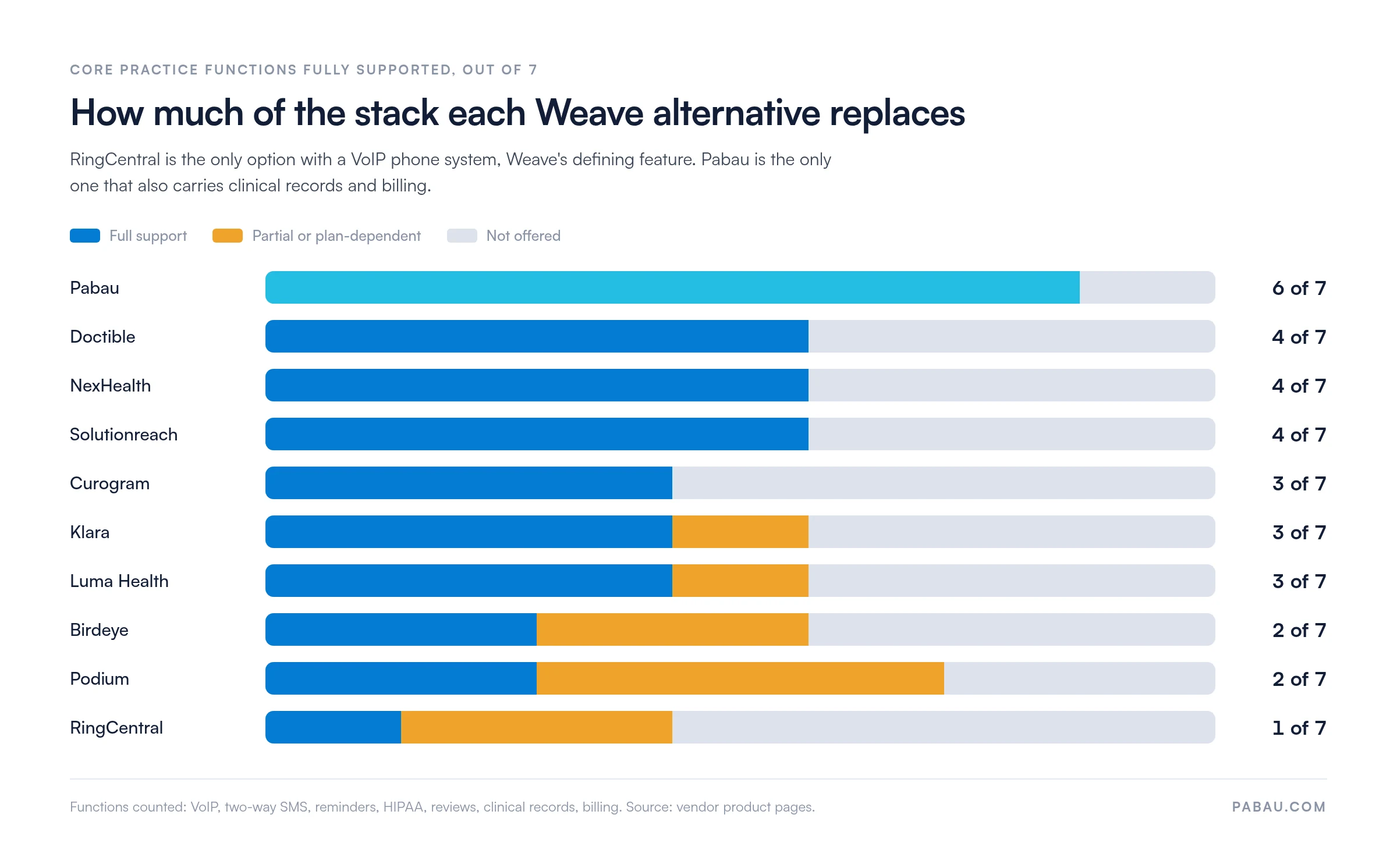
RingCentral is the closest match to Weave’s VoIP phone line, and NexHealth is the closest match to its integration-first design.
Pabau fits practices that want to replace Weave and their practice management system in one move.
Check your notice period and start the phone number port early, because a port can take weeks.
If you are searching for Weave alternatives, chances are you are already paying two software bills without meaning to. One covers Weave, for the phones and the texting. The other covers a separate practice management system, for the schedule, the records, and the billing.
Weave was never built to replace that second system, which is what makes this a bigger decision than swapping in a better texting tool.
The platform you pick now decides how many subscriptions you are still handling a year from now. Below are the 10 alternatives worth putting on that shortlist, what each one actually covers, and the details that trip practices up mid-switch.
Found our content helpful?
Compare the 10 Weave alternatives side by side
Pabau sits first as the pick for practices consolidating their whole tech stack, rather than as an overall winner. The other nine run alphabetically. Ratings come from Capterra, and every price below comes from the vendor’s own site.
Platform
Best for
Standout feature
Starting price
Rating
Pabau
Aesthetics, med spa, multi-specialty practices
All-in-one: scheduling, clinical records, billing, and communication
From $62/month
4.7/5 (600+)
Birdeye
Multi-location practices prioritizing reviews
Best-in-class reputation management
Contact for pricing
4.7/5 (Capterra)
Curogram
Medical practices needing HIPAA messaging
HIPAA-compliant two-way texting
Contact for pricing
4.7/5 (Capterra)
Doctible
Budget-conscious practices wanting core communication
Practices prioritizing reviews and payment collection
Reputation management and payments
Contact for pricing
4.3/5 (Capterra)
RingCentral
Multi-location practices needing enterprise VoIP
Reliable cloud VoIP with HIPAA-compliant plans
From $20/user/month
4.3/5 (Capterra)
Solutionreach
Established practices wanting proven communication tools
Appointment reminders and two-way texting
Contact for pricing
3.9/5 (Capterra)
Weave handles the phones, not the practice
Weave built its name on one feature. Its VoIP phone system pulls patient data out of your practice management software and puts it on screen the moment a patient calls.
The front desk sees the name, the next appointment, and the account balance before anyone picks up. For dental offices running Dentrix or Eaglesoft, that saves a lookup on every call.
What Weave leaves out is the rest of the practice. It carries no clinical records, no invoicing, no insurance billing, and no treatment documentation. It sits on top of software you already pay for, so adopting it commits you to two subscriptions for as long as you use it.
Four complaints come up most often in user reviews on Capterra and G2 when practices start looking elsewhere:
Cost: Weave’s price covers communication features only. The EMR, the scheduling tool, and the billing platform are all billed separately.
Limited EHR compatibility: Weave integrates well with the big dental systems, including Dentrix, Eaglesoft, and Open Dental. Support for medical EMRs is narrower. Practices outside the supported list lose the caller-ID feature that justifies the subscription.
Onboarding effort: Porting phone numbers and configuring integrations takes time. Smaller practices often find the setup out of proportion to the benefit.
Support response times: Negative reviews consistently flag delays on technical issues, especially integration failures.
Eight features decide which Weave alternative fits
Start by working out which part of Weave your practice leans on. A dental office that lives in the caller-ID screen needs something different from a med spa trying to cut its software count. Once you know that, the shortlist mostly writes itself.
It also helps to list the admin jobs the new platform should run, since reminders and intake are where workflow automation usually starts.
From there, check each candidate against the eight features that decide platform fit:
Two-way texting: SMS in both directions between staff and patients, threaded so the whole team sees the conversation
Automated appointment reminders: Confirmation, reminder, and follow-up messages triggered by booking events, with no manual send. Reminder messaging cuts no-shows by 30 to 50% in most practices.
HIPAA compliance: A signed Business Associate Agreement, known as a BAA, plus encrypted message storage and audit logs
Online scheduling: Patient-facing booking that syncs with your appointment calendar in real time
VoIP phone system: A cloud phone that shows patient data when a call comes in
EHR integration: Two-way data sync with your clinical records system
Reputation management: Automated review requests plus monitoring across the platforms patients read
Payment processing: Patient payments collected online and in person
The 10 best Weave alternatives for healthcare practices
Each review below covers what the platform does, where it holds up, where it falls short, and what it costs. The order matches the table above.
If you want Weave’s phone line back, RingCentral is the closer match. For its integration-first design, that is NexHealth. The rest sit between those two poles.
1. Pabau, best for consolidating your whole tech stack
Rating4.7/5★★★★★Best for consolidation
The bottom line
Pabau replaces Weave and the practice management system underneath it, which is a bigger switch than a communication upgrade.
Who it’s for
Aesthetics clinics and med spas cutting their software count
Multi-specialty practices needing treatment notes and messaging together
Scheduling, records, billing and messaging behind one login
Every subscription includes every feature
No EHR integration to configure or maintain
Aesthetics workflows such as consent and injection plotting
What doesn’t
No VoIP phone system, so phones stay separate
Automations and reporting take time to master
Practice management software like Pabau sits at the opposite end of this market from Weave. Where Weave adds a communication layer to software you already run, Pabau is the software you run.
Scheduling, clinical records, consent forms, patient messaging, billing, and reporting all live behind one login, so there is no integration between them to break.
That changes the arithmetic. A practice on Weave plus a separate EMR plus a scheduling tool is carrying three monthly bills. Pabau folds those into one.
Every subscription includes every feature. A solo injector and a 20-clinician group get the same clinical documentation, automated workflows, and messaging tools.
Price scales with users and locations, never by locking features into a higher tier. For the other side of the argument, see our own roundup of Pabau competitors and alternatives.
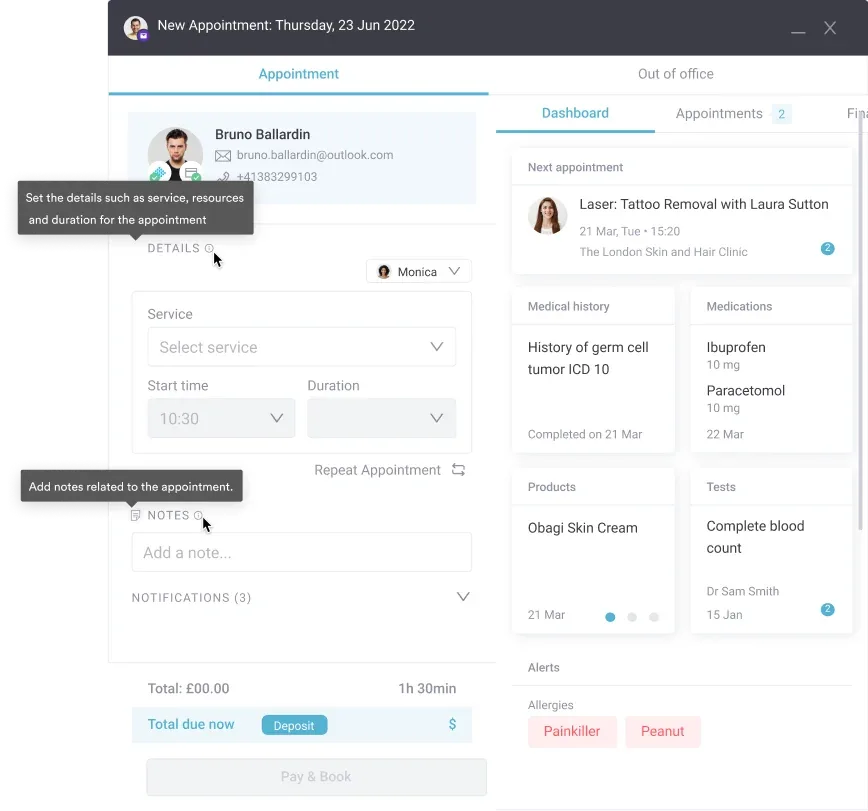
Pabau’s calendar holds the booking that triggers the reminder text, so a reschedule updates both without a second system.
Key features
Automated SMS and email reminders: Confirmation, pre-appointment, and post-care messages sent automatically off booking events
Two-way patient messaging: Direct SMS conversations between staff and patients, visible across the team
Online booking: Patient-facing online booking with real-time calendar sync, deposit collection, and cancellation policy enforcement
Digital forms: Intake questionnaires and consent forms delivered and signed before the appointment
Clinical records and treatment notes: Full patient history, before-and-after photos, injection plotting, and structured documentation
Billing and payment processing: Invoicing, payment collection, and financial reporting built in
Review management: Automated post-appointment review requests with monitoring across Google and other platforms
Multi-location support: Centralized reporting and team management across several sites
Where Pabau shines
Ends the dual subscription: One platform covers the clinical and the communication side, so Weave plus a separate EMR becomes one bill.
Built for clinical teams, not only the front desk: Practitioners, nurses, receptionists, and managers each get a workflow view that fits their job. Weave’s interface targets front-desk communication tasks.
No EHR dependency: Because Pabau is the EMR, there is no integration to configure or maintain. Weave’s best features depend on having a compatible practice management system.
Native to aesthetics and med spas: Consent workflows, injection plotting, before-and-after photo management, and treatment plans are built in. Weave has no equivalent clinical tools.
Where Pabau falls short
No VoIP phone system: Pabau does not include a cloud phone with caller-ID patient data. Practices that depend on Weave’s phone features will keep a separate phone provider.
Learning curve on the deeper features: Users note that configuring automations and reporting takes time to master.
What reviewers say
According to Capterra reviewers, Pabau holds a 4.7/5 rating from more than 600 verified reviews. Positive themes include appointment management, strong client records, and a helpful onboarding team. The most cited areas for improvement are reporting flexibility and occasional bugs on edge-case workflows.
Pricing
Plan
Price
What it covers
Starter
From $62/month
One user, up to 100 clients, full platform
Solo to Group
Quoted by team size
1 to 15 users, unlimited patients, full platform
Enterprise
Custom quote
16 or more users, multiple locations included
Every plan carries the full platform, so the tiers differ by user count rather than by feature access. Annual billing saves up to 20%.
2. Birdeye, best for reputation management at scale
Rating4.7/5★★★★★Our pick for reviews
The bottom line
Birdeye generates reviews better than the rest of this list, and covers no clinical workflow at all.
Who it’s for
Multi-location dental or medical groups
Practices where online reputation drives new patients
Practices adding review tools to a working EMR
PricingContact for pricingquoted by locations and features
Review requests across Google, Facebook and 150 plus platforms
One inbox for SMS, email, webchat and social
Single dashboard across every location
What doesn’t
Not healthcare-specific, so no clinical workflows
No VoIP, scheduling or billing
Priced for multi-location businesses
Birdeye is a customer experience platform, and healthcare is one of several markets it serves. Practices use it for reputation management, multi-channel messaging, and review generation.
It supports over 150 platforms for automated review requests. SMS, email, and webchat land in one inbox, so the front desk works from one screen.
Key features
Review management: Automated post-visit review requests across Google, Facebook, and 150+ platforms
Unified inbox: One messaging hub for SMS, email, webchat, and social channels
Two-way SMS: Direct patient-to-staff text conversations
Survey tools: NPS and satisfaction surveys with automated follow-up workflows
Multi-location dashboard: Review and messaging management for practices with several sites
Where Birdeye shines
Review generation at scale: Practices with high patient volume consistently report strong results from Birdeye’s automated review requests.
Multi-location support: One dashboard covering every location is an operational advantage for small healthcare groups.
Wide platform coverage: Birdeye monitors and responds across more review platforms than most competitors.
Where Birdeye falls short
Not healthcare-specific: Birdeye serves restaurants, auto dealers, and retail alongside healthcare. Clinical workflow features do not exist.
Cost for single locations: Pricing is built for multi-location businesses, so single-site practices often struggle to justify it.
No VoIP, scheduling, or billing: Birdeye replaces Weave’s communication features only. You still need a practice management platform.
What reviewers say
Birdeye holds a 4.7/5 rating on Capterra and a 4.8/5 on G2, with reviewers consistently praising review generation results. Trustpilot ratings are lower, at 3.6/5, with complaints focused on billing disputes and customer support response times.
Pricing
All plans
Quoted by location count and the features you select
Contact for pricing
Birdeye publishes no prices and routes every inquiry to sales, so budget for a quote rather than a list price.
3. Curogram, best for HIPAA-compliant medical texting
Rating4.7/5★★★★★Our pick for secure texting
The bottom line
Curogram does one job, HIPAA-compliant two-way texting, and does not pretend to do more.
Who it’s for
Medical practices happy with their current EMR
Practices replacing only Weave's messaging
Small teams that want a short onboarding
PricingContact for pricingquoted by patient volume
Curogram is a HIPAA-compliant patient communication platform built for medical practices. Two-way texting is the core of it, with automated appointment reminders and basic telehealth layered on top.
The scope is narrower than most platforms here. That focus shows in the messaging tools, which handle the medical context well.
Key features
HIPAA-compliant two-way SMS: Encrypted patient-to-staff messaging with full conversation history
Appointment reminders: Automated confirmation and reminder texts before appointments
Telehealth: Basic video visits from inside the Curogram platform
Patient broadcasting: Bulk sends to patient segments for open slots or practice updates
Form collection: Digital intake forms delivered and returned by SMS link
Where Curogram shines
Healthcare-native compliance: HIPAA compliance is built into the platform rather than retrofitted. That matters when every patient message is potentially protected health information.
Simple to adopt: The narrow feature set means shorter onboarding than a full suite.
Good beside an existing EMR: Practices keeping their clinical records system can add Curogram purely for communication.
Where Curogram falls short
Limited reputation management: Curogram has no automated review requests or multi-platform monitoring, so review tools need a second subscription.
No VoIP phone system: Curogram is messaging only. It does not replace Weave’s phone features.
Smaller feature set: Practices looking to consolidate several tools will find the scope too tight.
What reviewers say
Curogram holds a 4.7/5 rating on Capterra. Reviewers highlight how quickly two-way texting goes live and how well patients respond to automated reminders. The main limitation cited is the narrower feature set next to full-suite competitors.
Pricing
All plans
Quoted by patient volume and features per location
Contact for pricing
Curogram’s own pricing page was unavailable at the time of writing, and no figures appear elsewhere on their site. Treat any number you find on a comparison site as unconfirmed.
4. Doctible, best for practices on a tight budget
Rating4.8/5★★★★★Our pick on budget
The bottom line
Doctible covers reminders, texting and reviews at the lowest cost on this list, and stops there.
Who it’s for
Small and mid-sized dental or medical practices
Practices adding communication to a working EMR
Single-site practices watching software spend
PricingContact for pricingcustom plans, including multi-location
Built for healthcare, so workflows fit the practice
Reminders and review requests both work well
What doesn’t
Fewer EHR integrations than NexHealth or Luma Health
No VoIP or clinical features
Will not reduce your software count
Doctible is a healthcare-specific communication platform that covers the three things most practices use Weave for: appointment reminders, two-way texting, and review management. It sits at a lower price point than most competitors in this space. For a smaller practice that wants Weave’s communication features without Weave’s bill, that combination is hard to beat.
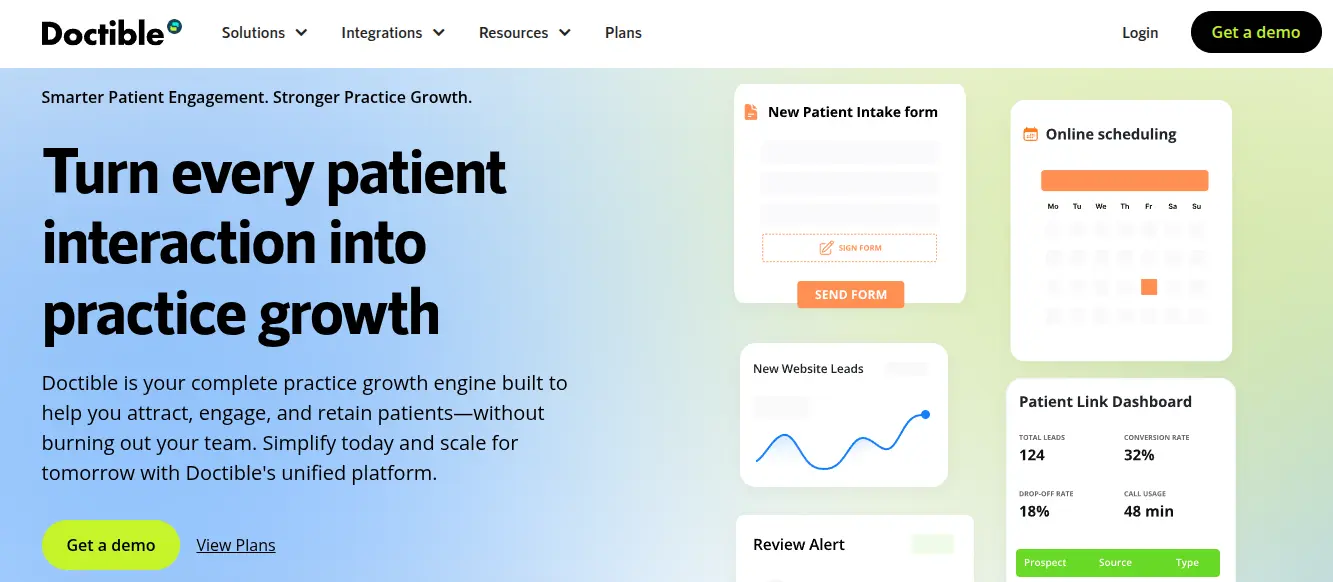
Doctible’s dashboard centers on the three jobs it does well: intake forms, scheduling, and lead tracking, rather than clinical records.
Key features
Automated appointment reminders: SMS and email reminders with customizable timing
Two-way texting: Direct patient messaging through a shared team inbox
Review management: Automated review request workflows and monitoring
Online scheduling: Patient-facing booking wired into the reminder workflows
Digital forms: Intake form delivery and collection
Where Doctible shines
Affordable entry point: Reviewers consistently put Doctible’s cost below Weave and below most alternatives listed here.
Healthcare-specific design: Unlike Birdeye or Podium, Doctible is built for practices, so its workflows already reflect clinical context.
Core features executed well: Reviews and reminders are the two features practices use most, and Doctible delivers both reliably.
Where Doctible falls short
Smaller integration ecosystem: Doctible supports fewer EHR integrations than NexHealth or Luma Health, which limits it for practices on less common EMRs.
No VoIP or clinical features: Doctible handles communication only, so it does not reduce a practice’s total software count.
What reviewers say
Doctible holds a 4.8/5 on Capterra, making it the highest-rated platform on this list by Capterra score. Reviewers most often highlight affordability and ease of use for appointment reminders and review collection.
Pricing
All plans
Custom plans, with multi-location and bulk options
Contact for pricing
Doctible publishes no rate card and builds plans per practice. Its own site does confirm there are no fees beyond the agreement and sales tax.
5. Klara, best for simple, secure patient messaging
Rating4.6/5★★★★★Our pick for patient experience
The bottom line
Klara is the cleanest messaging interface here, and patients adopt it without being asked twice.
Who it’s for
Specialist medical practices such as dermatology or psychiatry
Practices keeping their existing EMR
Teams that care about how messaging feels to patients
PricingContact for pricingquoted after a sales conversation
Clean threaded interface that staff and patients both like
Encryption and audit logging built into the core
Fits specialist patient interaction patterns
What doesn’t
No scheduling, billing or clinical documentation
Fewer integrations than NexHealth or Luma Health
No published pricing before a sales call
Klara is a HIPAA-compliant platform focused on secure messaging between healthcare teams and patients. Simplicity is the design goal.
Each patient gets one threaded conversation view, with automated follow-up messaging and basic telehealth built in. Klara was designed for medical practices, and its workflows show that more clearly than general-purpose communication tools do.
Key features
HIPAA-compliant messaging: Encrypted threaded conversations between staff and patients
Automated follow-up: Post-visit messaging workflows for care instructions and review requests
Telehealth integration: Basic video visits from inside the platform
Team inbox: Shared view of every patient conversation, with assignment and tagging
Patient forms: Digital intake and consent forms delivered inside the messaging thread
Where Klara shines
Clean, intuitive interface: Reviewers consistently praise Klara’s design for ease of use, for staff and patients alike.
Strong compliance architecture: Encryption and audit logging sit in the core product rather than bolted on afterward.
Good for specialist practices: Dermatology, psychiatry, and other specialist practices find that threaded messaging matches how their patients get in touch.
Where Klara falls short
Limited practice management features: Klara has no scheduling, billing, or clinical documentation. It is a messaging tool.
Fewer integrations than competitors: NexHealth and Luma Health both offer broader EHR connectivity.
Pricing opacity: Not knowing the cost before a sales conversation slows evaluation down.
What reviewers say
Klara holds a 4.6/5 on Capterra and a 4.5/5 on G2. Reviewers consistently highlight the clean interface and strong patient adoption rates. The main criticism is integration depth next to platforms like NexHealth.
Pricing
All plans
Quoted after a sales conversation
Contact for pricing
Klara’s pricing page now redirects to ModMed’s patient engagement product, and neither site publishes figures. Ask which entity you would be contracting with before you sign.
6. Luma Health, best for EHR-connected scheduling
Rating4.6/5★★★★★Our pick for filling cancellations
The bottom line
Luma Health fills cancelled slots off a waitlist without anyone picking up the phone.
Who it’s for
Practices and health systems with high appointment volume
Practices losing revenue to cancellations
Teams on a supported EHR they want to keep
PricingContact for pricingquoted by EHR and volume
Luma Health is a patient engagement platform built around scheduling automation and EHR integration. Weave’s value is communication layered on top of an existing system.
Luma Health’s value is making that existing system more productive. It connects to the major EHRs and uses that connection to automate waitlist management, reminders, and follow-up outreach.
Practices whose only problem is the calendar may not need a full engagement platform at all. In that case, it is worth reading up on healthcare scheduling software before you commit to a broader subscription.
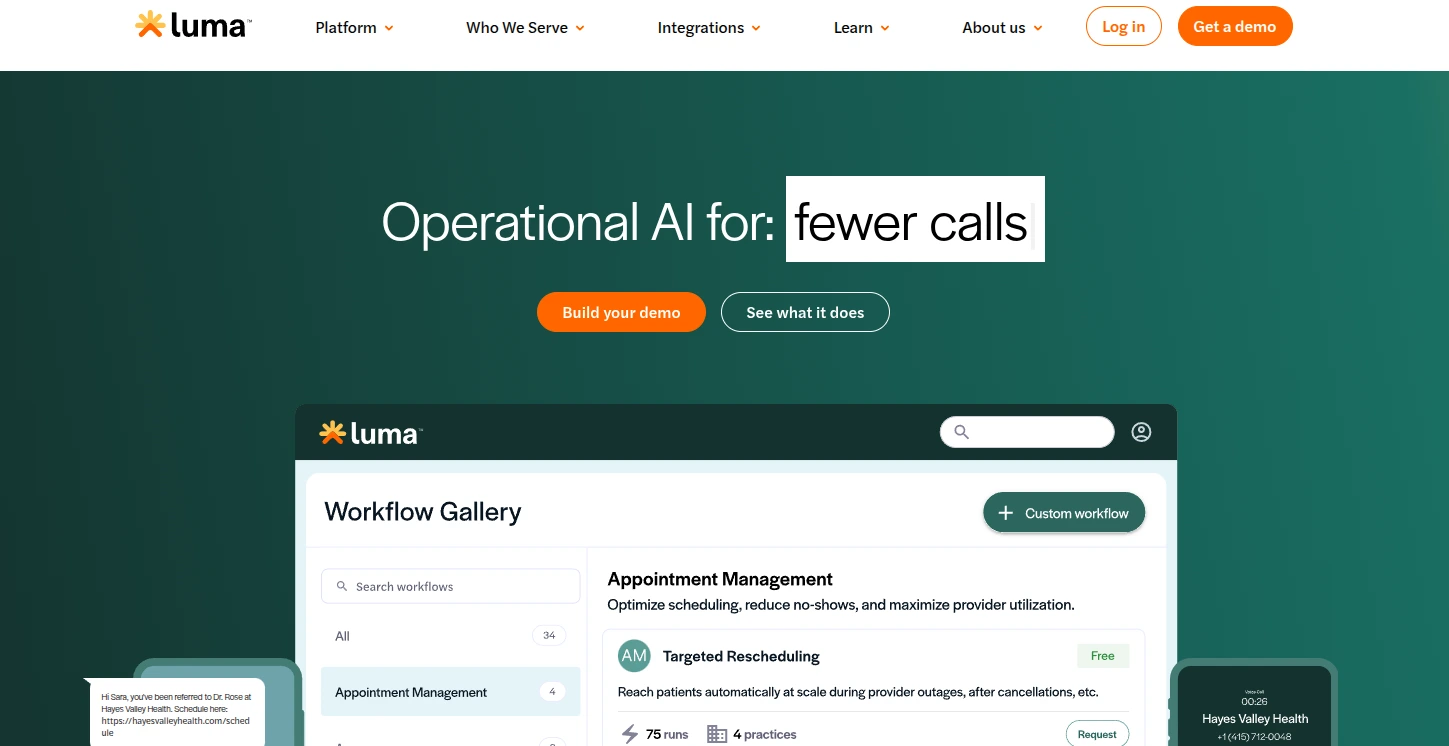
Luma Health packages scheduling work, like reaching patients during a provider outage, into a named, reusable workflow rather than a manual call list.
Key features
Automated scheduling: Waitlist automation that fills cancelled slots without staff intervention
EHR integration: Real-time two-way sync with the major EMR and EHR platforms
Appointment reminders: Automated reminders by SMS, email, and voice
Online scheduling: Patient-facing booking connected to the EHR calendar
Waitlist automation stands apart: Refilling a cancellation from a waitlist without staff calls is a meaningful operational win for high-volume practices.
Strong EHR connectivity: Reviewers consistently name integration depth with the major EMR platforms as the standout.
Multi-channel reminders: SMS, email, and voice let practices reach patients on the channel they answer.
Where Luma Health falls short
No VoIP phone system: Luma Health has no cloud phone, so it does not replace Weave’s phone features.
Pricing not transparent: Without published prices, upfront cost comparison is difficult.
EHR-dependent value: The most powerful features need a compatible EHR, so practices on unsupported systems see much less benefit.
What reviewers say
Luma Health holds a 4.6/5 on Capterra and a 4.5/5 on G2. Reviewers highlight scheduling automation and EHR integration as the standout features. Pricing and integration setup complexity draw the most criticism.
Pricing
All plans
Quoted by EHR system, patient volume and features
Contact for pricing
Luma Health has no pricing page on its site, so every plan is customized and quoted. Ask for the integration fee separately, because it is often priced apart from the subscription.
7. NexHealth, best for dental and medical EHR sync
Rating4.6/5★★★★★Closest match to Weave
The bottom line
NexHealth copies Weave's integration-first design and extends it into scheduling and forms, minus the phones.
Who it’s for
Dental practices on Dentrix, Eaglesoft or Open Dental
Medical practices on a supported EMR
Practices wanting booking, reminders and forms in one layer
PricingContact for pricingquoted by EHR and feature set
Patients book and the appointment lands in the EHR
Purpose-built for the dental workflow
What doesn’t
No VoIP phone system
Not positioned as a budget option
Value depends on your EHR being supported
NexHealth is a patient experience platform built for dental and medical practices, with real-time EHR integration as its centerpiece. It connects straight into practice management software and uses that data to power online scheduling, automated reminders, digital forms, and patient messaging.
Of the 10 platforms here, NexHealth is the closest architectural match to Weave, and it reaches further into scheduling and forms.
Dental practices weighing NexHealth against the system they already run will find more of the field in our guide to dental practice software.
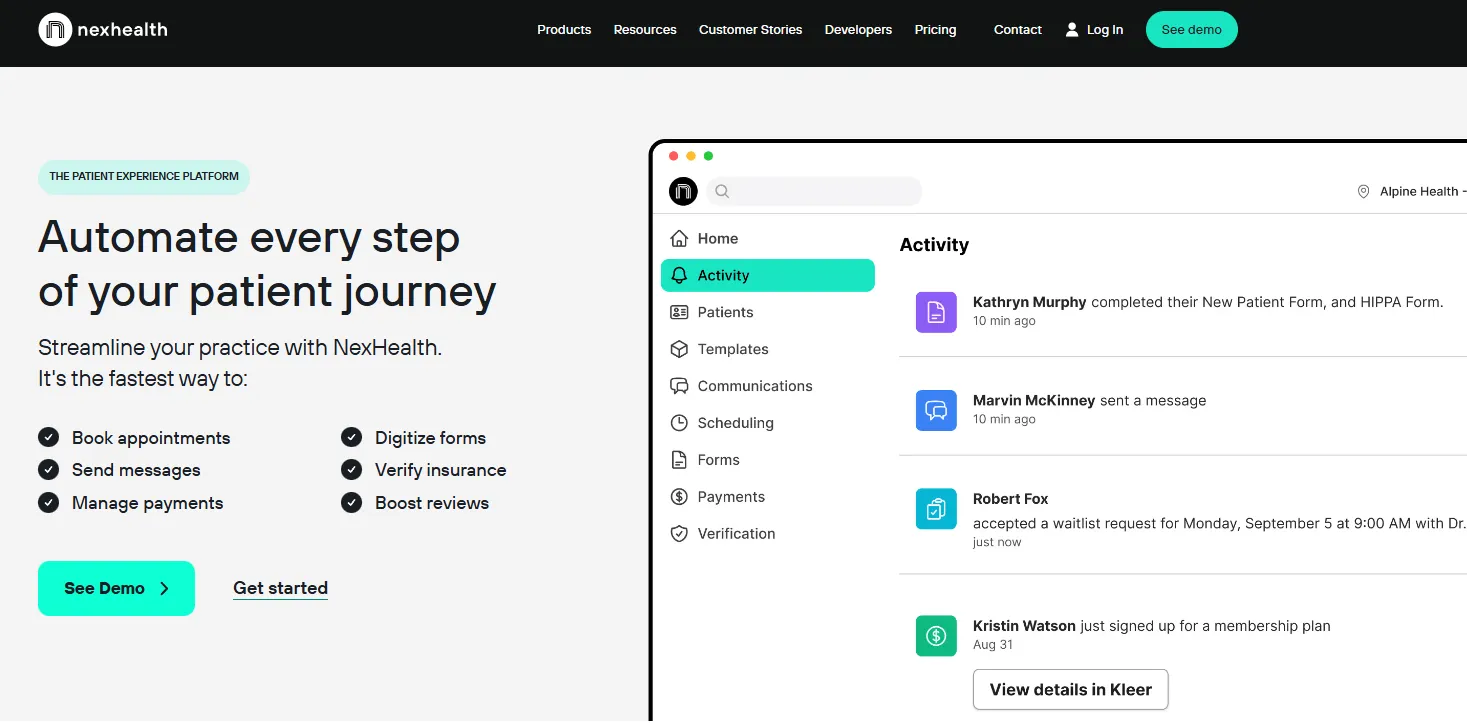
NexHealth’s activity feed is built around the EHR sync: every form, message, and booking shown here writes straight back to the patient record.
Key features
Real-time EHR sync: Two-way data sync with the major dental and medical practice management systems
Online scheduling: Patient-facing booking that writes appointments straight into the EHR
Automated reminders: Appointment confirmations, reminders, and recall messaging
Digital forms: Intake and consent forms completed online, with data returned to the patient record
Two-way texting: HIPAA-compliant patient messaging with a team inbox
Where NexHealth shines
Deep dental integration: NexHealth writes back in real time to Dentrix, Eaglesoft, Open Dental, and other major dental systems. This is the feature set closest to what Weave gives dental offices.
Booking that reaches the chart: A patient books online and the appointment appears in the clinical system with no staff step in between.
Strong for dental practices: NexHealth is purpose-built for the dental workflow in a way general-purpose communication platforms are not.
Where NexHealth falls short
Higher price point: NexHealth is not a budget alternative, so practices led by cost may struggle with the quote.
Integration-dependent: Like Weave, its value tracks the quality of your EHR integration. Practices on unsupported systems get less from it.
No VoIP phone system: NexHealth does not include a cloud phone.
What reviewers say
NexHealth holds a 4.6/5 on Capterra and a 4.5/5 on G2. Positive reviews consistently highlight EHR integration quality and scheduling automation. Critical reviews focus on setup complexity and pricing against smaller practice budgets.
Pricing
All plans
Quoted by EHR system and feature set
Contact for pricing
NexHealth’s pricing page asks for your EHR before it will quote, which tells you how much the integration drives the price. Name your exact system and version when you ask.
8. Podium, best for reviews and text-to-pay
Rating4.3/5★★★★★Our pick for collections
The bottom line
Podium turns an outstanding balance into a text link, which is the fastest way to get it paid.
Who it’s for
Multi-location practices competing on Google reviews
Practices carrying outstanding patient balances
Teams wanting webchat and SMS in one inbox
PricingContact for pricingquoted by features and locations
Review request workflows among the strongest in the market
Text-to-pay with no patient portal login
One inbox for SMS, webchat and review replies
What doesn’t
Generic business workflows, not clinical ones
HIPAA compliance depends on plan configuration
No scheduling, VoIP or clinical records
Podium is a customer communication platform serving many sectors, with healthcare as one of them. Two capabilities stand out: online review generation and payment collection by text.
Both are more developed here than in most healthcare-specific platforms. If your priorities are Google review count and getting balances paid, Podium’s feature set lines up well.
Key features
Review management: Automated review requests and monitoring across Google and the major platforms
Text-to-pay: Payment collection by SMS link, with no patient portal login required
Two-way texting: Patient-to-staff messaging through a unified inbox
Website chat: Live chat widget wired into the Podium messaging inbox
Bulk messaging: Broadcast messages to patient segments
Where Podium shines
Review generation at volume: Podium’s review request workflows rank among the most effective available. Practices competing hard on Google reviews see results.
Text-to-pay works: Collecting a balance through a text link removes most of the friction from collections.
One inbox across channels: SMS, webchat, and review responses in a single place means staff stop switching between tools.
Where Podium falls short
Not healthcare-specific: Podium applies generic business workflows to healthcare rather than native clinical ones. HIPAA compliance needs specific plan configurations.
Cost: Podium sits at the expensive end relative to healthcare-specific alternatives with equivalent communication tools.
No scheduling, VoIP, or clinical features: Podium covers communication and payments only.
What reviewers say
Podium holds a 4.3/5 on Capterra and a 4.5/5 on G2. Review generation quality is the standout positive. Trustpilot ratings are lower, at 3.8/5, with complaints focused on contract terms and support responsiveness.
Pricing
All plans
Quoted by feature set and location count
Contact for pricing
Podium publishes no plan prices on its own site and directs buyers to sales. Ask for usage charges in writing, since messaging and payment fees sit outside the subscription.
9. RingCentral, best for replacing Weave’s phone system
Rating4.3/5★★★★★Our pick for VoIP
The bottom line
RingCentral is the only option here with a phone system, which is the one thing Weave is known for.
Who it’s for
Practices whose main Weave use was the phone system
Multi-location groups centralizing phone infrastructure
Teams comfortable running separate patient communication tools
RingCentral is an enterprise cloud communications platform covering VoIP phone systems, video conferencing, and team messaging.
For a practice that specifically wants Weave’s phone system replaced, this is the direct equivalent. It also offers HIPAA-compliant plans for healthcare, which any phone system handling patient calls needs.
Key features
Cloud VoIP: Business phone system with unlimited domestic calling, call routing, and an auto-attendant
Video conferencing: Meeting platform for telehealth or internal team calls
Team messaging: Internal staff communication channels
SMS capabilities: Business SMS for patient outreach
HIPAA-compliant plans: Healthcare configuration with a BAA available on qualifying plans
Where RingCentral shines
Enterprise-grade reliability: RingCentral is the most mature VoIP platform on this list, with better call quality and uptime than practice-focused communication tools.
Scalability: Multi-location practices and healthcare groups can put their whole phone estate under one account.
BAA available: Practices can execute a Business Associate Agreement, which makes RingCentral compliant for calls involving patient health information. Per HHS HIPAA Security Rule guidance, any platform handling that data needs an executed BAA in place.
Where RingCentral falls short
Not a patient communication platform: There are no appointment reminders, no patient-facing booking, no review management, and no clinical context on incoming calls. It is a phone system.
No healthcare-specific workflows: RingCentral is built for general business use, so clinical workflow integration does not exist.
Needs additional tools: Practices choosing RingCentral for VoIP will still buy separate reminder, scheduling, and review tools.
What reviewers say
RingCentral holds a 4.3/5 on Capterra and a 4.0/5 on G2. Positive reviews consistently highlight call quality and reliability. Healthcare reviewers note that it works well as a phone system but needs additional tools to match Weave’s patient communication features.
Pricing
Plan
Price
What it covers
Core
$20/user/month
Unlimited domestic calling, call recording, 25 SMS per user
Advanced
$25/user/month
Adds CRM integrations, multiple sites, 100 SMS per user
Ultra
$35/user/month
Adds deeper business insights for larger deployments
Those are the annual-billing rates for one to five users, and monthly billing runs $30, $35, and $45. HIPAA compliance is not automatic, so request the BAA on a qualifying plan.
10. Solutionreach, best for recall campaigns at volume
Rating3.9/5★★★★★Our pick for recalls
The bottom line
Solutionreach chases overdue patients better than it presents itself, and the contract deserves a careful read.
Who it’s for
Larger established dental, vision or medical practices
Practices with a big overdue recall list
Teams keeping their existing EMR
PricingContact for pricingquote requested on their site
Solutionreach is one of the longest-established patient communication platforms in the market, serving dental, vision, and medical practices.
Appointment reminder automation and two-way texting are the core, with newsletter and recall campaign tools for retention. The platform is mature and proven. Its interface has drawn criticism for looking dated next to newer competitors.
Key features
Appointment reminders: Automated reminders by SMS, email, and voice
Two-way texting: Patient-to-staff messaging with conversation history
Recall campaigns: Automated outreach to patients due for recall or follow-up
Newsletter tools: Patient newsletters and educational campaign delivery
Reputation management: Review request workflows and monitoring
Where Solutionreach shines
Recall campaign automation: Chasing overdue recalls sets Solutionreach apart from platforms that only manage appointments already booked.
Proven track record: Two decades in market means the core reminder and texting features are reliable and well tested.
Good for larger practices: Reviewers consistently note that Solutionreach holds up at higher patient volumes.
Where Solutionreach falls short
Dated interface: Multiple reviewer cohorts put the user interface behind modern competitors, which makes staff adoption harder.
Difficult contracts: Reviewers consistently cite trouble canceling or changing contracts. Validate the exit terms before committing.
Support complaints: Response times and issue resolution are the most common negative themes in Solutionreach reviews.
What reviewers say
Solutionreach holds a 3.9/5 on Capterra and a 4.0/5 on G2, the lowest ratings among the communication-focused platforms in this comparison. Positive reviews focus on reminder reliability. Negative reviews consistently flag the dated interface and contract difficulties.
Pricing
All packages
Quoted by package, requested through their site
Contact for pricing
Solutionreach lists packages but no prices, and every route ends in a quote request. Given the contract complaints, ask for the term length and the notice period in the same conversation.
Where each platform covers your stack, feature by feature
The matrix below compresses the reviews into one screen. Feature availability comes from each platform’s own product pages. Check it with the vendor before you sign, because plan tiers move.
Counted up, the pattern is stark. No single alternative both matches Weave’s phone system and replaces the practice management software underneath it.
Counting full support only, no alternative covers both the phone system and the clinical record. Figures from each vendor’s product pages.
Platform
VoIP
Two-way SMS
Reminders
HIPAA
Reviews
Clinical records
Billing
Pabau
❌
✅
✅
✅
✅
✅
✅
Birdeye
❌
✅
⚠️ Via integrations
⚠️ Plan-dependent
✅
❌
❌
Curogram
❌
✅
✅
✅
❌
❌
❌
Doctible
❌
✅
✅
✅
✅
❌
❌
Klara
❌
✅
✅
✅
⚠️ Basic only
❌
❌
Luma Health
❌
✅
✅
✅
⚠️ Via integrations
❌
❌
NexHealth
❌
✅
✅
✅
✅
❌
❌
Podium
❌
✅
⚠️ Limited
⚠️ Plan-dependent
✅
❌
⚠️ Payments only
RingCentral
✅
⚠️ Business SMS
❌
⚠️ Plan + BAA required
❌
❌
❌
Solutionreach
❌
✅
✅
✅
✅
❌
❌
How to choose the right Weave alternative for your practice
The right choice depends less on which platform has the most features and more on which part of your setup you want to fix.
One question sorts most practices. Do you want to replace Weave’s communication layer with something better, or cut the number of systems you run?
Define what you use Weave for. If it is the VoIP phone system with caller-ID integration, RingCentral is the most direct replacement. Practices using it mainly for reminders and two-way texting have plenty of options here. For online reviews, Birdeye and Doctible are strongest.
Decide whether to consolidate or add a layer. Practices that want the dual subscription gone should evaluate Pabau, which replaces both. If you are happy with your EMR and upgrading only the communication layer, look at Curogram, Klara, NexHealth, or Luma Health.
Check EHR compatibility first. For the integration-dependent platforms, meaning NexHealth, Luma Health, and Solutionreach, confirm your specific EMR is on their supported list. An unsupported EHR strips out most of the value.
Verify HIPAA compliance properly. Every platform here claims some level of compliance, and the specifics matter. A BAA must be executed with each vendor before any patient health information moves through the system. Confirm that compliant features are included in the tier you are quoted.
Compare total cost of ownership, not the subscription fee. Add up your current subscriptions for the EMR, scheduling, billing, communication, and reviews. Weave does not publish prices, so you will need your own invoice to make that comparison honest.
Pro Tip
Before you book any demo, export your appointment data and patient communication history from Weave. Then ask each vendor specifically about data migration support. Platforms with strong onboarding teams will help you import it. Those without a clear migration path will leave your historical patient communication records behind.
What trips practices up when they leave Weave
Choosing the platform is the easy half. The switch itself is where practices lose weeks. Most of that comes down to two assets they do not fully control. One is the phone number. The other is the message history.
Work through this before you sign anything:
Read your notice period. Annual terms are common in this category, and the cancellation window often closes well before the renewal date. Find yours before you shortlist.
Start the number port early. You own your phone number, not your vendor. A port needs a signed letter of authorization, and it can take days or several weeks. Keep the old service live until it completes.
Export the message history. Two-way SMS threads are patient communication records. Pull them out before the account closes, because a closed account is usually unrecoverable.
Check the handsets. Desk phones provisioned to one VoIP provider often will not register with another. Ask whether yours can be reconfigured or need replacing.
Get the migration plan in writing. Confirm who imports the appointment data, who tests the EHR connection, and what happens if the sync fails on day one.
Three mistakes show up again and again:
Canceling Weave before the port completes, which drops inbound calls for days.
Assuming a platform supports your EMR because it supports your specialty. Ask for your exact system by name and version.
Buying on the demo. Ask to see the front-desk view with 40 appointments on the calendar, not an empty sandbox.
How Pabau replaces Weave and the system underneath it
A practice running Weave today works across two screens. Appointment changes and clinical notes happen in the practice management system. Confirmations, reminders, and patient texts happen in Weave. A reschedule that should trigger a fresh reminder needs both, so it depends on the integration between them holding up.
Pabau removes that seam. The reminder fires from the same booking record the front desk just edited. Treatment notes attach to the same patient who got the text. The invoice comes off the same appointment.
There is no sync to monitor, because there are not two systems to sync. Review requests, digital consent forms, and reporting sit in the same place.
The trade-off is worth stating plainly. Pabau does not include a phone system. If Weave’s caller-ID screen is the reason your front desk moves quickly, you will want a VoIP provider alongside it.
Replace Weave and your practice management system
See a live walkthrough of scheduling, clinical records, patient messaging, and billing in one platform. One system, one subscription, and every feature included.
Weave solved one problem well. Connecting the phone to the patient record made the front desk faster, and for dental offices on compatible software it still does. What has changed is the price of that convenience. A communication layer now means a second subscription that nobody outside the front desk touches.
So decide what you are buying before you sit through a demo. Want the phone line back? RingCentral gets you closest. If the integration-first design matters more than the phones, NexHealth does that. And if the two-bill arrangement is what you want gone, only a consolidating platform gets you there. Treat that one as a migration rather than a swap.
For that last route, Pabau covers scheduling, records, reminders, messaging, billing, and reviews on one subscription. Book a demo to walk through your current setup with the team before you commit.
Continue your research
Replacing the clinical system too?DrChrono alternatives compares the platforms medical practices move to when the EMR goes as well.
Frequently asked questions about Weave alternatives
Which Weave alternative is best for dental practices?
NexHealth, because it writes back to Dentrix, Eaglesoft, and Open Dental in real time. Doctible is the cheaper option for dental practices that only need reminders and review requests. Pabau serves medical aesthetics, dermatology, cosmetic surgery, weight loss, and wellness practices rather than dental ones.
How does Weave compare to Solutionreach?
Weave differentiates on its VoIP phone system, Solutionreach on recall campaigns and newsletters. Both handle reminders and two-way texting. Weave rates higher with users, at 4.4/5 against 3.9/5 on Capterra, and Solutionreach reviewers more often cite contract difficulties and a dated interface.
How long does switching from Weave usually take?
The phone number port and the EHR connection set the pace, not the software setup. Configuring a new platform takes days. A number port and a clinical data sync can take weeks. Run the old service in parallel until both are confirmed working.
Is there a free Weave alternative?
No, not one a healthcare practice can safely use for patient communication. HIPAA compliance needs a signed BAA, encrypted storage, and audit logs. Free general-purpose texting apps will not sign a BAA, which rules them out for protected health information.
Can a Weave alternative work without EHR integration?
Yes. Curogram, Klara, and Podium run as standalone messaging tools, so your EMR stays untouched. The cost is manual work, because appointments do not sync and staff re-upload patient lists. NexHealth and Luma Health lose most of their value without the integration.