Medical practice billing software automates claims, verifies eligibility, and runs the revenue cycle from appointment to payment.
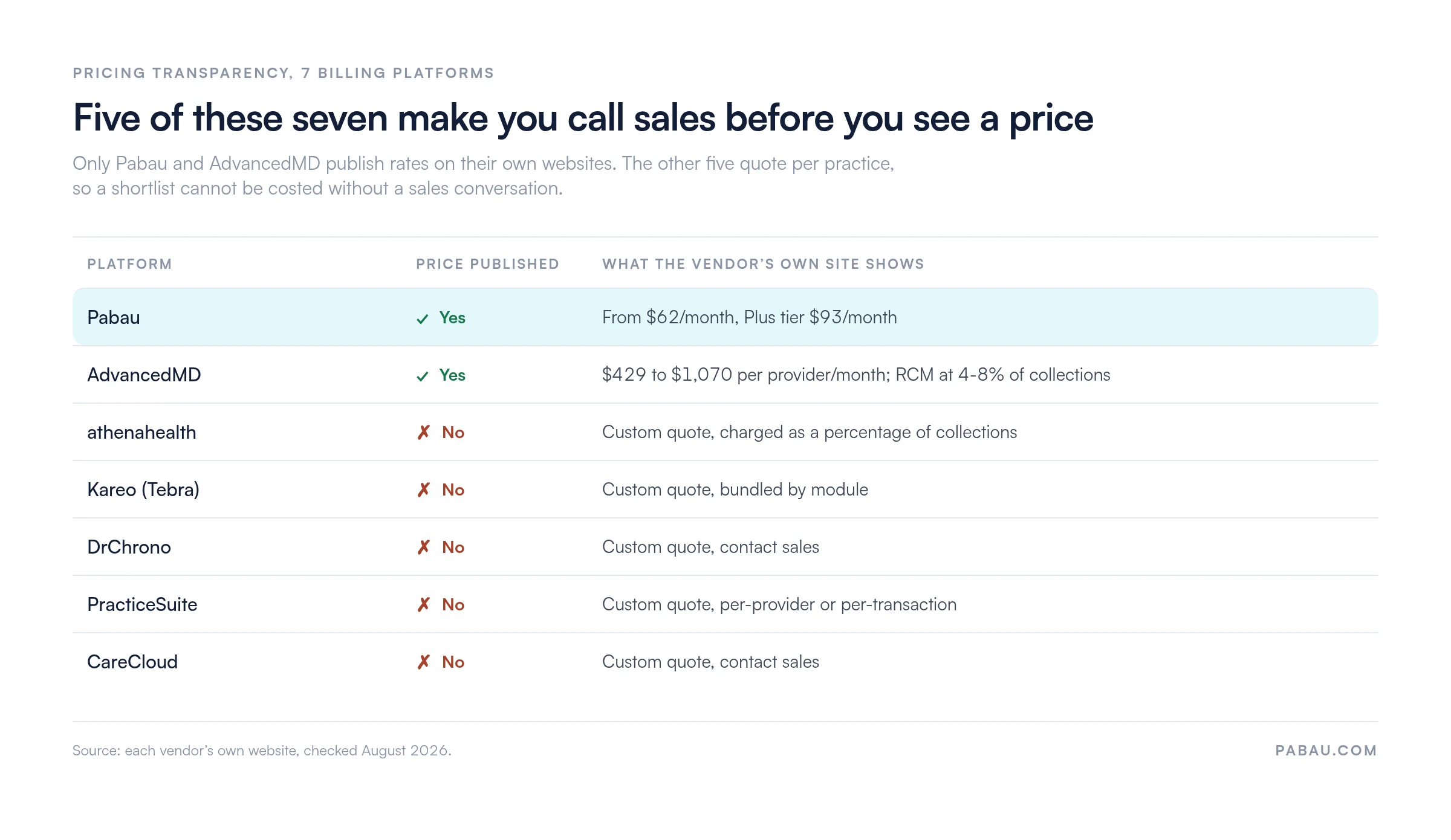
Only two of these seven vendors publish a price, so most shortlists cannot be costed without a sales call.
Percentage-of-collections pricing rises with revenue, which usually beats a flat subscription only at high claim volume.
Pabau combines billing, scheduling, and clinical notes from $104/month, rated 4.7/5 on Capterra by 600+ reviewers.
Medical practice billing software automates the path from a patient visit to a collected payment. This guide reviews seven platforms on the two things that decide the purchase. How much billing work does the software take off your staff, and can you find out what it costs without a sales call?
Pabau, our all-in-one practice management system, ranks first with the highest Capterra rating of the seven at 4.7/5. It suits aesthetic, wellness, and multi-specialty clinics where billing sits inside the clinical workflow.
Athenahealth ranks second for high-volume practices that want a managed billing team working denial queues alongside the automation. The table below gives you the shortlist before the full reviews.
Found our content helpful?
Medical practice billing software compared: Quick reference
Billing leaks are common enough that the Medical Group Management Association (MGMA) polls its members on where practices find them. The platforms below cover the full spectrum, from solo-practice tools to enterprise revenue cycle services.
Name
Best for
Standout feature
Starting price
Rating
Pabau
Aesthetic, wellness, and multi-specialty clinics
Booking, billing, and clinical notes in one platform
Built-in clearinghouse with a straightforward claims queue
Contact sales, no published pricing
4.0/5 (1,200)
AdvancedMD
Multi-specialty groups needing deep billing configuration
Reporting depth across AR aging and payer performance
From $429 per provider/month
3.6/5 (460)
DrChrono
iPad-based practices wanting EHR-native billing
CPT auto-population from clinical documentation
Contact sales, no published pricing
3.9/5 (480)
PracticeSuite
Billing companies and central billing offices
Claim scrubbing with built-in clearinghouse and ERA processing
Contact sales, no published pricing
4.0/5 (180)
CareCloud
Small-to-mid practices wanting a clean dashboard
Analytics-forward billing with practice performance dashboards
Contact sales, no published pricing
3.6/5 (112)
What medical practice billing software actually does
Medical practice billing software automates the financial workflow that sits between a patient visit and a deposited payment. Most practices lose revenue to slow submission timelines, unresolved denials, and eligibility problems caught too late. That sequence is what healthcare revenue cycle management covers end to end.
At its core, the software handles five connected tasks. Eligibility verification before the appointment, claim scrubbing and submission after the visit, denial tracking and resubmission, electronic remittance advice (ERA) posting, and patient statement generation. Charges, payments, and adjustments land on the patient ledger, the running per-patient record of what an account owes.
Platforms vary enormously in how deeply they automate each stage. They also differ on whether billing is a standalone module or part of a broader practice management suite. That distinction matters operationally, because a standalone billing tool requires staff to move data between systems.
A unified platform removes the rekeying risk. Clinical documentation, scheduling, and connected claims management share one database, so nobody types the same patient detail twice.
Claims raised from the treatment record carry the patient, procedure, and insurer details forward, so billing staff never rebuild an invoice by hand.
Key features to look for in medical practice billing software
Not every feature list deserves equal weight. These are the ones that separate platforms that reduce admin from platforms that merely digitize it.
Real-time eligibility verification: Catching a coverage problem before the appointment prevents a write-off. Look for batch eligibility runs 24-48 hours in advance, not only point-of-service checks.
Claim scrubbing with payer-specific rules: Generic scrubbing catches obvious errors. Payer-specific rule engines catch the subtler ones that drive denial rates.
Denial management dashboard: Denials need a workflow, not a log. The best platforms flag denial reason codes, suggest corrections, and track resubmission deadlines.
ERA auto-posting: Manual remittance posting is one of the largest hidden time costs in billing. Automated posting with exception flagging cuts reconciliation from hours to minutes.
Patient payment collection: Online payment portals, payment plans, and automated balance statements improve collection rates without extra staff calls.
Reporting and AR aging: Aging reports, payer performance breakdowns, and denial trending let practice managers intervene before a revenue leak becomes structural.
EHR and scheduling integration: Billing software that shares data with clinical documentation and scheduling eliminates duplicate entry and reduces coding lag.
HIPAA compliance and data security: Every platform in this list claims HIPAA compliance. The differentiators are BAA availability, encryption standards, role-based access, and audit logging.
Top medical practice billing software reviewed
The seven platforms below represent the main categories of medical practice billing software in 2026. Unified clinic platforms, managed billing services, small-practice tools, enterprise suites, EHR-native billers, billing-company tools, and analytics-forward options. Each review covers features, pricing, customer sentiment, and who the platform genuinely fits.
1. Pabau – best medical practice billing software for aesthetic and multi-specialty clinics
Rating4.7/5★★★★★Top pick
The bottom line
Billing that is generated by the treatment record rather than rebuilt from it.
Who it’s for
Aesthetic, wellness and medical spa clinics
Dermatology and IV therapy practices
Multi-location groups needing consolidated reporting
Invoices populate from appointment and treatment data
US claims go to payers through Claim.MD
Every subscription includes every feature
What doesn’t
No managed billing service working denials for you
Setup takes real time to configure properly
Pabau is a unified clinic management platform built for aesthetic, wellness, and multi-specialty practices. Rather than treating billing as a separate module, it connects scheduling, clinical documentation, invoicing, and payment collection in one interface.
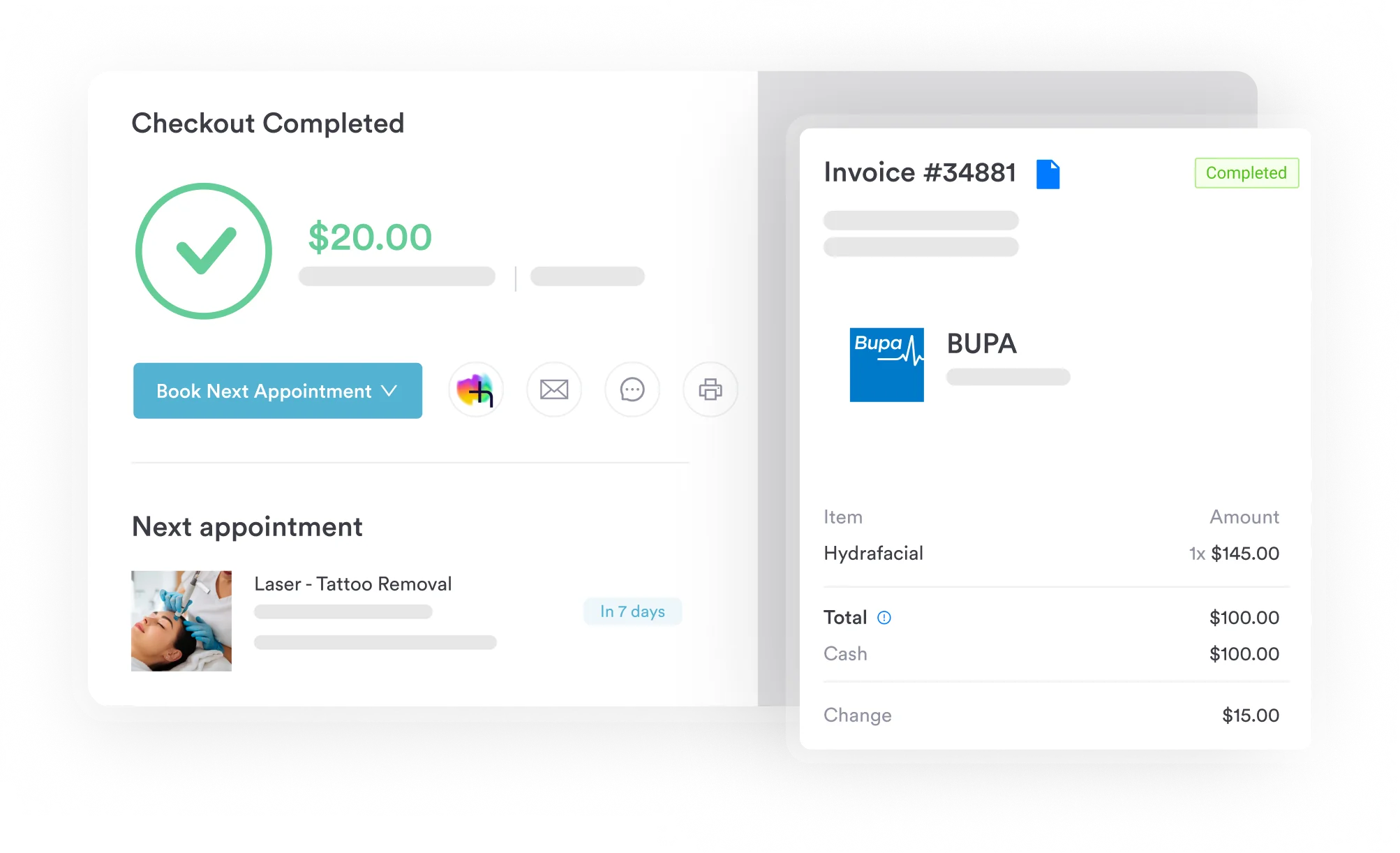
A patient books online, the appointment generates a clinical record, the clinician documents the treatment, and the invoice populates from that session data. No detail gets rekeyed between systems.
The platform supports aesthetic clinics, dermatology practices, medical spas, IV therapy clinics, private GP practices, and multi-location groups. The insurance claims workflow runs inside the main platform, so billing staff never toggle to a legacy interface to send a claim.
Key features
Automated invoicing: Invoices generate from appointment and treatment data without manual entry
Payment processing: Integrated card collection, deposit capture, and Klarna buy-now-pay-later
Insurance claims: Full claims workflow inside Pabau, submitting electronically to US payers
Financial reporting: Revenue by clinician, location, and service category, plus AR snapshots and period comparisons
Automated workflows: Eligibility reminders, payment follow-ups, and recall campaigns that run without staff triggering them
Client record integration: Billing data and clinical notes share one patient record, so a dispute or audit pulls the full picture
Where Pabau shines
No module fragmentation: Booking, treatment, and billing live in one database. Staff avoid re-entry and month-end reconciliation between systems.
Clinic-appropriate reporting: Revenue by clinician and treatment type, rather than payer-mix analysis. That suits owners making staffing and service decisions.
Automation depth: Payment reminders, deposit collection, and recall campaigns run without manual triggers, which cuts billing admin for small teams.
Where Pabau falls short
No managed billing service: US claims reach thousands of payers through the Claim.MD clearinghouse, with real-time eligibility and ERA posting. Pabau does not sell a team to work your denial queue, which athenahealth does.
Initial learning curve: According to Capterra reviewers, setup takes dedicated time, particularly for practices migrating from simpler tools.
Customer reviews
Pabau holds a 4.7/5 on Capterra from 600+ verified reviews, the highest rating in this comparison. Reviewers consistently highlight the appointment-to-invoice workflow. One noted: “The automation features have genuinely reduced our admin time. Everything from booking to billing is connected.” (Capterra, verified review.) The friction point cited most often is the onboarding investment.
Who Pabau is best for
Aesthetic and wellness clinics wanting billing embedded in the clinical workflow
Multi-location practices needing consolidated financial reporting across sites
Clinic owners who want automation to cut billing admin without hiring a billing team
Pricing
Plan
Price
Model
Key inclusions
Essential
From $62 / month
Per location and user
The full platform, every feature included
Plus
From $93 / month
Per location and user
The full platform plus additional Plus capabilities
Pricing scales with locations and users, and every subscription includes every feature. The full breakdown sits on Pabau’s pricing page.
Pro Tip
When evaluating medical practice billing software, run a denial rate comparison before and after implementation. Most vendors quote first-pass clean claim rates from their best-performing clients. Ask for the median across their customer base instead. That figure tells you far more about what your first year on the platform will look like.
2. Athenahealth – best medical practice billing software for high-volume managed billing
Rating3.8/5★★★★★Our pick for managed billing
The bottom line
The only platform here that sells you a billing team as well as billing software.
Payer rule database built across a large client network
CFO-grade reporting on AR and payer performance
What doesn’t
Costs scale with revenue, not with usage
Implementation is slow compared to smaller platforms
Athenahealth’s athenaOne platform sits in a different category from most billing software. It is as much a managed service as a software product. The platform combines EHR, practice management, and billing, but the differentiator is the human billing team behind it.
Those specialists follow up on denials, verify payer rules, and work AR queues alongside the automation. For a general-market practice that wants billing largely handled rather than merely automated, athenaOne is the strongest fit in this comparison.
Key features
Managed denial follow-up: Human billing specialists work denial queues alongside the automation layer
Intelligent claim management: Payer-specific claim rule database built from athenahealth’s large network of practice clients
Real-time eligibility verification: Pre-visit eligibility checks with coverage alerts
Patient payment collection: Online payment portals, automated statements, and payment plan options
Real-time dashboards: Financial reporting with payer mix analysis and denial trend data
Where athenahealth shines
Managed service layer: For practices without internal billing expertise, having athenahealth’s team follow up on denials lifts the knowledge burden off staff.
Payer network breadth: The rule database, built across thousands of client practices, catches payer-specific claim quirks that generic scrubbers miss.
Enterprise reporting depth: Financial reporting covers AR aging, payer performance, and denial trending at a level a CFO can work from.
Where athenahealth falls short
Cost at smaller volumes: Percentage-of-collections pricing means the fee grows with revenue. For a small practice, that can cost far more than a flat subscription.
Implementation complexity: Capterra reviewers frequently cite a long implementation and slower support responsiveness than smaller platforms offer.
Customer reviews
Athenahealth holds a 3.8/5 on Capterra from 912 reviews. Positive themes center on billing capability and payer network strength. The recurring criticism is cost and implementation friction, particularly for practices under 10 providers.
Who athenahealth is best for
High-volume multi-provider practices that want managed billing services alongside software
Groups where internal billing expertise is limited and outsourced denial follow-up adds value
Pricing
Plan
Price
Model
Key inclusions
athenaOne
Contact sales
Percentage of collections
EHR, practice management, billing, and the managed service layer
Add-on services
Contact sales
Quoted per practice
Patient engagement and analytics modules
athenahealth publishes no rates on its own website, so every figure comes from a quote tied to practice size, specialty, and collected revenue.
3. Kareo (Tebra) – best medical practice billing software for independent small practices
Rating4.0/5★★★★★Our pick for solo practices
The bottom line
The most approachable claims workflow here for a front desk that also handles billing.
Who it’s for
Solo and small-group practices with 1-5 providers
Teams billing in house without a specialist
Practices wanting clearinghouse access bundled
Primary care independents
PricingContact salescustom quote, bundled by module
Feature depth thins out for larger group practices
Post-rebrand support complaints are consistent
Kareo, now rebranded as Tebra after its 2021 merger with PatientPop, has long been the go-to billing platform for small independent practices. The platform bundles EHR, practice management, patient engagement, and billing into a modular suite.
Its built-in clearinghouse connectivity and straightforward claims workflow demand less specialist knowledge than enterprise alternatives. That makes it workable in practices where the front desk handles billing alongside other duties.
Key features
Built-in clearinghouse: Claims submit through Tebra’s integrated clearinghouse without a separate vendor contract
Claims workflow: Claim creation, scrubbing, and submission from a single queue
Patient billing: Online payment portal, automated statements, and balance notifications
EHR integration: Billing data flows from clinical documentation without rekeying
Patient engagement tools: Appointment reminders and post-visit follow-ups that support collections
Where Kareo (Tebra) shines
Small-practice fit: The workflow is designed for practices where billing is one of several admin responsibilities, not a specialist function.
Clearinghouse included: No separate clearinghouse contract and no third-party per-claim fees reduces total cost of ownership.
Where Kareo (Tebra) falls short
Post-rebrand support disruption: The Kareo-to-Tebra transition generated consistent complaints about support responsiveness and feature continuity, per Capterra reviewers.
Limited scalability: Feature depth for larger group practices is thin, and add-on pricing escalates as the practice grows.
Customer reviews
Kareo (Tebra) holds a 4.0/5 on Capterra from 1,200 reviews, the largest review set in this comparison. Practitioners consistently describe it as workable for practices without dedicated billing staff. The post-rebrand period has introduced more support friction than the platform’s earlier reputation would suggest.
Who Kareo (Tebra) is best for
Solo and small-group practices with one to five providers handling billing internally
Practices that want clearinghouse access bundled rather than contracted separately
Pricing
Plan
Price
Model
Key inclusions
Tebra bundle
Contact sales
Custom quote
EHR, practice management, billing, and patient engagement
Billing only
Contact sales
Custom quote
Claims workflow and clearinghouse access
Tebra publishes no fixed rates on its website. Pricing is quoted per practice and depends on which modules you bundle together.
4. AdvancedMD – best medical practice billing software for multi-specialty groups
Rating3.6/5★★★★★Our pick for large groups
The bottom line
The deepest reporting in this comparison, and the steepest configuration to get there.
Who it’s for
Multi-specialty groups with 10+ providers
Practices with complex payer mixes
Teams with a dedicated billing department
Finance leads negotiating payer contracts
PricingFrom $429 per provider/monthmedical specialties, published rate
Claim scrubbing with payer-specific rule configuration
AR aging, denial trending and payer mix analytics
Published per-provider rates you can budget against
What doesn’t
Expensive and training-heavy for small practices
Customer service consistency is a recurring complaint
AdvancedMD targets mid-to-large practices and multi-specialty groups that need enterprise-grade revenue cycle tools. The platform offers deep configuration, including payer-specific claim rules and customizable billing workflows.
Its reporting suite goes well past basic AR aging into denial trending, payer performance, and provider productivity analysis. That power comes with a learning curve, and with the highest published per-provider price in this comparison.
Key features
Advanced claim scrubbing: 100+ point claim scrubbing with payer-specific rule configuration
Billing analytics: AR aging, denial trending, payer mix analysis, and provider productivity reports
Revenue cycle management: Full coverage from eligibility through to ERA posting
EHR integration: Native EHR-billing connection with CPT and ICD-10 auto-population from clinical notes
Reporting suite: Custom report builder with scheduled delivery to practice administrators
Where AdvancedMD shines
Reporting depth: The analytics suite is the most comprehensive here. It gives finance leads the payer-level data they need to negotiate contracts and spot denial patterns.
Multi-specialty configuration: Specialty-specific billing rules and templates cut setup time for groups covering several clinical disciplines.
Published rates: AdvancedMD is one of only two platforms here that lists prices publicly, which makes budgeting possible before a sales call.
Where AdvancedMD falls short
Cost and complexity: The platform is expensive and requires significant staff training. Customer service inconsistency is a recurring theme in reviews.
Not suited to small practices: The configuration depth that helps multi-specialty groups becomes a burden for a two-provider practice.
Customer reviews
AdvancedMD holds a 3.6/5 on Capterra from 460 reviews. Reviewers from larger practices praise the reporting and billing depth. Smaller practices more often cite cost and complexity as misaligned with what they need.
Who AdvancedMD is best for
Multi-specialty groups with 10 or more providers and complex payer mixes
Practices with a dedicated billing team that can exploit the configuration depth
Pricing
Plan
Price
Model
Key inclusions
Medical specialties
$429 – $1,070 / month
Per provider
EHR, practice management, and billing
MedSpa edition
From $278 / month
Per provider
Aesthetic and wellness configuration
Managed billing
4 – 8% of collections
Percentage of collections
AdvancedMD works your revenue cycle
AdvancedMD lists these rates on its own website. It also notes that bundling EHR, practice management, and patient engagement discounts the total by up to 40%.
5. DrChrono – best medical practice billing software for iPad-first practices
Rating3.9/5★★★★★Our pick for iPad workflows
The bottom line
Billing codes that come out of the clinical note the clinician just wrote on an iPad.
Billing interface is unintuitive for non-specialists
Custom reporting hits a ceiling quickly
DrChrono is built natively on Apple’s ecosystem. The EHR and billing workflows run on iPad, iPhone, and Mac, which makes it the natural choice for practices committed to tablet-based clinical work.
Billing is EHR-native. CPT and ICD-10 codes auto-populate from clinical documentation, which shortens the lag between what the clinician does and what gets billed. The patient portal handles online payment, cutting the manual collection burden further.
Key features
EHR-native billing: CPT and ICD-10 codes auto-populate from clinical notes, reducing billing lag
Mobile workflow: Full billing and clinical functions on iPad, iPhone, and Mac
Patient portal: Online patient access to records, appointment booking, and payment
HIPAA-compliant documentation: Clinical and billing data managed within a HIPAA-compliant architecture
Claim submission: Integrated claims workflow from clinical documentation to payer submission
Where DrChrono shines
EHR-billing continuity: Practices already on an iPad clinical workflow get billing without a platform switch. Auto-populating procedure codes from notes is a genuine time-saver.
Mobile-first design: Clinicians and billing staff working from iPads get full functionality without a desktop workaround.
Where DrChrono falls short
Billing module complexity: Non-specialist billing staff find the interface less intuitive than platforms designed for general practice administrators.
Reporting limitations: Custom reporting is thinner than enterprise alternatives. Practices needing deep payer-level analysis hit a ceiling quickly.
Customer reviews
DrChrono holds a 3.9/5 on Capterra from 480 reviews. Positive feedback centers on the EHR-billing integration and the mobile experience. Support responsiveness is the most common complaint, particularly on billing issues.
Who DrChrono is best for
Practices already using iPad-based clinical workflows that want billing in the same ecosystem
Smaller practices where clinicians code their own notes directly
Pricing
Plan
Price
Model
Key inclusions
All tiers
Contact sales
Custom quote
EHR, practice management, and billing on Apple devices
DrChrono publishes no pricing on its website, so a quote is the only way to establish what a specific practice would pay.
6. PracticeSuite – best medical practice billing software for billing companies
Rating4.0/5★★★★★Our pick for billing offices
The bottom line
Built for people whose whole job is claims, not for owners who want billing to disappear.
Who it’s for
Central billing offices and billing companies
Teams managing claims for multiple practices
Billing specialists working at volume
Practices with in-house coding expertise
PricingContact salesper-provider or per-transaction quote
Claim scrubbing accuracy is a consistent review theme
ERA posting with exception management
What doesn’t
Interface feels dated next to newer platforms
Onboarding needs dedicated setup and training time
PracticeSuite is one of the few platforms here designed to serve both individual practices and central billing offices that manage billing for multiple providers.
Its claim scrubbing engine, integrated clearinghouse, and ERA processing are built for billing specialists who need high claim throughput. They are not built for practice owners who want billing to fade into the background.
Key features
Claim scrubbing: Built-in scrubbing engine with clearinghouse connectivity
ERA processing: Automated remittance posting with exception management
Patient statements: Automated statement generation and a collections workflow
Reporting and analytics: Financial reporting across AR aging, denial rates, and payer performance
Multi-practice support: Billing across multiple provider accounts from a single login
Where PracticeSuite shines
Billing company architecture: Managing multiple provider accounts from one login is rare here. Most platforms are single-practice only.
Claim scrubbing accuracy: Capterra reviewers consistently cite accurate claim scrubbing as a standout strength.
Where PracticeSuite falls short
Dated interface: The UI feels older than newer platforms. That is a daily friction point for staff who live in the system.
Onboarding investment: Getting full value takes dedicated setup time and staff training.
Customer reviews
PracticeSuite holds a 4.0/5 on Capterra from 180 reviews, level with Tebra and second only to Pabau here. Reviewers highlight billing feature depth and claim scrubbing accuracy. The most common criticism is the dated interface and onboarding complexity.
Who PracticeSuite is best for
Central billing offices and billing companies managing claims for multiple practices
Practices with in-house coding expertise that can use the scrubbing depth
Pricing
Plan
Price
Model
Key inclusions
Custom package
Contact sales
Per provider or per transaction
Modules selected to match the practice
PracticeSuite publishes no rates and no free tier on its website. It builds a modular package per practice and quotes on either a per-provider or per-transaction basis.
7. CareCloud – best medical practice billing software for a clean dashboard
Rating3.6/5★★★★★Our pick for non-specialist teams
The bottom line
The easiest dashboard here to hand to someone who does not bill for a living.
Financial reporting presented visually, not as raw tables
Claims, scrubbing and denial tracking in one flow
What doesn’t
No public pricing makes early budgeting hard
Thinner payer configuration than enterprise rivals
CareCloud positions itself as a modern, analytics-forward billing and practice management platform for small-to-mid practices. Its interface is consistently praised as one of the cleaner dashboards in the category.
That lowers the training barrier for practices without a dedicated billing specialist. The analytics cover practice performance dashboards, financial reporting, and billing trend analysis, though without the depth AdvancedMD offers.
Key features
Practice performance dashboards: Revenue and billing performance metrics in a clean visual interface
Claims management: Claims submission, scrubbing, and denial tracking in one workflow
Analytics suite: Financial reporting with payer performance and practice productivity data
Patient engagement: Appointment reminders, patient portal, and balance notifications
EHR integration: Billing connects to clinical documentation through CareCloud’s own EHR
Where CareCloud shines
Clean dashboard: The interface is one of the more intuitive here, which helps practices where billing is handled by non-specialists.
Accessible analytics: Financial reporting is presented visually rather than as raw data tables, which suits owners reviewing performance themselves.
Where CareCloud falls short
Pricing transparency: Quote-based pricing without public rates makes budget planning difficult during evaluation.
Thinner enterprise features: Practices needing deep payer configuration or managed billing services will find AdvancedMD and athenahealth stronger.
Customer reviews
CareCloud holds a 3.6/5 on Capterra from 112 reviews. Reviewers from small and mid-sized practices highlight the dashboard and the accessible analytics. Implementation support quality and pricing transparency are the recurring criticisms.
Who CareCloud is best for
Small-to-mid practices with one to eight providers wanting a clean billing dashboard
Practice owners who review financial performance themselves rather than delegating it
Pricing
Plan
Price
Model
Key inclusions
All plans
Contact sales
Custom quote
EHR, practice management, billing, and analytics
CareCloud does not list rates publicly, so pricing is established through a sales conversation tied to practice size and module selection.
HIPAA compliance in medical practice billing software: What to look for
Every platform in this comparison claims HIPAA compliance, and that claim covers a wide spectrum. The HHS HIPAA Security Rule (45 CFR Part 164) sets the floor.
That floor covers encryption of protected health information (PHI) in transit and at rest, access controls, audit logging, and breach notification procedures. The rule does not mandate specific technologies. It does require documented controls and a signed Business Associate Agreement (BAA) with any vendor handling PHI.
When evaluating any medical practice billing software for HIPAA purposes, ask for four specific things:
BAA in writing: The vendor signs a Business Associate Agreement before you transmit any patient billing data. This is a legal requirement, not a courtesy.
Encryption standards: TLS 1.2 or higher in transit, AES-256 at rest. These are the NIST-referenced standards HHS guidance points to.
Role-based access controls: Billing staff should not reach clinical records they do not need. Check whether permissions can be set granularly by user role.
Audit logging: The platform logs every PHI access, naming which user opened which record and when. This matters for breach investigation and compliance audits alike.
All seven platforms state HIPAA compliance on their product and compliance pages, and BAA availability is standard at this tier. The differentiators are encryption depth, audit log granularity, and how fast the vendor produces documentation when a practice faces an OCR audit.
Medical practice billing software for small practices: What matters most
Small practices face different billing priorities than large groups. What matters is cost predictability, ease of use for non-specialist staff, and how much admin the software removes relative to its complexity.
Percentage-of-collections pricing, used by athenahealth and offered by AdvancedMD, scales with revenue. A practice billing $100,000 per month at a 4% rate pays $4,000 per month in software fees. That is substantially more than a flat subscription at the same volume.
Pricing model
How it works
Best suited for
Watch out for
Flat subscription
Fixed monthly fee per location or provider, whatever the claim volume
Small-to-mid practices with predictable patient volume
Per-module add-ons that inflate the base price
Percentage of collections
Fee is a share of monthly collected revenue, typically 4-8%
High-volume practices where the service layer justifies the cost
Costs grow with revenue and can overtake a flat subscription fast
Quote-based
Negotiated rate based on practice size, specialty, and modules
Groups with requirements no standard package covers
Impossible to budget without a sales conversation first
Per transaction
Fee charged per claim or per processed transaction
Billing offices with variable monthly claim volume
A busy month costs more than a flat plan would have
Cost predictability runs into a practical wall during evaluation, because most of these vendors will not tell you a number. Only two of the seven publish rates on their own websites.
Budgeting a shortlist means five sales calls before you can compare a single number, based on each vendor’s own website in August 2026.
Cloud deployment is standard across all seven platforms, which removes the IT overhead of on-premise billing software. That matters most for small practices with no IT function, because updates, backups, and security patches become the vendor’s job.
How to choose the right medical practice billing software
The right platform depends on four variables. Practice size, billing model, internal billing expertise, and how tightly billing needs to connect to clinical work. Here is how to apply them.
Define your billing model first. Is billing handled by a front-desk generalist, a dedicated specialist, or an outside billing office? Generalist staff need simpler interfaces, which points to Pabau, Tebra, or CareCloud. Specialists can exploit the depth of AdvancedMD or PracticeSuite.
Clarify your integration requirements. If your practice already runs an EHR, the billing software has to integrate cleanly with it. Native integration removes data transfer risk. Third-party integration by API or HL7 adds a dependency that breaks when either system updates.
Assess your denial rate. If your first-pass clean claim rate sits below 90%, a platform with strong scrubbing and structured denial management pays back faster than a simpler tool. Per the AMA’s reporting on denials, payer denial rates have been climbing.
Model total cost of ownership, not the headline price. A cheap plan that needs two full-time staff to run costs more than a pricier automated platform at 20 providers. Include staff time for denial follow-up, ERA posting, and statement generation.
Check the reference customer profile. Vendors quote their best-case statistics. Ask for the median first-pass clean claim rate across their customer base, and for references from practices your size and specialty.
For high-volume primary care with a complex payer mix, athenahealth’s managed service layer solves the biggest problem. Its cost is also tied to what it collects. Aesthetic, wellness, and multi-specialty clinics are a different case. Where billing sits inside a broader operational workflow, a unified platform usually serves better than a billing specialist tool.
How Pabau keeps billing inside the clinical workflow
In most clinics, billing happens after the fact. A clinician finishes a treatment, someone reads the note later, and an invoice or a claim gets rebuilt by hand from what the record says. Every rebuild is a chance to mistype a code, miss an add-on, or bill the wrong insurer.
Pabau, our all-in-one practice management system, removes that step. The appointment, the treatment note, the invoice, and the claim all sit on one patient record. When the treatment is documented, the invoice populates from it. A US insurance claim then goes to the payer through Claim.MD, with eligibility already checked.
The outcome for a practice owner is fewer write-offs and a shorter month-end. Revenue reports break down by clinician, location, and treatment type. You can see which services pay before deciding what to schedule more of. Every subscription includes every feature, and new customers get structured onboarding rather than a login and a manual.
See how Pabau handles billing end to end
From automated invoicing to financial reporting, Pabau connects every billing touchpoint inside one clinic platform. Book a demo to see it running in your workflow.
Picking the wrong category of billing software costs more than picking the wrong vendor inside the right category. A managed service like athenaOne and a unified clinic platform like Pabau solve different problems, and neither one is a cheaper version of the other.
So decide the category before you book demos. If denials are piling up and nobody in the building knows payer rules, buy the service layer. If billing is one thread in a wider clinic operation, buy the platform that already holds the appointment and the treatment note.
One warning worth carrying into those calls. Five of these seven vendors quote per practice, so budget approval will lag your shortlist by weeks. Ask for the quote in the first conversation, not the fourth. Book a demo to see how billing runs inside a clinic platform built for aesthetic and multi-specialty practices.
Continue your research
New to the billing cycle?What is medical billing walks through each stage, from eligibility check to posted payment.
Need to bill a patient’s insurer directly?Superbill template gives you a ready-made form with the fields payers expect to see.
Medical practice billing software is a platform that automates the financial workflow between a patient visit and a collected payment. It handles eligibility verification, claim scrubbing and submission, denial tracking, electronic remittance advice (ERA) posting, and patient statement generation. Some platforms are standalone billing tools. Others embed billing within a broader practice management or EHR suite.
What is the best medical billing software for small practices?
For small practices billing with generalist staff, Kareo (Tebra) and CareCloud offer the most approachable claims workflows. Pabau suits aesthetic and wellness clinics that want billing embedded in the clinical record. Practices drowning in denials should look at athenahealth, despite its higher cost and slower implementation.
How does medical billing software integrate with EHR systems?
Integration happens through three models. Native integration means the EHR and billing come from the same vendor, as with DrChrono and athenaOne. API-based integration syncs data between separate systems in real time. HL7 and FHIR exchange covers certified EHR connections. Native integration removes data transfer risk, while third-party integrations add a dependency that needs monitoring when either system updates.
How much does medical billing software cost?
Only two of the seven platforms reviewed here publish rates. Pabau starts from $104 per month, and AdvancedMD lists $429 to $1,070 per provider per month for medical specialties. Percentage-of-collections deals typically run 4-8% of collected revenue. At $100,000 per month in collections, that is $4,000 to $8,000 per month, well above a flat subscription at the same volume.
Can medical billing software reduce claim denials?
Yes. Platforms with payer-specific scrubbing engines catch submission errors before a claim reaches the payer, which raises first-pass clean claim rates. The AMA reports that payer denial rates have been climbing. PracticeSuite, athenahealth, and AdvancedMD all include denial workflows that track reason codes and resubmission deadlines, so fewer denials go unworked.
Is cloud-based medical billing software secure for HIPAA compliance?
Cloud-based medical billing software can be fully HIPAA-compliant. The vendor has to sign a Business Associate Agreement. It also has to encrypt PHI in transit at TLS 1.2 or higher, and at rest with AES-256. Role-based access controls and logging of every PHI access are required too. All seven platforms reviewed here state HIPAA compliance. Request a BAA and security documentation before transmitting patient data.