Anja Dodevska
Good character traits list
What is a good character traits list? A good character traits list is a structur...

3
Last Updated: Oct 30, 2026
Free PDF 2 pages, print-ready Clinician-reviewed
A free timesheet template gives a practice one place to record clock-in and clock-out times, unpaid breaks, overtime, and sign-off. Download the sheet below as a PDF, or rebuild it in Excel or Google Sheets in about ten minutes.
Start with the weekly version if you have fewer than 15 staff. It matches how people think about their own schedules, and it surfaces overtime while the rest of the week can still absorb it. The daily, biweekly, and monthly sheets use identical fields, so switching later costs you nothing.
One thing separates this sheet from a generic business template: it has rows for on-call time and patient-contact hours. Those two lines are what a payroll run in a healthcare setting usually gets wrong.
A ready-made sheet with columns for clock-in and clock-out times, unpaid breaks, daily and period totals, overtime, and on-call hours. It closes with manager and employee sign-off lines, so the record is complete the moment it is handed in.
Start from scratch, or upload this PDF or any form you already use, and Pabau's AI Form rebuilds it with tick boxes, text fields and a signature. Attach it to the treatment once, and every patient gets it on time.
AI Form rebuilds the consent, history and aftercare forms you already use. You review each one, then publish.
Patients complete forms on their phone before they arrive, so the front desk stops retyping paper.
Every signed form is versioned and attached to the treatment record, ready when you need it.
Set how long a consent stays valid. Returning patients skip forms they have already signed.
Supports HIPAA and GDPR compliance AES-256 encryption 4.8 on G2 4.7 on Capterra Trusted by 4,000+ practices worldwide

A free timesheet template records hours worked, breaks, overtime, and totals, which is the documentation payroll and an audit both ask for.
Daily, weekly, biweekly, and monthly formats share the same fields, and weekly suits most practices with 2 to 15 staff.
A healthcare sheet needs two rows a generic template leaves out: on-call or standby time, and patient-contact hours.
Excel, Google Sheets, and PDF hold up to roughly 15 staff, after which correcting entries costs more than it saves.
Practice management software like Pabau logs hours against the staff schedule, so nobody retypes them into payroll.
A timesheet template is a structured form for recording staff hours. It captures when someone clocked in and out, the breaks they took, and the total they worked. In a healthcare setting it also records patient-contact hours and on-call time, because both change how pay is calculated.
The form does three jobs in a practice:
Every version of the sheet should carry the same core fields, whether it covers a day or a month. That consistency is what makes payroll fast and an audit dull. Here are the essentials:
The last two healthcare-specific rows are the ones most downloadable templates skip. Without them, on-call pay gets treated as ordinary time and commission has to be reconstructed from the appointment book.
The period you choose follows your pay cycle and the size of your team. The fields stay the same in all four, so a practice that outgrows one format simply prints the next. The grid below sets the options side by side.
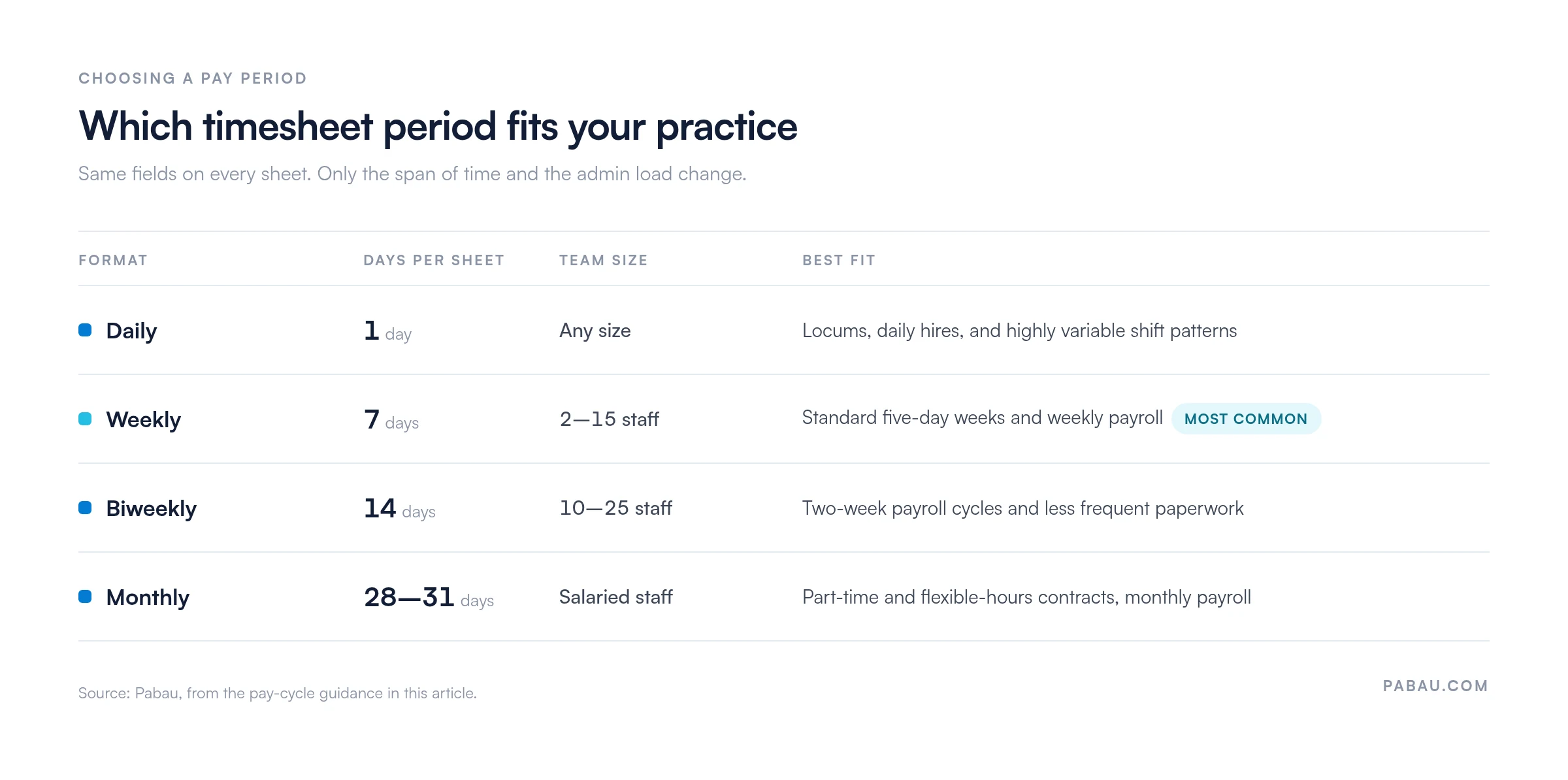
A daily sheet holds one day’s hours on a single form. It suits shift-based staff, such as a receptionist working a set eight-hour shift, and locums who invoice by the day. Pair it with a daily assignment sheet when you also need a record of who covered which patients.
Best for: Locum practitioners, staff hired by the day, and practices with highly variable shift patterns.
A weekly sheet covers seven consecutive days, starting on whichever day your practice treats as the start of the week. It is the most common choice for small and mid-size practices. Overtime shows up on Wednesday rather than at month end, which is usually early enough to rebalance the rest of the week.
Best for: Practices with 2 to 15 staff, standard five-day weeks, and weekly payroll.
A biweekly sheet covers 14 consecutive days and lines up with two-week pay cycles. It halves how often the paperwork lands on a manager’s desk. The trade-off is that an error can sit for a full extra week before anyone notices.
Best for: Practices with 10 to 25 staff running established two-week payroll cycles.
A monthly sheet covers a full calendar month. It is used mostly for salaried staff, locums on monthly contracts, and part-time practitioners. Fewer sheets reach the manager, though a mistake can go unnoticed for weeks.
Best for: Salaried clinical staff, flexible-hours employees, and practices running payroll once a month.
Google Sheets earns its place when staff log hours from more than one site, from a phone, or as the shift ends. Everyone can edit the same file at once, and permissions keep each person inside their own rows.
Setup steps:
=SUM(C2:C8)-D2 to subtract breaks.Tip: Use conditional formatting to color any day that runs past eight hours. Mistakes then surface before payroll runs rather than after it.
Accurate sheets depend on staff knowing what to record and how. The process is the same whichever format you print:
Small errors cascade into payroll disputes and compliance problems. Watch for these:
How you handle the sheets matters as much as the sheets themselves. These habits keep the record clean and the team relaxed about it:
For the underlying rules, read the UK ACAS working time guidance or the US Department of Labor FLSA page. Retention sits alongside the rest of your record-keeping, so it belongs in the same policy as your compliance management software and your patient records.
Pay accuracy is the other half of this. A practice that runs payroll from clean sheets can compare its own numbers against healthcare payroll software before committing to a subscription.
Templates hold up to about 15 staff. Past that, the time spent chasing and correcting entries costs more than a practice management app does. These are the signals that you have reached the switch:
In most practices the hours live in one file and the schedule lives in another, and someone reconciles the two at month end. Practice management software like Pabau removes that step, because its team management software and the appointment calendar are the same system.
Staff clock in and out in Pabau, and breaks and hours worked update as the day goes. Time-off requests and approvals sit in the same place, so the schedule always reflects who is actually available this week.
Timesheets and wages then feed into payroll and reporting, and commissions can be assigned to services, products, packages, and gift vouchers. The Team Report shows hours worked and commissions earned for each person. You can check a pay run without opening a spreadsheet at all.

Pabau tracks clock-ins, breaks, and hours worked against your staff schedule, then feeds timesheets and wages into payroll and reporting. Hours and commissions land in one Team Report, so a pay run no longer starts with a spreadsheet.

Pick one period, one template, and one deadline, then hold the practice to all three. A sheet filled in the same way every week is the one that survives an audit. It also produces a pay run nobody has to query.
The trade-off worth remembering is that a template costs nothing to start and a little more every month you grow. Somewhere around 15 staff, the hours spent correcting entries overtake the price of a system that records them once.
Set your retention period now, while the archive is still small enough to organize. Book a demo to see how Pabau records staff hours against the schedule and hands payroll a finished timesheet.

Need the schedule and the timesheet to agree? Patient scheduling and appointment management covers how to line up shift patterns with the pay periods above.
Chasing repeated late or missing sheets? The employee counseling form gives you a documented way to raise an attendance problem with a staff member.
Using hours worked in performance conversations? The annual review template turns those figures into a structured yearly discussion.
Ready to hand payroll off to software? The best healthcare payroll software compares the options for practices that have outgrown a spreadsheet.
A timesheet needs the employee name, the pay period dates, daily clock-in and clock-out times, break durations, total hours worked, overtime hours, and both signatures. In a healthcare setting, add patient-contact hours and on-call time.
Create columns for date, clock-in, clock-out, break, total hours, overtime, and signatures. Use a formula such as =SUM(C2:C8)-D2 for the total, format time cells as HH:MM, and apply conditional formatting to highlight overtime. Save it as a template and copy it each month.
A daily sheet records one day’s hours on a single form, which suits shift workers and locums. A weekly sheet covers seven consecutive days on one form. Weekly is the more common choice for small practices, and it makes overtime patterns easier to spot.
Yes. Excel, Google Sheets, and PDF templates work well for practices with up to 15 staff. Beyond that, manual data entry becomes slow and error-prone, and practice management software usually costs less than the corrections do.
Overtime is any time beyond the standard eight-hour day or 40-hour week. If someone worked nine hours on Monday, the extra hour is overtime. Flag it on the day it happens, then total it weekly or monthly to match your jurisdiction’s rules.
Switch once manual processing passes two hours a month, or once you manage 15 or more staff. The same applies if you run several locations, calculate commission, or have had a recent payroll error. Those are the cases where the software pays for itself fastest.