Maja Popovska
DASES: Drug Avoidance Self-Efficacy Scale
DASES at a glance and what it measures DASES stands for Drug Avoidance Self-Effi...

1
Last Updated: Oct 29, 2026
Free PDF 14 pages, print-ready Clinician-reviewed
A social work intake form is the structured document you use at the start of service engagement to gather a client’s essential information. It covers demographics, presenting concerns, medical and mental health history, risk factors, housing status, and consent for services.
A complete intake runs to eight sections. They start with personal details and the presenting problem, and they end with informed consent and the client’s own goals. Risk and safety screening sits in the middle, and it is the section that most often changes what happens next.
The template below is free to download and follows NASW practice standards. The sections that follow explain what each field captures, which questions to ask out loud, and how digital intake changes the work.
A ready-to-use form covering client demographics, the presenting problem, medical and mental health history, and housing and employment status. It also carries risk and safety screening, emergency contacts, consent and authorization, and goals for service engagement.
Start from scratch, or upload this PDF or any form you already use, and Pabau's AI Form rebuilds it with tick boxes, text fields and a signature. Attach it to the treatment once, and every patient gets it on time.
AI Form rebuilds the consent, history and aftercare forms you already use. You review each one, then publish.
Patients complete forms on their phone before they arrive, so the front desk stops retyping paper.
Every signed form is versioned and attached to the treatment record, ready when you need it.
Set how long a consent stays valid. Returning patients skip forms they have already signed.
Supports HIPAA and GDPR compliance AES-256 encryption 4.8 on G2 4.7 on Capterra Trusted by 4,000+ practices worldwide

A social work intake form captures demographics, presenting concerns, history, risk factors, housing status, and consent in one document.
The eight core sections run from personal details through risk screening to informed consent and service goals.
Risk and safety screening decides whether a client needs crisis services before any other plan is made.
Digital intake cuts transcription errors, supports HIPAA compliance, and lets clients fill the form in before they arrive.
Practice management software like Pabau feeds a submitted form straight into the client record, so nobody retypes it.
A social work intake form is the primary assessment document social workers and mental health professionals use at the start of a client relationship. It sits between first contact and ongoing case management, capturing presenting concerns, demographic data, history, risk factors, and the client’s consent for services.
The form does three jobs at once.
A well-designed form reflects NASW practice standards. It also lowers the odds of a missed safety concern, thin documentation, or a compliance problem at case initiation.
Every intake should include the eight sections below. A good form captures what practitioners need without burying the client in questions nobody will read again.
None of the eight is filler. Each one feeds a decision the case plan has to make in the first week. Map the sections against those decisions and it is obvious why a half-filled form causes trouble later.
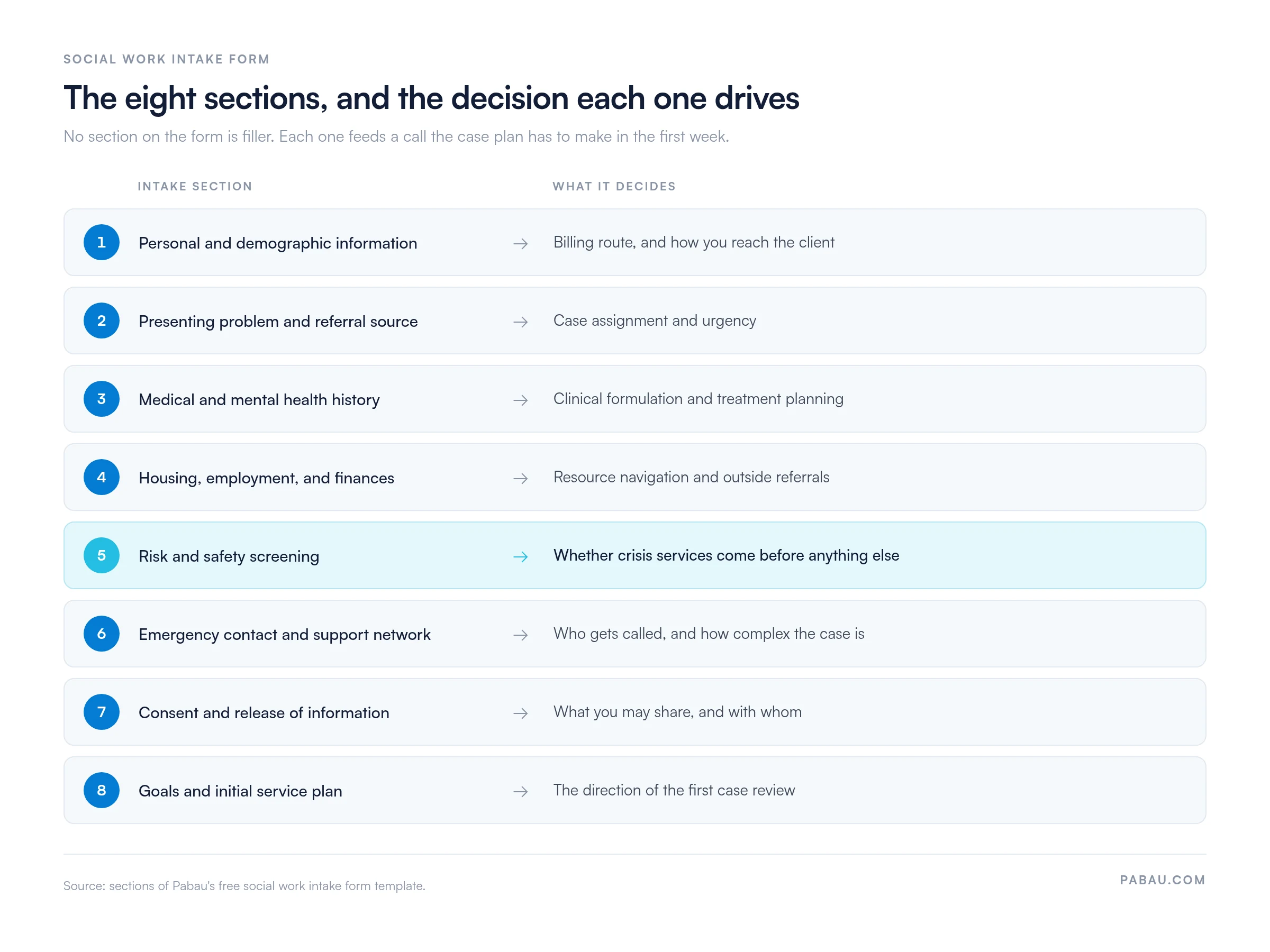
Collect full legal name, date of birth, current address, phone number, email, and household composition. Record pronouns and preferred name where they differ from the legal name.
Add insurance details, whether that is Medicaid, private coverage, or self-pay. Where one exists, note the primary care physician and their contact details. This section is what makes billing, referral coordination, and compliance documentation possible.
Document the client’s primary concern in their own words, then record the referral source. That might be a self-referral, a school, a physician, a family member, a court, or an employer.
Note the urgency level and any immediate safety concern alongside it. This is the section that decides case assignment and how quickly resources get allocated.
List current medications with dosages, past and current diagnoses, prior psychiatric hospitalizations, earlier therapy episodes, and any history of trauma. Record previous suicide or self-harm attempts, which psychiatric medications have been tried, and how well each worked.
Substance use patterns belong here too. Agencies that run a full biopsychosocial assessment will recognize most of these fields, since intake is where that longer picture starts.
Record current housing stability, employment status, job title, income sources, and financial stressors. Housing covers owned, rented, homeless, and transitional arrangements.
Note any housing insecurity, eviction history, or barrier to employment. These are the social determinants of health that drive resource navigation and outside referrals.
Screen systematically for suicide risk, self-harm, domestic violence, child or elder abuse concerns, and substance misuse. Document the specific risk factors, the protective factors, and any safety planning you completed in the session.
Risk screening is non-negotiable, because it identifies the clients who need crisis services now rather than at the next appointment. Where a client screens positive, a written mental health safety plan is the usual next document.
Record one or more emergency contacts with name, relationship, and phone number. Note which of them the client names as their primary support.
Document family composition, significant relationships, and informal support from friends, community, or spiritual resources. A strong network is protective, and its absence raises the complexity of the case.
Obtain signed informed consent for treatment. Explain the nature of the services, the limits of confidentiality around abuse, neglect, and danger reporting, and the fee structure. A counseling informed consent form covers the same ground for therapy services.
Document authorization to release information separately, naming the third party, the dates, and exactly what may be disclosed. HIPAA requires documented consent and written authorization before any protected health information leaves your agency.
Record the client’s own goals for service and the preliminary direction you agree on. That might be individual therapy, case management, resource coordination, or a group program.
Note any immediate next step or referral. This section keeps the client’s voice in the file, and it sets the frame for every progress note that follows.
Structured fields only get you so far. Open-ended questions are what surface the context behind the boxes, and the ones below are organized by domain.
Social work agencies have run on paper intake for decades. Digital intake changes five things about that work, and the table below sets them side by side.
The bigger change is what happens to the first appointment. When the form arrives the day before, you spend that hour on assessment and rapport rather than on data entry.
The template is a starting point, and it expects to be customized for your setting and client population. Five steps take it from download to daily use.
Intake sets the tone for the whole helping relationship. A trauma-informed, culturally aware process is what turns a form-filling exercise into the start of trust.
One form used the same way by the whole team produces consistent documentation. That lowers the odds of a missed safety concern. It also gives you a defensible record if the agency is audited or drawn into a legal matter.
Standardization also makes the record portable. A filing cabinet or an email thread keeps the history with whoever last handled it. Put intake data into software for therapy practices and any authorized colleague can see it at a glance.
The downstream effect shows up in case assignment, supervision, and handoffs between providers. The notes get easier too. Writing social work SOAP notes is far quicker when the baseline history already sits in the file.
Most agencies still run intake in two systems that never meet. The client fills in a PDF or a standalone form builder, then someone retypes the answers into the case file. That second step is where dates get transposed, medication lists get shortened, and a risk flag quietly goes missing.
Practice management software like Pabau removes the retyping. You build the eight intake sections once in the digital form builder, then send the form with the appointment confirmation. What the client submits writes itself into their record, next to the appointment, the notes, and the signed consent.
Consent and release forms are stored against the same record, with an audit trail of who opened what and when. So when a supervisor asks whether a client was screened for risk, the answer is on the file rather than in someone’s memory.
The outcome your team feels is a shorter first appointment and a case plan you can start writing before the client sits down.

Pabau’s digital form builder lets you send a social work intake form ahead of the appointment, then files the answers straight into the client record. Your team stops retyping, and consent, risk screening and history all sit in one place.

Download the template, reword it for your setting, and keep all eight core sections. The form is worth more as a shared standard than as a document each worker adapts alone.
The trade-off to remember is length against completion. A longer intake gathers more, but a client who gives up halfway leaves you with a file that looks complete and is not. Ask for what the first month of the case needs, then build the rest through the work.
Running it digitally is what makes that discipline stick, because the same fields reach every client and no answer depends on legible handwriting. Book a demo to see how Pabau moves a completed intake form into the client record without anyone retyping it.

A client screened positive for risk? The mental health safety plan template is the document that usually follows the intake form.
Need the consent paperwork to match? The counseling informed consent form covers confidentiality limits, fees and authorization in one signature.
Going deeper than intake? Biopsychosocial assessment explains how the history you gather at intake becomes a full clinical picture.
Writing the notes that follow? SOAP notes for social work shows how to turn session content into a defensible record.
Running a case management caseload? The case management intake form template adapts the same structure for coordination-led services.
It gathers a client’s essential information at the start of service engagement. That covers demographics, presenting concerns, medical and mental health history, risk factors, housing status, and consent. The form is the foundation for case management, treatment planning, and compliance documentation.
Eight sections: personal and demographic information, presenting problem and referral reason, medical and mental health history, and housing and employment status. Then risk and safety screening, emergency contact and support network, consent for treatment and information release, and goals for service engagement.
For most agencies, yes. Digital forms cut transcription errors, support HIPAA compliance, keep data encrypted, and give supervisors access straight away. Clients can also complete them at home before the appointment. Paper adds a manual data-entry step and more compliance risk.
Review it once a year with your team and supervisors. Update it when fields are missing, questions have become redundant, or the practice’s focus has shifted. Changes to HIPAA or state licensing requirements can force an update outside that cycle.
Use plain, non-judgmental language and drop the clinical jargon. Offer choice about when and how sensitive questions get answered, and let clients decline a question. Train staff to ask gently and with cultural sensitivity, on the assumption that many clients arrive with a trauma history.