Getting along with siblings worksheet
A getting along with siblings worksheet is a printable that helps children and t...

2
Last Updated: Oct 23, 2026

A sensory profile questionnaire rates how often a person responds to sensory input, then groups those ratings by sensory system.
The six sections are auditory, visual, touch, movement, body position, and oral processing, with no separate section for interoception.
Movement covers the vestibular sense, body position covers proprioception, and oral covers taste and smell together.
Always scores 1 and never scores 5, so a lower section total means the behavior happens more often.
Child Sensory Profile 2 covers ages 3 to 14, while the Adolescent/Adult Sensory Profile is self-reported from age 11.
A six-section observation form covering auditory, visual, touch, movement, body position, and oral processing. It carries 52 rated items, a response key, a raw score total per section, and a scoring summary page.
Download templateA sensory profile questionnaire rates how often a person reacts to sensory input, across six sensory systems. Take a child who covers both ears at the school gate and refuses most food textures. Those two complaints sit in different systems, so a single blanket sensory plan rarely helps either one.
The detail that trips people up is the direction of the scale. Always scores 1 and never scores 5, so a low section total means the response happens often. Read that backward and a sensory diet ends up aimed at the wrong system.
Below you will find what the form covers, which version suits which client, and how the scoring works in practice.
A sensory profile questionnaire is a standardized assessment of how a person processes sensory information, and how those patterns affect daily performance. Occupational therapist Winnie Dunn developed it. Each item describes an observable response, and the respondent rates how often it occurs.
Sensory Profile 2 groups its items into six sensory systems: auditory, visual, touch, movement, body position, and oral. Movement covers the vestibular sense, body position covers proprioception, and oral covers taste and smell together. Interoception is not scored as a separate section.
Once the ratings are in, the six section scores show whether the person is oversensitive, undersensitive, or within the typical range. That turns a vague referral into a specific starting point for intervention, an environmental change, or a sensory diet.
Dunn’s model then reads the same ratings a second way, as four patterns: seeking, avoiding, sensitivity, and registration. This is the part that changes plans. Two children can post almost identical auditory scores and still need opposite strategies. One is chasing the noise and the other is escaping it.
The form runs perfectly well on paper. It also rebuilds cleanly as one of your digital intake forms, so the caregiver completes it before they arrive. Either way, the six sections stay the unit of analysis, and the four patterns are how you read across them.
The template that goes with this article follows the same six systems the published instruments use. It is ready to print, hand to a caregiver, and file in the client record.
One caveat is worth stating plainly. This template is a structured observation record for your own practice, not a normed test, so it produces no standard scores. Classification bands still come from the normative tables of whichever published instrument you are licensed to use.
Trouble with a sensory questionnaire usually starts before anyone rates a single item. Five minutes of setup saves a form you cannot use.
A profile drifts when the conditions behind it change quietly. Two respondents, two different weeks, or two settings will all move the section totals. None of that shows up on the scoring page.
Once the setup is settled, the next call is which form to use. The Sensory Profile family has separate versions for different ages and respondents.
Your choice depends on the client’s age and on who can answer reliably. It also depends on whether you need a screener or a full assessment.
Child Sensory Profile 2 is the workhorse of pediatric practice. The School Companion form is what you send to the teacher when home and school reports disagree.
Short Sensory Profile 2 pulls the most discriminating items from the child form. That makes it the sensible choice for re-checks.
For adults, the Adolescent/Adult Sensory Profile is a 60-item self-report. That removes the caregiver from the loop, which matters in adult autism and ADHD pathways where no caregiver report exists.
In pediatric practice the caregiver or teacher answers, not the child. Young children rarely report their own sensory preferences accurately, so the adult who watches them daily is the more reliable observer.
In school-based occupational therapy, the results identify which children benefit from environmental changes, scheduled sensory breaks, or a structured sensory diet.
For a child being assessed for autism, the questionnaire adds documented observation alongside clinical interview and structured play.
Where home and school reports disagree, that difference is clinical information rather than a problem with the form. A child who scores as avoidant at school and typical at home is usually reacting to the classroom. Start the plan there.
Keep every completed questionnaire in unified client records. No form then goes missing between the caregiver, the teacher, and the appointment note it belongs to.
The Adolescent/Adult Sensory Profile is validated from age 11 upward, and the client completes it themselves. That makes it practical in a busy diagnostic pathway, where a caregiver report is often unavailable and rarely appropriate.
Adult results need a second reading that pediatric results do not. An adult may avoid a crowded room because the noise hurts, or because of social anxiety. The questionnaire alone cannot separate those two.
Long-standing coping strategies also mask sensitivity. A client can report typical frequencies while quietly organizing a whole week around avoiding one trigger.
So read the section scores alongside a history and a functional interview before you commit to a formulation. Used that way, the questionnaire helps you separate sensory processing differences from anxiety-driven avoidance.
Scoring runs in three steps. The respondent rates every item on a five-point frequency scale. You add the item scores up within each sensory section. Those raw section totals then convert to standard scores or percentiles using age-appropriate norms.
The direction of the scale is what catches people out. Always is scored as 1 and never as 5. A lower total therefore means the behaviors in that section happen more often. A section total well below the others is usually where your intervention starts.
Interpretation lands in one of three bands. Typical performance means processing in line with age peers. Probable difference means variation that may affect function and is worth watching. Definite difference means a difference large enough to warrant intervention, accommodation, or further assessment.
The original Short Sensory Profile makes those bands concrete. It has 38 items, so the total runs from 38 to 190. The cut-offs then sit close together at the top of that range.
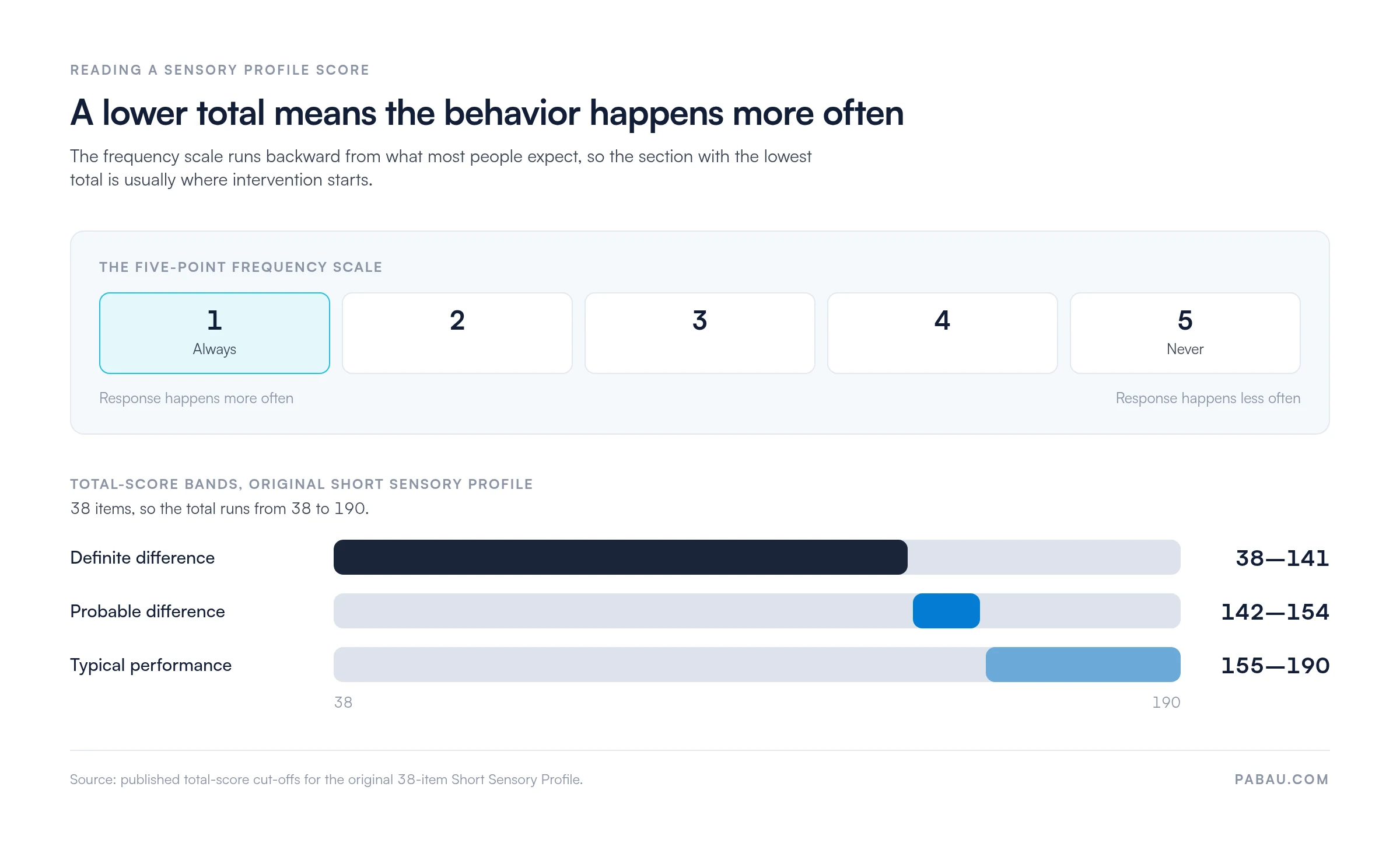
Two errors account for most misreadings. The first is treating a high total as a problem, when the high end is the typical one. The second is reading the grand total instead of the six sections. That hides a single system sitting far below the rest.
Whichever instrument produced the numbers, check them against something outside the form before you plan treatment. Functional observation, the teacher’s account, and the clinical interview should point the same way.
Where they do not, the disagreement is usually the finding. Our guide to Sensory Profile 2 scoring works through the quadrant scores behind those bands.
Occupational therapists run the questionnaire as one part of a wider assessment. It shows how sensory processing affects participation in school, work, play, self-care, and social life.
The results answer three questions: whether sensory-focused intervention is indicated, which kind, and how you will measure progress.
The pattern dictates the plan. A child scoring high on seeking often does better with heavy work, proprioceptive input, and high-intensity play spaced through the day. Score high on avoiding and the plan inverts, toward quiet breaks, fewer sensory demands, and graded exposure.
Sensory work rarely stays with one clinician. In a mixed rehab team the plan has to be visible to the physical therapist and the speech therapist too. That is where software for rehab practices earns its place.
Once the plan is agreed, automated workflows keep re-assessment dates and caregiver reminders on schedule. Every therapist working with the child then follows the same version of the plan.
On paper, one sensory profile questionnaire costs more than the twenty minutes a caregiver spends on it. Someone has to print it, chase it, and add up six section totals by hand. They then type the result into the notes and find it again at the next review.
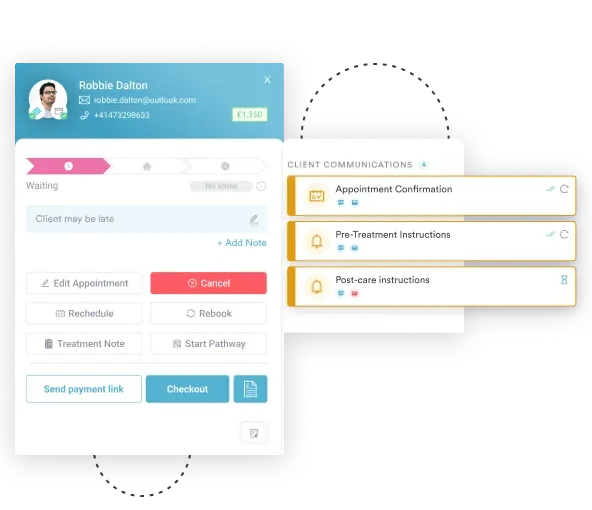
Pabau, practice management software for health and wellness practices, moves that loop into one system. You rebuild the six sections as a digital intake form and send it before the appointment. The responses land against the client record, next to the appointment history and clinical notes.
Because the form scores itself as it is completed, the section totals are on screen when the caregiver walks in. Repeat the form at review and you get the same six numbers side by side. You can show a parent what changed instead of describing it.
Every Pabau subscription includes every feature, so the forms, the records, and the automated reminders arrive as one workflow rather than three purchases.

Pabau turns the sensory profile questionnaire into a digital intake form that scores itself and files into the client record. Your team stops chasing paper and starts each review with the section totals already in front of them.

Treat the six sections as the finding, and the grand total as background. A child whose overall score looks unremarkable can still sit far below the rest of the profile on one system. That section is where the plan earns its keep.
The trade-off worth remembering is that this template is an observation record, not a normed test. It gives you a repeatable structure and a scoring page you can file, but the classification bands still come from the licensed instrument.
Download the template, run it on your next three assessments, and see how much of the delay is administration rather than clinical work. Book a demo to see how Pabau scores and stores sensory questionnaires alongside the rest of the client record.

Need help reading the scores? Sensory Profile 2 scoring and interpretation walks through the quadrant scores and cut-offs behind the three classification bands.
Setting goals after the assessment? Canadian Occupational Performance Measure turns what a client wants to do into a scored, repeatable outcome.
Assessing daily function as well? ADL assessment tool covers the self-care and independence side that sits next to a sensory profile.
Working with a child under three? Bayley Scales of Infant Development template covers the developmental assessment that often runs alongside sensory screening.
Comparing systems for your practice? Occupational therapy EMR covers what to look for in software that has to hold assessments, notes, and scheduling together.
Yes. Pearson classifies Sensory Profile 2 at Qualification Level B, which needs a relevant professional degree, license, or certification. Occupational therapists usually qualify through their professional registration.
Pearson lists 5 to 20 minutes for the caregiver, depending on which form you use. Scoring and interpretation add more time, and the longer forms take longer at both ends.
No. Sensory processing disorder is not a standalone diagnosis in the DSM-5, so no questionnaire can confirm it. Hyper- and hyporeactivity to sensory input does appear as one criterion within autism spectrum disorder.
The Sensory Processing Measure, Second Edition comes from a different publisher, WPS, and reports normalized T-scores. It also produces a difference score that compares one setting against another, such as home against school.
Treat it as unusable and ask again. A straight column of one rating usually means the respondent misread the key or rushed. Walk through the response key with them before they start.
Yes, but use two separate forms. The School Companion Sensory Profile 2 exists for exactly that, and comparing the two beats merging them into one profile.
The template on this page is free to download and use in your practice. The published, normed instruments are not. Sensory Profile 2 and the Adolescent/Adult Sensory Profile are purchased from Pearson, and only those give standard scores.