
 Maja Popovska

Modified Rankin Scale
What is the modified Rankin Scale used for? Clinicians use the modified Rankin S...

Last Updated: Nov 3, 2026
Free PDF 3 pages, print-ready Clinician-reviewed
A meal planning template is a pre-built grid that lays out meals, snacks and shopping items across a set period. It lets you plan a week or month of food in one sitting. This page explains the weekly and monthly layouts most people use and the formats they come in (PDF, Excel, Google Sheets and Notion). It also offers one downloadable template: a seven-day PDF for practitioners to give patients. Without a plan, it is easy to buy duplicates and make food decisions at 6 PM. A simple grid settles those choices before the week starts.
The GOLO 7-Day Meal Plan comes from the template library of Pabau, the practice management platform we build. It suits weight management and metabolic-health conversations. Individual targets still come from a registered dietitian or the prescribing clinician.
A ready-to-use seven-day meal planning template with breakfast, lunch and dinner slots for each day.
Start from scratch, or upload this PDF or any form you already use, and Pabau's AI Form rebuilds it with tick boxes, text fields and a signature. Attach it to the treatment once, and every patient gets it on time.
AI Form rebuilds the consent, history and aftercare forms you already use. You review each one, then publish.
Patients complete forms on their phone before they arrive, so the front desk stops retyping paper.
Every signed form is versioned and attached to the treatment record, ready when you need it.
Set how long a consent stays valid. Returning patients skip forms they have already signed.
Supports HIPAA and GDPR compliance AES-256 encryption 4.8 on G2 4.7 on Capterra Trusted by 4,000+ practices worldwide

A meal planning template is a reusable grid for planning meals, snacks and groceries in one sitting.
Weekly layouts suit most households, while monthly layouts suit batch cooking and budgeting.
Formats include PDF for printing, Excel and Google Sheets for editing, and Notion for database views.
A grocery list section turns the plan into a shopping list and reduces impulse purchases.
Pabau’s digital forms and Client Portal help practices share structured plans with patients.
A meal planning template is a fixed layout that lets you assign meals to days before you shop. It moves planning from memory into a single page you can check, print or edit.
A template turns a vague intention to eat better into a list of specific slots, and the grid makes it obvious which meals are repeating.
A useful plan covers a few core sections. Keep the layout simple enough that you will fill it in each week.
A weekly meal planning template uses a seven-day grid with meal categories across the top. It suits most households because one planning session covers the full week’s shopping.
The grid above shows the first three days as an example. Fill in the remaining rows to complete the week, then copy the shopping items into your grocery list section.
A monthly meal planning template uses a calendar-style view covering four or five weeks. It works well for batch cooking, where you prepare large portions once and reheat them across several days.
Monthly views also help with budgeting. Once you can see which weeks feature expensive proteins, you can spread the cost across the month rather than absorbing it in a single shop. Goal-specific plans use the same month-long view, as in our 30-day meal plan for weight loss.
A combined template pairs meal slots with a grocery section, so the shopping list is built from the plan rather than written from memory. This is the most common approach for households that shop once a week.
Lists built for one eating pattern follow the same steps. A Mediterranean diet grocery list is one ready-made example.
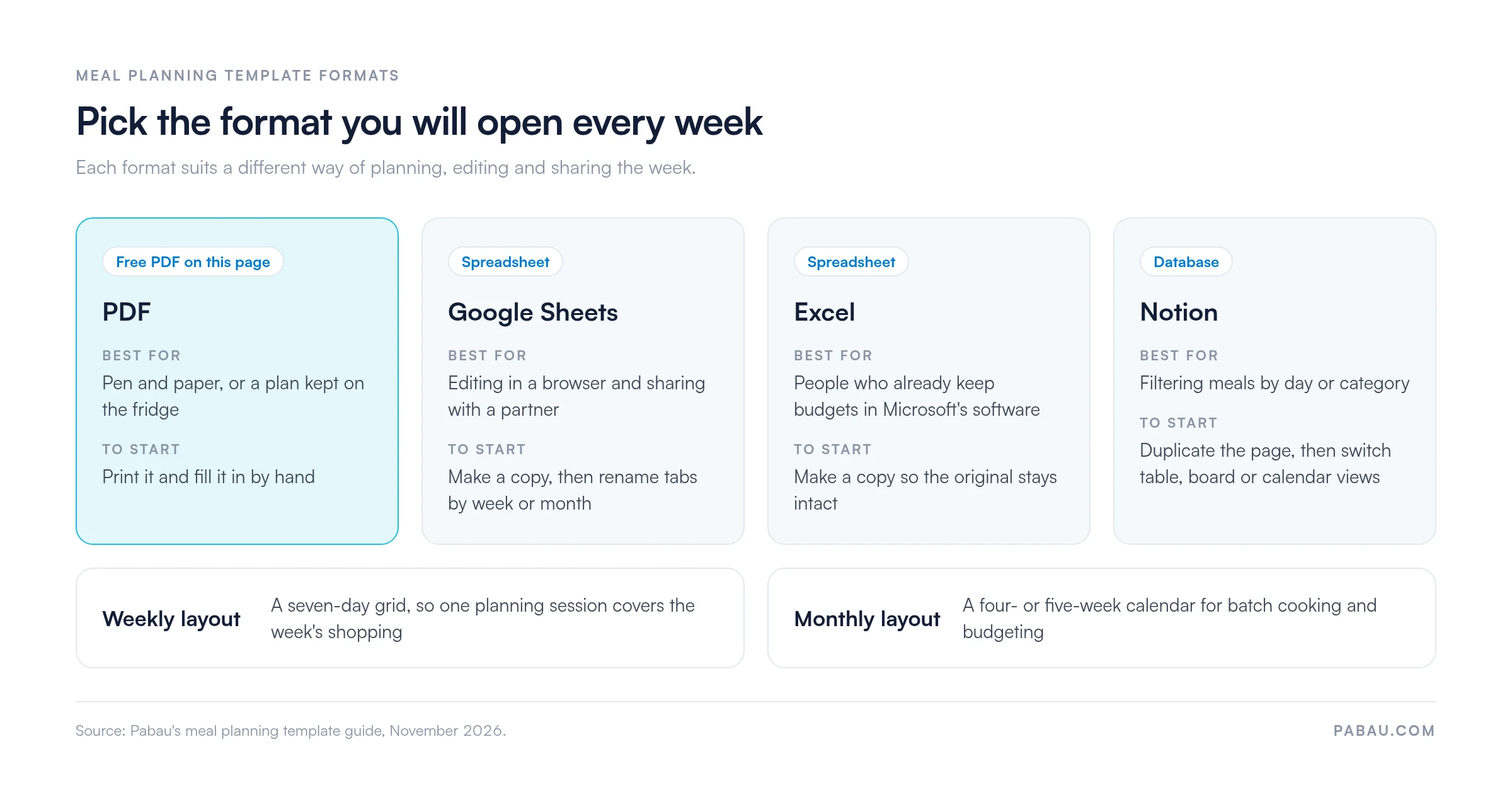
A printable PDF suits people who prefer pen and paper, or who want a template on the fridge. Print it, fill it in by hand, and keep it where the household can see it.
The GOLO 7-Day Meal Plan above is supplied as a PDF, so it prints cleanly on standard paper without any software. Each day has a breakfast, lunch and dinner box, so snacks and the grocery list go on a separate sheet.
A spreadsheet version lets you edit meals, totals and shopping items without redrawing the grid. Google Sheets works in a browser and can be shared with a partner. Excel suits anyone who already keeps budgets in Microsoft’s software.
Make a copy of the file before editing so the original stays intact. Then rename the tabs by week or month so the workbook stays easy to navigate.
A Notion version uses a database, so each meal becomes a row you can filter by day or category. Duplicate the page into your own workspace, then switch between table, board or calendar views to see the week differently.
Set side by side, the four formats differ mainly in how you edit and share the plan.
Using a template well is mostly a routine. The steps below take about fifteen minutes a week once the habit is set.
A plan records what you meant to eat. A food diary records what you did eat, and comparing the two speeds up the weekly review.
Families benefit from a shared grid that lists each person’s needs in the notes column. Keep the main meal the same for everyone and vary only the sides, which cuts cooking time.
For people managing weight, a plan can make portions visible. A planning template does not set calorie targets, so if you need specific numbers, ask a registered dietitian or your clinician to set them. Once a target is set, a 1500 calorie diet plan shows how a day at that level can look.
The most frequent mistake is overfilling the grid. A plan with twenty-one unique meals is hard to shop for and harder to stick to, so repeat meals wherever you can.
Audit your last month of shopping receipts before you choose a template. Note the meals you repeat and the items you throw away, then build the grid around what your household already eats.
Many practices still hand patients a printed meal plan at the end of a consultation. The sheet goes home, and the clinician has no record of how the week went until the next visit.
In Pabau, a meal plan can go out as one of the digital forms attached to the appointment, alongside a nutrition assessment form at intake. Patients open both through the Client Portal, and each completed form is saved to their patient record.
For practices running weight loss programs, Pabau’s weight loss clinic software keeps the plan, the intake answers and each follow-up note in one record. The next review then starts from what the patient wrote down during the week.

Pabau’s digital forms and Client Portal let your team share templates, collect intake details and keep patient plans in one record.
A meal planning template earns its place when it is short enough to fill in every week. Start with the seven-day PDF, repeat meals freely, and build the shopping list from the grid. Move to a spreadsheet or Notion once the paper habit holds.
For practices, the trade-off is follow-through. A printed plan is easy to hand over and hard to review later. Keeping it in the patient record pays off at the next appointment. Book a demo to see how Pabau keeps patient meal plans and intake forms in one record.

Need a short plan to start with? Three day diet menu plan sets out menus, calories and swaps for three days.
Following a points-based program? Weight Watchers diet plan pairs a seven-day meal guide with a template.
Managing diabetes? 28 day diabetes meal plan maps four weeks of meals in a free PDF.
Cutting back on salt? Low sodium diet meal plan lays out lower-salt meals you can plan around.
Trying to gain weight? 7-day meal plan for weight gain lays out seven days of meals for gaining weight.
A meal planning template is a fixed grid that assigns meals, snacks and shopping items to days. It lets you plan a week or month in one session.
Yes. The GOLO 7-Day Meal Plan above is available as a free PDF download from Pabau’s template library.
PDF suits printing, Google Sheets suits sharing and editing, Excel suits budget tracking, and Notion suits database-style views.
Fill in the meal slots first, then copy each ingredient into the grocery section and check your pantry before shopping.