Medicare charting cheat sheet
A Medicare charting cheat sheet is a one-page reference that lists what Medicare...

2
Last Updated: Oct 21, 2026
The best telehealth platforms UK practices can choose in 2026 start with practice management software like Pabau, followed by Carepatron and SimplePractice. Pabau suits private practices that want video consultations, online booking and patient records in one platform.
Carepatron suits solo practitioners who want a free plan, and SimplePractice suits mental health therapists. Zenoti fits spa and salon chains, and Cliniko fits physiotherapy teams. Doccla and Doctor Care Anywhere serve NHS virtual wards and consumer GP access rather than private practices.
UK practices use telemedicine and telehealth to mean the same thing, and every platform below covers both. Regulation shapes the choice as much as features do.
The Care Quality Commission (CQC) registers providers of regulated activities in England whether they treat patients in person or by video. UK GDPR and the Data Protection Act 2018 treat the health data a platform stores as special category data.
A platform that keeps video, notes and billing in separate tools leaves your team copying data between them every week. One that holds the EHR, billing, scheduling and video together gives your private GP practice or aesthetic practice one audit trail to grow on.

1. Pabau — best for UK private practices that want telehealth, online booking and one patient record, with video hosted in the browser.
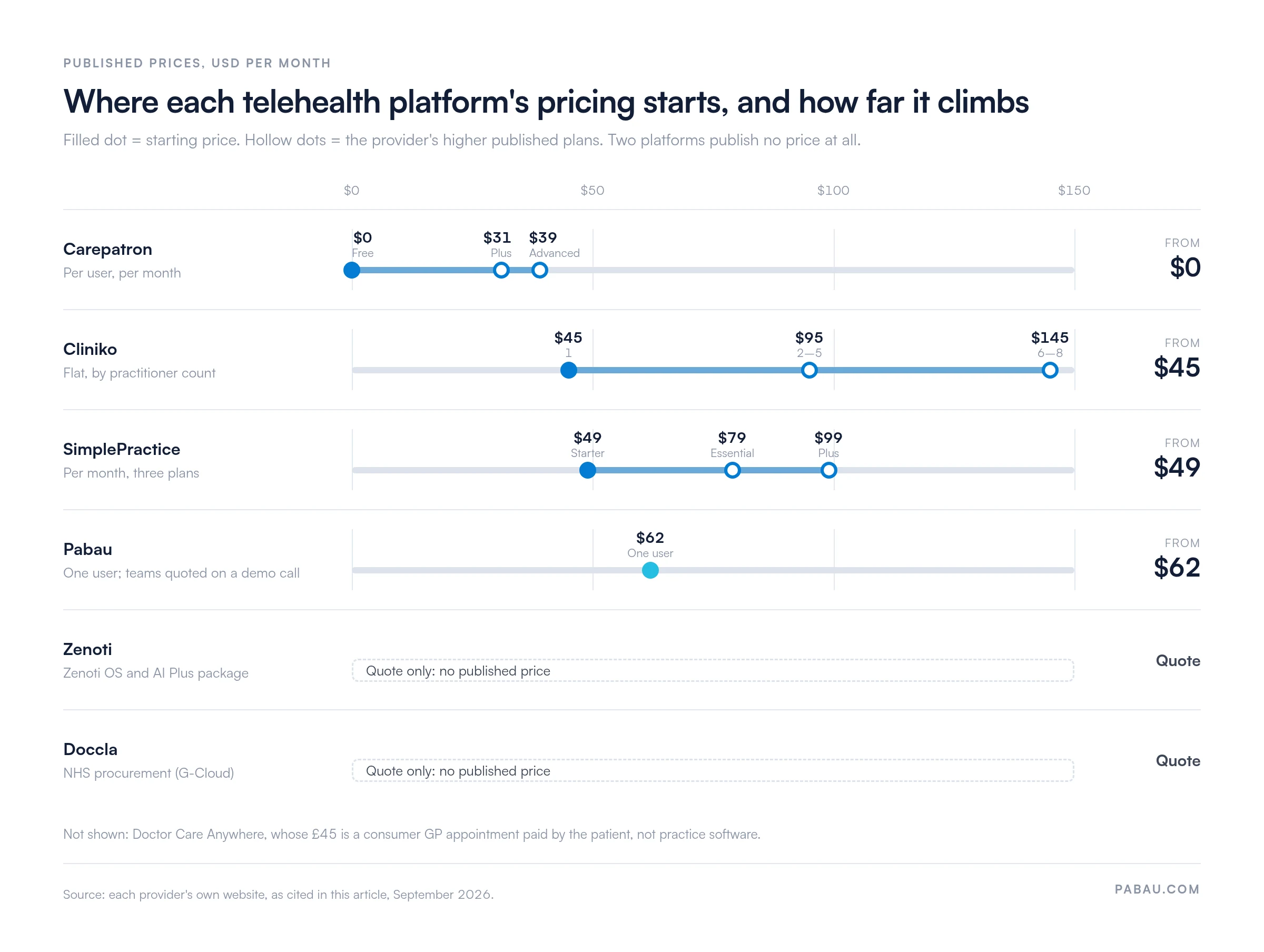
2. Carepatron — a $0 Free plan that includes telehealth and 1GB of storage, for solo practitioners starting remote sessions.
3. SimplePractice — telehealth on every plan for mental health therapists, priced in US dollars from $49 a month.
4. Zenoti — enterprise software for spa and salon chains, with virtual consultations through a Zoom integration.
5. Cliniko — built-in telehealth and UK data storage for physiotherapy and allied health teams, from $45 a month.
6. Doccla — a CQC-registered virtual ward provider for NHS trusts, not software for private practices.
7. Doctor Care Anywhere — a consumer GP service with one-off appointments from £45, not practice software.
This side-by-side snapshot compares each telehealth platform UK clinics are evaluating on pricing, ratings and standout features. Use it to shortlist the platforms most relevant to your practice type and budget.
Ratings come from Capterra where a profile exists. Doccla and Doctor Care Anywhere have no Capterra profile, so their ratings come from Trustpilot.
| Name | Best for | Standout feature | Starting price | Rating |
|---|---|---|---|---|
| Pabau | Multi-specialty private clinics | All-in-one: telehealth, EMR, billing, marketing | From $62 / month for one user | 4.6/5 (557+) |
| Carepatron | Solo practitioners on a budget | Free plan with telehealth included | Free / $31 per user/month | 4.5/5 (511+) |
| SimplePractice | Mental health therapists | Telehealth on all plans at no extra cost | $49 / ~£39 per month | 4.6/5 (2,810+) |
| Zenoti | Large spa and salon chains | Enterprise POS and inventory integration | Custom (contact sales) | 4.4/5 (964+) |
| Cliniko | Allied health practices (physio, chiro) | Built-in telehealth with UK data storage | $45 / ~£36 per month | 4.7/5 (24) |
| Doccla | NHS virtual ward programs | CQC-registered remote patient monitoring | Custom (G-Cloud) | 3.2/5 (3, Trustpilot) |
| Doctor Care Anywhere | Consumer telehealth patients | 24/7 GP appointments, same-day prescriptions | From £45 per GP appointment | 4.2/5 (1,214, Trustpilot) |
Telehealth runs in the browser inside the same patient record as online booking, notes and payments.
Pabau is practice management software for aesthetic, dermatology and healthcare practices, combining online booking, patient intake, charting and automated reminders in one platform. Telehealth sits inside that same software, next to billing, marketing and inventory management.
The video call, consent forms and post-consultation billing all attach to one patient record. Pabau GO, our iOS app for practitioners, lets clinicians manage consultations, capture consents and take payments from an iPhone or iPad.
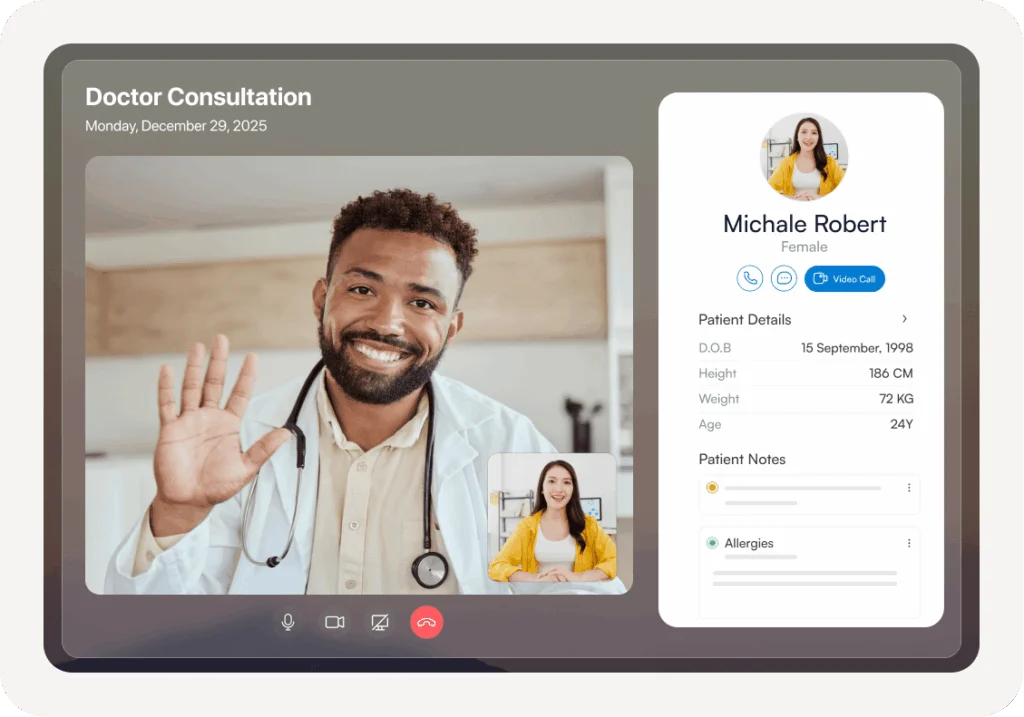
UK practices in aesthetic medicine, private GP, physiotherapy, mental health and fertility run in-person and remote appointments from one Pabau calendar. Pabau hosts the video call itself in the browser, so patients click Join in their confirmation with no app to download and no Zoom tab. Built-in consent management and audit trails support CQC inspection readiness.
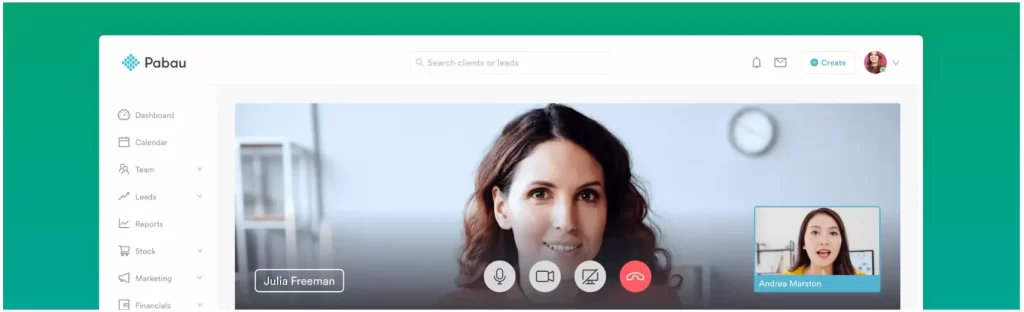
For practices evaluating telehealth platforms UK wide, Pabau stands out because the video consultation feature connects directly to the patient’s clinical record. Pabau is HIPAA and GDPR compliant, and virtual consultations sit under the same staff permissions as the rest of the record.
A dermatologist finishing a remote skin check can document findings, update treatment plans and trigger follow-up reminders without switching applications. According to Capterra reviewers, the all-in-one approach is Pabau’s strongest advantage, though some users note an initial learning curve because of the platform’s depth.
A typical telehealth workflow in Pabau starts when the patient receives an automated SMS or email reminder containing their unique video link. Before the session, the patient completes intake forms and consent documents through the Client Portal. The practitioner has that information before the call begins.
During the consultation, the practitioner can view and update the patient’s full medical history and add clinical photos. Once the session ends, payment is collected automatically and a follow-up appointment (either in-person or virtual) can be booked from the same screen.
Pabau Scribe, our AI scribe, can transcribe the conversation into structured SOAP notes during or after the video call, saving clinicians from manual note-taking. Practices that previously spent 10-15 minutes per session writing up clinical documentation can reclaim that time using automated transcription tied directly to the patient’s record.
“The all-in-one platform has replaced four separate tools we used to manage. Everything from booking to clinical notes to payments happens in Pabau.” (Verified reviewer, Capterra, 4.6/5 based on 557+ reviews)
Positive themes across reviews highlight the strong clinical documentation and flexible multi-industry configuration. Negative themes center on the initial learning curve due to feature depth. On G2, Pabau holds a 4.7/5 rating based on 320+ reviews. Users frequently praise the clinical records and the responsiveness of the customer success team during onboarding.
| Plan | Price | Who it’s for | Key features |
|---|---|---|---|
| One user | From $62 / month | Single practitioners | Full platform: scheduling, EMR, telehealth, payments, marketing, inventory. No feature gating. Up to 20% off with annual billing. |
| Team to Enterprise | Quote on a demo call | Practices with 2 to 16+ users | The same full platform, priced by user count and number of locations. |
You can see the full breakdown on Pabau’s pricing page, and telehealth calls draw on Pabau credits that practices top up as needed.
A $0 Free plan with telehealth makes it the cheapest way for a solo practitioner to start remote sessions.
Carepatron is practice management software for solo practitioners and small teams, and its Free plan includes telehealth at $0. According to Carepatron’s pricing, the Free plan also covers unlimited patients, 1GB of storage, a client portal and an AI scribe. That makes it one of the few platforms where UK practitioners can run video sessions at no cost.
Practices that outgrow the Free plan move to Plus at $31 per user per month, which adds unlimited storage and group telehealth. Advanced costs $39 per user per month and adds roles and permissions, white labeling and a 1:1 onboarding manager.
Carepatron appeals most to therapists, counselors and allied health providers who want straightforward video calls. If your practice needs integrated telehealth software alongside deeper clinical tools, Pabau may be a stronger long-term fit.
For UK practitioners, Carepatron’s site lists GDPR alongside HIPAA (the US health data standard) and PIPEDA. Its site does not name the region where UK patient data is stored. Ask for the data processing agreement and the hosting region before committing.
Solo therapists testing remote sessions for the first time will find the $0 entry appealing. Practices planning to grow past five team members should model per-user costs against platforms that include every feature at one price.
“Great for getting started without spending anything. The free plan covers everything a solo therapist needs for basic telehealth.” (Verified reviewer, Capterra, 4.5/5 based on 511+ reviews)
On G2, Carepatron has a notably high 4.5/5 rating based on 734 reviews. Users consistently praise the ease of setup and the value of the free tier for solo practitioners getting started with telehealth.
| Plan | Price | Who it’s for | Key features |
|---|---|---|---|
| Free | $0 | Solo practitioners | Telehealth, 1GB storage, unlimited patients, AI scribe, client portal. |
| Plus | $31 per user/month | Growing practices | Unlimited storage, group telehealth, shared inbox, custom branding. |
| Advanced | $39 per user/month | Multi-practitioner teams | Roles and permissions, white labeling, 1:1 onboarding manager, premium support. |
Carepatron publishes these prices in US dollars, billed per user.
Telehealth comes on every plan, but the pricing, compliance and treatment planners are built for US therapists.
SimplePractice says more than 250,000 practitioners use its practice management software, primarily in the mental health and therapy space. Telehealth is included on every plan at no extra cost.
That makes it a popular pick for psychologists, counselors and social workers who conduct most sessions remotely. The platform generates unique video links automatically for each appointment, and patients can join from any device without downloading software.
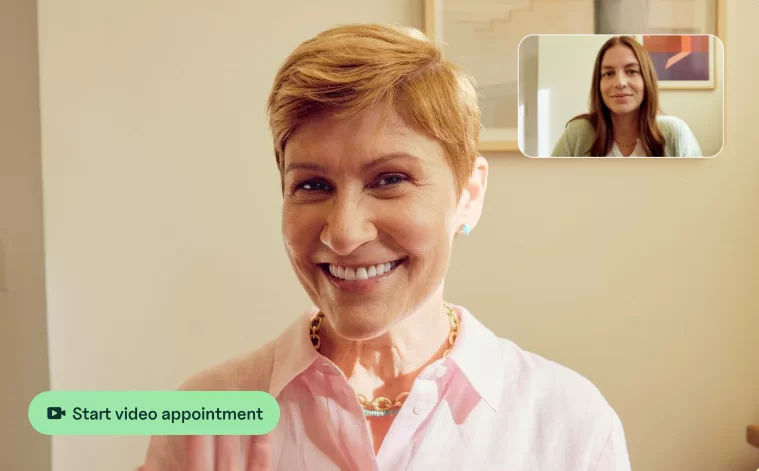
SimplePractice is HIPAA-compliant and built around US rules, so UK-based practitioners have extra checks to run. Its pricing page lists every plan in US dollars, billed monthly.
Practices operating under UK GDPR should verify how patient data is stored and whether servers sit within the UK or EU. If your practice requires both telehealth and UK-specific regulatory alignment, exploring compliance management features within platforms like Pabau may be more suitable.
SimplePractice generates a unique, encrypted video link for each session, so patients can join from any browser without downloading dedicated software. Therapists can share documents, send intake forms, and collect signatures within the same client portal.
The Wiley Treatment Planner integration on the Essential and Plus plans suits US-licensed therapists. Its relevance for UK practitioners working under different clinical frameworks is limited.
Group practices managing multiple clinicians will want the $99 Plus plan, which adds group appointments, group telehealth and a premium support phone line.
“SimplePractice makes telehealth easy for therapy. I can run sessions, send forms, and manage billing from one dashboard.” (Verified reviewer, Capterra, 4.6/5 based on 2,810+ reviews)
On G2, SimplePractice holds a 4.1/5 rating based on 120+ reviews. Common praise focuses on the built-in telehealth and intuitive interface. Criticism tends to center on US-specific features like insurance billing that have limited relevance for UK practitioners.
| Plan | Price | Who it’s for | Key features |
|---|---|---|---|
| Starter | $49 / ~£39 per month | Solo therapists | Telehealth, basic diagnostic and treatment plans, measurement-based care, online appointment requests. |
| Essential | $79 / ~£63 per month | Insurance-billing practices | Appointment reminders, calendar sync, secure client messaging, Wiley Treatment Planners. |
| Plus | $99 / ~£79 per month | Group practices | Group appointments, group telehealth, premium support phone line, appointment request widget. |
SimplePractice lists every plan in US dollars, billed monthly, and the ~£ figures are approximate conversions.
Strong for multi-location spa and salon operations, with virtual consultations routed through a Zoom integration.
Zenoti is enterprise software for salons, spas and medspas that need point-of-sale integration, inventory management and multi-location scheduling. By its own count, more than 30,000 businesses across 50+ countries use it, and it runs a UK version of its site. Virtual consultations run through a Zoom integration in myZen, its provider app, rather than video built into the platform.
UK spa chains exploring remote pre-treatment assessments or wellness coaching may find value here. Practices needing deep clinical documentation will likely need supplementary tools.

Zenoti publishes no prices, so every plan starts with a sales conversation. For smaller UK practices, this pricing model may not be practical. Practices comparing Pabau and Zenoti often find that Pabau provides a broader clinical feature set, priced by user count.
Where Zenoti excels is in retail-heavy environments. Spa chains that sell skincare products alongside treatments benefit from Zenoti’s built-in inventory management and loyalty program tools. Its AI agents, such as the AI Receptionist and the AI Lead Manager, need the AI Plus package on top of Zenoti OS.
For UK aesthetic practices that need clinical documentation and telehealth, Zenoti’s medical features are thinner than dedicated clinical platforms. It suits wellness and beauty operations better than regulated healthcare practices.
“Zenoti handles our five salon locations well, but getting support can sometimes take longer than expected.” (Verified reviewer, Capterra, 4.4/5 based on 964+ reviews)
On G2, Zenoti holds a 4.5/5 rating based on 310+ reviews. Users consistently highlight the POS and inventory features as strengths, while onboarding complexity and support response times appear as recurring concerns.
| Plan | Price | Who it’s for | Key features |
|---|---|---|---|
| Zenoti OS | Custom quote | Salons, spas and medspas of any size | Appointment book, point of sale, payment processing, inventory, online booking, marketing automation. |
| AI Plus package | Custom quote | Chains that want AI agents | AI agents such as the AI Receptionist and AI Lead Manager, a dedicated Customer Success Manager, SLA-backed priority support. |
Zenoti publishes no prices for either package, and its voice, SMS and messaging usage is billed on consumption.
Built-in encrypted telehealth, UK data storage and practitioner-count pricing suit small allied health teams.
Cliniko is practice management software popular with UK and Australian physiotherapy, chiropractic and osteopathy practices. Telehealth is built in. Patients get a link in their confirmation email and join an end-to-end encrypted video call with no login. Group telehealth takes up to four people, and screen sharing is included.
Cliniko’s tiered pricing scales by practitioner count rather than per user, which benefits small teams. A solo practitioner pays $45 / ~£36 per month, while practices with 2-5 practitioners pay $95 / ~£76 per month.
Every subscription includes every Cliniko feature, unlimited locations and unlimited patients, and SMS is the only paid extra at 10¢ per message. For UK physiotherapy practices that primarily need scheduling and record-keeping, Cliniko works well.
Practices that also need marketing and insurance billing next to telehealth may want to compare Pabau and Cliniko side by side.
Cliniko’s strength lies in its simplicity. Patients self-schedule through online booking, and treatment notes follow structured templates for physiotherapy, chiropractic and osteopathy. Letter generation and financial reporting are included at every tier.
On UK data residency, Cliniko states that accounts created in the UK keep their data in the UK. It also describes itself as UK GDPR compliant. Where a practice might choose differently is growth marketing. Cliniko’s recalls build a follow-up list the team works by hand, and it has no built-in email campaigns.
Cliniko holds a 4.7/5 rating on Capterra based on 24 reviews.
| Plan | Price | Who it’s for | Key features |
|---|---|---|---|
| 1 Practitioner | $45 / ~£36 per month | Solo practitioners | Full platform: scheduling, patient records, treatment notes, letters. |
| 2-5 Practitioners | $95 / ~£76 per month | Small teams | Shared calendar, multi-practitioner support, same feature set. |
| 6-8 Practitioners | $145 / ~£116 per month | Mid-size clinics | Expanded team capacity with the same feature access. |
Cliniko prices its plans in US dollars by practitioner count, and SMS credits are the only paid extra at 10¢ per message.
A CQC-registered virtual ward service for NHS trusts, not software a private practice can run.
Doccla occupies a distinct position among telehealth platforms UK clinicians encounter. It is a CQC-registered virtual ward provider that says it is live in over 60% of NHS regions.
Doccla reports millions of monitored patient days across 11 European countries. Its site lists NHS DTAC (the Digital Technology Assessment Criteria) among its security standards. The platform focuses on remote patient monitoring with wearable devices and clinical dashboards.
Private practices evaluating telehealth platforms UK practices rely on should note that Doccla is not practice management software. It does not handle appointment scheduling, patient intake forms, billing, or marketing.
Its purpose is to keep patients out of hospital beds by monitoring vitals remotely and flagging clinical deterioration to care teams. For practices needing digital forms and patient-facing booking alongside telehealth, Doccla is not a direct fit.
Doccla’s model works through NHS procurement channels (primarily G-Cloud), so pricing, onboarding and support follow enterprise frameworks rather than self-service sign-up. Hospital trusts contract Doccla to run virtual wards for specific patient cohorts. Examples include post-surgical recovery, chronic obstructive pulmonary disease and heart failure.
Patients receive wearable devices that send vital signs (heart rate, blood oxygen, blood pressure) to a central dashboard staffed by clinical teams. This model helps reduce hospital bed occupancy. It sits in a different market from the practice management software most private UK practices evaluate.
Doccla has no Capterra or G2 profile, and it holds 3.2/5 from three reviews on Trustpilot. Doccla operates primarily through NHS procurement channels, where feedback is managed through trust-level reporting rather than public review platforms. Practices that want patient-facing telehealth software with verifiable user feedback may prefer platforms with public review profiles.
| Plan | Price | Who it’s for | Key features |
|---|---|---|---|
| Virtual Ward Software | Custom (G-Cloud framework) | NHS trusts and hospitals | Remote monitoring, wearable integration, clinical dashboards, NHS interoperability. |
Doccla publishes no prices, because NHS trusts contract it through procurement frameworks such as G-Cloud.
A patient-facing GP service with appointments from £45, not software for running your own practice.
Doctor Care Anywhere says more than 3 million people across the UK can access its services. A UK GP is available 24/7, in as little as an hour. Its own site shows a CQC overall rating of Requires improvement, dated October 23, 2023.
Unlike the other telehealth platforms UK clinics use for practice management, Doctor Care Anywhere is a patient-facing service. Individuals or corporate health scheme members book consultations directly through the platform, receive same-day prescriptions, and get referrals to specialists when needed.
Private practice owners looking for online booking and clinical workflow tools should understand that Doctor Care Anywhere does not function as practice management software. It does not offer scheduling, EMR, billing, or inventory features. Instead, it competes in the direct-to-consumer telehealth space alongside services like Push Doctor, partnering with insurers such as Bupa and AXA Health.
Patients download the app, book a video or phone consultation and receive prescriptions electronically at their chosen pharmacy. A one-off private GP appointment starts at £45. The Care Pass membership costs £25 per person per month or £199 per year, and covers GP, physiotherapy and mental health support.
For practice owners, the key distinction is that Doctor Care Anywhere is a clinical service, not software. You cannot use it to manage your own practice’s appointments, patient records or billing. It is in this guide because UK professionals searching for telehealth platforms often encounter it.
Doctor Care Anywhere holds a 4.2/5 rating on Trustpilot based on 1,214 reviews, and it has no Capterra or G2 profile. The platform primarily serves consumers and corporate health schemes rather than healthcare professionals evaluating practice software.
| Plan | Price | Who it’s for | Key features |
|---|---|---|---|
| One-off GP appointment | From £45 per appointment | Occasional users | Single private GP consultation, no subscription. |
| Care Pass (monthly) | £25 per person/month | Regular users | Ongoing GP access, physiotherapy support, mental health support. |
| Care Pass (annual) | £199 per person/year | Families and regulars | Same Care Pass access on a 12-month contract. |
These are consumer prices from Doctor Care Anywhere’s own site, paid by the patient rather than by a practice.
Telehealth platforms for UK practices running virtual and in-person appointments need one calendar, one patient record and one set of notes for both. When the video call sits in a separate tool, the front desk books it twice. The practitioner then writes notes that the next in-person visit cannot see.
On this list, Pabau and Cliniko both put telehealth and online booking in the same calendar as in-person appointments. In both, a patient books a video slot through online booking and receives the join link in the confirmation. Automated reminders carry that link for video visits and the address for in-clinic ones.
In Pabau, the video consultation, the in-clinic follow-up, consent forms and payment all save to a single patient record. A practitioner who sees a patient on video in March and in the treatment room in April reads one continuous history.
Pabau supports solo practitioners, small practices and multi-practitioner, multi-location groups on the same platform, and every subscription includes every feature. Doccla and Doctor Care Anywhere do not fit this model, because neither is software a practice runs its own in-person appointments on.
Telehealth platforms with EHR access put patient history and treatment notes on screen during the video consultation. For a physiotherapy practice, that means no second tool to open mid-call.
The EHR (electronic health record, sometimes called an EMR) holds the assessment, the exercise plan and any uploaded imaging report. When telehealth runs inside the same software, the physiotherapist reviews last week’s range-of-motion notes while the patient is still on the call. Physical therapy practices in the US use the same setup under a different name.
Pabau keeps the patient record open during the call. Cliniko runs telehealth in the same software, with the patient file in a second browser tab. Zenoti routes video through Zoom, and Doccla shares data with NHS hospital records rather than a private practice EHR.
Mobile access matters for physiotherapists who work across sites or visit patients at home. Pabau GO, our iOS app for practitioners, opens the same patient record on an iPhone or iPad. Cliniko’s telehealth runs in the browser on a computer, tablet or phone.
Selecting from the available telehealth platforms UK practices can access starts with understanding your clinic’s operational priorities. A solo therapist running 15 remote sessions a week has different needs than a multi-location aesthetic clinic.
That practice might run 200 in-person and virtual appointments a day. The wrong choice leads to duplicate data entry, missing consent records and frustrated staff. The right choice reduces admin hours and gives patients a smoother experience from booking through to payment.
Consider these five decision criteria when evaluating which telehealth platform UK clinics should invest in:
Audit your telehealth platform shortlist against the ICO’s guidance on health data processing before signing any contract. UK practices must confirm that patient video consultations are encrypted end-to-end and that data residency meets UK GDPR. The vendor must also provide a Data Processing Agreement. Running this check early rules out platforms that would fail a data protection review later.
One practical approach is to map your current tool stack against each platform’s built-in capabilities. If you already pay for separate video conferencing, EMR, billing, and email and SMS campaign tools, calculate the combined monthly cost.
A consolidated telehealth platform UK clinics use for all four functions may cost less than the standalone subscriptions combined. It also keeps patient data in one place.
Ask your shortlisted vendors for a live demo. Test the telehealth workflow from the patient’s perspective: can they book, complete forms, join the video call, and pay without calling your front desk?
Platforms that require patients to download separate apps or navigate multiple portals create friction that increases no-show rates. The most effective telehealth platforms UK practices adopt in 2026 are those where the patient experience feels as simple as clicking a single link.
For practices that need one platform for telehealth, clinical records, billing and patient engagement, Pabau covers the widest range of UK practice types.
Pabau runs telehealth for UK practices inside the same software that handles online booking, charting and payments. The video call is hosted in the browser, so patients join from the link in their confirmation without downloading an app. Notes from the call save to the same patient record as an in-person visit.
Virtual consultations sit under the same staff permissions as the rest of the record. Remote care stays inside your UK GDPR controls and CQC-ready audit trail. Pabau’s AI-powered charting drafts the clinical note from the consultation, and the practitioner reviews and signs it.

Pabau combines video consultations, clinical records, automated billing, and patient communications so your UK practice can deliver remote care without juggling multiple tools.

For a UK private practice, the platform to pick is the one that runs video in the same software as the EHR, billing and marketing. Practices that split these across point tools tend to outgrow them within a year.
They end up copying data by hand and holding records a CQC inspector will question. Pabau pairs built-in telehealth with full practice management, per-user pricing and a UK support team. Your practitioners spend appointments on patients rather than switching screens.
Book a demo with Pabau to see how UK clinics consolidate telehealth, EMR, scheduling, and billing on a single, CQC-aligned platform.

Running two separate systems for calls and notes? Telemedicine EHR covers the integrations and compliance features that connect the two.
Need a platform that meets HIPAA requirements? HIPAA compliant telehealth platforms compares seven tools on workflow, billing, and patient data handling.
Wondering how a physical exam works over video? Telemedicine physical exam techniques covers the tools and documentation for remote assessments.
The best telehealth platforms UK clinics use depend on practice type. Pabau suits multi-specialty private clinics needing all-in-one management. Carepatron offers a free entry point for solo practitioners. SimplePractice is popular with mental health therapists. Cliniko serves allied health practices, while Zenoti targets enterprise spas. Evaluate based on your regulatory, clinical, and budgetary requirements.
Not all telehealth platforms meet GDPR standards. UK clinics should verify that the platform encrypts video consultations end-to-end and stores patient data within the UK or EU. It should also provide a Data Processing Agreement. Pabau supports GDPR-compliant workflows with built-in consent management. Platforms like SimplePractice focus on HIPAA for US practices, so UK clinics should confirm GDPR alignment separately.
If your UK practice provides regulated activities remotely (such as treatment of disease, disorder, or injury), CQC registration may be required. Practices offering consultations, prescribing, or clinical assessments via telehealth should check CQC guidance on regulated activities. Doccla is an example of a CQC-registered telehealth provider, though it serves NHS trusts rather than private practices.
Telehealth software in the UK starts at free with Carepatron’s Free plan. Pabau’s pricing page lists plans from $104 a month for one user. SimplePractice starts at $49 a month and Cliniko at $45. Zenoti and Doccla quote custom enterprise prices. The right price depends on whether you need telehealth alone or full practice management.
Yes, UK doctors can prescribe medication during telehealth consultations, subject to General Medical Council (GMC) guidance on remote prescribing. The prescribing clinician must have sufficient clinical information to make a safe prescribing decision. Doctor Care Anywhere offers same-day electronic prescriptions, while practice management platforms like Pabau support prescription workflows within the clinical record.
Doctor Care Anywhere partners directly with Bupa and AXA Health for insured telehealth consultations. For private practices billing insurers, Pabau includes insurance billing support through its claims management feature. Zenoti and Cliniko do not include built-in UK insurance billing. Practices should verify individual insurer compatibility before committing to a platform.