General survey nursing: Free template + what it covers and when to do it
A general survey in nursing is the first, head-to-toe observation a nurse makes ...

1
Last Updated: Oct 19, 2026
Visual scanning worksheets are structured printable tasks that train a patient to search a page or space in a systematic way. Occupational therapists use them with adults who have visual neglect after stroke, and with children who need support with reading readiness and visual perception.
Used well, they give you a repeatable task you can grade, measure and document, rather than an improvised exercise. This guide covers what the free PDF contains, how to grade the tasks, who uses them, and how to record progress.
A two-page letter cancellation worksheet with a five-row letter array and a blank for the target letter you choose. It also has name, date and time fields, plus a notes page for your observations and sign-off.
Download template
Visual scanning worksheets train systematic search across a page or space.
Cancellation-style tasks are a standard tool for visual neglect treatment.
Grade tasks from single targets to dense arrays as accuracy improves.
Use worksheets inside a wider OT plan, never as a standalone cure.
A patient record in Pabau can hold scanning progress beside session notes.
Visual scanning worksheets are paper tasks that ask a patient to find every instance of a target among distractors, working across the whole page. The most common format is a cancellation task, where the patient crosses out each target letter, number or shape they find.
The task looks simple, but it draws on several skills at once. The patient has to hold the target in mind and move their eyes in an organized pattern. They also have to notice when they skip part of the page. A therapist watching the attempt learns where the search breaks down, not only how many targets were missed.
The download is a two-page letter cancellation worksheet built for repeated use in sessions. It contains:
Because the target letter is left blank, one sheet can serve many sessions. Changing the target each time gives the patient a fresh search without a new layout, which limits the effect of memorizing where targets sit.
Run the task the same way each time. A change in the result should then reflect the patient, not the setup. A practical sequence looks like this:
Counting the targets per half before the session gives you a denominator for each side. Without it, “missed four” tells you little, because you cannot say whether the misses cluster on one side.
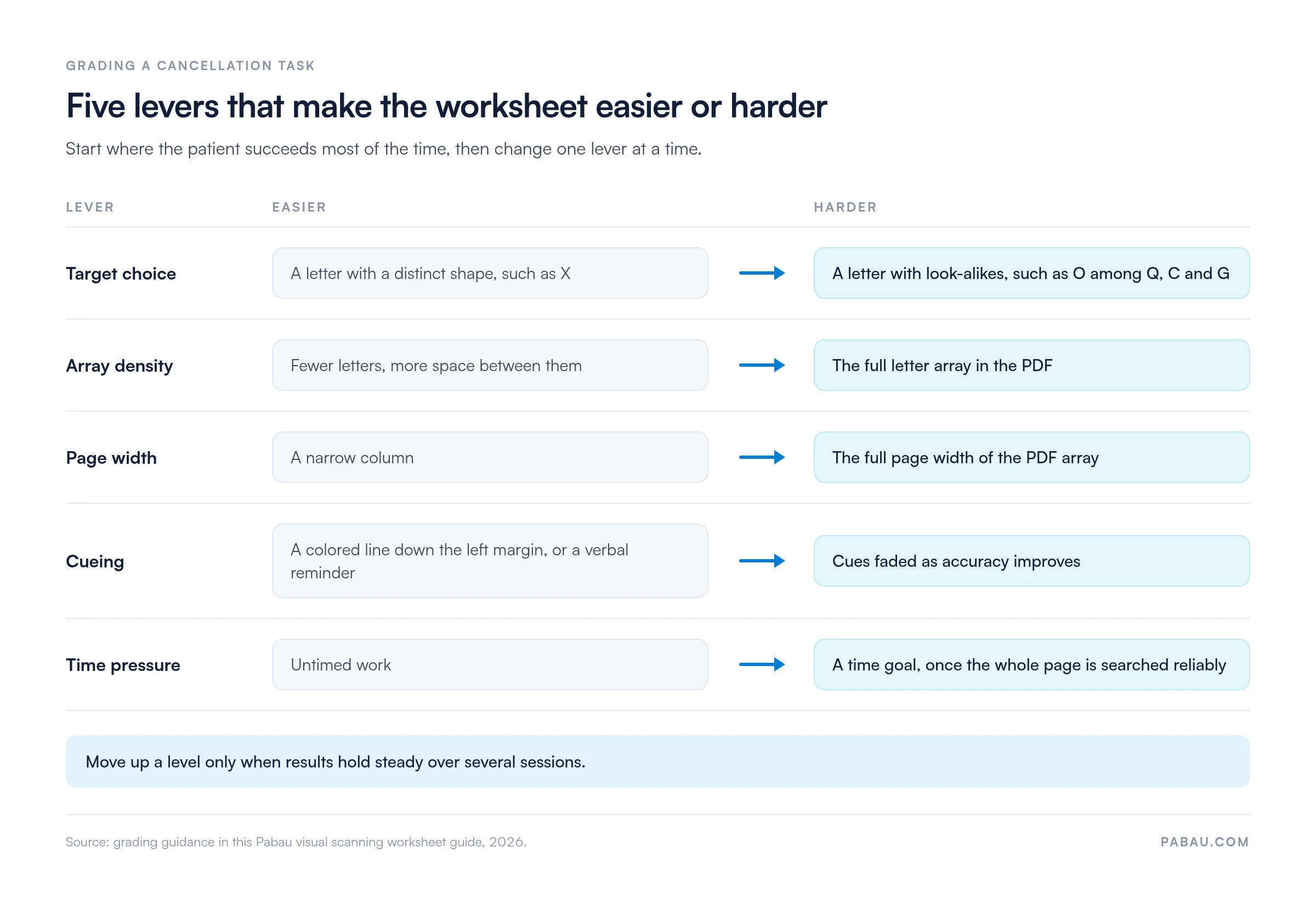
Grade the worksheet by changing one variable at a time, starting from a level where the patient succeeds most of the time. The levers that make a cancellation task easier or harder include:
Move up a level when results hold steady over several sessions, rather than after a single good attempt. Fatigue, mood and time of day all affect attention, so one session can mislead. The chart below sets out each lever from its easiest to its hardest setting.
Occupational therapists are the main users, with adult neurological and pediatric caseloads the two largest groups. Physical therapists, speech-language pathologists and low vision specialists may also use scanning tasks as part of a wider plan.
Unilateral spatial neglect is a common consequence of stroke, most often affecting the left side of space after right-hemisphere damage. A patient with neglect may miss targets on one side of the worksheet without realizing it. Cancellation tasks are widely used to observe neglect, and scanning practice is a recognized part of its rehabilitation.
Visual field loss, such as hemianopia, can look similar on paper but has a different cause. Patients with field loss are often aware of the problem and can learn to turn their head and eyes toward the affected side. The worksheet helps you observe the difference, but it does not tell the two conditions apart on its own.
Pediatric occupational therapists use scanning tasks with children who lose their place when reading, skip lines, or struggle to copy from the board. Letter arrays fit naturally alongside early literacy work. For younger children, pictures or shapes can replace letters, and a smaller array keeps the task achievable.
Scanning practice also appears in rehabilitation after traumatic brain injury, and in work with older adults whose attention is affected by other neurological conditions. In each case, the worksheet is one tool inside a plan aimed at daily activities such as reading, cooking and moving safely around the home.
The worksheet gives the patient something to practice on, and a scanning strategy gives them a method. Teaching one explicitly tends to work better than asking the patient to “look harder”. Common strategies include:
Fade each cue once the patient uses the strategy without prompting. Then check whether it carries over to a functional task, such as finding items on a shelf or reading a menu.
A completed worksheet is only useful if its result can be compared with the next one. Record the same measures every time, in the same place, so a trend becomes visible across sessions.
| Measure | What to record | Why it matters |
|---|---|---|
| Accuracy | Targets found out of the total, for example 14 of 18 | Shows overall change across sessions. |
| Omissions by side | Misses on the left and right halves of the array | Shows whether misses cluster on one side. |
| Start point | Where on the page the first mark was made | Patients with left neglect often start on the right. |
| Time | Minutes and seconds to finish | Tracks search speed once accuracy is stable. |
| Cues | Each verbal or visual prompt you gave | Separates independent performance from supported performance. |
| Strategy | Whether the patient used anchoring or another method | Shows whether a taught strategy is becoming habit. |
Write the session number beside the date and keep the same target difficulty when you want a fair comparison. If you change the target, the array or the cueing, note it, so a jump in the score is not mistaken for progress.
Worksheets do not diagnose neglect, field loss or a perceptual disorder. They are a practice and observation tool, and they work best beside standardized assessment, such as a visual perception test, and functional observation.
A patient can improve on paper while still bumping into door frames or leaving food on one side of the plate. Measures that look at daily life, such as the Catherine Bergego Scale for neglect, help show whether gains have carried over. When the paper score improves but daily function does not, shift the session time toward functional tasks.
On paper, completed scanning sheets tend to pile up in a folder. Comparing this week’s omission count with last month’s then means sorting through sheets by hand, often between patients.
Pabau, the physical therapy EMR we build for rehab and occupational therapy practices, keeps the result next to the session it came from. You can record the accuracy, left and right omissions, time and cues in a digital form attached to the patient record. Through digital forms, the same fields appear in the same order every session.
Pabau Scribe, our AI medical scribe, can draft the session note while you talk the patient through their result. Every Pabau subscription includes the full feature set, so scheduling, notes, forms and reminders sit in one system.

Pabau stores each visual scanning result in the patient record, next to the session note. You can see how accuracy and omissions change over time without digging through paper files.

A visual scanning worksheet is worth using when you run it the same way each time and record more than a single score. The side the misses fall on, where the patient starts, and how many cues they needed tell you more than the total alone.
Treat the paper task as a bridge to daily life rather than the goal itself. Grade it gradually, teach a strategy, and check whether the gains show up in reading, cooking and moving around the home.
Book a demo to see how Pabau helps occupational therapists record scanning results and track progress across sessions.

Assessing visual perception more broadly? Visual perception test documentation template helps you record and score standardized visual perception assessments.
Ruling out an acuity problem first? Visual acuity test explains how to run the chart and read the results.
Looking at attention and memory too? Neurocognitive test covers the cognitive domains, scoring and clinical use.
Assessing hand function after stroke or injury? Dexterity test walks through test types, scoring and administration.
Choosing records software for your OT practice? Occupational therapy EMR covers what to look for in a system for OT notes and progress tracking.
Visual scanning worksheets are used to practice and observe organized visual search. Occupational therapists use them with adults who have visual neglect after stroke and with children who need support with visual perception.
A cancellation task asks the patient to cross out every instance of a target among distractors on a page. The free PDF uses a letter array, with the target letter written in by the therapist.
Count the targets found against the total, and split misses into the left and right halves of the array. Record the time taken, where the patient started, and any cues you gave.
No, a worksheet does not diagnose neglect or any other condition. It supports observation and practice, and it works best beside standardized assessment and functional observation.
Yes, pediatric occupational therapists use them for visual perception and reading-readiness work. Younger children may do better with pictures or shapes and a smaller array.
Frequency depends on the treatment plan and the patient’s tolerance. Keeping the setup the same each session matters more than the exact frequency, because it makes results comparable.
Yes, write a different target letter in the blank each time. The layout stays the same, but the search changes, which limits the effect of remembering where targets sit.
Make it harder once results hold steady across several sessions. Change one variable at a time, such as target letter, array density, cueing or time pressure.