Despina Petrushevska
Good character traits list
What is a good character traits list? A good character traits list is a structur...

3
Last Updated: Oct 30, 2026
Free PDF 1 page, print-ready Clinician-reviewed
A freelance invoice template is a reusable document that lists your services, what each one cost, and how the client should pay you. This one is a free, one-page PDF with fields for both parties, the invoice and due dates, itemized charges, totals and payment terms. Print it or fill it in with a PDF editor. If you'd rather edit a file, recreate its fields in Word, Excel or Google Docs. What follows covers the fields every invoice needs and the payment terms and tax points behind most disputes. It also compares the four file formats for different ways of billing.
A one-page PDF with fields for your details, the client's billing details, the invoice and due dates, itemized charges, totals and payment terms.
Start from scratch, or upload this PDF or any form you already use, and Pabau's AI Form rebuilds it with tick boxes, text fields and a signature. Attach it to the treatment once, and every patient gets it on time.
AI Form rebuilds the consent, history and aftercare forms you already use. You review each one, then publish.
Patients complete forms on their phone before they arrive, so the front desk stops retyping paper.
Every signed form is versioned and attached to the treatment record, ready when you need it.
Set how long a consent stays valid. Returning patients skip forms they have already signed.
Supports HIPAA and GDPR compliance AES-256 encryption 4.8 on G2 4.7 on Capterra Trusted by 4,000+ practices worldwide

A freelance invoice is a request for payment that lists your services, the amounts and the due date.
Every invoice needs a unique invoice number, both parties’ details and a clear total due.
Stating payment terms such as Net 30 or due on receipt reduces late payments.
The template is a one-page PDF, and you can recreate its fields in Word, Excel or Google Docs.
A freelance invoice must include a unique invoice number, the invoice date, your contact details and the client’s details. It also needs an itemized list of services and the total amount due. Payment terms and bank details are strongly recommended because they tell the client how and when to pay.
These fields are the minimum for a usable freelance invoice. Without them, clients have grounds to query or delay payment.
These additions speed up payment and reduce disputes. Add the ones that match how you trade.
On the page, those fields fall into six zones that run from your header down to the payment terms.
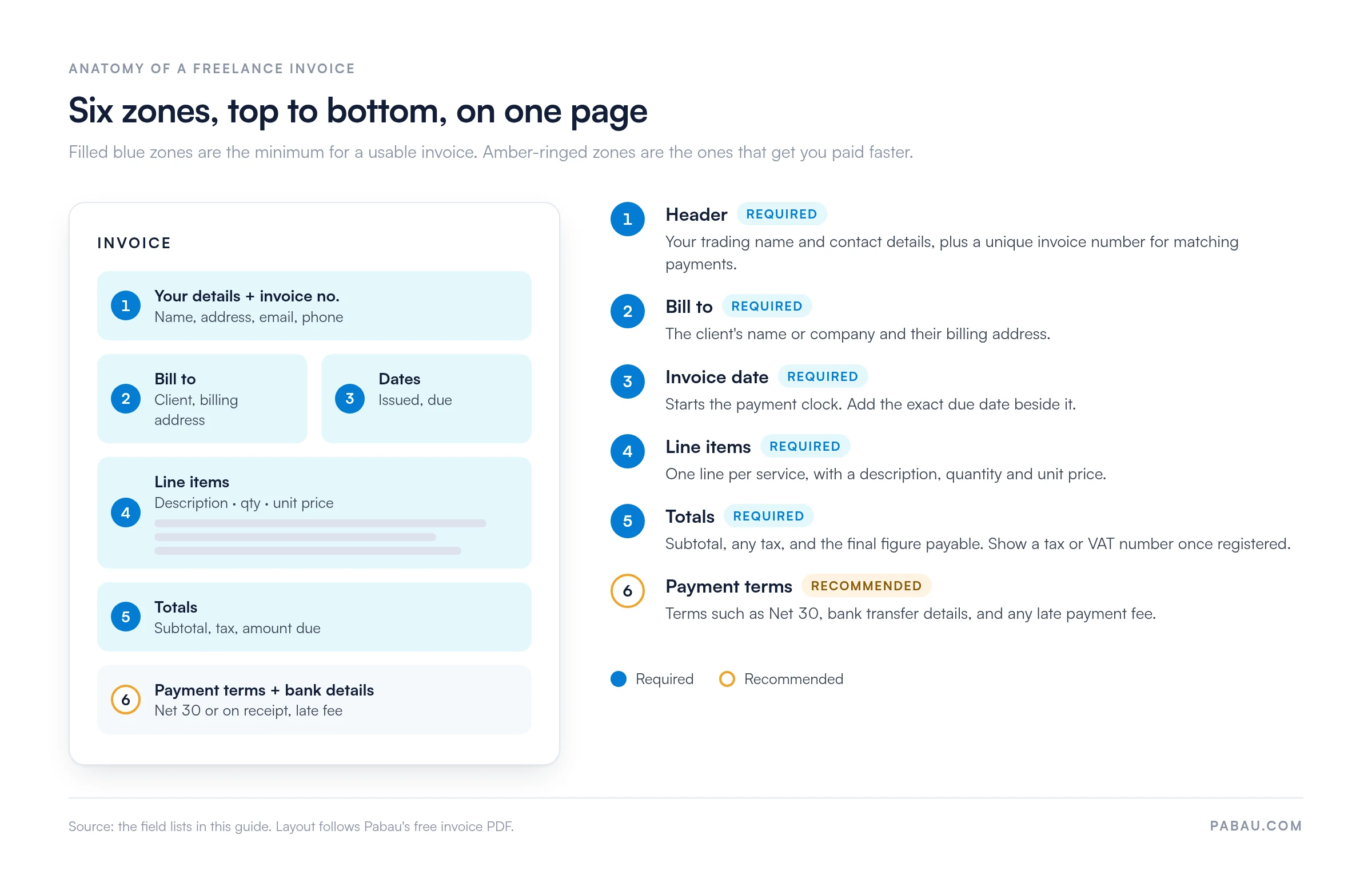
Follow these steps to complete the template correctly the first time. Each step matches a field you will see in the file.
Number invoices in a single unbroken sequence, such as INV-001, INV-002. Gaps and duplicates are the fastest way to confuse a client’s accounts team when they reconcile payments.
The template downloads as a PDF. If you’d rather work in an editable file, you can recreate its fields in Word, Excel or Google Docs.
The right choice depends on whether you need to edit the layout, calculate totals automatically or send a fixed document. The table below compares the four options so you can pick the one that fits your workflow.
A PDF is the standard way to send a finished invoice because it looks the same on every screen and is harder to alter. Print the template and complete it by hand, or fill it in with any PDF editor. Check the totals before you send it, and keep a copy of each sent PDF for your records.
Word suits freelancers who want full control over layout and branding. Recreate the PDF’s fields in your own Word document if you prefer an editable file. Word works well for one-off projects where you invoice a few times a year.
Excel is the strongest choice when you bill by the hour or manage many line items. Recreate the PDF’s fields in a spreadsheet, then set a formula for each line total. The sheet then calculates the subtotal, tax and amount due, which removes the most common source of arithmetic errors on invoices.
Google Docs is free and works from any browser, which makes it useful if you move between devices. Recreate the PDF’s fields in a new document, then share it with a client for review and keep every version in one place. Export a PDF once the invoice is final.
Different freelancers bill in different ways. The same core fields apply, but the line items and billing basis change with the work.
Writers often bill per word, per article or per project. List each piece as its own line with the word count or deliverable, so the client can match each charge to a commissioned piece.
Consultants frequently bill hourly or on a retainer. Show the retainer as a separate line from any extra hours, so the client can see what is fixed and what is variable.
Independent contractors often bill against project milestones. Reference the milestone or deliverable on each line and include the bank details the client needs to pay quickly. If you work in construction or the trades, start from our invoice template for builders instead.
For hourly work, record the date, hours worked and rate on each line. Multiply hours by rate to get each line total, then sum the lines for the amount due.
Payment terms set the deadline for payment and the consequences of missing it. Stating them on every invoice removes ambiguity and gives you a clear basis for follow-up.
Late payment rules differ by country. In the UK, the Late Payment of Commercial Debts (Interest) Act 1998 sets statutory interest on overdue business-to-business debts. Gov.uk explains how the rate is calculated. Check the current rules for your jurisdiction before relying on a late fee clause.
Tax obligations depend on where you live and how much you earn. The rules change, so always confirm current thresholds with the official tax authority before you add a tax line to your template.
If you are not registered for VAT, do not show a VAT line or VAT number on the invoice. If you are registered, show the rate and VAT number on every invoice.
A template works well while invoices are occasional and easy to track by hand. It becomes a bottleneck once you send many invoices, bill on a recurring schedule or chase several overdue payments at once.
Self-employed practitioners who treat patients often type each invoice after the appointment, then check the bank statement to see who has paid. The services and prices are already in the booking, so the same details get entered twice.
Pabau, the practice management software we build, raises the invoice from the appointment and treatment record instead. The booked services become the line items, so you check the invoice rather than retype it.
Payments are recorded against the same patient record. Online payments run through Pabau’s payment processing, and Pabau Pay, our card terminals, takes payment at checkout. You can see which invoices are still unpaid without keeping a separate spreadsheet.

Book a demo to see how Pabau connects scheduling, records and invoicing in one place, so billing needs less manual effort.

Start with the PDF, and treat the invoice number and the payment terms as fixed on every bill. Those two fields head off the most common payment queries before a client raises them.
Move the fields into Excel once you bill by the hour, because formulas catch the arithmetic errors a hand-filled form lets through. When invoicing starts eating into treatment time, a template has done its job. Book a demo to see how Pabau turns each appointment into an invoice for your practice.

Taking payment at the appointment? Patient payment form template gives you a ready form for recording how and when a patient pays.
Keeping a card on file? Credit card authorization form covers the fields and consent you need before charging a stored card.
Shipping goods across borders? Commercial invoice template in Word sets out the extra details a customs invoice needs.
Taking card payments for treatments? Medical credit card processing explains fees, terminals and the rules that apply to practices.
Chasing overdue balances? Patient collections walks through ways to raise your collection rate without souring the relationship.
A freelance invoice template is a reusable document that lists the services you provided, their cost, and the payment details a client needs. It saves you rebuilding the layout for every job.
Yes. A Word document works as a freelance invoice as long as it includes the mandatory fields. Export it to PDF before sending so the layout stays fixed.
Use a single running sequence with no gaps, such as INV-001 and INV-002. Never reuse a number, even for cancelled invoices.
An invoice requests payment before it is made, while a receipt confirms that payment has been received. Send the invoice first and issue a receipt once you are paid.