Monika Lazarevska
OT SOAP note sample: Free template and worked examples
Download your free OT SOAP note sample A four-page form with an identifying head...

2
Last Updated: Nov 5, 2026
Free PDF 1 page, print-ready Clinician-reviewed
A commercial invoice template in Word gives your front desk one fixed format for billing a patient, an insurer, or a company. Build each invoice from scratch instead, and deposits get missed, totals drift, and payment lands late.
One point matters most. In a practice, a commercial invoice is the bill for services you delivered, not the customs form of the same name. Confuse the two and you send an insurer a document it cannot process.
The template above is the billing version. Below you’ll find every field explained, a walkthrough, and the mistakes that hold up payment.
A one-page invoice with your practice details, the bill to block, and both dates at the top. The items and services section takes one line per service, then totals down to the balance due.
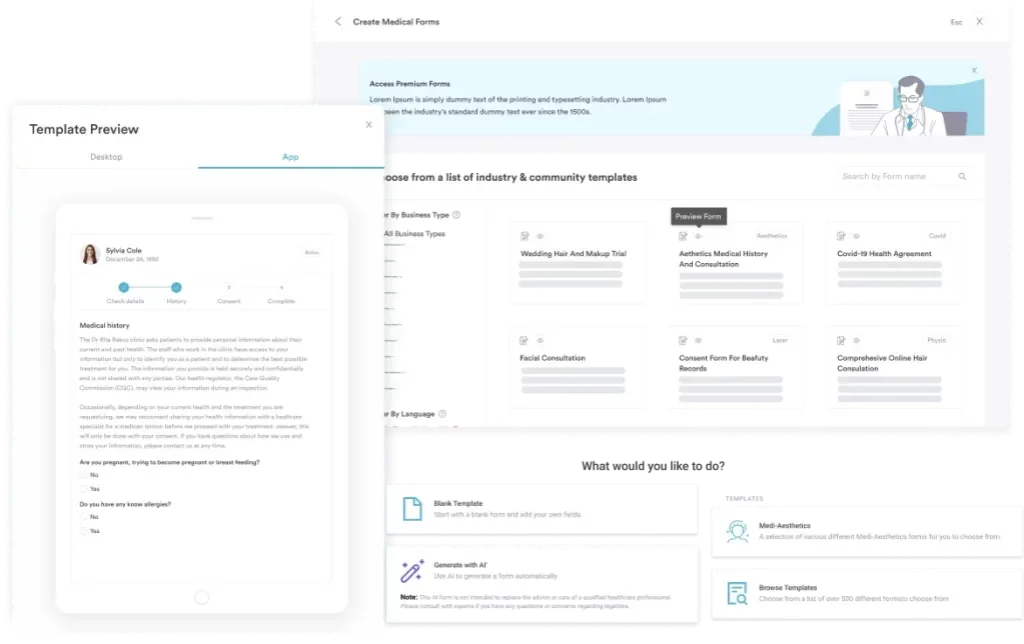
Start from scratch, or upload this PDF or any form you already use, and Pabau's AI Form rebuilds it with tick boxes, text fields and a signature. Attach it to the treatment once, and every patient gets it on time.
AI Form rebuilds the consent, history and aftercare forms you already use. You review each one, then publish.
Patients complete forms on their phone before they arrive, so the front desk stops retyping paper.
Every signed form is versioned and attached to the treatment record, ready when you need it.
Set how long a consent stays valid. Returning patients skip forms they have already signed.
Supports HIPAA and GDPR compliance AES-256 encryption 4.8 on G2 4.7 on Capterra Trusted by 4,000+ practices worldwide

This commercial invoice template is a practice billing invoice, issued to a patient or payer after services are delivered.
It covers practice details, invoice number and dates, bill to details, an itemized services table, and the balance due.
The customs commercial invoice is a different document, and it also needs tariff codes, country of origin, and Incoterms.
The download is a print-ready PDF, so copy the same field order into Word if you need an editable file.
Practice management software like Pabau raises the same invoice from the appointment record, so nobody rekeys a price by hand.
In a practice, a commercial invoice is the bill you issue after treatment. It names your practice, names the payer, itemizes the services delivered, and states what is owed and by when.
It is a commercial document rather than a clinical one. The clinical record says what you did and why. The invoice says what it costs and who owes it. Those two should agree line for line, which is why the template asks for a code against each service.
Most practice invoices go to one of three payers. The patient settles it directly, an insurer reimburses against the itemized detail, or a corporate account pays on terms. One template covers all three, because the fields a payer needs do not change.
Where the patient settles the bill directly, any pre-service cost estimate the practice issued should match the invoice lines.
The download is one page split into two labeled sections. The top section says who is billing and who is being billed. The second lists the services, then works down to the balance due.
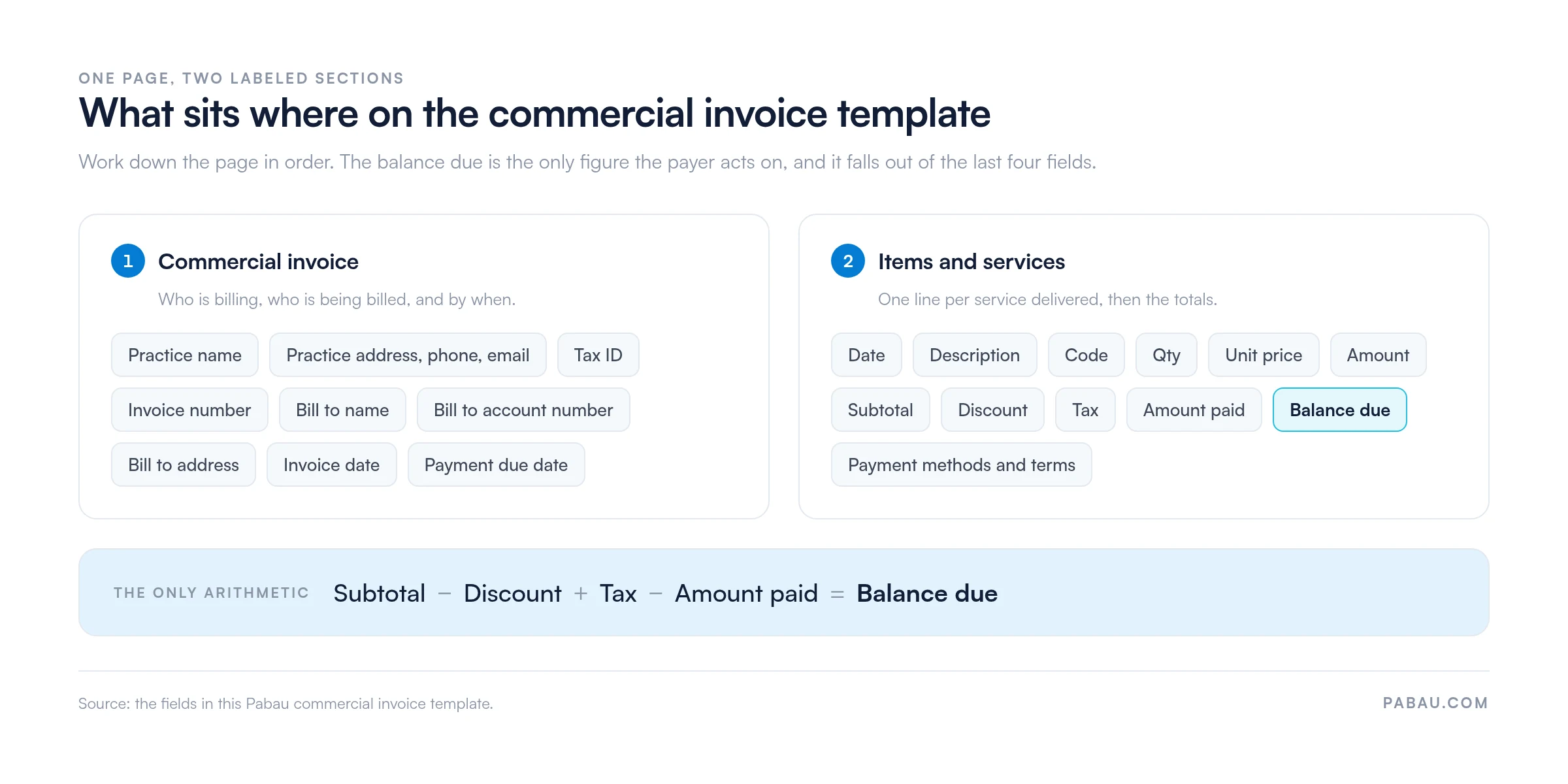
Here is each field, what goes in it, and why it matters.
The code column is a billing or procedure code, not a customs tariff code. US practices usually enter the CPT code. UK private practices use the CCSD code instead. It comes from the Clinical Coding and Schedule Development group, and UK private insurers price against it.
Cash-pay aesthetic practices often use their own service codes. Whichever you use, keep it consistent, because an insurer reads that column first.
Open the download and work down the page. The template gives one instruction up front. Enter one line per item or service supplied, then check the totals before the invoice goes out.
A quick note on the file itself. The download is a print-ready PDF, which is what you want for sending. If you would rather type into it every week, copy the same field order into a blank Word document once, then reuse that.
Before the invoice leaves the practice, compare it against your payment records. The template’s own instruction is to check the totals against your practice management system first. Then save it as a PDF, so the payer receives a fixed document rather than an editable file.
Several documents in a practice look alike and do different jobs. This table sorts them out, including the customs document that shares the name.
That last row is a different document with the same name. A customs commercial invoice needs fields this template does not carry. It wants an HS (Harmonized System) tariff code for each product. It also needs the country of manufacture and an agreed Incoterms rule.
If you are importing devices or consumables, ask your freight forwarder for their customs invoice format instead.
Any practice that bills a patient, an insurer, or a company for services it has delivered. That covers most of the sector, but a few groups get more out of a standard format than others.
A template suits a practice issuing a handful of invoices a week. Past that, raising each one from the appointment record inside a practice management app saves far more time than a tidy layout.
A standard template mostly removes decisions from a busy front desk. The same fields appear in the same order every time. Nobody is designing a document under pressure.
None of that guarantees payment, of course. Once an invoice ages past its due date, your patient collections process takes over, and it runs on the invoice number you assigned.
Deduct the deposit before you send. A deposit taken at booking is the most common reason an invoice total and a patient record disagree. Enter it in the amount paid field. Then confirm the balance due matches what your practice management system shows.
Most invoice problems come from the same short list. These are the ones that cost a practice money, rather than the ones that just look untidy.
Run the finished invoice past these six points. It takes under a minute and catches almost every version of the mistakes above.
One more habit worth building. If the patient plans to settle the balance by card later, take a signed credit card authorization form. Do it while they are still in front of you.
Building an invoice in Word means reading numbers off one system and typing them into another. Someone opens the appointment and checks which services were delivered. Then they look up each price and check whether a deposit was taken. The whole lot gets retyped into a blank document.
Practice management software like Pabau does that step for you. Pabau builds the invoice from the appointment and the services recorded against it, so description, quantity, and price come straight from the patient record. Deposits already taken show up as amount paid, without anyone looking them up.
Payment then closes the loop. Take it on Pabau Pay, our card terminals, or online, and it posts against both the invoice and the patient record. Pabau’s accounting integration passes the finished invoice through to Xero, so nobody exports a spreadsheet at month end.
The outcome is one figure in one place. Nobody rekeys a price, and the invoice a patient receives matches what the practitioner recorded at the appointment.

Pabau builds each invoice from the appointment and the services recorded against it, then posts the payment back to the patient record. Your front desk stops reconciling two systems by hand.

Use this template for the invoice itself, and keep the customs version well away from it. The two documents share a name and little else. A patient invoice needs the services, the codes, and the balance due.
The template earns its place while you are still invoicing by hand. Once the practice issues more than a handful a week, typing them out stops being the cheap option. Every one is another chance to drop a deposit or a due date.
Book a demo to see how Pabau builds patient invoices from the appointment record and settles them in the same system.

Sent the invoice and still waiting? Patient collections covers how to chase an unpaid balance without straining the relationship.
Taking the balance by card later? Credit card authorization form gives you a signed record before you charge anything.
Wondering what card data you may keep? HIPAA compliant payment processing sets out what a practice can store and what it cannot.
Do not edit the original and resend it. Issue a credit memo that cancels the invoice, then raise a fresh one with a new number. Keep both on file, so the numbering still runs clean.
Rules vary by country, and some tax authorities do require it. Either way, a sequence makes a missing invoice obvious. Pick a format, such as the year plus a counter, and never reuse a number.
Yes, and most practices do. Attach the PDF rather than pasting the detail into the email body. Put the invoice number in the subject line, so the payer can quote it when they pay.
Put the employer’s legal name and billing address in the bill to block, not the patient’s. Name the patient on the service lines instead. Ask whether the employer needs a purchase order number on the invoice.
Retention rules vary by country. In the US, the IRS ties it to the period of limitations on the return, generally three years from filing. Check your local tax and health record rules too.